

The best approach is a CRM-integrated AI email writer paired with a human-in-the-loop approval step, not a standalone writing tool. This structure keeps a permanent audit trail, pulls live policy data into every draft, cuts E&O exposure, and shortens response times on renewals, claims updates, and quote follow-ups. Callbackcrm builds this workflow directly into its platform, giving agents a practical way to trial AI-assisted email without separating writing from the record system that protects them.
TL;DR:
- Using CRM-integrated AI for insurance emails with human review reduces errors, maintains proper audit trails, and ensures compliance with carrier and regulatory rules.
- Start with low-risk tasks like renewal reminders, as they have structured data, a low error rate, and can quickly demonstrate time savings.
- Implement a strict review process focused on policy data accuracy, proper terminology, and clear next steps to minimize legal and financial liability.
- Tracking KPIs such as time saved, approval rate, and error correction rate is essential during pilot testing before full deployment.
- Adoption is most successful when AI drafting is paired with integrated workflows, not standalone tools, and begins with high-volume, low-stakes emails.
Table of Contents
- What Is an AI Email Writer for Insurance Agents?
- Where AI Email Writing Actually Helps Agents Today
- How Do You Keep AI-Generated Emails Compliant?
- Prompts and Workflows That Work for Insurance Email
- Rolling Out an AI Email Writer in Your Agency
- What Does AI Email Automation Cost, and What’s the Return?
- How Agents Are Actually Using This Today
- Where Agencies Get AI Email Adoption Wrong
- Get Started With Callbackcrm’s AI Email Tools
- Sources
What Is an AI Email Writer for Insurance Agents?
An AI email writer for insurance agents is software that drafts client-facing messages, renewal notices, claims updates, quote follow-ups, using policy and CRM data as input. The standard industry term for this category is “email automation for insurance” or “AI communication tools for agents,” and both phrases describe the same function: reducing the time an agent spends typing routine but necessary correspondence.
Not every tool in this category works the same way, and the differences matter more than most vendor pages let on.
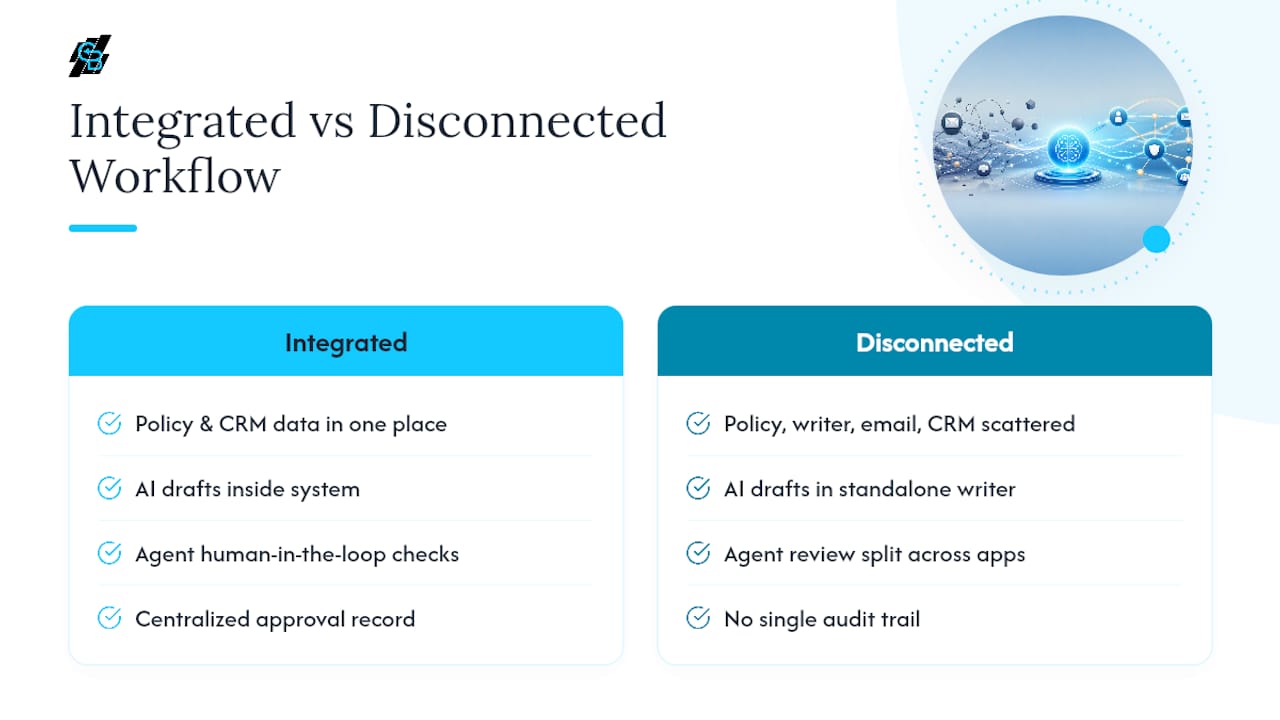
Standalone AI writers work like a smarter version of a word processor. You feed in a prompt, get a draft, and copy it into your email client. They’re cheap, fast to learn, and completely disconnected from your book of business. That disconnection is the problem: nothing pulls in the policy number, effective date, or carrier name automatically, so every fact has to be entered by hand, which reintroduces the exact error risk you were trying to eliminate.
Shared-inbox AI agents sit inside a team inbox and draft replies to inbound messages. They’re useful for agencies fielding high volumes of service requests, but they typically lack deep policy context and can misfire on carrier-specific language if not tuned carefully.
CRM-integrated AI writes drafts using the same database that holds your client records, policy details, and communication history. This is the model that supports practical agent workflows most cleanly, because the draft, the approval, and the record all live in one place. When a compliance officer or E&O carrier asks what happened, you have one system to check, not three.
Full automation platforms go a step further and combine AI drafting with SMS, workflow triggers, funnel tools, and reporting. These suit agencies running renewal campaigns at scale or IMOs managing downline agents, where consistency across hundreds of emails matters more than any single message.
Here’s a quick way to match your agency to a starting point:
- Solo agent, low volume: Start with CRM-integrated AI inside your existing CRM rather than adding a separate writing tool.
- Small agency, service-heavy: Test a shared-inbox AI agent for claims and service email, but keep renewals and quotes inside your CRM workflow.
- Multi-line agency or IMO: Pilot a full automation platform on one line of business (Medicare Advantage or auto renewals are common starting points) before rolling it out agency-wide.
- Anyone billing E&O premiums seriously: Skip standalone writers entirely. The lack of an audit trail is the wrong tradeoff for the time saved.
Where AI Email Writing Actually Helps Agents Today
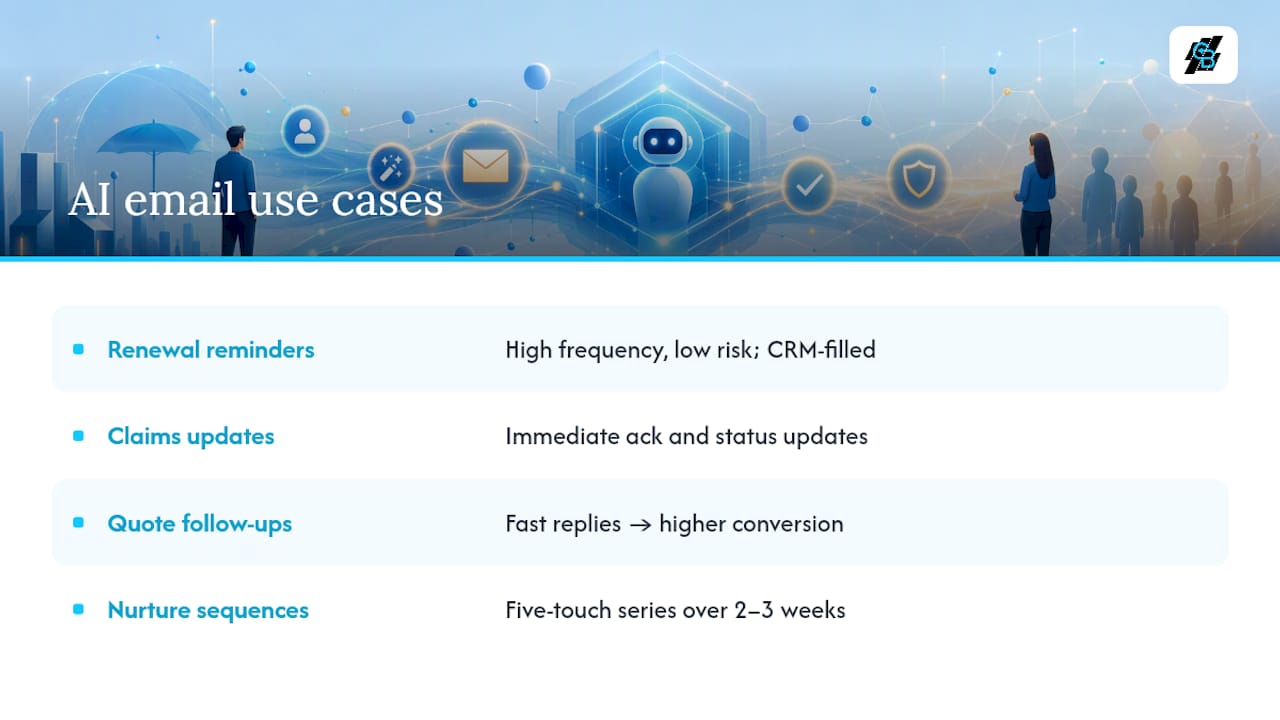
AI drafting tools already handle four categories of insurance email well, and each one has a template shape you can adapt today.
1. Renewal reminders with policy tokens. These are the highest-frequency, lowest-risk email an agency sends, which makes them the best place to start a pilot. A CRM-integrated tool pulls the policy number, renewal date, premium, and carrier directly from the record, so the agent reviews rather than retypes.
Template shape: “Hi [First Name], your [Policy Type] policy with [Carrier] renews on [Date]. Your premium is [Amount]. Reply if you’d like to review coverage before renewal, or we’ll process automatically.”
2. Claims acknowledgements and status updates. Clients calling to ask “any update?” is one of the most common and most avoidable service drains in an agency. An automated acknowledgement sent the moment a claim is logged, followed by status-change emails as the claim moves through adjustment, cuts that call volume without leaving the client in the dark.
3. Quote follow-ups and broker replies. Speed matters enormously here. Vendor case data on insurance email automation links faster quote responses to higher contact-to-bind conversion, which tracks with basic sales logic: the prospect who gets an answer in ten minutes is still thinking about you, the one who waits three days has usually called someone else.
4. Multi-step nurture and re-engagement sequences. Not every prospect converts on the first email. A five-touch sequence spread over two to three weeks, quote reminder, testimonial or coverage explainer, urgency nudge, final check-in, keeps warm leads from going cold without demanding manual follow-up from the agent. Callbackcrm’s guide to insurance email sequences breaks down sequence timing in more detail if you’re building your first one.
Pro Tip: Start your pilot with renewal reminders only. They’re the lowest-regret use case, the data fields are already in your CRM, and a mistake here is far easier to catch and correct than a mistake on a claims or coverage-recommendation email.
The common thread across all four use cases is that AI drafts, but the agent still owns the send button, at least until the agency has enough confidence in the output to loosen that rule for the lowest-risk categories.
How Do You Keep AI-Generated Emails Compliant?
Every AI draft needs a human checkpoint before it reaches a client, and the checkpoint needs to be documented, not assumed. This is the part of AI adoption most agencies underestimate, and it’s the part that determines whether a tool is a genuine asset or a future liability.
Build the review process around three questions before any AI-drafted email goes out:
- Who signs off on what? Renewal reminders with policy tokens might get a light review from any licensed staff member. Anything mentioning coverage recommendations, exclusions, or claim outcomes should require sign-off from the agent of record.
- Is sensitive data handled securely? Policy details, health information tied to underwriting, and Medicare eligibility data all carry higher handling requirements. Any AI tool touching this data should run through encrypted, access-controlled infrastructure, not a general-purpose chatbot with no data governance.
- Are carrier and CMS rules being followed? Medicare Advantage and Medicare Supplement communications carry specific CMS marketing rules that generic AI models don’t know unless they’re trained on them. An AI draft referencing plan benefits or enrollment periods needs a compliance check against current carrier guidelines every time, not just the first time.
A workflow that pairs automated factual checks, confirming the policy number, effective date, and carrier name are correct, with a required human sign-off on any recommendation or quote, cuts E&O exposure far more than either control alone. Automated checks catch typos and stale data; human review catches judgment calls a model has no basis to make.
The compliance number that matters: AI email agents integrated with structured data extraction can cut inbound email handling time by up to 40%, but that efficiency gain only holds up if the extraction is paired with review, not a bypass of it.
Keep a log of every AI-assisted email: who approved it, when, and what was changed from the original draft. That log is what turns “we use AI responsibly” from a talking point into something you can actually show a carrier or regulator if it’s ever questioned.
Prompts and Workflows That Work for Insurance Email
A good AI email workflow follows the same five-step sequence every time: trigger → draft → agent review → send → log. The trigger might be a renewal date approaching, a claim status change, or a new quote request. The draft comes from your AI tool using CRM fields. The agent reviews and edits. The email sends. The action gets logged against the client record. Skipping any step, especially the log, is how agencies lose the audit trail that makes AI adoption defensible.
Here are four prompts you can adapt directly:
-
Renewal reminder: “Write a short, warm renewal reminder email for [Client Name]'s [Policy Type] policy with [Carrier], renewing on [Date] at [Premium]. Mention they can request a coverage review before renewal. Keep it under 120 words and avoid any specific coverage advice.”
-
Claim status update: “Draft a claim status update for [Client Name] regarding claim #[Claim Number] with [Carrier]. Current status: [Status]. Do not speculate on payout amount or timeline beyond what’s provided. Tone: reassuring, factual, no legal language.”
-
Quote follow-up: “Write a follow-up email for [Prospect Name] who requested a quote for [Policy Type] three days ago. Reference the quote amount of [Amount] and invite a call this week. Keep urgency light, not pushy.”
-
Cold outreach: “Draft a first-touch outreach email introducing [Agency Name] to a prospect who inquired about [Policy Type] coverage. Focus on one clear benefit and a single call to action. Under 100 words.”
Subject lines follow their own formula: [Benefit or Action] + [Specificity] + [Optional Deadline]. “Your Auto Policy Renews April 3, Here’s What Changed” outperforms a generic “Renewal Notice” because it front-loads a concrete detail. Callbackcrm’s breakdown of insurance email subject lines has more tested formulas if you want to expand the list beyond these four use cases.
Run every AI draft through this QA checklist before it leaves the review queue:
- Policy number, effective date, and carrier name match the CRM record exactly.
- No coverage recommendation appears without agent sign-off.
- Carrier-specific terminology matches that carrier’s current approved language, not generic industry phrasing.
- Tone matches the client relationship (long-standing client vs. new prospect read differently).
- The email includes a clear, single next action, not three competing calls to action.
Pro Tip: Save your five best-performing prompts as templates inside your CRM rather than rewriting them each time. Consistency in the prompt produces consistency in tone, which matters more to client trust than any individual email’s polish.
Rolling Out an AI Email Writer in Your Agency
Implementation breaks into four steps, and skipping the training step is the most common reason pilots underperform.
- Connect inboxes and map fields. Link your email account to your CRM and confirm policy number, effective date, carrier, and premium fields populate correctly into draft templates.
- Train the AI on your book of business. Feed the tool a sample of your actual past emails so tone matches how you already communicate, not a generic insurance voice. Tools that learn from a recent sample of agent emails commonly produce usable first drafts within 24 to 48 hours of connection.
- Set approval SLAs. Decide how fast a draft needs review, same day for renewals, within the hour for claims updates, and assign backup reviewers so nothing sits unsent.
- Track pilot KPIs from day one, not after the fact.
| KPI | What it measures | Target for a 30-day pilot |
|---|---|---|
| Time saved per email | Minutes from trigger to send, vs. manual baseline | 40% reduction |
| Draft approval rate | Percent of AI drafts sent with no major edits | Above 70% |
| Response rate | Client replies to renewal and quote emails | Improvement over prior month |
| Errors caught in review | Factual corrections needed before send | Trending toward zero |
Callbackcrm’s email automation guide for insurance agents walks through a fuller version of this checklist if you want more detail before you start.
What Does AI Email Automation Cost, and What’s the Return?
Pricing in this category typically follows one of three shapes: a flat monthly platform fee, a per-seat fee that scales with agency headcount, or a base platform fee plus usage-based charges for email and SMS volume billed at wholesale rates. Watch for hidden costs in AI usage fees and SMS overage charges. These add up fast for agencies running large renewal campaigns.
A conservative ROI model looks like this: if an agent saves 20 minutes per renewal email across 100 renewals a month, that’s roughly 33 hours reclaimed monthly. At even a modest hourly value, that time savings alone often covers a mid-tier platform subscription before counting any lift in response or conversion rates.
- Start with a single line of business as your pilot, Medicare Advantage or auto renewals work well because volume is high and stakes per email are moderate.
- Measure time saved and draft approval rate for 30 days before expanding.
- Expand to full rollout once approval rates stay above 70% and no compliance issues surface.
- Revisit pricing tier as SMS and email volume grows, since usage fees scale faster than flat platform costs.
Callbackcrm’s AI marketing case data shows how lead engagement metrics move once automation reaches full deployment, useful context when building your own pilot business case.
How Agents Are Actually Using This Today
The pattern across agencies adopting AI email tools looks consistent: they don’t start with the hardest problem, they start with the most repetitive one. Renewal reminders, sent monthly, sometimes weekly, are the first thing to get automated because the data is already structured and the risk of a bad email is low. Agencies report that once renewal drafting moves off an agent’s plate, the time saved gets redirected toward the calls and reviews that actually require a licensed professional’s judgment, not toward doing nothing.
Claims communication tells a similar story. Clients calling to ask about a claim they already know is “in process” is one of the most common drains on agency staff time. Automated status updates, sent the moment a claim record changes, reduce that inbound call volume because the client already has the answer before they’d think to ask.
Quote follow-up speed shows up as a sales metric more than a service one. Agencies that automate the first follow-up touch on a quote, sent within minutes rather than the next business day, consistently see stronger contact-to-bind rates, a pattern documented across insurance email automation case data. The mechanism isn’t complicated: prospects who feel forgotten shop elsewhere, and speed is the cheapest way to signal they haven’t been.
None of this requires abandoning judgment to a machine.
Where Agencies Get AI Email Adoption Wrong
Most of the hype around AI email tools treats generative writing as the hard part. It isn’t. Getting a model to produce a decent-sounding renewal email is trivial now; any general-purpose chatbot can do it. The hard part, the part that determines whether adoption actually protects an agency or quietly exposes it, is everything around the writing: where the data comes from, who checks it, and whether there’s a record of that check.
I’d push back on any agency treating a standalone AI writer as a serious long-term tool, regardless of how good its output reads. A slick paragraph with a wrong policy number or an outdated carrier name isn’t a productivity win, it’s a liability with good grammar. The agencies getting real value out of this technology are the ones that chose integration over novelty: a system where the draft, the policy data, and the approval trail live in one place, not scattered across a writing tool, an email client, and a CRM that never talk to each other.
Human-in-the-loop review isn’t a compliance formality to tolerate until the tool “proves itself.” It’s the permanent structure that makes AI-assisted email defensible, because insurance email carries legal and financial weight that a generic marketing email never does. A missed deadline on a marketing email costs you a click. A missed detail on a renewal or claims email can cost a client their coverage, or cost you an E&O claim.
If I were advising an agency starting from zero, I’d tell them to ignore every use case except renewals and high-volume claims acknowledgements for the first sixty days. Prove the workflow, the review process, and the audit trail on the lowest-stakes, highest-frequency email first. Everything else, quote follow-ups, nurture sequences, cold outreach, gets easier once that foundation is solid, and near impossible to trust if it isn’t.
— Kyle
Get Started With Callbackcrm’s AI Email Tools
Callbackcrm replaces the disconnected setup most agencies end up with, one tool for writing, another for sending, a third for tracking, with a single platform where AI drafting, approval workflows, and your client records share the same data. That means every renewal reminder or claims update your AI drafts pulls policy details straight from your CRM, gets routed for agent review, and logs automatically once it’s sent.

The platform bundles AI-assisted email and SMS drafting with the automation and CRM sync described earlier, all hosted securely on Google Cloud, so agents aren’t stitching together separate tools to get the audit trail compliance requires. SMS and email usage bill at wholesale rates on top of your subscription, with no separate writing-tool subscription to manage alongside it.
If you’re ready to move past manual renewal emails and disconnected drafting tools, start by exploring Callbackcrm’s messaging and automation features and request a demo to see how a connected inbox and CRM produce your first AI drafts within days, not months.
Sources
- AI for Insurance Agents in 2026: Workflows, Prompts & …
- Automate inbound emails | Email processing automation for insurers & banks | Tovie AI agents
- AI Email Management for Insurance Agents — AssistantAI