

The subject lines below are ready to copy. Pick three, load them into your next campaign, and run a split test before you read another word.
Copy-ready subject lines:
- “Quick question about your auto coverage”
- “[First Name], your policy renews in 30 days”
- “One thing most homeowners miss at renewal”
- “Are you paying too much for the same coverage?”
- “Your neighbor just saved — here’s how”
- “Life insurance: what your family actually needs”
- “A claims update for your account”
- “Referral request — 2 minutes of your time”
- “Have you reviewed your commercial policy this year?”
- “What changes in 2026 mean for your coverage”
- “Is your home underinsured? A quick check”
- “Following up on your quote request”
Three micro-rules:
- Short vs. descriptive: Use subject lines under 45 characters for cold outreach and renewals. Go longer (45–60 characters) only for educational newsletters where context helps.
- When to personalize: Add a first name or policy detail whenever your list has clean CRM data. Skip tokens if your fallback is a blank field.
- Words to avoid: Drop “free,” “guaranteed,” “quote,” “rates,” and “save” from subject lines. These words trigger spam filters and read as vendor noise to insurance audiences.
A small test protects your sender reputation and gives you real data before you commit.*
Key Takeaways
| Point | Details |
|---|---|
| Start with three tests this week | Pick one peer-question, one benefit-first, and one curiosity-gap subject line and run a single-variable A/B test. |
| Segment before you send | Divide your list by policy type and lifecycle stage; a subject line that works for prospects rarely works for active renewal clients. |
| Track CTR, not just opens | A high open rate with a low CTR means the email body needs work, not the subject line. |
| Stay compliant | Follow CAN-SPAM requirements and never include PHI or misleading context in a subject line. |
| Automate winner promotion | Use Callbackcrm’s automation workflows to rotate variants, capture results, and promote the winning subject line without manual steps. |
Table of Contents
- What are the best insurance email subject lines by campaign type?
- What subject lines work for cold B2B insurance outreach?
- Which subject line frameworks work for any insurance campaign?
- What subject lines should you avoid, and what triggers spam filters?
- How do you A/B test insurance email subject lines effectively?
- Fill-in-the-blank subject line templates and personalization tokens
- How do you scale subject-line personalization with automation?
- What the data actually shows about insurance subject-line performance
- Callbackcrm handles subject-line testing and automation for you
- Sources
What are the best insurance email subject lines by campaign type?
The right subject line depends on what the email is actually trying to do. A renewal reminder needs urgency. A newsletter needs curiosity. A claims update needs clarity. Below are tested-style subject lines grouped by use case, with a short note on tone and length for each.
Life insurance
Educational and empathetic tone works best. Avoid anything that sounds like a sales pitch.
- “Does your family have enough coverage if something happens?”
- “Life insurance: the one conversation most families skip”
- “How much life insurance do you actually need?”
- “Term vs. whole life — a plain-English breakdown”
- “Your life insurance may not cover what you think”
- “A 5-minute review could change your family’s future”
- “What happens to your policy when your kids grow up?”
- “One gap most life insurance policies leave open”
Tone: calm and helpful. Length: 45–60 characters. Preview text: pair with a specific stat or scenario.
Auto insurance
Practical and direct. Drivers respond to specifics.
- “Your auto rate may have changed — here’s why”
- “Quick check: are you covered for rideshare driving?”
- “One add-on most drivers skip (and regret)”
- “Auto renewal coming up — what you need to know”
- “Did your commute change? Your rate might too”
- “Accident forgiveness: do you have it?”
- “New car? Your old policy may not cover it fully”
- “A 2-minute auto coverage review”
Tone: direct and informative. Length: 40–55 characters. Preview text: name the specific gap or change.
Home insurance
Seasonal hooks and risk-awareness angles perform well here, as top-performing subject lines tend to be educational rather than promotional.
- “Is your home covered for this year’s storm season?”
- “One thing most homeowners miss at renewal”
- “Your home’s value went up — did your coverage?”
- “Flood insurance: what your standard policy doesn’t cover”
- “Home inventory checklist — protect what you own”
- “Renovation alert: update your policy before you build”
- “What a $500 deductible really costs you”
- “Are you underinsured? A quick 3-point check”
Tone: advisory. Length: 45–60 characters. Preview text: lead with a dollar figure or risk scenario.
Commercial and B2B
Specificity wins. Generic subject lines get ignored by business owners.
- “Is your business covered for a data breach?”
- “One liability gap most small businesses overlook”
- “Your commercial policy renewal — key changes inside”
- “Workers’ comp: are your classifications current?”
- “A quick audit of your business coverage”
- “What your BOP policy doesn’t cover (and should)”
- “Commercial auto: are your drivers on the policy?”
- “Cyber liability — the coverage most SMBs skip”
Tone: professional and specific. Length: 45–55 characters. Preview text: name the specific risk or gap.
Newsletter and education
Concrete problem-focused lines outperform vague thought-leadership phrases for busy readers who scan quickly.
- “3 insurance mistakes people make every year”
- “What changed in insurance law this quarter”
- “The coverage gap nobody talks about”
- “Your monthly insurance briefing — [Month] edition”
- “5 questions to ask before your next renewal”
- “How to read your policy (without falling asleep)”
- “Insurance myths that cost people real money”
- “What your agent wants you to know this season”
Tone: educational and conversational. Length: 40–55 characters. Preview text: tease the first tip or fact.
Renewals, claims, and referrals
These three categories need different tones. Renewals need urgency. Claims need clarity and reassurance. Referrals need a light, personal touch.
Renewals:
- “[First Name], your policy renews in [X] days”
- “Action needed: review your renewal before [Date]”
- “Your coverage is about to change — here’s what to do”
Claims communications:
- “An update on your claim — [Claim Number]”
- “Next steps for your open claim”
- “Your claim has been processed — details inside”
Referrals:
- “Could you help a friend get better coverage?”
- “A quick favor — do you know someone who needs this?”
- “Referral request: 2 minutes, real value for someone you know”
Quick selector guide:
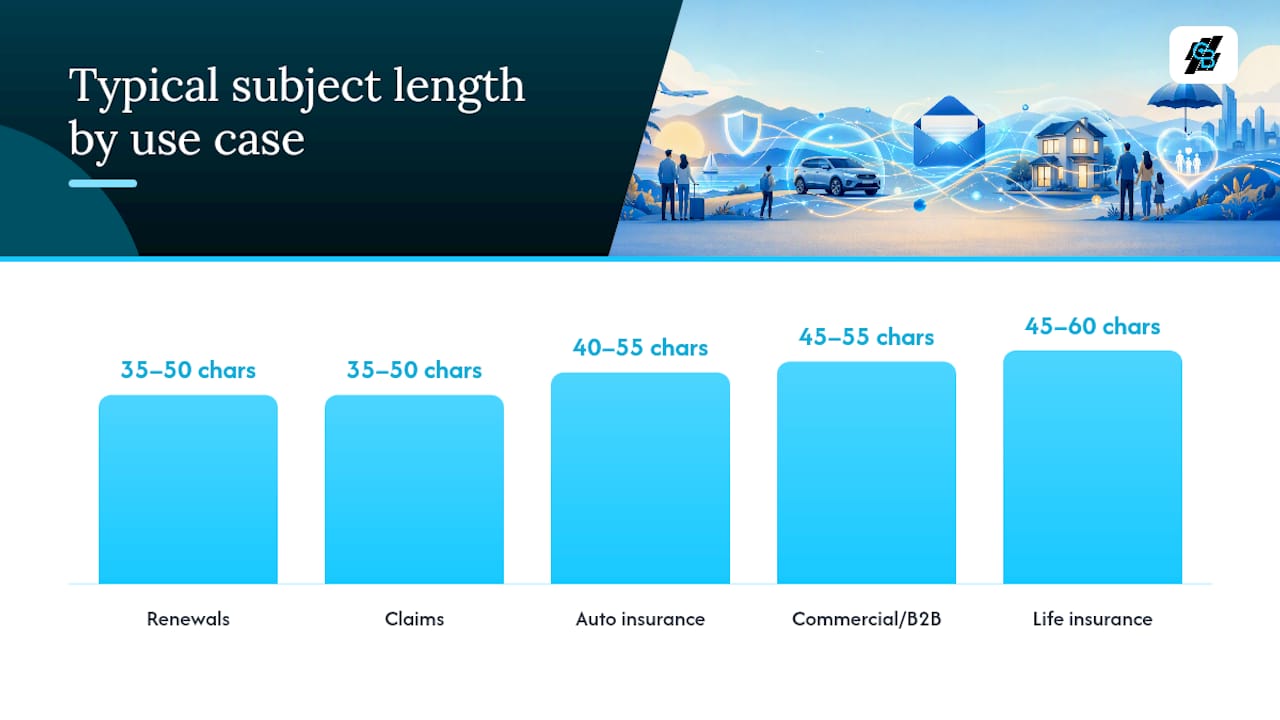
| Use Case | Best Audience | Recommended Tone | Typical Length | When to A/B Test |
|---|---|---|---|---|
| Life insurance | Families, new parents | Calm, educational | 45–60 characters | New prospect campaigns |
| Auto insurance | Drivers, commuters | Direct, practical | 40–55 characters | Renewal sequences |
| Home insurance | Homeowners | Advisory, risk-aware | 45–60 characters | Seasonal sends |
| Commercial/B2B | Business owners | Specific, professional | 45–55 characters | Cold outreach |
| Newsletter | All policyholders | Conversational | 40–55 characters | Every send |
| Renewals | Existing clients | Urgent, clear | 35–50 characters | High-volume renewal lists |
| Claims | Active claimants | Reassuring, factual | 35–50 characters | Rarely — keep consistent |
| Referrals | Satisfied clients | Personal, light | 40–55 characters | Referral program launches |
What subject lines work for cold B2B insurance outreach?
Cold outreach to benefits managers, brokers, and agency partners is a different game. These recipients get a lot of vendor email. Short, lowercase, specific subject lines that read like a colleague message outperform long, salesy lines for this audience. Avoid pricing words like “quote,” “rates,” and “save” entirely.
Patterns that work:
- Peer question: “How are you handling [specific problem]?” feels like a colleague, not a vendor.
- Specific observation: Reference something real about their business, role, or market.
- Referral context: Name a shared connection or a relevant trigger event.
Cold B2B subject line examples:
- “Question about your group benefits setup”
- “Saw you’re expanding — wanted to check in”
- “How are you handling cyber liability for clients?”
- “Quick question on your renewal process”
- “Intro from [Mutual Contact Name]”
- “One gap I see in most agency portfolios”
- “Are your commercial clients covered for [specific risk]?”
- “Benefits managers in [City] — a quick question”
- “Following up on your open enrollment prep”
- “Your agency’s E&O coverage — a 2-minute check”
Recommended 3-step cold outreach sequence:
- Email 1 (Day 1): Peer question or specific observation subject line. Keep the body under 100 words. One clear ask.
- Email 2 (Day 4): Reference the first email briefly. Add one concrete piece of value (a stat, a checklist, a relevant case). Subject line: “Following up — [original topic].”
- Email 3 (Day 9): Short breakup-style message. Subject line: “Should I close your file?” or “Still worth a conversation?”
Deliverability and trust signals for B2B sends:
- Use a professional sending domain with SPF, DKIM, and DMARC records configured.
- Keep the preview text consistent with the subject line — mismatched preview text drops open rates.
- Send from a named person (e.g., “Sarah at [Agency Name]”), not a generic “info@” address.
- Avoid HTML-heavy templates for cold sends. Plain text reads more like a real message.
A strong reply rate for B2B cold email runs 1.5–3%; tightly targeted campaigns can reach 4–5%.
Which subject line frameworks work for any insurance campaign?

Five formulas cover most insurance email scenarios. Each one is reusable across campaign types with minor adjustments.
1. Specific observation Formula: “[Observation about their situation or market]” Example: “Your home’s value went up — did your coverage?” Best for: Renewals, home and auto campaigns, B2B outreach. Length: 40–55 characters. Preview text: add the implication or next step.
2. Peer question Formula: “Question about your [specific topic]” Example: “Quick question about your commercial policy” Best for: Cold outreach, B2B, broker partnerships. Length: Under 45 characters. Preview text: keep it equally casual.
3. Curiosity gap Formula: “The [thing] most [audience] miss about [topic]” Example: “The coverage gap most homeowners miss at renewal” Best for: Newsletters, educational campaigns, prospecting. Length: 45–60 characters. Preview text: tease the answer without giving it away.
4. Benefit-first with urgency Formula: “[Specific benefit] — [time or action trigger]” Example: “Your policy renews in 30 days — review now” Best for: Renewals, time-sensitive campaigns. Length: 40–55 characters. Preview text: state the deadline or next step clearly.
5. Social proof or referral Formula: “[Peer or neighbor] did [thing] — here’s how” Example: “Your neighbor just updated their coverage — here’s why” Best for: Referral campaigns, community-based prospecting. Length: 45–60 characters. Preview text: name the outcome or benefit.
6. Named problem Formula: “Are you [specific risk or gap]?” Example: “Are you underinsured for a total loss?” Best for: Home, auto, life, commercial campaigns. Length: 35–50 characters. Preview text: answer the question with a stat or scenario.
7. Direct update Formula: “[Status or action] — [account or policy reference]” Example: “Claim update — your file has been reviewed” Best for: Claims communications, policy change notices. Length: 35–50 characters. Preview text: state the next step immediately.
Personalization tokens for these formulas:
{{first_name}}— always include a fallback (“there” or “valued client”){{policy_type}}— auto, home, life, commercial{{renewal_date}}— pull from CRM; format as “March 15” not “03/15/2026”{{agent_name}}— sender name for trust{{city}}or{{state}}— geographic relevance for local agents
What subject lines should you avoid, and what triggers spam filters?
Some subject-line patterns reliably reduce deliverability and open rates for insurance agents. Knowing what to cut is as useful as knowing what to write.
Words and patterns that trigger spam filters or reader skepticism:
- Pricing shorthand: “free quote,” “save now,” “lowest rates,” “best price”
- Excessive punctuation: “Act NOW!!!” or “Your policy expires???”
- All-caps words: “FREE,” “URGENT,” “LIMITED TIME”
- Fake personalization: “As a valued customer” (no actual name or detail)
- Vague urgency: “Don’t miss out,” “Last chance,” “Act before it’s too late”
- Misleading previews: Subject lines that don’t match the email body
- Overpromising: “Guaranteed savings,” “100% coverage,” “Zero risk”
U.S. compliance cautions:
CAN-SPAM requires that commercial emails include a physical mailing address, a clear unsubscribe mechanism, and a subject line that accurately reflects the email’s content. A subject line that implies a personal relationship (“Following up on our conversation”) when no prior contact occurred can create compliance exposure.
For health-related insurance emails, never include protected health information (PHI) in a subject line. This means no diagnosis references, no specific medication names, and no claim details that identify a health condition. Keep health-related subject lines general: “A note about your health coverage” rather than anything that names a condition or treatment.
Statistic to know: The insurance industry average open rate runs around 17.9%. If your open rates are consistently below that, the issue may be deliverability rather than subject-line copy.
Pro Tip: Before any large send, run your subject line through a spam-score tool such as Mail-Tester or GlockApps. Send a test to a Gmail, Outlook, and Yahoo address and check whether the message lands in the inbox or the promotions/spam folder. Fix authentication issues before you scale.
How do you A/B test insurance email subject lines effectively?
Testing subject lines is straightforward when you control for one variable at a time. Testing on small segments before a full send is the standard practice for good reason: it protects your sender reputation and gives you real data before you commit the full list.
Testing methodology:
- Isolate one variable. Test subject line A against subject line B. Change nothing else in the email body, send time, or audience segment.
- Set your sample size. Use 10–20% of your list split evenly between the two variants. For lists under 1,000 contacts, run the test on the full list and treat the result as directional.
- Define a winner metric before you send. Open rate is the primary metric for subject-line tests. Set a minimum threshold (e.g., 2 percentage points difference) before declaring a winner.
- Wait long enough. Most opens happen within 4 hours of delivery. Wait at least 24 hours before reading results.
- Promote the winner automatically. Send the winning variant to the remaining list. Most email platforms support this natively.
- Run tests on a regular cadence. One test per campaign type per month gives you enough data to build a pattern over a quarter.
KPI benchmarks for insurance email:
Best practices beyond the test:
- Length: Keep subject lines under 50 characters for mobile. Most email clients truncate at 40–50 characters on a phone screen.
- Preview text: Treat it as a second subject line. It should add information, not repeat the subject.
- Emoji use: One emoji at the start or end of a subject line can lift open rates for consumer lists. For B2B and claims communications, skip them entirely.
- Segmentation: A subject line that works for a 35-year-old homeowner may not work for a 60-year-old retiree reviewing a life policy. Segment by age, policy type, and engagement history before testing.
- Timing: Tuesday through Thursday, 9–11 AM local time, consistently outperforms Monday and Friday sends for insurance audiences. Test your own list, but start there.
Pro Tip: Track CTR and downstream conversions alongside open rates. Fix the right variable.
Fill-in-the-blank subject line templates and personalization tokens
These templates are ready to paste into your email platform. Replace the bracketed tokens with CRM field values or use the fallbacks listed below.
Prospecting templates:
- “Quick question about your
{{policy_type}}coverage,{{first_name}}” - “One gap most
{{city}}homeowners miss at renewal” - “Are you covered for
{{specific_risk}}?” - “
{{first_name}}, have you reviewed your coverage this year?”
Renewal templates:
- “
{{first_name}}, your{{policy_type}}renews on{{renewal_date}}” - “Action needed: your policy review before
{{renewal_date}}” - “Your
{{policy_type}}renewal — 3 things to check”
Claims templates:
- “Update on your claim —
{{claim_number}}” - “Next steps for your
{{policy_type}}claim” - “
{{first_name}}, your claim has been processed”
Referral templates:
- “
{{first_name}}, could you help someone get better coverage?” - “A quick favor — do you know someone who needs
{{policy_type}}?”
Newsletter templates:
- “Your
{{month}}insurance briefing from{{agent_name}}” - “3 things
{{city}}residents should know about coverage this season”
Recommended personalization tokens and safe fallbacks:
Pre-send checklist:
- Confirm every token has a fallback value configured in your platform.
- Send a test email to yourself and check that all tokens render correctly.
- Verify subject line character count is under 50 characters for mobile.
- Check that preview text adds new information rather than repeating the subject.
- Run the email through a spam-score tool before the full send.
- Confirm the unsubscribe link is present and functional.
- Review the from-name and reply-to address for accuracy.
The email marketing checklist for agents from Callbackcrm covers these steps in detail and includes additional pre-send checks for segmentation and deliverability.
How do you scale subject-line personalization with automation?
Running one A/B test manually is straightforward. Running 12 tests across 6 audience segments simultaneously requires a workflow. Here is how to build one that runs without manual intervention.
Step-by-step automation workflow:
- Segment your list. Divide contacts by policy type, lifecycle stage (prospect, active client, lapsed), and engagement history (opened in last 90 days vs. unengaged). Each segment gets its own subject-line variant.
- Build tokenized templates. Create subject-line templates with CRM-mapped tokens for each segment. Map every token to a fallback value before activating the workflow.
- Set up subject-line rotation. Configure your automation platform to rotate between two or three subject-line variants per segment. Assign each variant to a percentage of the segment (e.g., 50/50 or 33/33/33).
- Define behavioral triggers. Route contacts to different subject-line variants based on behavior: opened but did not click, clicked but did not convert, or has not opened in 60 days. Each trigger maps to a different tone and formula.
- Capture performance data automatically. Connect your email platform to your CRM so open rates, CTRs, and reply rates are logged against each contact record and each variant.
- Promote the winner automatically. Set a rule: if Variant A achieves a 2-percentage-point open-rate advantage after 24 hours, send Variant A to the remaining unsent contacts in that segment.
- Feed results into future campaigns. Tag winning subject-line formulas in your CRM. Use those tags to pre-select templates for the next campaign cycle.
Integration points that make this work:
- CRM custom fields feed tokens directly into subject lines without manual data entry.
- Behavioral triggers (email opened, link clicked, form submitted) rotate contacts between sequences automatically.
- Analytics dashboards surface open rate, CTR, and conversion data by segment and variant in one view.
Callbackcrm’s automation workflows and email marketing features are built for exactly this kind of setup. The platform supports tokenized templates, behavioral triggers, list segmentation, and automated winner promotion without requiring a separate testing tool. Agents who want to scale lead generation workflows alongside subject-line testing can connect both inside the same platform.
Pro Tip: Before activating any automated sequence, run a token integrity report. Send the workflow to a test contact with intentionally missing CRM fields and confirm every fallback renders correctly. A broken merge field in a live send reduces trust and open rates on every subsequent email from that sender.
What the data actually shows about insurance subject-line performance
Most agents focus on subject-line copy when open rates drop. That is often the wrong place to start.
The patterns that consistently move the needle are short, specific, and peer-toned. A subject line that reads like a message from a colleague outperforms one that reads like a marketing email, particularly for B2B outreach and renewal sequences. The peer-question and specific-observation formulas in this article work because they signal relevance before the recipient opens the email.
What most articles skip is the diagnostic step. A subject line cannot fix a sender reputation problem or a list full of unengaged contacts. Run a deliverability audit, check your authentication records, and clean your list before you test new subject lines. Once deliverability is confirmed, then test copy.
The other pattern worth noting: personalization and authentic urgency, when applied to a clean, segmented list, can lift open rates substantially. The gap between a generic blast and a tokenized, segmented send is not marginal.
Pro Tip: If open rates are low but your spam score is clean, check your list engagement rate. Suppress unengaged contacts before your next test.
Callbackcrm handles subject-line testing and automation for you
Agents who want to move from manual testing to automated, personalized campaigns at scale have a direct path with Callbackcrm. The platform gives you tokenized email templates, behavioral triggers, list segmentation, and automated winner promotion built into one system, so you are not stitching together separate tools for each step.

Three features that map directly to the tactics in this article:
- Automation workflows: Build segment-specific sequences that rotate subject-line variants, trigger on behavior, and promote winners without manual intervention.
- Tokenized templates: Map CRM fields to subject-line tokens with fallback values configured at the platform level, eliminating broken merge fields.
- Analytics and reporting: Track open rates, CTRs, and conversions by segment and variant in a single dashboard, with data feeding back into your CRM for future campaign targeting.
Callbackcrm also supports funnel and website builder features so agents can route email traffic directly to dedicated landing pages and track the full conversion path from subject line to signed application. Start with a free trial at Callbackcrm to see how the automation setup works for your list.
Sources
- Best Cold Email Subject Lines for Insurance in 2026
- Top Email Subject Lines for Insurance Agents to Improve Open Rates | OutboundEngine
- Insurance Marketing Quick Fix: Crafting Email Subject Lines That Double Open Rates - Direct Connection Advertising & Marketing