

An AI assistant is a reactive software tool that interprets a request, generates a response, and connects to other agency systems to complete repeatable work. For agencies, the benefit is straightforward: fewer hours lost to drafting, formatting, and status updates, and more time spent on strategy and client relationships.
Agencies that adopt assistants well tend to see three concrete outcomes: hours returned to staff each week, more consistent client deliverables, and the ability to scale recurring work like reporting without adding headcount. Slack’s research on workplace assistants frames this as a force-multiplier effect, and platforms like CallBack CRM build on the same principle by pairing assistants with CRM and outreach data.
To start a pilot the right way:
- Pick one workflow. Choose something repeatable and templated, like weekly reporting.
- Define guardrails. Decide what the assistant can touch and what needs a human check.
- Measure a baseline. Time the current process before you automate any part of it.
Pro Tip: Before connecting any assistant to client data, read Brookings’ guidance on AI assistant privacy and security — it’s the clearest short primer on what data controls to demand from a vendor.
Key Takeaways
AI assistants save agencies time on repeatable work by interpreting requests and executing tasks within human-reviewed guardrails, not by replacing strategic judgment.
| Point | Details |
|---|---|
| Assistants are reactive, not autonomous | Human review stays on every client-facing output; agents that act without it carry more risk. |
| Start with templated workflows | Reporting and brief generation deliver the fastest, most reliable time savings. |
| Guard data access tightly | Use least-privilege credentials, tenant isolation, and audit logs on every integration. |
| Run a timed pilot | Six to eight weeks with a documented baseline gives you a real go/no-go decision. |
| CallBack CRM as a starting platform | Its built-in CRM, SMS, and automation connectors let agencies pilot assistant workflows with Google Cloud hosting and tenant isolation already in place. |
Table of Contents
- What Is an AI Assistant and How Does It Actually Work?
- Key Features and Assistant Types Agencies Should Know
- Where AI Assistants Fit Into Agency Roles and Functions
- Benefits, Limitations, and How to Manage the Risk
- How to Evaluate and Choose the Right Assistant
- Implementation Playbook: Pilot Template, Prompts, and Workflow Example
- What Agency Leads Get Wrong About Adopting AI Assistants
- How CallBack CRM Supports Safe AI Assistant Adoption
- Frequently Asked Questions
- Sources
What Is an AI Assistant and How Does It Actually Work?
An AI assistant, at its core, does three things: it interprets a request in plain language, generates an output, and calls other tools to finish the job. Grammarly’s explainer on AI assistants describes this mechanism as natural language processing paired with a large language model, wrapped in whatever interface the vendor chooses. That’s why the same underlying technology shows up as a chat window, a sidebar inside your project management tool, a browser extension, or a feature buried in your CRM.
The architecture is simpler than it sounds. A request comes in, the NLP layer parses intent, the LLM generates a draft response, and tool connectors pull or push data to finish the task. A context store holds recent history so the assistant doesn’t forget what you asked five minutes ago.
Input → NLP/LLM interpretation → tool connectors (CRM, calendar, ad platform) → output → context store updates for the next request.
This is also where the assistant/agent distinction matters, and agencies get it wrong constantly. According to Akamai’s glossary definition, an assistant is reactive: it waits for you to ask, does the task, and stops. An agent is different. It plans and executes multi-step goals with far less human involvement.
- AI assistant: you prompt it, it responds, a human reviews the output before it reaches a client.
- AI agent: you give it a goal, it plans the steps, executes them, and may only report back once the job is done.
For most agencies, staying on the assistant side of that line for client-facing work isn’t caution for its own sake. It’s the difference between catching a factual error before a client sees it and finding out after.
An assistant that drafts a report still needs a human to check the numbers against the source data. An agent that pulls the numbers, writes the report, and sends it unsupervised removes that checkpoint entirely.
Pro Tip: Scope every assistant’s data access to the minimum it needs for its one job. If a reporting assistant only needs read access to your analytics dashboard, don’t hand it write access to your CRM “just in case.” Least-privilege access limits the damage of a bad output or a compromised account.
Key Features and Assistant Types Agencies Should Know
Most agency-relevant assistants cluster around a handful of features, and knowing which one you need keeps you from buying more capability than the job requires.
- Content drafting — blog outlines, ad copy variations, email drafts.
- Summarization — condensing call transcripts, long threads, or research documents.
- Meeting notes — auto-generated summaries with action items pulled from calls.
- Scheduling — coordinating calendars across internal teams and clients.
- CRM lookups — pulling account history or contact details without a manual search.
- Multi-step connectors — chaining a data pull, a formatting step, and a delivery action.
Those features map to a few common assistant types you’ll see marketed to agencies:
- Writing assistants — built for drafts, tone adjustment, and copy variations.
- Conversational or chat assistants — handle client or lead questions in real time.
- Productivity sidebars — live inside tools like project trackers or email and surface suggestions contextually.
- Scheduling assistants — manage calendar logistics with minimal back and forth.
- Reporting or report-builder assistants — pull metrics and draft client-ready summaries.
- Low-autonomy agentic assistants — chain two or three steps together but still stop for approval before anything client-facing goes out.
Agencies report the fastest time savings on reporting and brief generation, and there’s a reason: those workflows use structured inputs and stable templates, which is exactly the condition where language models perform most reliably. A creative brief pulled from a fixed intake form is a much safer bet than an open-ended creative concept with no template at all.
The risk flags worth noting sit right next to the upside. Content drafting and summarization carry real hallucination risk when the source material is ambiguous. CRM lookups and multi-step connectors carry privacy exposure the moment credentials are scoped too broadly. Match the feature to the risk before you deploy it, not after.
Where AI Assistants Fit Into Agency Roles and Functions
Different roles get different value out of the same underlying technology, and the highest-ROI use cases share one trait: repeatable, templated inputs.

Account managers save the most time on status updates and client check-in prep. A weekly status report that once took 45 minutes of manual data-pulling can be drafted by an assistant in minutes, leaving the account manager to review and add the strategic framing a client actually pays for.
Strategists and planners use assistants to summarize research, competitive scans, or campaign performance into a first-draft brief. The assistant doesn’t set strategy. It clears the busywork blocking the strategist from getting to the interesting part faster.
Content teams lean on writing assistants for first drafts, headline variations, and formatting cleanup across channels.
Operations staff benefit most from onboarding intake. New client paperwork, kickoff scheduling, and initial data collection are exactly the kind of structured, repetitive tasks assistants handle without drama.
Sales and business development use assistants to draft first-pass proposals or personalize outreach at a scale a single rep couldn’t manage manually.
Two workflows illustrate the pattern well:
- Weekly client report. The assistant pulls performance metrics from a connected analytics source, drafts the summary in the agency’s standard format, and flags anomalies for human review before it goes to the client.
- Client onboarding intake. The assistant collects and organizes intake form responses, populates a CRM record, and schedules the kickoff call, cutting a task that used to eat a full afternoon down to a quick review.
Time savings vary by task complexity, but agencies report meaningful ranges when the workflow is genuinely repeatable. Some field data points to 15 to 20 hours a month in admin overhead per client that assistants can absorb when human checkpoints stay in place. A single account might reasonably free up one to six hours a week depending on how much of its reporting and admin load is templated versus custom.
The guardrail that matters most across every one of these roles: nothing client-facing goes out the door without a human reading it first. An assistant that drafts a proposal still needs a human who knows the client to check tone, pricing, and accuracy before it’s sent. Skip that step and you’re not saving time, you’re just moving the risk downstream to whoever notices the mistake first, and that’s usually the client.
Benefits, Limitations, and How to Manage the Risk
The upside is real, but so is the downside, and agencies that pretend otherwise tend to get burned on the first client-facing mistake.
What you gain:
- Time back on repetitive drafting, summarizing, and reporting work.
- More consistent formatting and tone across deliverables, since the assistant follows the same template every time.
- The ability to scale recurring deliverables, like monthly reports across dozens of accounts, without adding staff.
What you risk:
- Hallucination — the assistant states something false with total confidence, especially when source data is thin or ambiguous.
- Data privacy exposure — assistants connected to client systems can leak or mishandle sensitive information if access isn’t scoped correctly.
- Vendor lock-in — deep integration with one platform’s assistant can make switching costly later.
- Brittle integrations — a connector that breaks silently can feed an assistant stale or wrong data without anyone noticing right away.
A short mitigation checklist closes most of that gap:
- Require human sign-off on anything that reaches a client.
- Isolate client data by tenant so one account’s information never bleeds into another’s outputs.
- Log every assistant action for audit purposes, and review those logs periodically.
- Check vendor SLAs and encryption practices before signing, not after a breach.
Brookings’ policy recommendations put transparency and identity verification at the center of responsible deployment, and that’s a useful internal standard even outside formal compliance requirements. Encrypt data in transit and at rest, set a retention policy that actually gets enforced, and use least-privilege credentials for every connector.
Pro Tip: Ask any vendor a direct question before you sign anything: what happens to client data if you cancel the contract? A vague answer is itself the answer.
How to Evaluate and Choose the Right Assistant
Picking an assistant starts with a checklist, not a demo. Run every candidate tool through the same set of questions:
- Primary use case — is this built for writing, scheduling, support, or automation?
- Integration scope — does it connect to your CRM, calendar, and ad platforms, or just a narrow slice?
- Data access model — is data processed on-device, in a general cloud, or in an enterprise-grade environment with contractual protections?
- Autonomy level — is this a reactive assistant or does it edge toward agent-like multi-step execution?
- Admin controls — can you set permissions per user, per team, per client?
- Audit logs — is every action traceable after the fact?
- Pricing model — subscription, usage-based, or a blend?
- Support and SLAs — what’s the actual response time when something breaks?
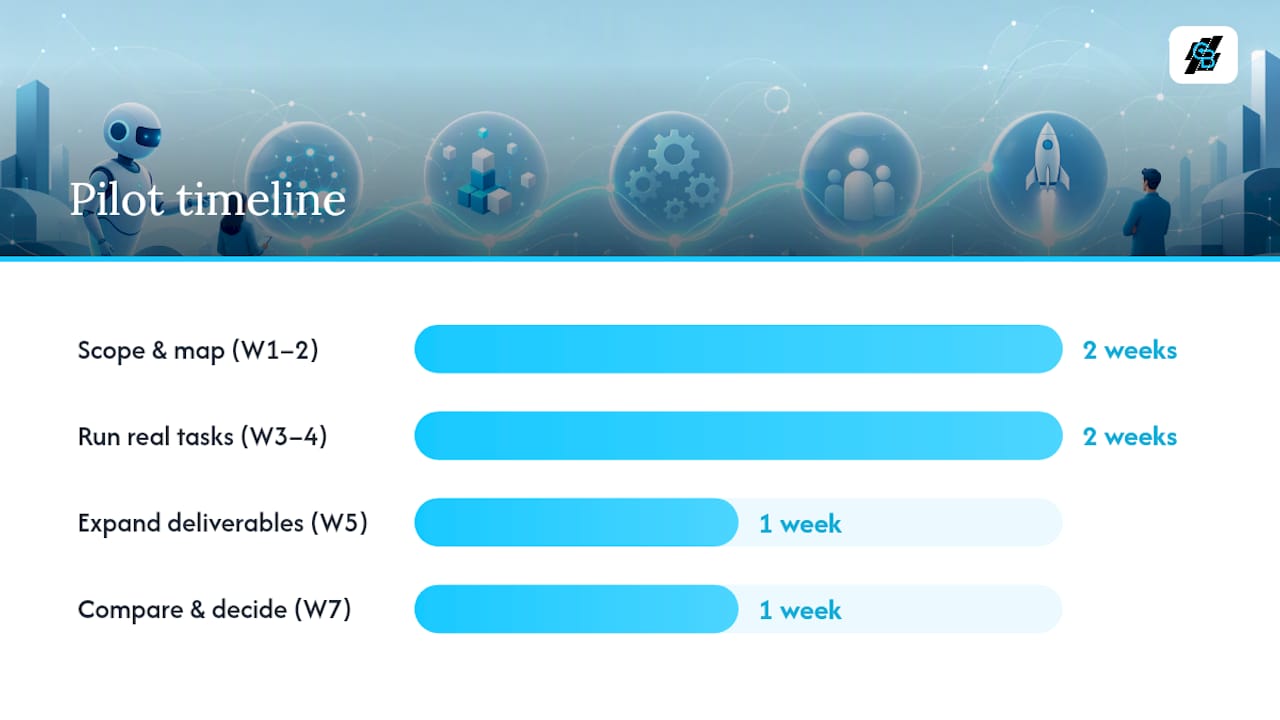
A pilot should run on a fixed clock, not drag indefinitely while everyone “gets a feel for it.”
| Week | Activity | Output |
|---|---|---|
| 1–2 | Scope the workflow, map data sources, set access permissions | Documented pilot plan and guardrails |
| 3–4 | Run the assistant on real (non-client-critical) tasks | First drafts reviewed against baseline time |
| 5 | Expand to a small set of live client deliverables with human review | Logged outputs, error rate tracked |
| 7 | Compare results against baseline, decide scale or stop | Go/no-go decision with documented KPIs |
Track a small set of KPIs, not a dashboard full of vanity numbers: time saved per deliverable, error rate against a manual baseline, client satisfaction on affected accounts, throughput per staff member, cost per deliverable, and how often guardrails actually get triggered.
On cost, expect one of two shapes: a flat subscription fee or usage-based pricing tied to volume. Either way, budget separately for integration work and ongoing monitoring. Those two line items get skipped in planning more often than the license fee itself, and they’re usually where the real cost lives.
Implementation Playbook: Pilot Template, Prompts, and Workflow Example
A pilot succeeds or fails based on sequencing, not enthusiasm. Follow the same order every time:
- Scope the single workflow you’re testing. One workflow, not five.
- Map the data the assistant needs and where it currently lives.
- Set guardrails — who reviews outputs, and what triggers a stop.
- Monitor performance against the baseline you measured before starting.
- Decide whether to scale, adjust, or kill the pilot based on the data, not gut feeling.
A few reusable prompt templates make the first week faster:
- “Draft a client status report using [data source] for the period [date range], following our standard format.”
- “Summarize this call transcript into three action items and one risk flag.”
- “Generate three headline variations for [campaign] targeting [audience], keeping tone consistent with our brand voice guide.”
- “Draft a first-pass creative brief from this intake form response.”
- “Write a personalized outreach message for [prospect name] referencing [specific detail], keeping it under 100 words.”
Before any of that runs live, check your integration list: CRM connection, calendar sync, ad platform APIs, analytics access, a knowledge base or document store, and audit logging across all of it. Missing any one of those turns a smooth pilot into a manual patchwork.
Here’s a plausible example of how this looks in practice. An agency connects its analytics source and CRM to CallBack CRM’s automation layer, sets up a weekly report workflow, and configures the assistant to draft the summary and flag any metric that moves more than a set threshold. The report waits in a review queue before it’s emailed to the client. Tenant isolation keeps each client’s data walled off from every other account on the platform, and every step from data pull to send gets logged.
Pro Tip: Test hallucination risk before trusting any output. Feed the assistant a reference document with known correct answers, then check whether its response matches. If it invents details that aren’t in the source, that’s your warning sign to tighten guardrails, not your cue to disable them.
What Agency Leads Get Wrong About Adopting AI Assistants
Agencies that pilot an assistant on one templated workflow, like weekly reporting, tend to see the time savings almost immediately. The mistake is expecting that speed to hold once the workflow gets messier or more client-specific. What actually holds up is the discipline of a human checkpoint before anything reaches a client. This is not a limitation of the technology, but what makes consistent quality possible at all.
How CallBack CRM Supports Safe AI Assistant Adoption
CallBack CRM gives agencies a faster path to a working assistant pilot than building integrations from scratch, because the connectors to CRM data, SMS, email, and workflow automation already exist inside one platform. That means less time spent wiring together separate tools and more time spent testing whether the assistant actually saves your team hours.

Data stays hosted on Google Cloud with tenant isolation between client accounts, and every automated action leaves an audit trail your team can review. If you’re piloting a reporting or outreach workflow, the SMS marketing and automation features are a practical starting point. Start a trial and connect one workflow this week to see where the hours actually go.
Frequently Asked Questions
What is the simplest way to explain AI assistants for agencies? An AI assistant reads a request, generates a response, and connects to your existing tools to finish the task, with a human reviewing anything that reaches a client.
Are ChatGPT, Microsoft Copilot, Google Gemini, and Claude all the same kind of tool? They share the same underlying mechanics, natural language processing paired with a large language model, but differ in integration depth, data handling, and enterprise controls. ChatGPT and Claude tend to excel at drafting and reasoning tasks, Microsoft Copilot integrates tightly with Office and Outlook workflows, and Google Gemini leans on deep integration with Google Workspace and Search.
How is an AI agent different from an AI assistant? An assistant waits for a prompt and responds once; an agent plans and executes multiple steps toward a goal with far less human input at each stage, according to Akamai’s definition.
Which agency workflows should get the first pilot? Anything templated and repeatable, like weekly client reporting or onboarding intake, because structured inputs produce the most reliable outputs.
What’s the biggest risk agencies overlook? Data access scope. An assistant connected with more permissions than it needs turns a minor bug into a real privacy incident.
How long should a pilot run before deciding to scale? Six to eight weeks is enough to establish a baseline, run the workflow on real tasks, and compare error rates and time saved before committing further.
Sources
- Should consumers and businesses use AI assistants? — Brookings
- AI assistants: what they do and why you need them — Slack
- What are AI assistants — Akamai glossary