

Seven automated insurance email sequences drive the majority of measurable results for agencies: new-lead nurture, welcome/onboarding, policy renewal reminders, cross-sell/bundling, post-claim follow-up, re-engagement/win-back, and birthday/anniversary emails. Industry-standard cadences for these sequences — a 6-email, 21-day lead nurture and a 90/60/30 renewal reminder series — consistently produce measurable open, click, and conversion results when triggered from AMS or CRM events. CAN-SPAM compliance is required for every sequence: a working unsubscribe link, a physical business address, and accurate header information are non-negotiable. Callbackcrm supports all seven sequences with built-in automation workflows, date-based triggers, and blended email/SMS delivery.
Here is when each sequence fires and the single KPI to track:
- New-lead nurture: triggers on new contact creation; track quote-to-bind rate or booked calls
- Welcome/onboarding: triggers on policy purchase or binder issuance; track client portal login rate
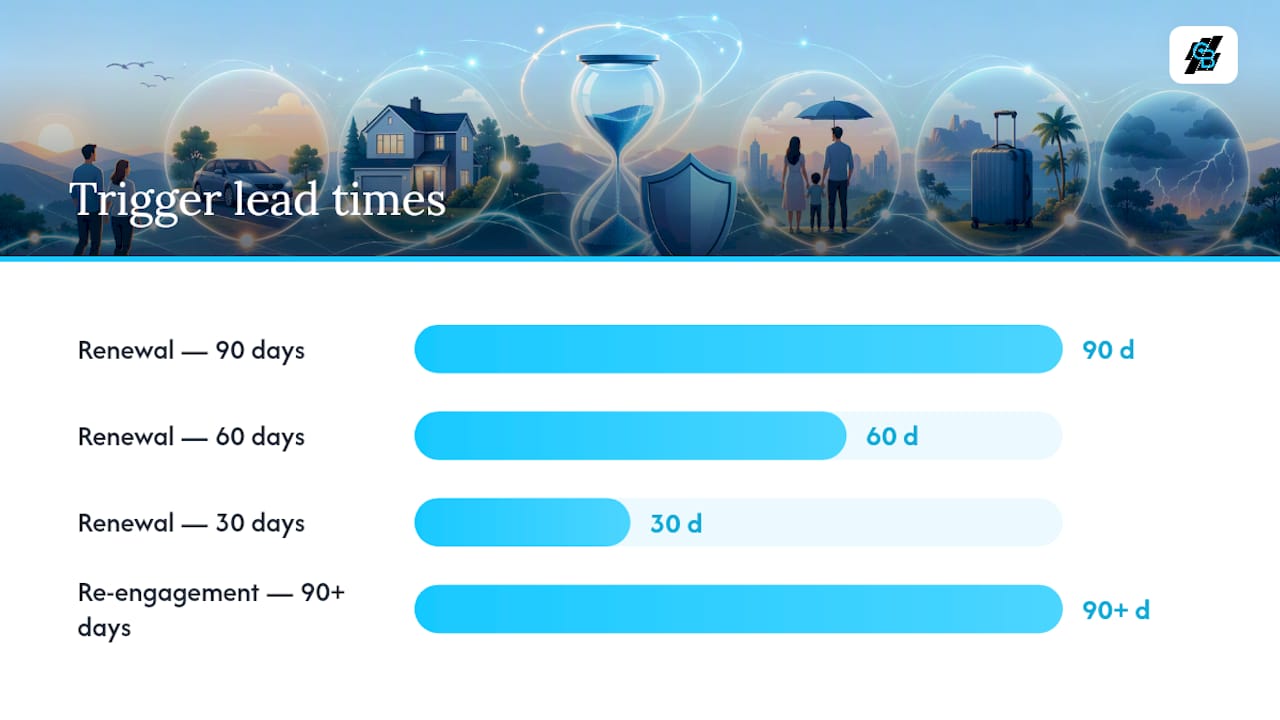
- Policy renewal reminders: triggers 90/60/30 days before policy expiration date; track renewal retention rate
- Cross-sell/bundling: triggers on policy tag or life-event flag; track cross-sell conversion rate
- Post-claim follow-up: triggers on claim opened; track satisfaction response rate and claim-driven churn
- Re-engagement/win-back: triggers after 90–120 days of inactivity; track reactivation rate (click, reply, or booked call)
- Birthday/anniversary: triggers on stored date fields; track engagement rate and referral requests generated
Key Takeaways
Seven automated sequences cover the full insurance client lifecycle — from first contact to renewal to re-engagement — and each one requires a clear trigger, suppression rules, and a single KPI to measure.
| Point | Details |
|---|---|
| Start with renewal or lead nurture | Both have clear triggers and immediate ROI; configure one before building the rest. |
| Suppression rules are mandatory | Pause all marketing sequences when a claim is open; sending cross-sells mid-claim damages retention. |
| Renewal open rates reach 50–65% | Subject lines that include policy type and expiration date drive the highest open rates in any sequence type. |
| Re-engagement achieves 10–15% reactivation | Target contacts inactive for 90–120 days with a 3-email, 30-day drip before suppressing permanently. |
| Callbackcrm automates all seven sequences | Built-in date triggers, suppression rules, and blended email/SMS workflows reduce manual setup and improve accuracy. |
Table of Contents
- What should your new-lead nurture sequence look like?
- How should you onboard new policyholders in the first 30 days?
- How do renewal reminder sequences protect your retention rate?
- How do you build a cross-sell sequence that converts without annoying clients?
- Why does a post-claim follow-up sequence matter for retention?
- How do you re-engage inactive contacts before they’re gone for good?
- How do birthday and anniversary emails build loyalty without adding noise?
- What segmentation fields does every insurance agency need?
- How do you connect your AMS or CRM to trigger sequences automatically?
- What benchmarks and A/B tests should you track by sequence type?
- What mistakes kill sequence performance, and how do you avoid them?
- How do you build and launch your first automated sequence?
- Worked example: 6-email lead nurture sequence in Callbackcrm
- What most agencies get wrong about email automation (and what to do instead)
- Callbackcrm puts these sequences to work for your agency
- Sources
What should your new-lead nurture sequence look like?
The goal of a new-lead nurture sequence is simple: move a cold prospect to a booked call or submitted quote before they forget you exist. For a practical marketing automation checklist for SMBs, including tasks and trigger sequencing best practices, see this step-by-step guide. A 6-email, 21-day cadence is the industry standard, and it works because it spaces touches far enough apart to avoid fatigue while staying present through the prospect’s decision window.
Trigger: new contact record created via website form, purchased lead, or referral entry in your CRM/AMS.
| Timing | Intent | Subject line example | |
|---|---|---|---|
| 1 | Immediate | Confirm & welcome | “Your [Coverage Type] quote request — next steps” |
| 2 | Day 2 | Educate on coverage | “What most [state] homeowners don’t know about their policy” |
| 3 | Day 5 | Social proof | “How we helped a family like yours save $400/year” |
| 4 | Day 8 | Objection handling | “The #1 reason people delay getting covered (and why it costs more)” |
| 5 | Day 14 | Quote or offer | “Your personalized quote is ready — here’s what it covers” |
| 6 | Day 21 | Final follow-up | “Still thinking it over? Let’s talk for 10 minutes” |
Template prompts by email:
- Email 1: Confirm receipt of their inquiry. One sentence: “We received your request and will have options ready within [X hours].” Include your direct phone number.
- Email 2: Share one specific, relevant coverage fact for their line of business. Keep it under 100 words. End with a soft CTA: “Reply with any questions.”
- Email 3: Reference a real outcome (e.g., a policy review that found a gap). No invented testimonials — describe the scenario generically. CTA: “See if your current coverage has gaps.”
- Email 4: Address the most common objection for your line (cost, complexity, “I’ll do it later”). One paragraph. CTA: “Book a 10-minute call.”
- Email 5: Present the quote or a clear next step to get one. Be specific about what is covered.
- Email 6: Short, direct. Acknowledge the silence. Offer one last easy action: a call link or a reply.
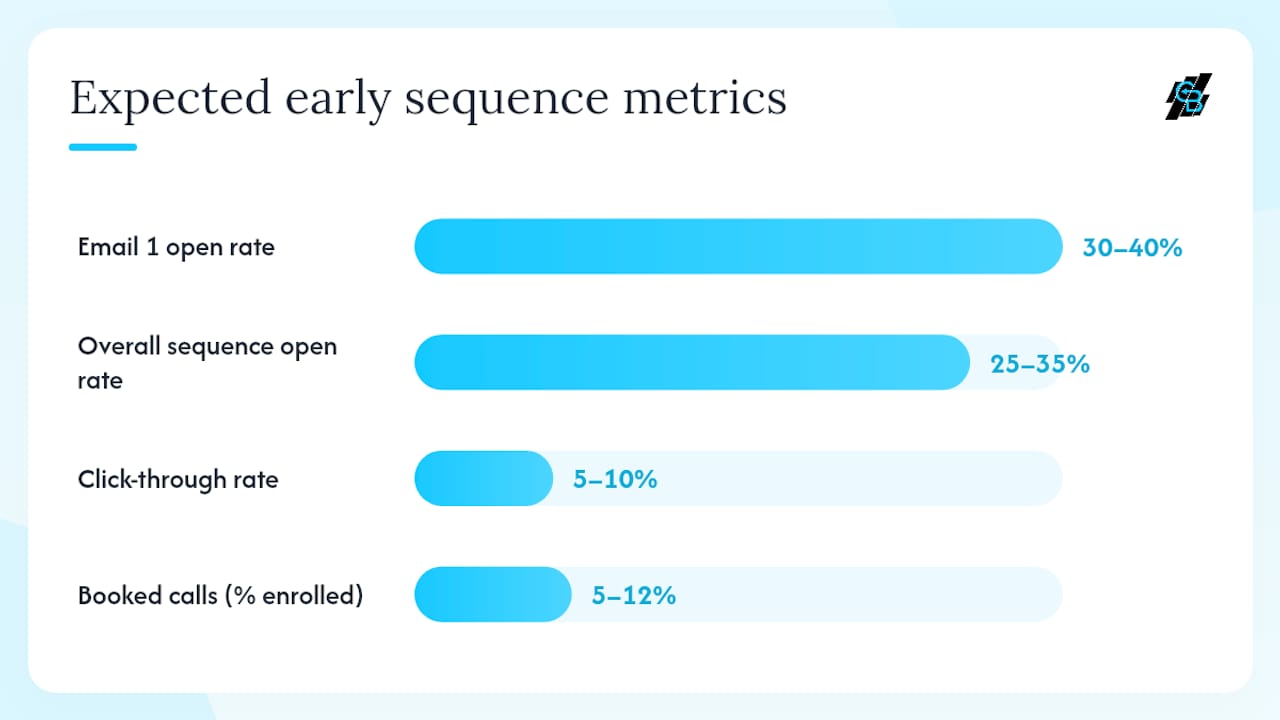
Benchmark: Welcome and nurture emails sent immediately after a prospect’s first contact can reach open rates of 30–40%, well above the typical insurance email average. If your Email 1 open rate falls below 25%, test the subject line before adjusting the cadence.
For more on structuring multi-touch sequences, the insurance lead nurturing guide on the Callbackcrm blog covers the full conversion framework.
How should you onboard new policyholders in the first 30 days?
A welcome sequence is not a marketing sequence. Its job is to reduce inbound calls, set expectations, and get the client using their policy resources before they need to file a claim. Three touches over 30 days cover the essentials.
Trigger: policy purchase confirmed or binder issued in AMS/CRM.
- Immediate (Day 0): Subject: “Welcome to [Agency Name] — your policy details inside.” Body: Confirm coverage is active, attach or link policy documents, provide your direct contact and after-hours claims number.
- Day 3–7: Subject: “How to file a claim — the short version.” Body: Walk through the claims process in three bullet points. Link to your client portal. Include payment setup instructions if not yet completed.
- Day 14–30: Subject: “Your account is set up — a few things to know.” Body: Confirm portal access, remind them of the renewal date, and invite them to schedule an annual review. This is also a natural moment to mention one adjacent coverage line they do not yet hold — one sentence, no pressure.
Onboarding items every sequence should include:
- Policy documents (PDF link or portal access)
- Payment options and due dates
- Claims contact number and process overview
- Client portal login link
- Agency contact for questions
KPI to track: client portal login rate within 30 days of policy issuance. Low login rates signal that your Day 3–7 email needs a clearer CTA or a simpler portal link.
How do renewal reminder sequences protect your retention rate?
Renewal reminders are the highest-ROI automated sequence most agencies can build, because the trigger data — the policy expiration date — already lives in your AMS. Automated renewal reminders recover policies that would otherwise lapse silently, and subject lines that include the policy type and expiration date materially improve open rates.
The standard cadence is 90, 60, and 30 days before expiration. High-value commercial accounts often need an additional 120-day touch to allow time for remarketing, coverage review, and carrier negotiations.
| Days before expiration | Intent | Subject line example |
|---|---|---|
| 120 (commercial only) | Early awareness | “Your commercial policy renews [Month] — let’s review early” |
| 90 | Awareness | “Your [Policy Type] renews on [Date] — here’s what to expect” |
| 60 | Value review / quote | “Is your [Policy Type] coverage still the right fit?” |
| 30 | Urgency / final action | “Action needed: your [Policy Type] renews in 30 days” |
Template prompts:
- 90-day email: State the renewal date and policy type. Offer a no-obligation review. Keep it under 80 words.
- 60-day email: Ask one question about life changes (new vehicle, home renovation, business expansion). Offer a quote comparison. CTA: “Schedule a 15-minute review.”
- 30-day email: Direct and specific. Name the date, the policy, and the action required. CTA: “Renew now” or “Call us today.”
Pro Tip: Set suppression rules before launch. If a claim is currently open on the account, pause the renewal sequence — sending a renewal upsell while a client is mid-claim damages trust. Also suppress contacts who have already renewed. Both rules take under five minutes to configure in most CRMs and prevent the most common renewal-sequence complaint agencies receive.
How do you build a cross-sell sequence that converts without annoying clients?
Cross-sell sequences work when they are triggered by a real signal, not a calendar date. The most reliable signals are policy tags (a client holds auto but not home), missing related lines visible in your AMS, and life-event flags (new home purchase, new driver added, upcoming retirement).
Targeting rules:
- Pull contacts who hold one line but not the adjacent one (auto-only, home-only, life-only)
- Prioritize by premium tier — higher-value clients justify more personalized outreach
- Add life-event tags when you learn of them (new baby, business launch, home purchase)
- Exclude contacts with an open claim or a recent complaint
3-email cadence over 30 days:
- Email 1 (Day 0) — Education: Subject: “Are you covered if [specific scenario]?” Body: Describe one real coverage gap relevant to their current policy. No pitch. One sentence CTA: “Reply if you’d like to know more.”
- Email 2 (Day 10) — Quantify: Subject: “Bundling [Policy A] + [Policy B] could save you [X%].” Body: Give a concrete savings or risk example. CTA: “Get a bundled quote in 5 minutes.”
- Email 3 (Day 30) — Convert: Subject: “Quick question about your coverage.” Body: One direct ask. Offer a 10-minute review call. If no response after this email, remove from the cross-sell sequence for 90 days.
Avoid sending cross-sell emails more than once per 30-day window to any single contact. Frequency fatigue is the fastest way to generate unsubscribes from your best clients.
Why does a post-claim follow-up sequence matter for retention?
A claim is the moment a client finds out whether their policy was worth buying. How you communicate during and after that process determines whether they renew, refer, or leave. This sequence is service-first — no upsells, no promotions.
Cadence and templates:
- 24-hour acknowledgement: Subject: “We received your claim — here’s what happens next.” Body: Confirm the claim number, name the adjuster or next contact, and give a realistic timeline. Two sentences maximum.
- 1-week check-in: Subject: “Checking in on your claim — [Claim #].” Body: Ask if they have questions or need anything. Offer a direct call. This email has one job: show you are paying attention.
- 30-day satisfaction/feedback: Subject: “How did we do? Your feedback matters.” Body: Ask one question about their experience. Link to a short survey or a Google review request. This is also the right moment — and only this moment — to mention a referral: “If we took good care of you, we’d appreciate an introduction to someone you know.”
The 30-day email is where service transitions back to relationship mode. Post-claim communications should follow this 24-hour, 1-week, 30-day structure, with the 30-day touch serving as the natural handoff to referral and review requests.
Benchmark: Agencies that run a structured post-claim follow-up sequence report measurable reductions in claim-driven churn. Clients who receive a proactive 24-hour acknowledgement are significantly more likely to renew than those who hear nothing until the adjuster calls. Track your satisfaction response rate and compare renewal rates for claimed vs. non-claimed accounts over a 12-month window.
KPIs: satisfaction survey response rate, claim-driven churn rate (compare renewal rates for clients who filed claims vs. those who did not).
How do you re-engage inactive contacts before they’re gone for good?
Inactivity is a clear signal, not a reason to give up. Define “inactive” as no email open, click, reply, or policy action in 90–120 days. Contacts beyond that window need a dedicated re-engagement drip before you suppress them permanently.
Trigger: contact last-interaction date exceeds 90–120 days with no policy action recorded.
3-email re-engagement cadence over 30 days:
- Email 1 (Day 0) — Reminder of value: Subject: “It’s been a while — are you still covered?” Body: Reference their policy or the last interaction. Remind them of what your agency offers. Soft CTA: “Reply to reconnect.”
- Email 2 (Day 14) — Offer or review: Subject: “A free coverage review — no strings attached.” Body: Offer something concrete: a policy audit, a rate check, or a market update relevant to their line of business. CTA: “Book a 15-minute call.”
- Email 3 (Day 30) — Last chance or survey: Subject: “Should we keep in touch?” Body: Give them a clear choice: stay on your list (with a one-click confirm) or unsubscribe. A short two-question survey (“What would make our emails more useful?”) can recover contacts who were disengaged due to irrelevance, not disinterest.
Benchmark: Re-engagement sequences targeting contacts inactive for 90–120 days achieve approximately 10–15% reactivation. Count a contact as reactivated when they click a link, reply, book a call, or take a policy action within 30 days of the sequence completing.
After Email 3, suppress non-responders from all marketing sequences. Continuing to mail unresponsive contacts hurts deliverability and wastes send credits.
How do birthday and anniversary emails build loyalty without adding noise?
Special-date emails have the highest goodwill-to-effort ratio of any sequence. They require minimal copy, carry no sales pressure, and keep your agency name visible at a moment when the client is receptive.
Common triggers to configure:
- Client birthday (date of birth field in CRM)
- Policy anniversary (original policy start date)
- Renewal anniversary (first renewal date, distinct from expiration)
- Life-event tags: new home purchase, new driver added, retirement, new business
Short template examples:
- Birthday: Subject: “Happy Birthday from [Agency Name]!” Body: One sentence of genuine goodwill. Optional: “As a birthday gift, we’re offering a free policy review this month — no obligation.” No hard CTA required.
- Policy anniversary: Subject: “One year with [Agency Name] — thank you.” Body: Thank them for their trust. Mention one thing that has changed in their coverage or the market that might be worth a quick review. CTA: “Schedule a 10-minute check-in.”
- Life-event (new home): Subject: “Congrats on the new home — is your coverage updated?” Body: One sentence of congratulations, one sentence about the coverage implication, one CTA.
Frequency guidance: limit special-date sends to one per trigger per year. If a client’s birthday and policy anniversary fall in the same month, send the birthday email and skip the anniversary that month. Combining these sends with an active renewal or cross-sell sequence in the same 30-day window increases unsubscribe risk — use suppression logic to space them out.
What segmentation fields does every insurance agency need?
Segmentation is what separates a relevant email from a deleted one. Segmenting by line of business — personal lines, commercial lines, life/health — is the foundational cut. Every other segment builds on it.
Recommended segmentation keys:
- Line of business (personal, commercial, life/health)
- Policy expiration date (drives renewal sequence enrollment)
- Policy status (active, lapsed, canceled, pending)
- Last-interaction date (drives re-engagement enrollment)
- Lead source (website, referral, purchased list, social ad)
- Premium tier (low, mid, high — for prioritization)
- Life-event tags (new home, new driver, retirement, new business)
List hygiene rules:
- Hard bounces: remove immediately and permanently
- Soft bounces: suppress after three consecutive soft bounces
- Unsubscribes: remove within 10 business days per CAN-SPAM; same-day removal is best practice
- Open claims: suppress from all marketing and cross-sell sequences
- Canceled policies: move to a win-back segment; do not continue standard sequences
| Field | Type | Used in sequence |
|---|---|---|
| Line of business | Tag/category | All sequences (segmentation) |
| Policy expiration date | Date | Renewal reminders |
| Policy status | Status field | Suppression rules |
| Last interaction date | Date | Re-engagement trigger |
| Lead source | Tag | Lead nurture enrollment |
| Life-event tags | Tag | Cross-sell, special-date |
| Premium tier | Category | Cross-sell prioritization |
Pro Tip: Run a list audit every 90 days. Pull contacts with no policy record, no interaction in 180 days, and no valid email address. Suppress or delete them before they drag down your sender reputation. A smaller, cleaner list consistently outperforms a large, stale one.
Pro Tip: Tag every new contact with their lead source at the point of entry. This one field lets you measure which channels produce the highest quote-to-bind rates and adjust your lead spend accordingly.
For a full walkthrough of email drip campaign structure for insurance workflows, the Callbackcrm blog covers the setup in detail.
How do you connect your AMS or CRM to trigger sequences automatically?
The trigger is the most important part of any automated sequence. A well-written email sent at the wrong time — or not sent at all because the trigger never fired — produces nothing. Three integration patterns cover most agency setups.
Required field mappings:
| AMS/CRM field | Automation trigger | Sequence enrolled |
|---|---|---|
| Policy expiration date | 90/60/30 days before date | Renewal reminders |
| Policy status = “Active” | On status change | Welcome/onboarding |
| Claim status = “Open” | On claim creation | Suppression rule (pause renewal/cross-sell) |
| New contact created | Immediately | Lead nurture |
| Last interaction date | 90+ days elapsed | Re-engagement |
| Life-event tag added | On tag creation | Cross-sell or special-date |
Integration options:
- Batch exports/scheduled imports: Export a CSV from your AMS on a daily or weekly schedule and import it into your email platform. Sufficient for renewal and cross-sell sequences where a 24-hour delay is acceptable. Most agencies running Applied Epic or AMS360 start here.
- Webhooks/API live enrollment: Fires the trigger in real time when a field changes in the AMS. Real-time triggers matter most for lead response speed (Email 1 should fire within minutes of a new lead) and for suppression accuracy (an open claim should pause sequences immediately, not 24 hours later).
Applied Epic stores policy expiration dates, client contact records, and claim status fields that map directly to renewal and suppression triggers. Most agencies export these fields on a nightly schedule.
AMS360 provides similar policy and client data with configurable export formats. Its activity and policy status fields are the primary suppression sources for renewal and cross-sell sequences.
Callbackcrm supports live webhook enrollment, date-based triggers, and suppression rules natively. A new lead captured via a Callbackcrm funnel or website form enrolls in the lead nurture sequence immediately, with no manual import step required.
Implementation checklist:
- Map every required field from your AMS to your email platform’s contact record
- Configure date-based triggers for policy expiration and birthday/anniversary fields
- Set suppression conditions: open claim, canceled policy, already renewed
- Test enrollment with a single internal contact before going live
- Confirm unsubscribe flow removes the contact from all active sequences
What benchmarks and A/B tests should you track by sequence type?
Benchmarks give you a baseline. Testing tells you whether you are above or below it and why. Both matter.
| Sequence type | Typical open rate | Typical click rate | Primary conversion metric |
|---|---|---|---|
| Welcome/onboarding | 30–40% | 8–12% | Portal login rate |
| New-lead nurture | 25–35% | 5–10% | Booked call or quote submitted |
| Renewal reminders | 50–65% | 10–15% | Renewal retention rate |
| Cross-sell | 20–30% | 4–8% | Cross-sell conversion rate |
| Re-engagement | 10–20% | 2–5% | Reactivation rate (10–15%) |
| Post-claim follow-up | 35–50% | 6–10% | Satisfaction response rate |
Renewal sequences typically reach open rates of 50–65% when the subject line includes the policy type and renewal date.
A/B testing checklist:
- Test first: subject line (the single highest-impact variable)
- Test second: preheader text (often ignored, often the reason for a low open rate)
- Test third: CTA button text vs. hyperlinked text, and CTA placement (top vs. bottom)
- Minimum sample size: 200 contacts per variant before drawing conclusions
- Evaluation window: 72 hours for open rate; 7 days for click and conversion metrics
Attribution: track a renewal or cross-sell back to an email sequence by logging the click source in your CRM, then matching it to a booked call or bound policy within a defined attribution window (typically 30 days). In Callbackcrm, this maps to the contact’s activity timeline and pipeline stage.
Pro Tip: Test one variable at a time. Changing the subject line and the CTA simultaneously makes it impossible to know which change drove the result.
What mistakes kill sequence performance, and how do you avoid them?
The most common failure mode is not a bad subject line. It is sending the wrong sequence to the wrong person because suppression rules were never configured.
Common mistakes:
- No suppression rules: sending a cross-sell email to a client mid-claim, or a renewal reminder to someone who already renewed, damages trust and generates complaints
- One-size-fits-all messaging: a personal lines auto client and a commercial property client should never receive the same email — line-of-business segmentation is the fix
- Stale data: expired email addresses, wrong policy dates, and missing life-event tags produce irrelevant sends; run a data audit before launching any sequence
- Generic subject lines: “Important information about your policy” tells the reader nothing; “Your homeowners policy renews October 15” gets opened
- Over-mailing: more than two marketing emails per month to the same contact increases unsubscribe rates; set frequency caps at the contact level
Compliance reminders: CAN-SPAM requires a working unsubscribe mechanism in every email, a physical business address in the footer, and accurate “From” and subject-line information. State insurance departments may impose additional communication rules — check your state’s requirements before launching sequences to policyholders.
Pro Tip: Write subject lines with the policy type and a date whenever possible. “Your auto policy renews March 3” outperforms “Time to review your coverage” on open rate every time. The specificity signals relevance before the email is even opened.
How do you build and launch your first automated sequence?
Start with the renewal sequence or the lead nurture sequence. Both have clear triggers, measurable outcomes, and immediate ROI. Here is the build order:
- Choose your sequence. Renewal reminders if you have an existing book of business. Lead nurture if new leads are your priority.
- Map your fields. Identify the trigger field in your AMS or CRM (policy expiration date or new contact creation date). Confirm it is populated for at least 80% of your contacts.
- Write your emails. Aim for 100–150 words per email. Write the subject line first. Use the policy type and a date where possible.
- Set suppression rules. Define who should NOT receive this sequence: open claims, already-renewed contacts, unsubscribed contacts, canceled policies.
- Configure the automation. Set the trigger, the delay between emails, and the exit conditions (contact renews, contact unsubscribes, contact books a call).
- Set measurement events. Define what counts as a conversion: a clicked link, a booked call, a bound policy. Log these in your CRM.
- QA the workflow. Enroll a test contact. Confirm Email 1 fires on time. Click every link. Test the unsubscribe flow. Verify suppression conditions work.
- Soft-launch. Send to 10–20% of your eligible contacts first. Measure for 30–60 days before rolling out to the full book.
QA checklist before launch:
- Test enrollment fires correctly for a new contact
- All links resolve and track correctly
- Unsubscribe removes the contact from the active sequence within 24 hours
- Suppression conditions pause the sequence as expected
- Physical address and unsubscribe link appear in every email footer
For a detailed email marketing checklist covering QA steps and launch validation, the Callbackcrm blog has a step-by-step version.
Worked example: 6-email lead nurture sequence in Callbackcrm
This example shows how a website lead flows from form submission to a completed 6-email nurture sequence in Callbackcrm, with field mappings and copy prompts for each step.
Step 1 — Lead capture: A prospect submits a quote request form on a Callbackcrm-hosted funnel page. Callbackcrm creates a new contact record automatically, populating: first name, last name, email, phone, lead source tag (“website”), and line-of-business tag (from the form field).
Step 2 — Sequence enrollment: An automation rule fires immediately: “If contact tag = ‘new-lead’ AND lead source = ‘website,’ enroll in Lead Nurture Sequence.” No manual import required.
Step 3 — Email delivery and suppression: The sequence runs on the 6-email, 21-day cadence. Suppression condition: if the contact books a call or submits a quote, exit the sequence immediately. If the contact unsubscribes, remove from all sequences.
Email copy prompts and subject lines:
- Email 1 (Immediate): Subject: “We got your request — here’s what’s next.” Body: Confirm receipt, set a response timeline, include direct contact.
- Email 2 (Day 2): Subject: “One thing most [State] drivers overlook.” Body: One relevant coverage fact for their line of business.
- Email 3 (Day 5): Subject: “A real example of a coverage gap we found.” Body: Generic scenario (no invented client names). CTA: “See if yours has one.”
- Email 4 (Day 8): Subject: “The real cost of waiting on coverage.” Body: Address the delay objection. CTA: “Book a 10-minute call.”
- Email 5 (Day 14): Subject: “Your quote is ready — take a look.” Body: Direct link to quote or scheduling page.
- Email 6 (Day 21): Subject: “Last note from [Agent Name].” Body: Short, personal, no pressure. One final CTA.
Callbackcrm fields used: contact tag (new-lead), lead source tag, sequence enrollment action, pause condition (call booked or quote submitted), unsubscribe trigger.
| Metric | Expected range (first 90 days) |
|---|---|
| Email 1 open rate | 30–40% |
| Overall sequence open rate | 25–35% |
| Click-through rate | 5–10% |
| Booked calls from sequence | 5–12% of enrolled contacts |
Pro Tip: After 60 days, pull the contacts who opened at least two emails but never booked a call. That group is warm. Move them into a separate “warm re-engagement” sequence with a more direct offer — a free policy audit or a rate comparison — rather than suppressing them entirely.
For a full lead generation workflow tutorial that maps this process end to end, the Callbackcrm blog covers the automation steps in detail.
What most agencies get wrong about email automation (and what to do instead)
Most agencies treat email automation as a set-it-and-forget-it task. They configure a renewal sequence, confirm it fires, and move on. Six months later, they wonder why renewal retention has not improved.
The problem is almost never the cadence. It is the data feeding the triggers. A cross-sell sequence that ignores open-claim suppression will send a bundling pitch to a client who is furious about a denied claim. These are not edge cases — they are the norm in agencies that have not audited their AMS data in over a year.
The second mistake is treating drip marketing as a volume game. More emails do not produce more conversions. The agencies that see the strongest results send fewer, more targeted emails — triggered by real signals, segmented by line of business, and suppressed aggressively when the timing is wrong. That discipline is harder to maintain than a high-volume blast, but the retention and conversion numbers reflect it.
Start with data quality. Then build the sequences. The automation is the easy part.
Callbackcrm puts these sequences to work for your agency
Agencies that run all seven sequences manually spend hours each week on follow-up that should be automatic. Callbackcrm is built specifically for insurance agents and agencies who need those sequences running without the manual overhead.

The platform handles date-based triggers (policy expiration, birthday, policy anniversary), suppression rules (open claims, already-renewed contacts, unsubscribes), and blended email/SMS sequences from a single workflow builder. AI-assisted copy tools reduce the time to write and test subject lines. Live webhook enrollment means a new lead from your website enters the nurture sequence in seconds, not the next morning after a batch import. Callbackcrm runs on Google Cloud with 24/7 support, so your sequences stay live and your policyholder data stays secure.
Start a free trial or explore the SMS and blended messaging features to see how multi-channel sequences work in practice.
Sources
The following sources back the benchmarks, compliance guidance, and cadence recommendations in this guide:
- Insurance Agencies — Email marketing benchmarks and sequences (EmailWarmup)
- 5 Email Sequences Insurance Agencies Need in 2026 | US Tech Automations
- Insurance Email Templates: The Complete Guide for Insurance Agencies and Brokers | Pathway
- Email Marketing for Insurance Agents: Complete Setup Guide | Mailsoftly
- CAN-SPAM Act: A compliance guide for business | Federal Trade Commission
- What Is Drip Marketing for Insurance? | Agents Alliance