

Email spf dkim insurance controls only work as a set: SPF and DKIM authenticate a message, but DMARC is what actually enforces the result and reports on failures. If you run an insurance agency, agency network, or IMO, your first move is a full sender inventory and a DMARC record published in monitoring mode (p=none) with reporting turned on. Insurers increasingly expect enforced DMARC as proof of operational control, and getting there from scratch typically takes 6 to 8 weeks.
TL;DR:
- Full implementation of DMARC enforcement typically requires 6 to 8 weeks, including inventory, monitoring, and staged policy tightening.
- SPF records should be limited to 10 DNS lookups and start with a soft fail (
~all) before moving to a hard fail (-all).- DKIM signing must be enabled for all domains with regularly rotated selectors to ensure cryptographic integrity and avoid delivery issues.
- Reviewing and analyzing DMARC aggregate reports weekly helps identify unrecognized senders or spoofing attempts early.
- Maintaining detailed, timestamped documentation of DNS records, enforcement stages, and change logs is crucial for underwriting evidence and renewal processes.
Table of Contents
- What Do SPF, DKIM, and DMARC Actually Do?
- Why BEC and Spoofing Are an Underwriting Problem, Not Just an IT Problem
- How Do You Roll Out SPF, DKIM, and DMARC Step by Step?
- How Do You Read a DMARC Report and Catch Problems Early?
- What Evidence Should You Keep for Underwriters?
- What Insurance Email Stacks Get Wrong Most Often
- Who Should Own This Project, and What Should Executives Expect?
- An Adjunct Option for Managing Legitimate Senders
- Sources
- FAQ
What Do SPF, DKIM, and DMARC Actually Do?
Each protocol checks something different, and none of them alone stops a determined spoofer; following a marketing automation checklist can help manage the various third-party senders involved.
SPF (Sender Policy Framework) publishes a DNS record listing which IP addresses and third-party services are allowed to send mail for your domain. When a receiving server gets a message, it checks the sender’s IP against that list. SPF has a hard limit worth knowing: it allows only 10 DNS lookups per check, and busy insurance domains running a CRM, a billing system, and a marketing platform can blow past that limit fast. The record also ends in a qualifier, either ~all (soft fail, flag but deliver) or -all (hard fail, reject), and most security teams eventually move to -all once they’ve confirmed every legitimate sender is accounted for. RFC 7208 defines the exact mechanics the IETF specifies for SPF evaluation.
DKIM (DomainKeys Identified Mail) attaches a cryptographic signature to outgoing mail using a private key, verified against a public key published in DNS as a “selector” record. Selectors should rotate periodically, and every sending platform (your CRM, your claims portal, your marketing tool) needs its own selector and key pair. RFC 6376 covers the signing and verification process.
DMARC (Domain-based Message Authentication, Reporting, and Conformance) ties the two together. It requires that SPF or DKIM pass and align with the domain in the “From” address, then tells receiving servers what to do with mail that fails: p=none (monitor only), p=quarantine (send to spam), or p=reject (block outright). DMARC also generates aggregate reports, which is the only way to see failures you’d otherwise never know about. RFC 7489 is the governing standard.
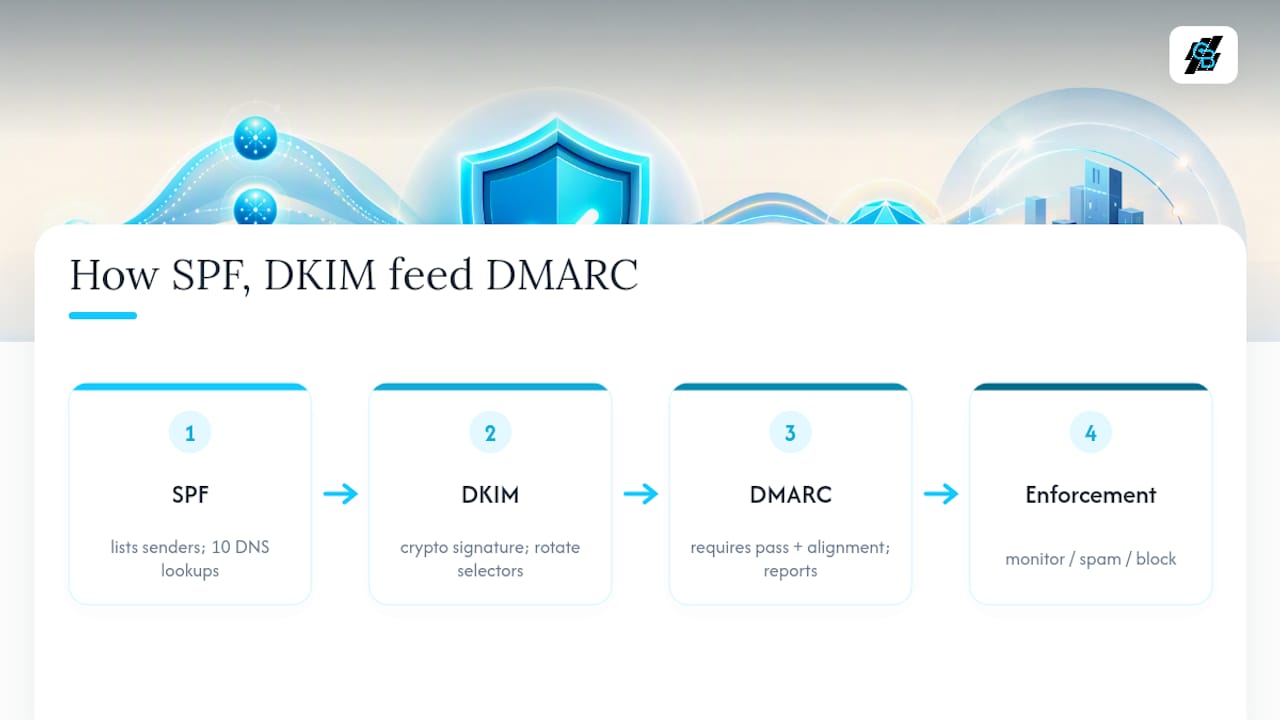
One practical wrinkle: email forwarding often breaks SPF alignment because the forwarding server isn’t on your authorized sender list. DKIM signatures usually survive forwarding intact, which is exactly why relying on SPF alone leaves gaps. Running both, under a DMARC policy, closes most of that hole.
Why BEC and Spoofing Are an Underwriting Problem, Not Just an IT Problem
Insurance firms are a disproportionately attractive target for business email compromise. Agents routinely email policy changes, payment instructions, and claims documents, and every one of those messages is a potential impersonation vector. A spoofed message asking a policyholder to redirect a premium payment, or a fake “urgent” wire request that appears to come from an agency principal, doesn’t need to fool a computer. It only needs to fool one employee for thirty seconds.
The FBI’s IC3 2025 annual report documents that business email compromise and phishing remain among the costliest categories of internet crime reported to the bureau, year after year.
The insurance sector itself is behind on fixing this. Red Sift’s analysis of the top 50 US insurance brokers found that 52% lacked effective DMARC protection, with 26 of those 50 brokers running no DMARC record at all. That’s a large, well-resourced slice of the industry leaving its own domain open to impersonation.
Three scenarios show up again and again in insurance-specific fraud:
- Policy-change fraud: a spoofed email requests a change of beneficiary or payment routing on an active policy.
- Claims diversion: attackers impersonate a claimant or adjuster to redirect settlement funds.
- Agent impersonation: a fraudulent message mimics a known agent’s domain to solicit sensitive client data.
Underwriters are starting to treat DNS-level authentication as evidence of operational maturity, not a technical footnote. Palisade’s research on DMARC and cyber insurance notes that carriers increasingly ask for documented authentication posture during renewals, and enforcement gaps can affect both premiums and coverage conditions. Fixing this protects more than your inbox. It protects your loss ratio.
How Do You Roll Out SPF, DKIM, and DMARC Step by Step?
Treat this as a staged project with checkpoints, not a single DNS change. Here’s the order that actually works.
- Inventory every sender. List every domain and subdomain you own, then every service that sends mail on your behalf: your CRM, billing platform, claims portal, webinar tool, e-signature service, and any marketing software. Missing one sender here is the single most common cause of a botched rollout.
- Publish SPF conservatively. Add an
include:mechanism for each authorized service, keep the lookup count under the 10-mechanism ceiling defined in RFC 7208, and start with~allwhile you confirm the list is complete. - Enable DKIM signing for every sending domain and subdomain. Generate a distinct selector for each platform, document the selector names in a shared record, and set a rotation schedule (annually is common, more often for high-risk domains).
- Publish DMARC at
p=nonewith reporting addresses configured. This step alone lets you start collecting aggregate reports without affecting deliverability. Microsoft’s DMARC configuration guide walks through the exact record syntax for Microsoft 365 tenants. - Move to
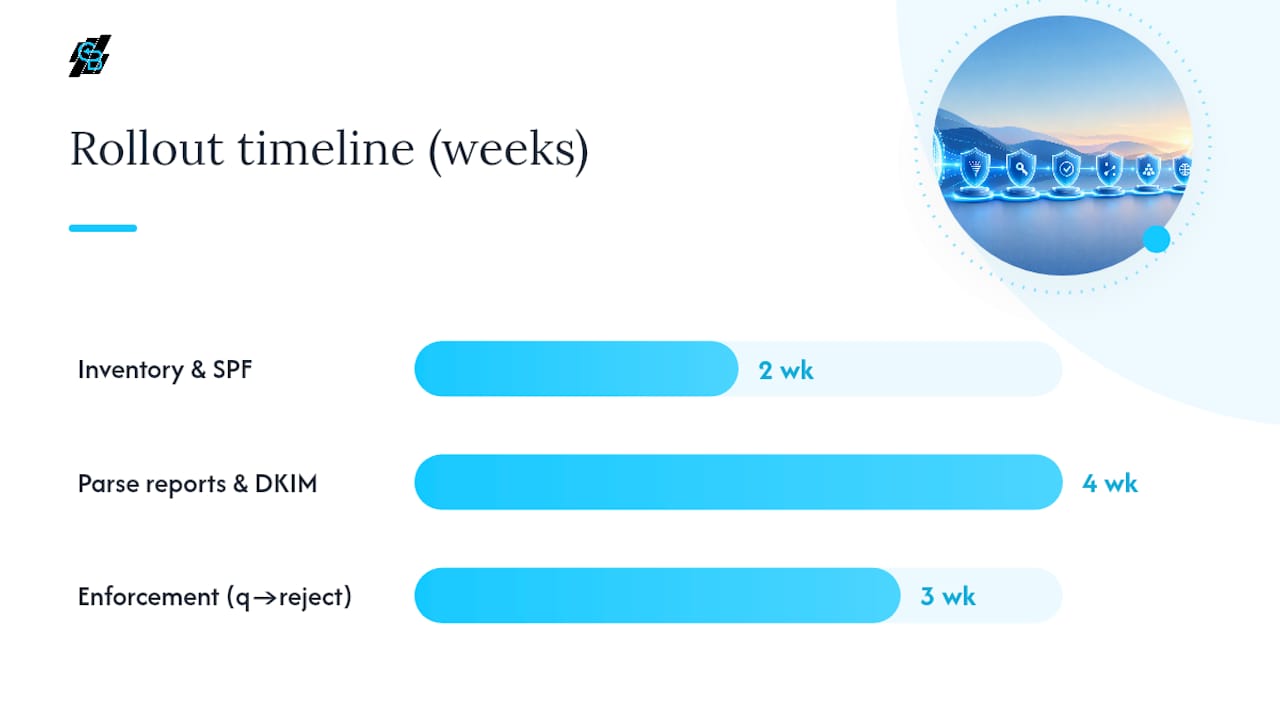
p=quarantine, thenp=reject, over roughly 6 to 8 weeks. Red Sift’s data on enforcement timelines maps this cleanly: weeks 1 to 2 for inventory and initialp=nonepublication, weeks 2 to 5 to parse reports and authorize every legitimate sender, and weeks 5 to 8 to move through quarantine and into full enforcement while watching delivery metrics.
A few operational notes that trip up teams mid-rollout. Subdomains inherit the parent domain’s DMARC policy unless you set an explicit sp= tag, so a forgotten marketing subdomain can either go unprotected or get accidentally blocked. If your SPF record is over budget on lookups, flatten it by replacing nested include: chains with direct IP ranges where possible, or drop unused services. And always keep a rollback plan: if a legitimate sender starts failing after you move to quarantine, you can temporarily add it to SPF or issue it a DKIM selector without dropping back to p=none entirely.
Pro Tip: *Run your DMARC policy at p=quarantine; pct=10 before jumping straight to full enforcement.
How Do You Read a DMARC Report and Catch Problems Early?
DMARC aggregate reports arrive as XML files (most tools convert them to readable dashboards) and show, per sending source, how many messages passed or failed SPF and DKIM alignment. A source you don’t recognize sending mail “as” your domain is either a shadow IT tool you forgot to authorize, or a spoofing attempt. Both need action.
A few things worth building into your process:
- Parse reports daily for the first two to three weeks after publishing DMARC, since that’s when you’ll discover senders you missed in the inventory.
- Shift to weekly review once you move into
p=quarantine, when the cost of missing a legitimate sender is higher. - Drop to quarterly review after reaching stable
p=reject, unless you add new marketing or communication tools. - Use free DNS lookup tools to verify SPF and DKIM records resolve correctly before you tighten enforcement, and lean on Microsoft’s SPF configuration documentation if your environment runs on Microsoft 365.
If a legitimate sender gets blocked after you enforce, don’t panic and revert to p=none. Add the sender’s IP to SPF or issue it a DKIM key, confirm the fix in the next report cycle, and keep enforcement active for everything else.
What Evidence Should You Keep for Underwriters?
Underwriters don’t just want a live DNS record. They want a timeline and proof it has held. Keep a dated snapshot of your SPF, DKIM, and DMARC records at each stage of the rollout (none, quarantine, reject), along with the dates enforcement changed. Archive a sample of DMARC aggregate reports from before and after enforcement, and keep a simple change log noting when each sender was added or removed from your authorized list.
External DNS scans can only prove what’s published and when. They can’t show your internal mailbox filtering, secure email gateway configuration, or whether multifactor authentication is enforced at the mailbox level, so document those separately when a broker or carrier asks for your full security posture.
| Evidence type | What it proves | Where it lives |
|---|---|---|
| Dated SPF/DKIM/DMARC snapshots | Authentication was published and enforced by a specific date | DNS registrar export or screenshot with timestamp |
| DMARC aggregate reports | Ongoing pass/fail rates and sender legitimacy | Report parser or dashboard export |
| Change log | When senders were added, removed, or reconfigured | Internal IT ticketing or shared document |
| Internal control documentation | SEG rules, attachment scanning, MFA enforcement | Security policy documentation, not DNS |
A short checklist for renewal season: export current records, pull the last quarter’s aggregate report summary, confirm your enforcement date is documented, and attach your internal control notes. That packet answers most underwriter questions in one file.
What Insurance Email Stacks Get Wrong Most Often
The most common gap is missing DKIM on transactional subdomains, things like claims notifications or e-signature confirmations, because those get set up outside the main IT project. A close second: someone adds a new marketing or webinar tool and never updates SPF, which either breaks delivery or, worse, goes unnoticed until a DMARC report flags it months later. Centralizing outbound campaign sending through one platform makes DKIM key management far easier to track, though DNS records still govern actual enforcement.
Who Should Own This Project, and What Should Executives Expect?
Assign one owner, IT or security, not marketing, with a small cross-functional group that includes compliance and whoever manages your agent-facing communications. Prioritize billing, claims, and customer-notification domains first; they carry the highest fraud impact if spoofed. Set milestone dates for each enforcement stage and loop in underwriters as you cross them. That paper trail is worth more at renewal than a perfect DNS record with no history behind it.
— Kyle
An Adjunct Option for Managing Legitimate Senders
DNS controls are non-negotiable, but keeping every sending tool inventoried gets harder as agencies add more channels. Centralizing email and SMS campaign sending, funnel pages, and automated follow-up into one platform cuts down on the “forgotten sender” problem that breaks SPF records and confuses DMARC reports in the first place.

Consolidating outbound marketing through a single platform doesn’t replace DMARC enforcement. It reduces the number of moving parts you have to track when you build and maintain your SPF and DKIM setup, since new campaign tools stop showing up in DNS as unauthorized surprises. For agencies managing multiple locations or writers, the Enterprise plans support centralized account management across teams, while smaller shops can start with the Professional plan at $97 per month. If SMS is part of your client communication mix, review the SMS marketing features built into the same platform. Start a signup and add your sending domains to the inventory you’re already building for DMARC.
Sources
FAQ
What Is SPF DKIM?
SPF checks whether a message came from an IP address authorized to send for that domain, while DKIM verifies a cryptographic signature proving the message wasn’t altered in transit. They check different things, which is why both matter.
Do I Need Both SPF and DKIM?
Yes. SPF breaks under most forwarding scenarios, and DKIM alone doesn’t stop someone from sending mail from an unauthorized server using a different domain. Running both under a DMARC policy closes gaps that either one alone leaves open.
Do You Need SPF if You Use DKIM?
You still need SPF even with DKIM configured, because DMARC requires alignment on at least one protocol, and relying on a single point of authentication leaves no fallback if that one signature fails to validate for any reason.
What Is SPF, DKIM, and DMARC in Email?
SPF and DKIM are the two authentication checks a receiving server runs on incoming mail, and DMARC is the policy layer that tells the server what to do when those checks fail, plus a reporting mechanism to show you the results. Insurance firms use all three together to block spoofed communications and document that control for underwriters.
How Long Does DMARC Enforcement Take?
Moving from initial setup to full enforcement (p=reject) typically takes 6 to 8 weeks, based on Red Sift’s analysis of real broker rollouts, assuming the inventory and reporting phases are done thoroughly first.