

Agents selling Medicare Advantage or Part D plans must follow CMS’s Medicare Communications and Marketing Guidelines (MCMG) and the HPMS submission rules. That means submitting required materials before use, avoiding prohibited activities like door-to-door solicitation and unsolicited cold calls, collecting a Scope of Appointment before any sales meeting, and documenting consent at every step.
TL;DR:
- All marketing materials must be reviewed and filed with CMS through HPMS before use, with the file-and-use option allowing a five-day grace period.
- Using unpermitted activities like door-to-door solicitation, cold calling without prior consent, or marketing in clinical areas triggers immediate non-compliance risks.
- Collecting and recording Scope of Appointment documents and consent timestamps is essential for lawful sales and audit readiness.
- Online and phone outreach must include accurate plan documents, clear service area protection, and documented opt-in/opt-out procedures.
- CMS and carrier policies demand continuous compliance monitoring, with workflows and tools built into CRM platforms to prevent violations before campaign deployment.
Table of Contents
- What Counts as Marketing vs. Communications Under CMS Rules
- Prohibited Activities That Put Agents at Risk
- HPMS Submission, File-and-Use, and Timing
- Events, Scope of Appointment, and Where the Line Sits
- Digital, Phone, and Advertising Rules Agents Overlook
- Turning Rules Into Daily Compliance Habits
- A Practitioner’s Note on Building Compliance Into CRM Workflows
- How Callbackcrm Supports Consent Tracking and SOA Records
- Where to Verify the Rules Yourself
- Sources
What Counts as Marketing vs. Communications Under CMS Rules
CMS draws a hard line between “communications” and “marketing,” and the distinction determines whether a piece needs HPMS review. The MCMG defines communications as any activity that provides information to current or prospective enrollees, aligned with 42 CFR Parts 422 and 423. Marketing is a narrower category: content intended to draw a beneficiary toward a specific plan or steer them away from another.
CMS applies an intent-and-content test to sort the two. Intent factors include who receives the piece, when it’s distributed, and the setting it appears in. Content factors matter just as much:
- Mentions specific benefits or plan features
- References premium, cost-sharing, or savings
- Cites Star Ratings or plan comparisons
- Includes a call to enroll or contact an agent
A newsletter describing general Medicare eligibility rules is a communication. Add a comparison of premiums or a Star Rating claim, and it becomes marketing. When the classification is unclear, treat the material as marketing. Reviewers consistently apply that same conservative read.
Prohibited Activities That Put Agents at Risk
Certain behaviors are banned outright, regardless of intent. Medicare’s consumer-facing marketing rules spell out the core violations:
- Uninvited door-to-door solicitation
- Unsolicited cold calls without prior permission
- Marketing inside exam rooms, pharmacy counters, or other clinical care areas
- Cross-selling non-health products (annuities, life insurance) during a Medicare sales appointment
- Offering cash or gifts valued over a low monetary threshold per beneficiary, per year
Gift limits catch more agents than any other rule. A gift card at a community health fair exceeding allowed value limits, even with good intentions, is a violation. So is stacking small gifts across multiple touchpoints to exceed the allowed limit in aggregate.
Service-area misstatements cause similar trouble. Advertising a benefit through local media that only applies in part of that market, without clearly limiting the claim to eligible areas, violates general marketing requirements under 42 CFR § 422.2263. Misleading benefit claims, exaggerated savings language, and vague “call now” urgency tactics all fall into the same enforcement bucket.
HPMS Submission, File-and-Use, and Timing
Most marketing materials require submission to CMS through the HPMS Marketing Module before use, and the plan sponsor or carrier, not the individual agent, typically owns that submission. Some materials qualify for File-and-Use (F&U), which lets a plan use the material five days after submission if it meets specific criteria and doesn’t require prior CMS approval.
A workable submission sequence looks like this:
- Draft the material using approved carrier templates.
- Route it through internal carrier compliance review, which can take several weeks.
- Submit the finalized version to HPMS, flagging it as F&U eligible if applicable.
- Hold use until the five-day F&U window closes, or until full CMS approval if F&U doesn’t apply.
- Record the HPMS filing ID and retain it with the campaign file for audit purposes.
Skipping step five is the most common paperwork failure. Without a filing ID on record, you can’t prove a piece was ever compliant, even if it was.
Events, Scope of Appointment, and Where the Line Sits
CMS separates educational events from sales events, and mixing the two is one of the fastest ways to trigger a violation. Educational events can discuss Medicare generally, but they cannot include enrollment forms, applications, or individual plan-specific sales pitches. If a beneficiary at an educational event wants to talk about a specific plan, that conversation has to move to a separate sales event, which requires its own Scope of Appointment (SOA).
An SOA must be collected before any one-on-one sales discussion, and it has to specify which product types (Medicare Advantage, Part D, dual-eligible plans) the appointment will cover. Verbal SOAs are permitted in limited circumstances but need to be documented immediately.
- Confirm the SOA covers every plan type you plan to discuss
- Wait the required interval between SOA collection and the appointment when a walk-in scenario applies
- Never market inside common areas of provider facilities
Pro Tip: Keep a digital SOA template that timestamps and locks the record the moment it’s submitted. A locked timestamp is far easier to defend in an audit than a paper form filed away in a drawer.
Digital, Phone, and Advertising Rules Agents Overlook
Plan websites must host specific documents, including Star Ratings information and Evidence of Coverage materials, and agents promoting a plan online need to link back to accurate, current versions of those pages rather than screenshots or outdated PDFs.
Telephone outreach carries its own consent rules. Unsolicited cold calls are restricted unless the beneficiary gave prior permission, and that permission needs a paper trail. A documented CRM workflow that timestamps opt-in and opt-out requests protects you far better than a note in a spreadsheet.
- Log every opt-in and opt-out with a timestamp
- Never advertise a benefit outside the service area it applies to
- Display carrier names accurately, and never imply CMS endorsement
Social posts count as advertising too. A documented approach to Medicare social content keeps campaign messaging inside the same guardrails as print and phone outreach.
Turning Rules Into Daily Compliance Habits
Carriers routinely layer stricter rules on top of CMS’s floor, and agents are on the hook for following both. CMS holds plan sponsors responsible for oversight of subcontractors and downstream agents, which is why carrier compliance teams push their own templates and approval steps.
- Store consent logs, SOA copies, and HPMS filing IDs together per campaign
- Archive every version of a sent piece, not just the final approved draft
- Build opt-out and SOA checks directly into your CRM so noncompliant sends can’t fire automatically
Automated tools without opt-out enforcement built in create their own audit trail of violations. Configure the gate before you configure the campaign.
A Practitioner’s Note on Building Compliance Into CRM Workflows
Most compliance failures aren’t willful. They happen because a workflow fired before an SOA was on file, or a call list didn’t exclude a prior opt-out. Gate every sales workflow behind a locked SOA record, log consent at the point of capture, and run a pre-send compliance check before any Medicare campaign goes live. Automation should catch the mistake before a human ever sees it.
— Kyle
How Callbackcrm Supports Consent Tracking and SOA Records
Rebuilding SOA capture and consent logging by hand, appointment by appointment, is exactly the kind of manual work that creates gaps an audit will find. The platform is built to gate Medicare sales workflows behind a completed SOA, timestamp opt-in and opt-out requests automatically, and keep a searchable audit log tied to each lead record.

The platform includes campaign gating that blocks a sales sequence from firing until required documentation is on file, plus reporting tools that surface your filing IDs and consent records in one place instead of scattered across spreadsheets. A lead workflow built with these gates from day one saves the scramble later. None of this replaces legal counsel or your carrier’s compliance sign-off. It’s a tool for enforcing the process you already have to follow. Visit the features page to see how the gating and audit log work before your next campaign goes out.
Where to Verify the Rules Yourself
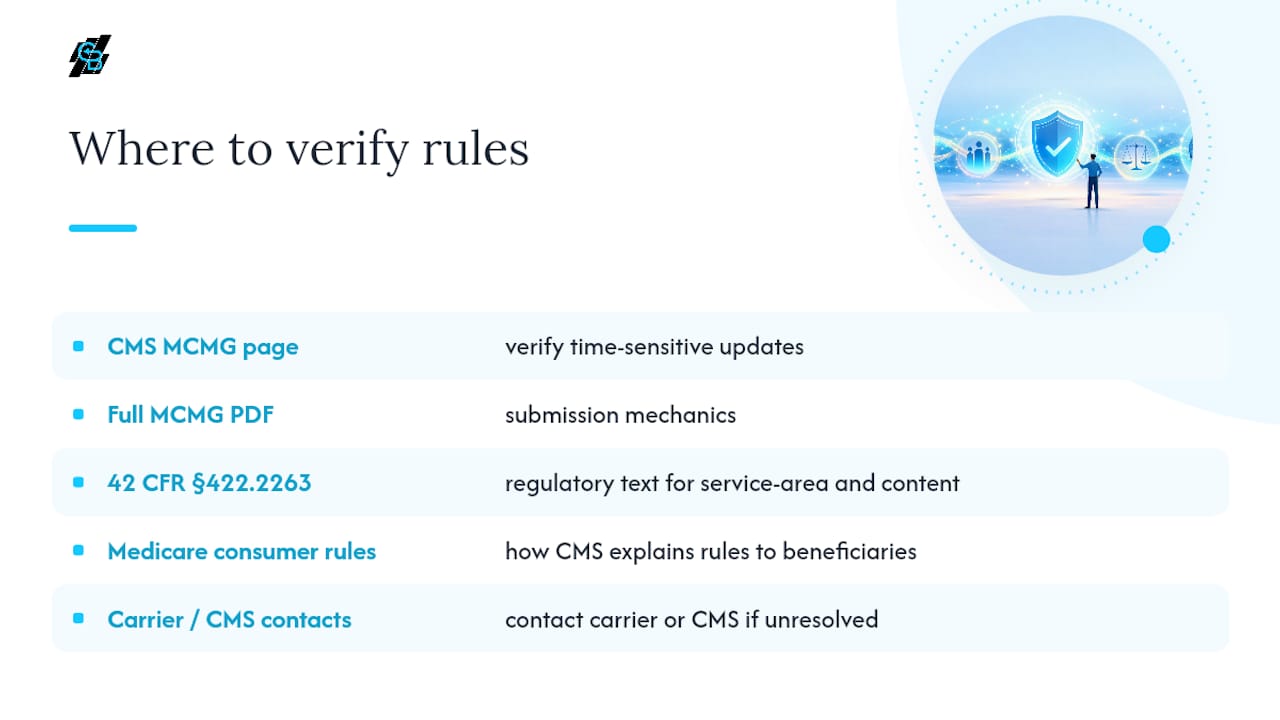
Regulatory language changes, and CMS updates the MCMG periodically, so verify anything time-sensitive directly at the source. Start with the CMS Medicare Marketing Guidelines page and the full MCMG PDF for submission mechanics. Cross-reference 42 CFR § 422.2263 for the regulatory text behind service-area and content rules, and check Medicare’s consumer-facing marketing rules to see how CMS explains these same rules to the beneficiaries you’re marketing to. For anything unresolved, contact your carrier’s Account Manager or CMS directly through the Managed Care Marketing contact resources before you launch.
Sources
- Medicare Marketing Guidelines | CMS
- Marketing rules for health plans | Medicare
- 42 CFR § 422.2263 - General marketing requirements | LII / Cornell