

Webinars are one of the fastest ways for insurance agents to generate qualified, consultable leads. They produce booked appointments, warmer prospects than cold outreach, and evergreen content you can reuse for months. The sections below cover topic selection, promotion, delivery structure, follow-up automation, measurement, and compliance.
TL;DR:
- Webinars should focus on educating prospects about insurance categories before pitching specific products, preventing early product pushback.
- Promoting webinars effectively requires multi-channel outreach, including email, paid social ads, partnerships, and SMS reminders, with a longer planning window.
- Keeping session structure simple and educational, with polls every 10 to 15 minutes, improves engagement and maximizes conversions to consultations.
- Follow-up within 48 hours is crucial, including sharing recordings, using segmented nurturing sequences, and integrating calendar booking links for direct scheduling.
- Using an all-in-one, compliant webinar platform that supports qualification data, automated reminders, and secure recordings is essential for tracking and improving ROI.
Table of Contents
- Why Webinar Marketing for Insurance Works
- Choosing Topics and Segmenting Your Audience
- Promoting Your Webinar and Filling the Registration List
- The Webinar Structure That Actually Converts
- Turning Attendees Into Booked Consultations
- What Your Webinar Platform Needs to Do
- Measuring Whether Your Webinars Are Working
- Compliance Guardrails You Cannot Skip
- A Practitioner’s Take on What Actually Moves the Needle
- How CallBack CRM Handles the Webinar Grind for You
- A Few More Resources Worth Bookmarking
- Sources
Why Webinar Marketing for Insurance Works
Complex products create a trust gap. A prospect who does not understand the difference between term and whole life, or how Medicare Advantage differs from a supplement plan, is not ready to talk to a salesperson. A webinar closes that gap by teaching first, which is why LiveWebinar’s analysis of the insurance sector points to education as the mechanism that makes prospects receptive to a follow-up call.
Attendees also self-select. Nobody registers for a 45-minute session on long-term care planning by accident, so the people who show up are already closer to a buying decision than a cold-list contact ever is.
Webinars scale in a way outreach cannot: one live session becomes on-demand content that keeps generating registrations for months.
Three failure points show up again and again:
- Pitching a specific product before the audience understands the category
- Ignoring chat and polls, which turns a webinar into a monologue
- Skipping a tech rehearsal and losing the first ten minutes to audio problems
Pro Tip: Run your first webinar as a “pilot” with a small internal list. You will catch slide errors and pacing problems before a hundred strangers do it for you.
Choosing Topics and Segmenting Your Audience
Topic selection should track the line of business and where the buyer sits in their decision. A life insurance session for new parents is an awareness-stage topic. A Medicare Advantage comparison webinar in October is a decision-stage topic, because the audience already knows they need to choose something.
Useful topic angles by line:
- Life insurance: “Term vs. Whole Life: What Changes After You Have Kids”
- Medicare: “5 Medicare Mistakes That Cost Retirees Thousands”
- Small business: “Group Health Plans: What Changed for Small Employers”
- Long-term care: “Paying for Long-Term Care Without Draining Savings”
- Annuities: “Turning Savings Into Guaranteed Retirement Income”
Registration forms should do double duty as a qualification tool. Ask about timeline to purchase, current coverage status, and household size. WebinarKit’s insurance-focused guidance treats these registration questions as a pre-qualification tool, which means your sales team walks into every follow-up call already knowing who is worth prioritizing.
Promoting Your Webinar and Filling the Registration List
Registrations rarely happen by accident. They come from a deliberate sequence across channels you already control and a few you rent.
- Email your existing CRM list first with a three-touch invite sequence: announce, remind, last call.
- Run paid social ads with copy that leads on education, not selling. “Free class: How Medicare Actually Works” outperforms “Get a Quote.”
- Partner with a CPA, mortgage broker, or HR consultant to co-host and reach their list too.
- Layer in a text message nudge at the 24 hour and 1 hour marks. SMS reminders consistently outperform email-only reminders for last-minute attendance.
- Send reminders at 72 hours, 24 hours, and 1 hour before the live session, tightening the message each time.
TechSoup’s ten-step webinar checklist treats promotion as a full week of planning, not a single announcement email, and that longer runway is what separates a 40-person session from a 400-person one.
The Webinar Structure That Actually Converts
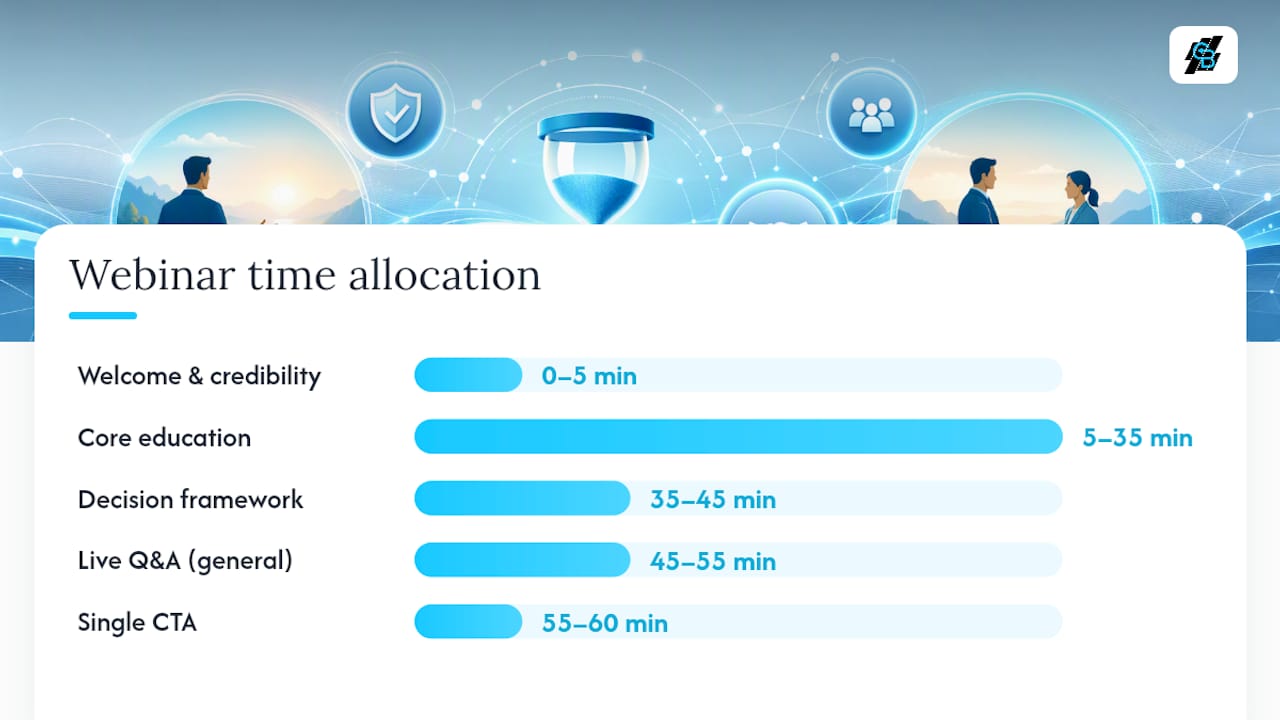
Structure matters more than production value. WebinarKit’s recommended insurance webinar structure runs intro, education, decision framework, Q&A, then a single clear call to action, and that sequence maps cleanly onto a 45 to 60 minute session:
- 0 to 5 minutes: Welcome, credibility, and what attendees will walk away knowing
- 5 to 35 minutes: Core education, one idea per slide, no product pitches yet
- 35 to 45 minutes: A decision framework, i.e. “here’s how to know which option fits your situation”
- 45 to 55 minutes: Live Q&A
- 55 to 60 minutes: One clear next step
LiveWebinar’s guidance on educational content backs the ratio directly. Its webinar marketing analysis recommends keeping 80 to 90 percent of a session focused on teaching, with the remainder reserved for a next step. Case examples work better than statistics here. A story about a family who chose the wrong beneficiary designation lands harder than a slide of industry data.
Keep engagement active with polls every 10 to 15 minutes and a standing chat prompt. Frame Q&A generally (“many people ask about X”) rather than answering a specific attendee’s personal coverage question live, which keeps you educational rather than advisory on air.
Turning Attendees Into Booked Consultations
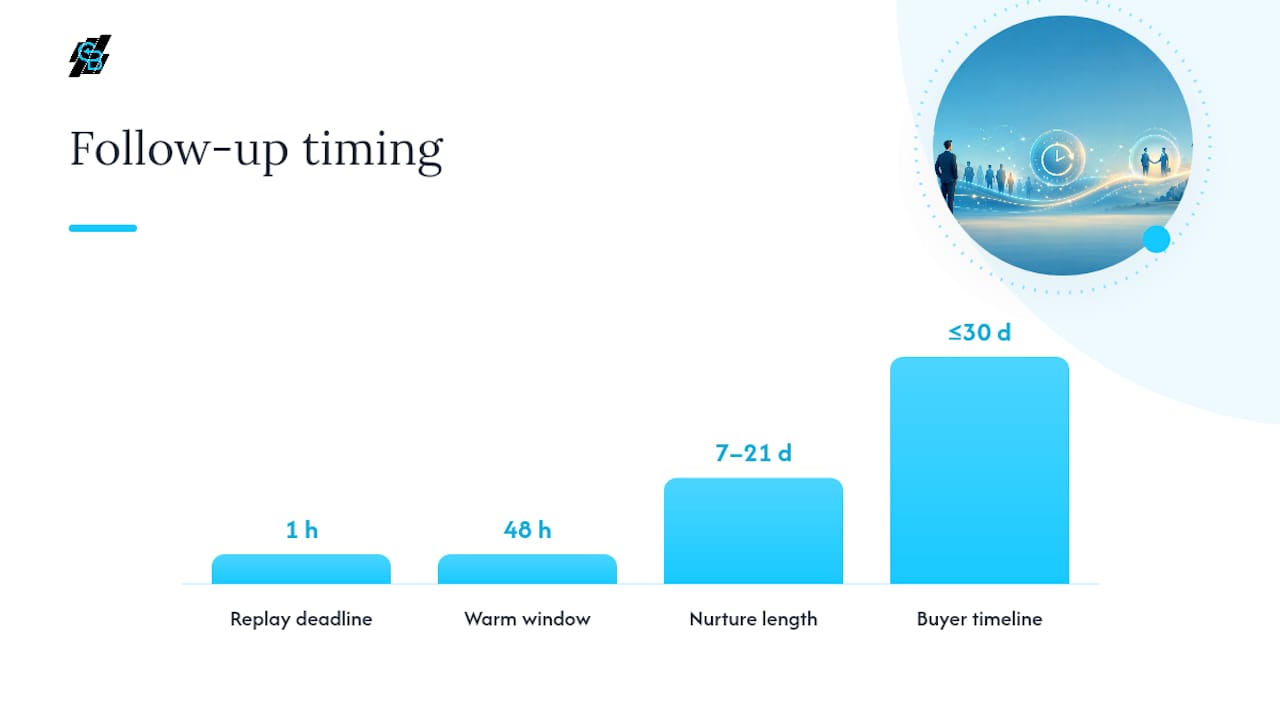
The follow-up sequence is where most agents leave money on the table. Attendees are warm for roughly 48 hours after the live session, and that window shrinks fast if you wait.
- Send the replay and a related resource within one hour of the session ending, to everyone including no-shows.
- Split your list by registration answers and engagement signals (attended the full session vs. left early vs. never joined).
- Put a calendar link directly in every follow-up email so prospects can self-book a consultation without a phone tag.
- Run a 7 to 21 day nurture sequence, escalating from educational content toward a direct consultation offer.
- Hand any lead that books a call, or clicks through twice without booking, to a sales-ready queue.
Pro Tip: Segment your nurture flow by the “timeline to buy” field from registration. A prospect who said “within 30 days” should get a different sequence than one who said “just researching.”
A tool like CallBack CRM’s lead generation workflows can handle this segmentation automatically instead of requiring a spreadsheet.
What Your Webinar Platform Needs to Do
Not every webinar tool is built for a regulated industry. Before you commit to one, confirm it covers these categories:
- Registration forms with custom qualification fields, not just name and email
- Built-in calendar booking so attendees can schedule a consult without leaving the confirmation page
- Recording with secure, exportable storage for compliance review
- Attendance and engagement analytics broken out by registrant
- Native email and SMS automation for reminders and follow-up
- CRM and ad pixel integrations so webinar data flows into your existing pipeline
LiveWebinar’s guidance is direct on this point: secure data handling and analytics are treated as requirements, not nice-to-haves, for a regulated industry like insurance. An all-in-one marketing platform tends to beat a standalone webinar tool once you factor in the cost of stitching four separate systems together.
Measuring Whether Your Webinars Are Working
Five numbers tell you almost everything: registration rate, attendance rate, engagement rate (polls answered, questions asked), consultation booking rate, and policy conversion where you can trace it that far. Prose Media’s insurance marketing playbook treats webinar KPIs as part of the broader CRM funnel rather than a standalone metric, which is the right way to think about it. If your webinar tool cannot pass attendance and engagement data into your CRM, you are measuring interest without measuring revenue.
Run small experiments monthly:
- A/B test two topic titles for the same content
- Split promotion budget between email and paid social to see which channel books more consultations
- Test two CTA phrasings on the closing slide
Compliance Guardrails You Cannot Skip
Educational content stays educational. Avoid recommending a specific product or carrier during the teaching portion of the session; save that for a one-on-one consultation.
- Include required disclosures on screen and verbally, not buried in a footer slide
- Get compliance pre-approval on your slide deck when your agency or carrier requires it
- Archive every recording with a clear retention schedule, since secure storage and documentation is what protects you in an audit
- Phrase your CTA as an invitation to a consultation, not a sales close (“Let’s review your options” beats “Buy this plan”)
A Practitioner’s Take on What Actually Moves the Needle
Most agents overthink production value and underthink the registration form. The webinars that book the most consultations are not the ones with the best slides. They are the ones where three or four smart qualification questions let the sales team walk into every follow-up call already knowing what the prospect needs.
The other pattern worth watching: agents who treat the replay as an afterthought leave the biggest lever on the table. A recording, cut into three short clips and reused in email and social, often books more consultations over the following month than the live session did. Platforms built specifically for insurance workflows, like CallBack CRM, make that repurposing automatic instead of a manual export-and-edit chore.
— Kyle
How CallBack CRM Handles the Webinar Grind for You
Running a webinar well means juggling registration forms, reminder sequences, calendar bookings, and follow-up emails, usually across four different tools. CallBack CRM puts all of it in one place built specifically for insurance agents, so nothing falls through a gap between systems.

Registration pages support the qualification fields covered above, calendar booking is built in so attendees schedule a consult without a second email, and recordings store securely for compliance review. Reminder sequences run automatically through SMS automation, which lifts attendance without you manually texting anyone at midnight. Once the session ends, replies route into segmented nurture flows so a “ready in 30 days” lead and a “just researching” lead never get the same email. If your current setup means logging into three platforms to run one webinar, book a walkthrough of CallBack CRM’s webinar tools and see what a single dashboard does to your time-to-appointment.
A Few More Resources Worth Bookmarking
For deeper procedural detail, TechSoup’s ten-step planning checklist and WebinarKit’s insurance-specific structure guide are worth a bookmark.
Sources
- 10 steps for planning a successful webinar — TechSoup
- Using webinars to educate and convert prospects in the insurance industry — LiveWebinar
- WebinarKit for Insurance Agents: Generate Qualified Leads — WebinarKit