

Proposal follow-up automation sends timed, behavior-triggered messages after a proposal goes out and stops the moment a prospect replies or signs. It runs on two mechanics: a schedule with initial touches spaced over several days and a set of behavior branches (opened, reopened, ignored). The result for sales teams is fewer manual check-ins and a measurable lift in reply and sign rates, because prospects hear from you on a consistent cadence instead of whenever a rep remembers to follow up.
TL;DR:
- Trigger accuracy is critical; unreliable proposal status updates can cause sequences to misfire or stall, reducing follow-up effectiveness.
- Behavior-based branching, such as multiple opens or no reply within 48 hours, helps tailor follow-ups and escalate prospects faster if needed.
- Shorter, event-driven delays—such as 6 to 12 hours after an open—outperform fixed schedules for maintaining engagement and relevance.
- Integrating proposal tools, CRM deal data, and real-time alerts ensures sequences are timely, context-aware, and avoid messaging prospects who already responded.
- Personalization that references specific prospect actions, like sections viewed or time spent, significantly improves reply rates over generic messaging.
Table of Contents
- How Proposal Follow-Up Automation Actually Works
- What Components Does a Follow-Up System Need?
- What Sequence Templates Work Best?
- How Do You Wire Up the Integrations?
- How Do You Keep Automated Follow-Ups From Sounding Robotic?
- What Should You Measure and Test?
- A Working Implementation From CallBack CRM’s Playbook
- When Should You Automate and When Should You Call?
- See This Workflow Running in CallBack CRM
- Sources
How Proposal Follow-Up Automation Actually Works
The mechanics come down to five moving parts: trigger, branch, message, stop, update. Once you see the loop, building or troubleshooting a sequence gets a lot less mysterious.
Trigger. The sequence starts when a defined event fires, most commonly a proposal marked “sent” in your CRM or proposal tool. That event carries a payload: proposal ID, contact record, deal value, and the assigned rep. Everything downstream depends on that payload being accurate, so a sequence built on incomplete deal data will misfire regardless of how clever the copy is.
Branch. From there, the system watches for the client’s engagement signal. Proposal analytics can flag which sections a prospect viewed and how long they spent there, which lets the workflow route the prospect down a different path depending on what happened:
- No open after 48 hours: send a check-in reminder with a longer delay before the next touch.
- Opened once, no reply: shorten the next delay and shift the message toward a specific value point.
- Reopened multiple times: flag the rep immediately. Repeated opens usually signal internal discussion, and a live human often closes faster than another automated touch.
- Replied or signed: kill the sequence instantly. No exceptions.
Message. Each branch has its own draft, either pre-written or generated from a template that pulls in deal specifics. Stop. Exit conditions get checked before every single send, not just at sequence start. Update. The CRM record gets a timestamp and outcome log so the next rep who touches the deal knows exactly what’s already been said.
The full send-and-follow-up loop typically runs a check-in, a value reminder, and a final nudge, each tied to a specific trigger rather than a blind calendar date. That distinction, event-driven versus date-driven, is what separates a sequence that feels considerate from one that feels like spam. Our guide to automating follow-ups breaks down the trigger logic in more detail if you’re mapping this onto an existing CRM.
What Components Does a Follow-Up System Need?
Before you build anything, inventory what you already have against what the sequence actually requires. Most teams discover gaps here, not in the messaging.
Event sources. You need at least one reliable trigger feed: proposal tool webhooks (sent, opened, viewed, signed), CRM deal-stage change events, and email open tracking. Redundancy matters, because a single webhook failure shouldn’t leave a deal silently stalled for two weeks.
Deal data storage. Every automated touch needs context to pull from: who the decision makers are, what the proposal actually proposed, the deal’s dollar value, and the timestamp of the last human touch. Without that context, your “personalized” follow-up is just a mail merge with a first name swapped in.
Automation primitives. These are the building blocks that make timing and safety possible:
- Timers and delays that can be shortened or lengthened based on behavior, not fixed on a calendar.
- Conditional checks that verify deal stage, reply status, and opt-out flags before every send.
- Draft mode versus auto-send mode, so higher-value deals route to a human for a quick edit instead of firing blind.
- Rate limits that prevent a reopened proposal from triggering three overlapping messages in one day.
A workflow that classifies stalled deals into categories like decision delay, budget review, or champion ghosting, then assigns urgency tiers turns a flat list of “proposals sent” into a prioritized worklist. That classification step is what most homegrown sequences skip, and it’s exactly why they eventually get ignored as spam instead of treated as useful nudges.
Pro Tip: Before you build a single automation, write out the sequence as a table: touch number, trigger condition, delay, message type, exit condition. If you can’t fill in every column on paper, you’re not ready to automate it yet.
What Sequence Templates Work Best?
You don’t need to invent a cadence from scratch. Two structures cover most B2B and agency scenarios, and both can be adapted to your sales cycle length.
Standard B2B sequence typically involving multiple touches spread over a few weeks:
- Day 2: Check-in touch. Confirm the proposal arrived and offer to answer questions. If unopened, this is a soft reminder; if opened, reference the specific section they viewed.
- Day 5 to 6: Value reminder. Reinforce one concrete outcome from the proposal, not a generic recap. Branch to a shorter delay if they’ve opened it more than once since the last touch.
- Day 10 to 12: Direct ask. Request a specific next step, a call, a signature, a yes/no. This is where vague “just checking in” language needs to disappear entirely.
- Day 15 to 18: Breakup message. State plainly that you’ll close the file unless you hear back, and give a real deadline. This touch alone often produces the highest reply rate in the whole sequence, because it removes ambiguity about what happens next.
High-velocity sequence usually with fewer touches compressed into about a week for urgent sales. It compresses the same arc for shorter sales cycles, insurance renewals, or lower-ticket proposals where urgency matters more than patience. Day 1 check-in, day 3 to 4 value point, day 6 to 7 direct ask or breakup combined into one message.
The behavior branch matters more than the calendar date. Shortening the delay to 6 to 12 hours after an open, rather than sticking to a fixed schedule, consistently outperforms rigid timing. Message angle should progress in a specific order across touches: help first, then value, then a direct ask, then the breakup. Restrict sends to business days and reasonable hours; a 6 a.m. Saturday text does more damage to trust than a missed touch ever would. And the instant a prospect responds with contract questions or requests a call, that deal should exit the automated sequence entirely and move into a negotiation workflow with a human driving it.

How Do You Wire Up the Integrations?
The sequence templates only work if the plumbing behind them is solid. Three integration points matter more than the rest combined.
- Trigger source. Most proposal tools expose webhooks for sent, viewed, and signed events; connecting these through Zapier or a direct API integration is the standard pattern rather than polling a database on a timer.
- Pre-send CRM lookup. Before any message fires, the workflow should query current deal stage. Checking stage before every send prevents a proposal follow-up from landing in an inbox after the deal has already moved into contract review or negotiation. This single check eliminates the most common complaint about automated sequences: prospects getting a “just checking in” text the same day they signed.
- Notification hooks. Route reopen events and reply detection to Slack or SMS so reps get pulled in at the right moment instead of discovering engagement three days later in a report.
Where you place these hooks matters. A Slack alert on a triple reopen should go to the assigned rep directly, not a shared channel that gets ignored. An SMS alert on a signed contract should go to whoever handles onboarding, not sales. Our sales automation workflow guide for insurance agents walks through pipeline-connected automation in more depth, including where CRM stage checks typically break down in practice. For a broader implementation checklist that applies outside insurance, the marketing automation checklist for SMBs covers the same wiring principles from a different angle.
How Do You Keep Automated Follow-Ups From Sounding Robotic?
Personalization in an automated sequence isn’t about inserting a first name. It’s about referencing something the prospect actually did.
- Mention the specific section they viewed, how many times they reopened the document, or how long they spent on the pricing page.
- Keep each message short. Three sentences that reference something real beat ten polished sentences that reference nothing.
- Vary the angle across touches deliberately: offer help on touch one, deliver value on touch two, make a direct ask on touch three, and state the deadline plainly on the breakup message.
- Reserve auto-send for lower-value, high-volume deals. Route anything above your team’s threshold to draft mode so a rep edits before it goes out.
Proposal analytics that show which section a prospect read and for how long produce far more relevant follow-ups than a generic “checking in” message, and that data should shape the draft, not just the timing. AI drafting tools speed this up considerably, generating a first pass that references the right section and deal value automatically, but they still need a human check on tone for anything with real dollars attached. Our post on personalized marketing strategies covers how AI-assisted drafting keeps that balance without losing the specificity that makes a follow-up land.
Pro Tip: If an AI-drafted message could be sent to any prospect on your list without editing a single detail, it’s not personalized. It’s a template wearing a disguise.
What Should You Measure and Test?
Five numbers tell you whether a sequence is actually working: open rate, reply rate, sign/close rate, time-to-reply, and overall sequence engagement (how many touches it typically takes before a prospect responds).
Run these tests before assuming your sequence is finished:
- Timing windows. Test a 6 to 12 hour post-open delay against a fixed 24 hour delay and compare reply rates directly.
- Message angle. Swap the order of value-first versus ask-first on touch two and see which produces faster replies.
- Touch count. Test three touches against five on the same deal segment; more isn’t automatically better past a certain point.
- Exit thresholds. Assigning urgency tiers, critical at seven-plus days stalled, warning at four to six, monitor at three, gives you a concrete rule for when a deal needs human escalation instead of another automated nudge.
Tie every automation event back to pipeline value, not just email metrics. A sequence with a mediocre open rate that closes 20% of stalled six-figure deals matters more than one with a great open rate on small deals that never sign. Following up automatically has been shown to save reps administrative time while keeping outreach consistent, and that saved time is worth quantifying alongside the close-rate gains when you report ROI to leadership.
A Working Implementation From CallBack CRM’s Playbook
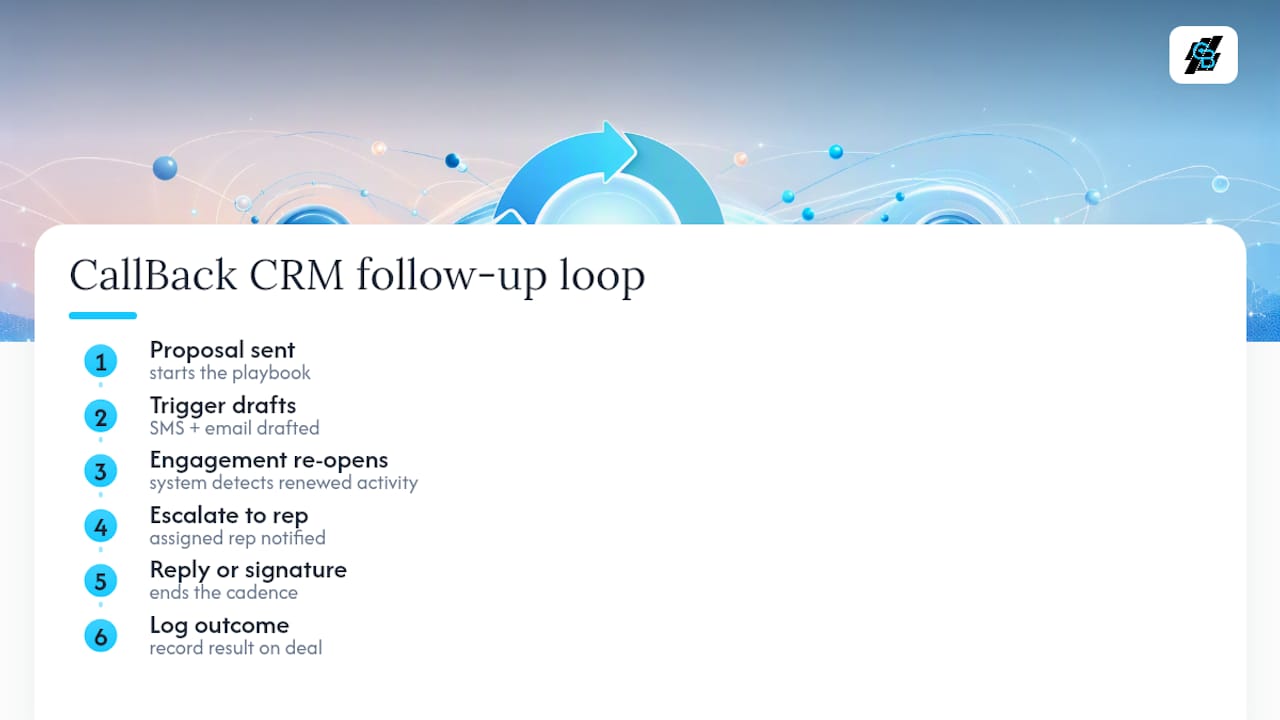
CallBack CRM’s own follow-up playbooks, developed by Kyle, follow the same loop described above: proposal sent triggers an SMS and email draft, engagement re-opens escalate to the assigned rep, and any reply or signature kills the sequence and logs the outcome to the deal record automatically. That log matters as much as the messages themselves, since the next person who touches the deal needs the full history, not a guess. The insurance agency outreach playbook documents this exact flow applied to renewal and policy-follow-up scenarios.
When Should You Automate and When Should You Call?
Automation earns its place on high-volume, repeatable work: renewals, standard proposals, low-risk touches where consistency beats creativity. It falls short on complex contracts, six-figure deals, or any moment where a prospect signals hesitation through tone rather than a clean open or ignore. The rule of thumb holds up well in practice: automate the routine touches, and the second a deal shows real friction or real money, put a person on the phone.
— Kyle
See This Workflow Running in CallBack CRM
CallBack CRM replaces a stack of disconnected tools with one system that already runs the loop described above: proposal triggers, SMS and email automation, deal memory, and CRM stage checks built in rather than bolted on. A typical setup looks like this: proposal marked sent triggers a same-day SMS, a day 5 email references the exact section the prospect viewed, and the sequence stops automatically the moment a reply or signature comes in, with the outcome logged to the deal record without anyone touching a spreadsheet.

For agencies and insurance agents managing dozens of open proposals at once, that stage check alone prevents the awkward follow-up sent after a deal already closed. If you’re ready to see the SMS side of this in action, the SMS automation features page walks through how texts fit into the same sequence as email, with delivery and reply tracking built into one dashboard. Start a trial and connect it to your current proposal tool to see the first sequence fire on your next send.
Sources
- Proposal Send and Follow-Up Loop — Taskade
- Automate Proposal Follow-Ups Without Sounding Robotic — LowCode Agency
- Proposal Follow-Up Automator — ForgeWorkflows
- Follow Up Automation That Wins Clients — FreshProposals