

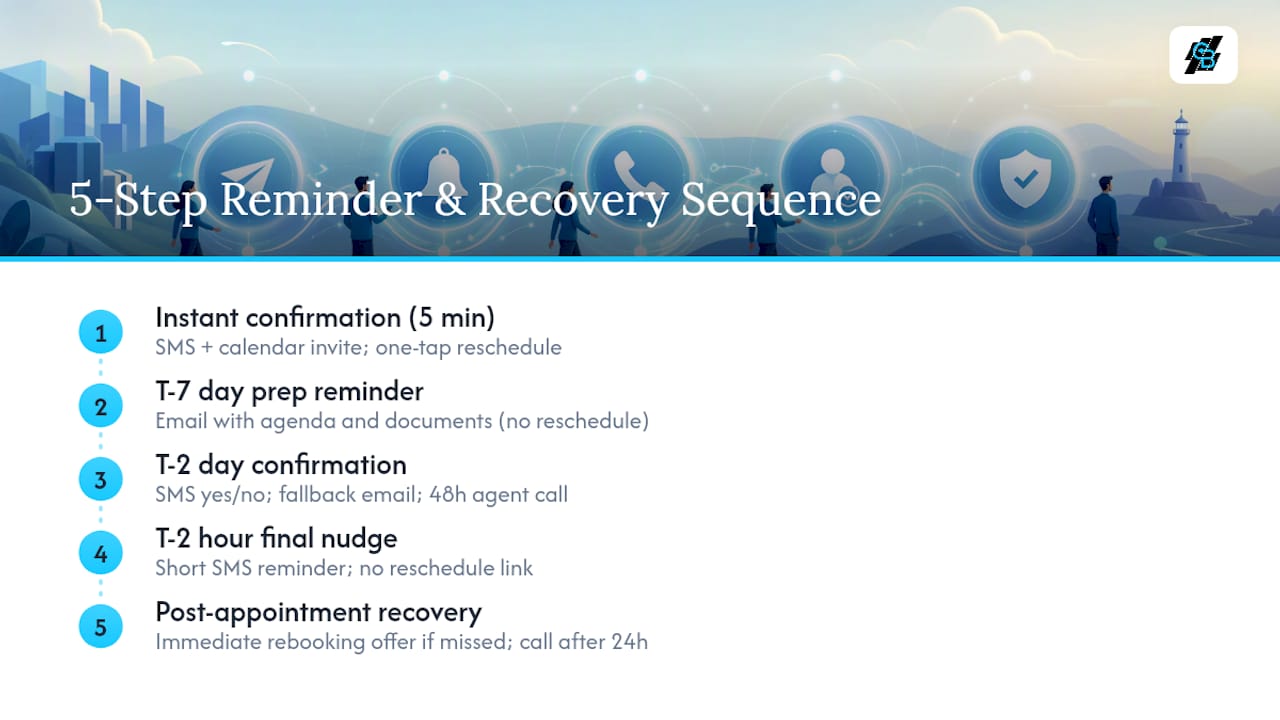
Cutting missed appointments starts with a timed, multi-channel automated cadence: instant confirmation, a T-7 day prep message, a T-2 day confirmation with reschedule option, a T-2 hour SMS nudge, and a post-appointment recovery step. Route anything unconfirmed at the 48-hour mark to the agent for a personal call. Agencies running this sequence report no-show rates much lower, down from rates two to three times higher on manual workflows. A platform like CallBack CRM can run the entire sequence without manual tracking.
TL;DR:
- Booking appointments within 24 to 48 hours significantly improves attendance, as longer lead times correlate with higher no-show rates.
- A five-step automated sequence, especially focusing on T-2 day confirmation and T-2 hour reminders, reduces no-shows more effectively than single reminders.
- Manual calls at the 48-hour mark are the highest-leverage intervention to recover unconfirmed or missed appointments.
- Integration of scheduling, CRM, and messaging systems ensures that notification triggers, status updates, and suppression logic operate seamlessly.
- Testing the core T-2 hour SMS reminder with reschedule link is the fastest, most cost-effective way to improve appointment attendance.
Table of Contents
- Why Do Insurance Appointments Get Missed?
- How Do You Build the 5-Step Reminder and Recovery Sequence?
- Setting Up the Cadence: Fields, Triggers, and Integrations
- What Metrics Show Whether the Cadence Is Working?
- What CallBack CRM’s Own Data Shows About This Approach
- Why Most No-Show Advice Gets the Priority Order Wrong
- Getting the Cadence Running Without Building It Yourself
- Sources
- FAQ
Why Do Insurance Appointments Get Missed?
Distance kills intent. Appointments booked a week or more out show measurably worse attendance than those scheduled within a tighter window, which is why research on scheduling behavior recommends booking within a short window (about 24 to 48 hours) whenever the calendar allows it. A prospect who agrees to a meeting on Monday for the following Thursday has eight days to forget why they said yes.
Single-touch reminders compound the problem. An agency that sends one email three days out and calls it done is relying on a channel with weak same-day visibility. Email open rates for day-of reminders lag far behind SMS, and a missed email produces silence, not a reschedule.
Missed appointments rarely trace to one cause. They stack: long lead times, one reminder instead of a sequence, no reschedule link, and no suppression logic to stop messages after a cancellation. Add a missing escalation path for unconfirmed bookings, and a no-show becomes close to inevitable rather than a rare exception.
How Do You Build the 5-Step Reminder and Recovery Sequence?
The sequence below reflects the structure behind documented agency rollouts that pushed no-show rates down to roughly single digits, compared to much higher rates with no reminders at all.
1. Instant booking confirmation (within 5 minutes). Fire an SMS plus a calendar invite the moment the appointment gets booked, with a one-tap reschedule link built in. A sample text: “You’re confirmed with [Agent Name] on Thursday at 2:00 PM. Need to change it? Tap here: [link].” This message does double duty. It reassures the client and it captures a mobile number you can use for every message that follows.
2. T-7 day prep reminder (email). Seven days out, send an email with the agenda and any documents the client should have ready, such as a Medicare card or current policy declarations. Skip the reschedule link here. This message exists to prepare, not to give an easy exit this far from the meeting.
3. T-2 day confirmation with reschedule option. Two days before, send SMS first with a direct yes/no confirmation question: “Still good for Thursday at 2:00 PM? Reply YES or tap to reschedule: [link].” Fall back to email if the text goes unanswered within a few hours. Anyone still unconfirmed at the 48-hour mark should generate an automatic task for the agent to call personally. Practitioner data shows that manual call at the 48-hour point is the single highest-leverage moment in the whole cadence. A human voice recovers appointments that a text never will.
4. T-2 hour final nudge. Keep this one short and warm, with no reschedule link: “See you in 2 hours, [Client Name]! Reply if anything changes.” The goal is a reminder, not another decision point.
5. Post-appointment follow-up and recovery. If the appointment happened, log the outcome and trigger next-step follow-up. If it did not, send an immediate rebooking offer within minutes rather than waiting until the next business day. Speed here matters more than almost anything else in the sequence, since a prompt rebooking invite recovers far more meetings than a delayed one. Escalate to a human call if the client doesn’t respond within 24 hours.
Pro Tip: If you can only build one piece of this cadence today, build the T-2 hour SMS nudge with a reschedule link. It’s the fastest to deploy and, according to industry benchmarking, the highest-yield single fix available to an agency starting from scratch.
Every SMS touch needs a working opt-out. Include “Reply STOP to unsubscribe” on the first text in any sequence, and make sure your platform honors it instantly. An agency that ignores this isn’t just risking compliance complaints. It’s risking the phone number itself getting flagged by carriers.
Setting Up the Cadence: Fields, Triggers, and Integrations
The cadence above only works if your scheduler, CRM, and messaging system actually talk to each other. That means mapping the right fields and wiring the right trigger events before the first reminder ever fires.
Store these fields on every appointment record:
- Appointment ID and appointment type (sales, service, policy review)
- Date, time, and time zone
- Client mobile number and preferred contact method
- Assigned agent name
- Status field with values like confirmed, unconfirmed, cancelled, and completed
Trigger events do the actual work. A booking.created event (sometimes called invitee.created depending on your scheduler) should fire the instant confirmation. A change in the confirmation status field should trigger or cancel downstream messages automatically. An appointment.end or no-checkin event should log the outcome and, if the client never showed, kick off the recovery message.
Suppression logic is the piece agencies skip most often, and it’s the one that causes the most embarrassing mistakes: a reminder text landing after a client already canceled. Wire cancellations and reschedules to stop every pending message tied to that appointment ID the instant status changes.
Pro Tip: Don’t try to launch all five steps on day one. Start with booking confirmation, a 24-hour SMS, a 1-hour nudge, and missed-appointment recovery. Add the T-7 prep email once the core four are running clean.
For agencies without an existing scheduler-to-CRM connection, platform features that bundle SMS, calendar sync, and automation into one system remove a lot of the integration risk that comes with duct-taping three separate tools together.
What Metrics Show Whether the Cadence Is Working?
Track five numbers every month: total appointments booked, no-show rate, rebook rate for missed appointments, cancellation rate, and outcomes broken out by producer. Producer-level data matters because a agency-wide average can hide one person whose personal booking habits are dragging the whole number down.
These ranges align with what agencies see after connecting booking tools to their CRM and running the full sequence rather than a partial version of it.
If your numbers stall above these ranges, work the problem in order: shorten lead times first, since anything booked more than 48 hours out needs a stronger confirmation push. Then add an SMS touch if you’re still email-heavy. Test your message copy next, since a confusing or overly formal reminder gets ignored. Finally, verify suppression logic is actually stopping messages after cancellations. Run a 60 to 90 day pilot comparing one producer or appointment type before and after the change, so you have clean before/after numbers instead of a gut feeling.
What CallBack CRM’s Own Data Shows About This Approach
Kyle has spent years studying how insurance agencies structure sales operations, with a focus on where automation actually changes outcomes versus where it’s just noise. CallBack CRM was built specifically for that gap: an all-in-one marketing and sales automation platform for insurance agents, agencies, and IMOs, with AI tools aimed at customer engagement, lead generation, and sales follow-through.
The internal numbers back the framework above. Agents running AI appointment setting for final expense sales through CallBack CRM see close rates between 25% and 40% on those appointments. Separately, CallBack CRM’s own reporting on AI follow-up in insurance sales shows the same automated lead scoring and outreach logic that powers the reminder cadence also improves the quality of who shows up in the first place.
Why Most No-Show Advice Gets the Priority Order Wrong
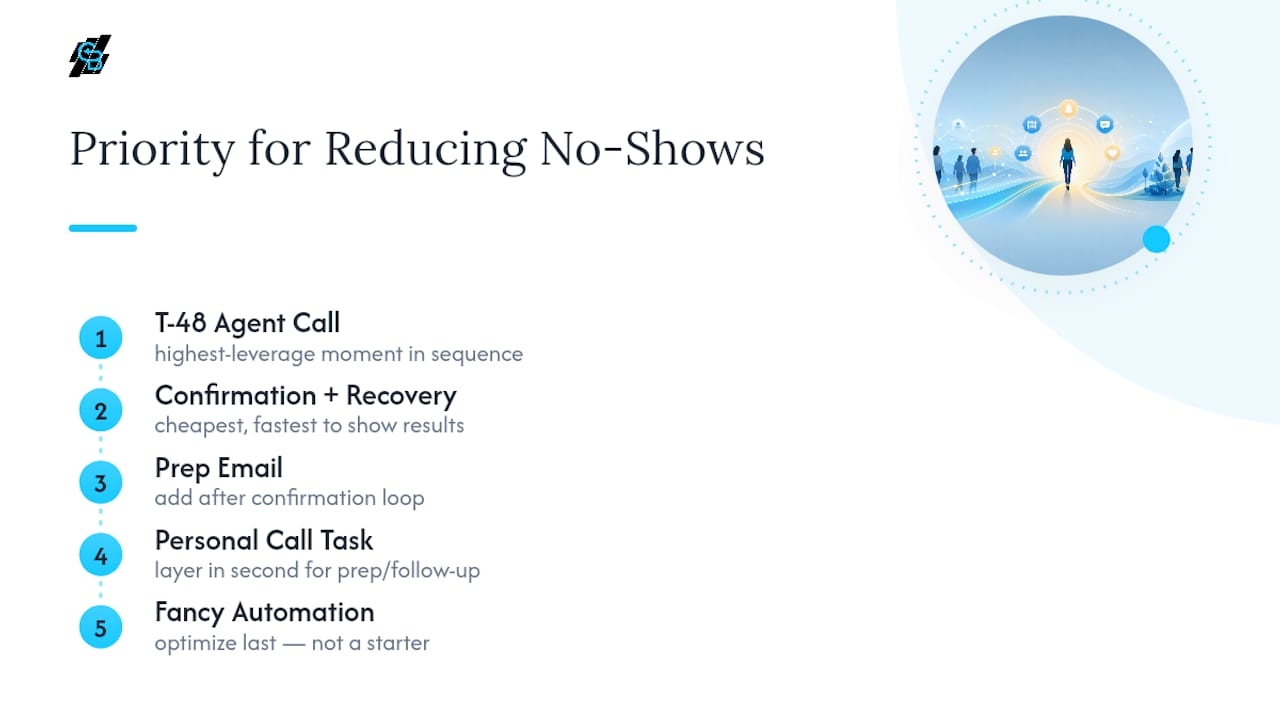
Most articles on this topic treat every step of the cadence as equally important. It isn’t. The T-48 hour agent call is the highest-leverage moment in the entire sequence, and agencies that skip straight to fancier automation while ignoring that one manual touch are optimizing the wrong end of the funnel.
The conventional advice also overstates how much a single reminder fixes. A lone text the morning of an appointment feels like progress, but it’s treating a symptom. The real fix is upstream: shorter lead times between booking and meeting, and a status field that actually suppresses messages when plans change. Skip that plumbing and even a well-written SMS sequence will misfire on canceled or rescheduled appointments.
If you’re deciding where to start, don’t start with the flashiest piece. Start with the confirmation-plus-recovery loop, since it’s the cheapest to build and the fastest to show results. Layer in the prep email and the personal call task second. Agencies that try to launch a perfect five-step system on day one usually stall before they launch anything at all.
— Kyle
Getting the Cadence Running Without Building It Yourself
Everything in this playbook, the instant confirmation, the T-7 prep message, the T-2 day confirmation with reschedule, the T-2 hour nudge, and the missed-appointment recovery step, runs natively inside CallBack CRM’s automation workflows. That means no separate scheduler-to-CRM integration project and no engineer to wire the trigger events described above. The platform handles SMS and email sequencing, calendar sync, AI follow-up, and outcome logging in one place, so your no-show and rebook rates are visible without exporting spreadsheets.

If you want to test the approach before rolling it out agency-wide, start with one producer or one appointment type for 60 days and compare no-show and rebook rates before and after. CallBack CRM’s Professional plan runs $97 a month and covers the automation workflows, SMS, and calendar features needed for a single-producer pilot. Agencies planning a multi-user rollout can review the Enterprise plans starting at $297 a month for 10 full CRM accounts. Check the fee breakdown for SMS and email usage costs before you scale past the pilot.
Sources
The benchmarks and cadence structure in this article draw on PMC’s research on appointment no-show factors, US Tech Automations’ 5-step reminder workflow data, and its insurance no-show benchmarking report. For related reading on keeping prospects engaged between booking and appointment, see this lead nurturing overview.
- Factors associated with appointment no-shows in clinical settings (PMC article)
- Streamline 5-Step Appointment Reminders 2026
FAQ
What Is a Realistic No-Show Rate After Automation?
Full results usually show up within 90 days of implementation.
How Far in Advance Should I Book Insurance Appointments?
Book within 24 to 48 hours when possible, since longer lead times measurably reduce attendance. If a longer lead time is unavoidable, treat it as a soft booking and run a stronger confirmation sequence closer to the date.
What’s the Fastest Fix for Reducing No-Shows?
Add a 24-hour SMS reminder plus a 1-hour SMS nudge, both with a one-tap reschedule link. This single change can be deployed in a day and produces measurable gains without touching the rest of your workflow.
Does CallBack CRM Handle SMS and Email Reminders?
Yes. CallBack CRM’s automation workflows support SMS and email sequencing, calendar sync, and AI follow-up needed to run the full cadence described above. Pricing starts at $97 a month for the Professional plan, with SMS and email usage billed separately at the rates listed on the fees page.
What Should I Track to Know If My Cadence Is Working?
Track total appointments booked, no-show rate, rebook rate on missed appointments, and cancellation rate every month, broken out by producer. If numbers stall, shorten lead times first, then add SMS touches, then verify your suppression logic is actually stopping messages after cancellations.