

For most agents, the best approach pairs automated booking with CRM integration, mandatory confirmation calls, and timestamped audit logs. This combination cuts phone tag, raises show rates, and produces the records compliance reviews require. The rest of this guide breaks down the methods, the compliance rules, the CRM connections, and a checklist you can put in place this month.
TL;DR:
- Using automated booking paired with CRM integration and confirmation calls significantly improves show rates and ensures compliance through timestamped audit logs.
- HIPAA compliance requires secure handling of personal and health data, with clear consent, encrypted storage, and detailed audit trails for all scheduling-related information.
- CRM and calendar integrations streamline the booking process by attaching relevant client data, automating reminders, and enabling routing rules based on lead source or agent availability.
- Implementing a 30-day rollout with layered features like intake forms, confirmation steps, and audit logs can produce measurable improvements in appointment management within a month.
- Human confirmation is essential for high-value or in-home appointments despite automation handling routine scheduling tasks efficiently.
Table of Contents
- What Are the Different Insurance Appointment Scheduling Methods?
- How Does HIPAA Affect Insurance Appointment Scheduling?
- How Do CRM and Calendar Integrations Improve Appointment Booking?
- How Do You Choose or Configure a Scheduling Workflow?
- What Does a 30-Day Scheduling Implementation Look Like?
- When Should Automation Give Way to a Human Touch?
- How CallBack CRM Handles Insurance Appointment Scheduling
- Sources
- FAQ
What Are the Different Insurance Appointment Scheduling Methods?
Agents book appointments five main ways, and each fits a different line of business and sales style.
Preset appointments use a trained setter (human or AI) to qualify a prospect and lock a confirmed meeting time on the agent’s calendar. This model works well for final expense and Medicare agents who need pre-qualified prospects rather than raw leads. Confirmation calls placed 24 to 48 hours ahead materially improve show rates for this method.
Live transfers connect an interested caller straight to an agent, skipping the calendar step entirely. Speed is the advantage. The tradeoff is that agents lose control over timing and can get transfers stacked back to back during busy call windows.
Online booking pages let prospects pick a time slot themselves, day or night. These work best embedded on quote pages or ad landing pages, where a warm prospect can self-schedule without waiting for a callback.
AI and voice booking tools answer inbound calls or texts, ask qualifying questions, and place a confirmed slot on the calendar without a human touching the exchange. This method scales well for high call volume but needs a review step before high-value or in-home meetings.
Manual phone scheduling still has a place, particularly for complex commercial lines or long-time clients who prefer a live conversation. It is the slowest method and the hardest to standardize.
Track these markers regardless of method:
- Lead-to-book time (minutes, not hours, for online and AI booking)
- Show rate by method and by producer
- No-show handling protocol and reschedule rate
- Confirmation cadence (initial confirmation plus a day-of reminder)
Field agents doing in-home visits tend to see stronger close rates but need longer lead times for driving and prep. Phone-based Medicare and IUL agents can run tighter booking windows since there’s no travel involved, which makes automated and AI booking a natural fit for that segment.
How Does HIPAA Affect Insurance Appointment Scheduling?
Booking forms and reminders touch personal data, and for many insurance lines that data brushes up against health information. The HIPAA guidance for professionals from HHS sets the baseline: protected health information needs safeguards whether it moves through a phone call, a text reminder, or a public booking form.
Keep detailed health questions off public-facing intake forms. A booking page that asks “What medications are you currently taking?” before a licensed conversation has even started creates unnecessary exposure. Collect that detail after the appointment is confirmed, ideally through a secure, authenticated channel, not an open web form.
At minimum, your scheduling system should log:
- Booking timestamp and the channel used (phone, web, SMS)
- Every confirmation attempt and its outcome
- Full reminder history (SMS and email)
- Intake responses tied to that specific appointment
- Any signed consent forms for contact by text or email
Consent matters as much as encryption. Get explicit opt-in for SMS and email reminders before you send them, and store that consent record alongside the appointment. A scheduling tool that can’t export a clean audit log on request isn’t ready for regulated selling.
Encrypted storage, restricted access to intake data, and the ability to pull a full audit trail in minutes rather than days are the practical safeguards that separate an audit-ready setup from a liability.
How Do CRM and Calendar Integrations Improve Appointment Booking?
An appointment that lands in a calendar with no context wastes the first five minutes of the meeting. Integration solves that by attaching everything the agent needs to the booking itself.
- Two-way calendar sync keeps the agent’s real availability accurate across every booking channel, so no one double-books a slot already taken elsewhere.
- Booking pages embedded on quote pages let a prospect schedule the moment they see a price, while intent is highest.
- Intake fields attached to the booking capture policy number, carrier, line of business, and renewal date up front, so the agent walks in prepared.
- Automatic reminders fire by SMS and email on a set cadence without anyone touching a phone.
- Pre-appointment document collection gathers the paperwork an agent would otherwise chase down mid-meeting.
Routing rules decide who gets which appointment. Round-robin distribution spreads volume evenly across a team. Appetite or line-of-business routing sends Medicare leads to Medicare-certified producers and commercial leads to commercial specialists. Named producer preference respects a client’s request for a specific agent. Out-of-office exclusion keeps bookings off a producer’s calendar while they’re on leave.
Pro Tip: Cutting lead-to-book time from hours to minutes is one of the highest-leverage changes an agency can make, since immediate scheduling captures interest before it cools.
How Do You Choose or Configure a Scheduling Workflow?
Whether you’re evaluating a vendor or configuring your own CRM, run through this checklist before committing.
Must-have features:
- Compliance logging with exportable audit trails
- Required confirmation step before the appointment
- Configurable intake fields matched to your lines of business
- Two-way calendar sync
- A clear reschedule and cancellation flow
- Reporting on show rates by producer and by lead source
- Transparent pricing with no hidden per-booking fees
- A defined no-show policy, including whether leads get replaced or credited
Questions to ask a vendor or your own IT team:
- Where is client data stored, and is it encrypted at rest and in transit?
- Which calendars and CRMs does the system integrate with natively?
- What’s the support response time when scheduling breaks mid-week?
- How often do confirmation reminders fire, and can that cadence be adjusted?
Red flags that should end the conversation: no audit logs, no confirmation workflow, a vague or unwritten no-show policy, and any system that can’t sync with the CRM or calendar you already run.
What Does a 30-Day Scheduling Implementation Look Like?
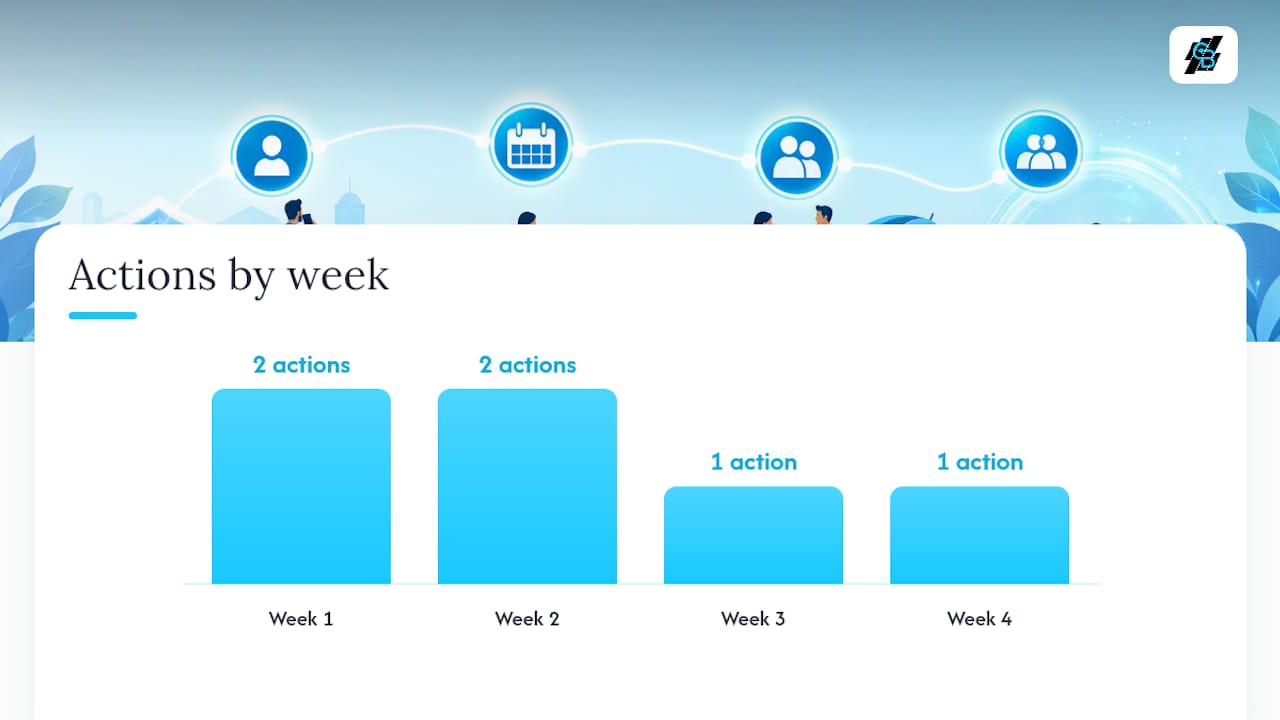
Rolling out a new scheduling workflow doesn’t need a quarter. Most agencies see measurable change inside 30 days if they follow a fixed sequence instead of changing everything at once.
- Week 1: Add the booking link to every quote page and lead-capture form.
- Week 1: Turn on intake fields for policy number, carrier, and renewal date.
- Week 2: Set up mandatory 24 to 48 hour confirmation calls for in-home and high-value appointments.
- Week 2: Configure SMS and email reminders on a fixed cadence.
- Week 3: Enable audit logging and confirm the export function actually works before you need it.
- Week 4: Pull the show-rate report and compare it against your baseline.
Quick wins show up fast. Adding a single confirmation call step, even a manual one, tends to lift show rates within the first week. CallBack CRM’s sales automation checklist and its notes on AI-assisted appointment setting both point to the same pattern: agencies that pair automated booking with a human confirmation step report stronger close rates than those relying on either alone.
Pro Tip: Don’t wait for a perfect rollout. Turn on confirmation calls and reminders in week one, then layer in reporting and routing rules as the data comes in.
When Should Automation Give Way to a Human Touch?
Automation should handle the routine work: booking the slot, sending the reminder, logging the confirmation. But a final expense sale or an in-home Medicare visit carries enough weight that a machine-only handoff is a mistake. The strongest workflow I’ve seen automates the booking and then forces a human to confirm anything high-value or in-home 24 to 48 hours out. Speed wins the appointment. A live voice wins the show rate.
— Kyle
How CallBack CRM Handles Insurance Appointment Scheduling
There’s no shortage of ways to piece together a scheduling stack: a booking widget here, a spreadsheet for intake there, a separate reminder tool bolted on top. CallBack CRM replaces that patchwork with one system built around the checklist covered above: two-way calendar sync, intake fields tied to each booking, automated SMS and email reminders, exportable audit logs, and AI follow-up that shortens the time between a lead raising a hand and a confirmed appointment on the calendar.

Agencies running a single producer can start on the Professional plan. Larger teams that need multiple full CRM accounts and routing across producers can review the Enterprise options. Add-on costs for phone numbers, SMS, and AI usage are listed on the pricing and fees page. Start a trial and add your booking link to one quote page today to see the difference a confirmed, logged appointment makes.
Sources
For scheduling compliance and setup, review the HIPAA guidance for professionals, the CMS appointment-making checklist, and Microsoft 365’s scheduling and booking documentation. For intake preparation, see Healthline’s appointment-prep guide and this marketing automation checklist.
- HIPAA for professionals (HHS)
FAQ
What Is an Insurance Appointment?
An insurance appointment is a scheduled meeting, by phone, video, or in person, between an agent and a prospect or client to discuss coverage, review a policy, or complete an application. It typically includes an intake step where the agent collects policy details before the conversation begins.
Is It Cheaper to Buy Insurance Directly or Through an Agent?
Pricing depends on the carrier and product, not the sales channel. Agents often help clients compare options and understand what to expect at no added cost, since commissions are typically built into the carrier’s rate either way.
What Does It Mean to Schedule an Appointment?
Scheduling an appointment means confirming a specific date and time for a meeting and recording that commitment somewhere both parties can reference. In insurance sales, it also usually means collecting basic intake information up front so the meeting starts prepared rather than cold.
How Long Do Insurance Appointments Take?
Most insurance appointments run 30 to 60 minutes, depending on the line of business and whether it’s a first meeting or a policy review. In-home visits and complex commercial cases tend to run longer than a quick phone-based Medicare or final expense call.
How Does CallBack CRM Support Insurance Appointment Scheduling?
CallBack CRM connects calendar sync, intake fields, automated reminders, and audit logging in one platform built for insurance workflows. Pricing starts at $97 per month on the Professional plan.