

Yes, Facebook ads can generate quality insurance leads, but only under two conditions: you build campaigns within Meta’s Special Ad Category rules, and you automate follow-up so leads get contacted in under a minute. Get either piece wrong and you’ll pay for clicks that never turn into policies. Track cost-per-bind instead of cost-per-lead, and the picture gets a lot clearer.
TL;DR:
- Declaring the Special Ad Category is mandatory and removes precise targeting options such as ZIP code, gender, and detailed age targeting, requiring more focus on creative filtering.
- Including qualifying questions on lead forms can reduce lead volume by 20 to 30 percent but improve lead quality by 40 to 60 percent, especially when targeting complex insurance lines.
- Contact a lead within five minutes of submission to increase the likelihood of qualifying by 21 times, as delays beyond that significantly lower conversion chances.
- Using broad geographic targeting with strong creative and filtering via qualifying questions and landing pages yields better results than narrowly defined audiences, due to Meta’s restrictions.
- Budgeting $25 to $45 per lead is realistic, with a focus on cost-per-bind and proper follow-up speed rather than chasing the lowest CPC or CPL, to ensure campaign profitability.
Table of Contents
- Facebook Ads Insurance Leads: Quick Wins to Implement This Week
- What Is Meta’s Special Ad Category and How Does It Limit Targeting?
- Creative That Filters for Qualified Insurance Prospects
- How Do You Target Insurance Clients Without Detailed Targeting?
- Instant Forms vs. Landing Pages: Which Captures Better Insurance Leads?
- Wiring Facebook Leads to Your CRM: The 60-Second Rule
- Insurance Facebook Ad Budgets: What Should You Actually Spend?
- Campaign Build Checklist: Launching a Compliant Test
- Testing Order for Insurance Facebook Campaigns
- Why Operations Beat Optimization in Insurance Lead Generation
- Get Meta Leads Into Automated Follow-Up Without Building It Yourself
- Sources
- FAQ
Facebook Ads Insurance Leads: Quick Wins to Implement This Week
Most agents lose leads not because Facebook’s targeting is weak, but because their operations can’t keep pace with the leads that arrive. Before touching your budget or creative, fix these four things.
- Declare Special Ad Category status immediately. Insurance falls under Meta’s Financial Products and Services classification, and running campaigns without declaring it risks account suspension.
- Add 2 to 3 qualifying questions to your lead form, or route higher-intent lines like life or long-term care to a short landing page instead of an instant form. Custom qualifying questions can cut raw lead volume by 20 to 30 percent while lifting lead quality by 40 to 60 percent.
- Pipe every lead directly into your CRM so a callback or text fires automatically, without a human checking a spreadsheet first.
- Optimize your campaign toward a screened conversion event, sent back through the Conversions API, rather than the raw form submission.
None of this requires a new budget. It requires rewiring what happens in the first 90 seconds after someone taps “Submit.” Agents who treat that window as an afterthought are the ones who complain that Facebook leads “don’t convert.” The leads were fine. The response time wasn’t.
What Is Meta’s Special Ad Category and How Does It Limit Targeting?
Insurance ads fall under Meta’s Financial Products and Services Special Ad Category, and that classification strips out several targeting tools you may have relied on in other industries. Once you declare the category (and Meta will detect and enforce it even if you forget), the platform removes:
- Targeting by ZIP code or sub-city radius
- Gender-based targeting
- Precise age-band targeting, replaced with broader age ranges
- Standard lookalike audiences built from custom or website audiences
This is confirmed directly in Meta’s advertising policy for financial services, and it isn’t a temporary quirk. It’s a permanent structural constraint on how insurance campaigns can be targeted.
The strategic shift this forces is simple to state and harder to execute: you can no longer buy a precise audience. You have to filter for one. That means your creative and your lead form do the qualifying work that ZIP-code and age-band targeting used to do. A generic “Get a quote” ad aimed at a broad Special Ad Category audience will draw broad, low-intent clicks. A specific ad that names a scenario, a coverage gap, or a life stage will draw people who see themselves in it and skip past everyone else.
Compliant messaging also matters here, separate from targeting. Meta and most state insurance regulators expect ad copy to avoid guaranteed outcomes (“guaranteed approval,” “lowest rate guaranteed”) and to avoid implying government affiliation. Safe framing looks like “See if you qualify for coverage options” rather than “You’re approved.” Vague savings claims (“save thousands”) without a basis also tend to trigger review flags. Write copy that describes eligibility and process, not promises.
Creative That Filters for Qualified Insurance Prospects
Since you can’t target your way to a qualified audience anymore, your ad has to do that filtering. The most effective approach is a direct “this ad is for” hook in the first three seconds of video or the first line of image copy: “This is for homeowners over 55 who haven’t reviewed their life insurance since buying their house.” That single sentence does more targeting work than any lookalike audience ever could, because it self-selects viewers before they even click.
Format matters too. A few patterns tend to outperform generic stock-photo ads for insurance:
- Short vertical video with a real person talking, ideally an agent explaining a specific scenario rather than a polished studio spot.
- Single-image ads with a concrete offer, such as a free coverage review or a rate comparison, rather than a brand-awareness message.
- Carousel ads that walk through a decision process, useful for more complex lines like Medicare supplements where prospects need a few data points before they’re ready to submit a form.
Meta’s own tooling makes creative testing cheaper than it used to be. The platform’s AI-assisted image and background generation lets agents produce multiple visual variations without a full photo shoot for every test, which matters when your only real lever left is creative iteration.
Compliant copy examples that work: “Compare Medicare Advantage plans in your area before enrollment closes” or “See what term life coverage might cost based on your age and health.” Both describe a process and an outcome without guaranteeing a rate or approval.
Pro Tip: Skip the polished stock photography. Ads that look like they came from an actual agent’s phone, slightly imperfect lighting included, consistently draw more engagement in this vertical than agency-produced video, because they read as trustworthy rather than promotional.
How Do You Target Insurance Clients Without Detailed Targeting?
With ZIP radius, gender, and lookalikes off the table, your targeting strategy shifts from audience-building to audience-seeding. The tools that still work are the ones built on your own data, not Meta’s inferred categories.
Start with your existing customer list. Uploading a custom audience of current policyholders, past quote requesters, or CRM contacts and running ads to that list (or a “similar interests” audience Meta still permits under Special Ad Category rules) gives you a foundation that reflects who actually buys from you, not who Meta guesses might.
Beyond that:
- Feed broad, unrestricted geographic audiences with strong creative and let Meta’s delivery algorithm do the optimization work. Broad targeting paired with a sharp “this ad is for” hook usually outperforms a narrow audience with generic copy.
- Use state or DMA-level location settings, which remain permissible even though ZIP and sub-city radius targeting do not.
- Layer in contextual signals through your landing page and form, letting the qualifying questions do what precise demographic targeting used to do.
This is a real shift in mindset for agents used to buying tightly defined audiences in other ad platforms. Under Special Ad Category rules, the algorithm and your creative carry more of the qualification burden than your targeting settings do. Agents who fight that reality by trying to find targeting workarounds tend to waste more time than the ones who just build better filtering into their ads and forms.
Instant Forms vs. Landing Pages: Which Captures Better Insurance Leads?
Both formats have a place, and the right choice depends on the line of business and how much friction you can afford.
| Factor | Instant Lead Forms | Landing Pages |
|---|---|---|
| Volume | Higher, since the form stays inside Facebook | Lower, due to the extra click and load time |
| Lead quality | Lower unless qualifying questions are added | Generally higher, since visitors self-select before submitting |
| Best fit | High-volume, lower-complexity lines like auto or renters | Complex or high-value lines like life, long-term care, Medicare |
| Setup effort | Minimal, built inside Ads Manager | Requires a hosted page and pixel/Conversions API setup |
Instant forms win on sheer reach because there’s no page load, no second screen, nothing standing between a tap and a submission. That convenience is exactly why raw instant-form leads skew lower intent. Adding two or three custom qualifying questions closes much of that gap. Blueprint Digital’s analysis of Meta lead ads found that higher-intent form structures with review screens can reduce volume by 20 to 30 percent while improving quality by 40 to 60 percent, which is a trade most agencies should take without hesitation.
Three qualifying questions worth testing across most lines:
- “Do you currently have coverage?” (Yes/No)
- “When are you looking to have coverage in place?” (multiple choice: immediately, within 30 days, just researching)
- “Best time to reach you?” (morning, afternoon, evening)
For TCPA compliance, place consent language directly above the submit button, stating clearly that the prospect agrees to be contacted by phone or text about insurance products. Don’t bury it in a linked terms page. Regulators and Meta’s own ad review process both look more favorably on consent language that’s visible before submission, not after.
Wiring Facebook Leads to Your CRM: The 60-Second Rule
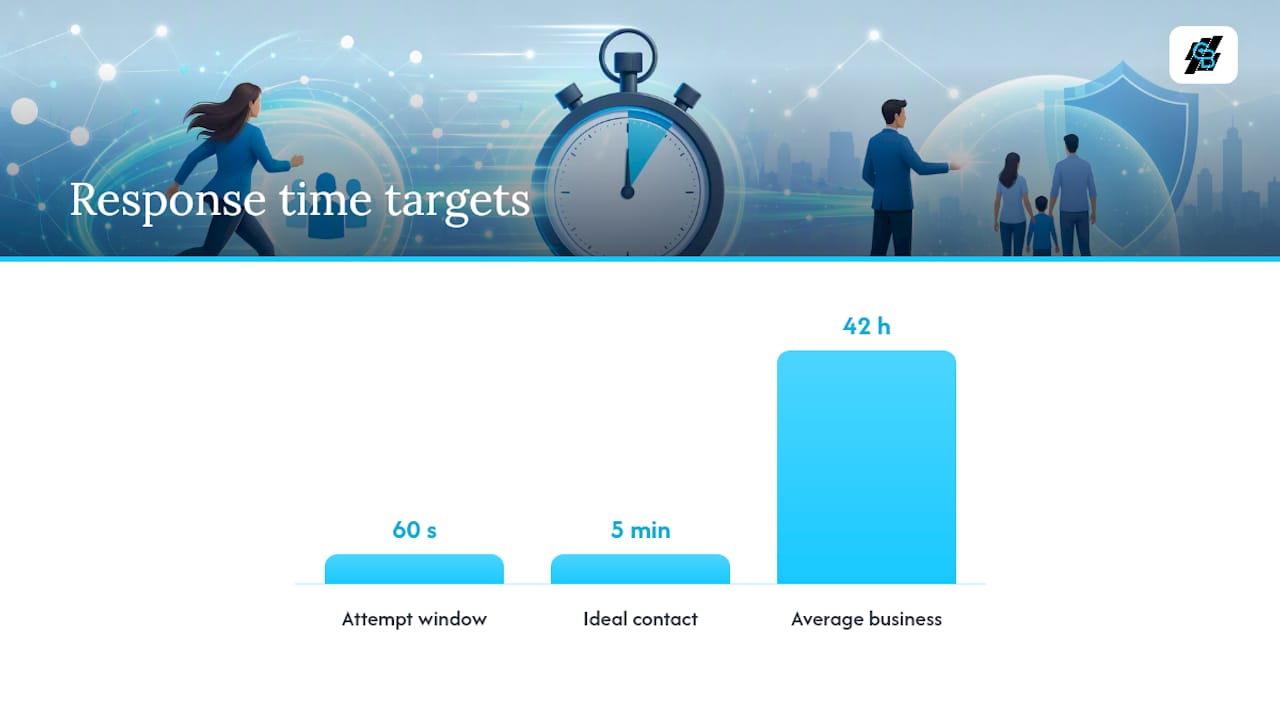
Here’s the number that should reshape how every agent thinks about Facebook lead generation: contacting a lead within 5 minutes makes you roughly 21 times more likely to qualify them, yet the average business takes 42 hours to respond. That gap isn’t a rounding error. It’s the difference between a campaign that pays for itself and one that quietly burns budget for months while everyone blames the ad creative.
Insurance leads decay faster than almost any other consumer category, because the moment someone fills out a form, they usually fill out three more on competing sites. Whoever calls first tends to win the conversation, regardless of who had the better ad.
A wiring pattern that works in practice:
- Facebook lead form submission fires a Conversions API event marking it as a “screened lead,” not just a raw form fill.
- That event routes instantly into your CRM, tagged with the qualifying answers collected on the form.
- An automated SMS goes out within seconds confirming receipt and setting expectations for a callback.
- An AI-assisted caller or auto-dialer attempts contact within 60 seconds, escalating to a live agent when the prospect picks up or replies.
- Leads that don’t connect immediately drop into an automated nurture sequence, not a forgotten CRM tab.
This flow is described in detail in Blueprint Digital’s implementation research, and the logic holds regardless of which platform executes it: speed and consistency of contact matter more than the sophistication of any single follow-up message. A tool like an automated CRM workflow can handle the routing and timing pieces so a live agent isn’t the bottleneck.
Monitoring matters as much as the automation itself. Set a service-level target, such as 95 percent of leads contacted within 5 minutes, and review it weekly. If that number slips, the problem usually isn’t your ad account. It’s a broken integration or an agent who’s not getting notified fast enough.
Insurance Facebook Ad Budgets: What Should You Actually Spend?
Cost-per-lead is the metric most agents obsess over, and it’s also the one most likely to mislead them. Finance and insurance ad categories run some of the highest cost-per-click and lowest click-through rates on Meta of any vertical, which means chasing a cheap CPL often means accepting garbage lead quality.
- Start with a realistic planning range. Many U.S. insurance advertisers budget $25 to $45 per form-level lead, depending on the line of business and market competitiveness.
- Work backward from your commission and close rate, not forward from your ad budget. If your average commission per bind is $400 and you close 1 in 8 qualified leads, your allowable cost-per-bind is roughly $3,200, meaning you can afford to spend a good deal more than $35 per lead if your follow-up process is tight enough to hit that close rate.
- Report weekly on cost-per-bind, not cost-per-lead, alongside contact rate and appointment-set rate, so you can see exactly where the funnel leaks before the money’s gone.
Smart operators stop treating CPL as the finish line and start treating it as one input in a longer equation that ends with an issued policy, an approach the industry benchmark data supports across the vertical. An automated lead funnel that tracks a lead from click to bind makes that math visible instead of guessed at.
Campaign Build Checklist: Launching a Compliant Test
Before you spend a dollar, run through this setup sequence in order.
- Flag the campaign under Special Ad Category at the ad account level, not just the campaign level, so Meta’s automated enforcement doesn’t flag it later.
- Install the Meta pixel and set up Conversions API on your landing page or CRM integration, so screened-lead events pass back to Meta reliably.
- Choose your campaign objective, typically Leads, and confirm whether you’re optimizing for instant form submissions or a Conversions API event.
- Prepare 3 to 5 creative variations, including at least one short video with a “this ad is for” hook and one static image with a specific offer.
- Write and place consent language on your form or landing page, visible before submission, covering phone and text contact.
- Connect your CRM integration so leads route automatically, with an SMS and callback trigger configured to fire within seconds of submission.
- Set a callback SLA (5 minutes or less) and assign monitoring so someone notices if that target slips.
Skipping step 6 is the most common mistake. Agents spend days perfecting creative and targeting, then launch with leads landing in an inbox nobody checks until the next morning.
Testing Order for Insurance Facebook Campaigns
Test in this order, because each layer affects the ones below it.
- Creative first. Run 3 to 5 variations against the same audience and let Meta’s delivery system find the strongest performer before you touch anything else.
- Form questions second. Once you know which creative pulls the most relevant clicks, test qualifying question variations to see which combination filters best without killing volume.
- Audience seeds last. Custom audience lists and broad targeting adjustments matter, but they’re the smallest lever available under Special Ad Category rules, so test them after creative and form structure are locked.
Don’t trust results from small sample sizes. A campaign with fewer than 50 conversion events in a week hasn’t given Meta’s algorithm enough signal to learn properly, and that applies whether you’re optimizing to form fills or a Conversions API event. If your volume can’t support 50 events on the actual conversion you want, optimize to an earlier proxy like a screened lead or a booked call instead, so the algorithm has enough data to work with.
Why Operations Beat Optimization in Insurance Lead Generation
Every agent wants to talk about audience targeting and ad creative, and almost none of them want to talk about their callback speed. That’s backwards. The data on 5-minute contact windows versus 42-hour average response times isn’t a marginal optimization tip. It’s the single largest lever in this entire playbook, and most agencies never touch it because fixing operations is less fun than testing a new headline.
Incremental creative tweaks squeezed out of an already-slow follow-up process produce diminishing returns fast. A campaign with mediocre creative and instant, automated follow-up will consistently outperform a campaign with brilliant creative and a next-morning callback. If you’re a small agency deciding where to put your next dollar, put it into automation and CRM integration before you put it into another round of ad testing. The follow-up system is the durable advantage. The ad creative is not.
— Kyle
Get Meta Leads Into Automated Follow-Up Without Building It Yourself
Everything in this playbook points to the same conclusion: the campaign matters less than what happens the moment a lead lands. Callbackcrm is built to close that exact gap for insurance agents, connecting Meta lead forms directly to a CRM that fires SMS and AI-assisted callback attempts automatically, without a staff member manually checking for new submissions.

The platform handles the pieces this article covers as separate technical challenges: real-time lead capture, Conversions API integration for screened-event optimization, automated SMS and callback sequences, and funnel or landing page tools for higher-intent lines that need more than an instant form. For agents used to piecing this together with a patchwork of apps, having it under one system removes the integration risk that usually causes leads to sit unanswered.
A practical starting point is a short pilot: connect one active Meta lead campaign to Callbackcrm, measure contact rate and speed-to-lead for two to three weeks, and compare it against your current process. The Professional plan at $97 per month is built for exactly that kind of test before scaling to a larger Enterprise setup with multiple CRM accounts. Explore the full feature set and see whether your current callback speed can actually compete.
Sources
These sources back the compliance, speed-to-lead, and benchmark claims made throughout this guide: Meta’s Special Ad Category policy details, lead form and speed-to-lead research, industry CPC and budgeting benchmarks, and guidance on nurture sequencing for leads that don’t convert on first contact.
- Meta ads financial services restrictions & targeting workarounds
- Improve Meta lead ads (Blueprint Digital)
- Meta’s AI tools for advertisers can now create new images, not just new backgrounds (TechCrunch)
- Meta ads for life insurance leads (Elevarus)
FAQ
Can You Run Insurance Ads on Facebook?
Yes, but every insurance campaign must be flagged under Meta’s Financial Products and Services Special Ad Category, which removes ZIP-radius targeting, gender targeting, precise age bands, and standard lookalike audiences. Agents who skip this declaration risk having campaigns paused or accounts restricted.
How Do You Get Leads for Insurance Sales Using Facebook?
The most reliable approach combines a specific, self-selecting ad hook with a qualifying lead form and instant CRM routing. Adding 2 to 3 qualifying questions can reduce volume by 20 to 30 percent while improving lead quality by 40 to 60 percent, and pairing that with automated follow-up closes the loop.
Is $10 a Day Enough for Facebook Ads in Insurance?
A $10 daily budget is unlikely to generate meaningful volume in insurance, since the vertical carries some of the highest cost-per-click rates on Meta of any industry. Many agents plan around $25 to $45 per lead, so a $10 daily spend may produce only a handful of leads per week, which isn’t enough volume for Meta’s algorithm to optimize effectively.
How Do You Get Leads With Facebook Ads Without Losing Money?
Track cost-per-bind rather than cost-per-lead, and make sure every lead gets contacted within minutes, not hours, since contacting a lead within 5 minutes makes qualification roughly 21 times more likely compared to slower response times. Some platforms automate that instant follow-up step so speed doesn’t depend on staff availability.
What’s the Difference Between Instant Forms and Landing Pages for Insurance Leads?
Instant forms generate higher volume because prospects never leave Facebook, but they tend to produce lower-intent submissions unless qualifying questions are added. Landing pages generate fewer leads but typically higher quality, since visitors self-select before filling anything out, making them a better fit for complex lines like life insurance or Medicare supplements.