

Successful CRM adoption for insurance agencies depends on a people-first, phased rollout that automates renewals before anything else, tracks weekly KPIs, and treats the CRM as the agency’s system of engagement. CallBack CRM fits this model well for agencies that want policy-aware workflows and AI-assisted automation built for insurance rather than adapted from a generic sales tool. Start now: begin discovery interviews, name a champion, and schedule a 30-day data cleanup sprint before you configure a single field.
TL;DR:
- Agencies should focus their 90-day rollout on discovery, minimal data cleanup, and launching renewal automations for one policy line to ensure adoption success.
- Training must be role-specific, with regular practice opportunities and a strict governance rule that if activity isn’t in the CRM, it did not happen, to build trust and consistency.
- Data migration requires auditing, deduplication, and a policy-centric schema, with sandbox testing to avoid overwriting critical renewal information.
- Prioritizing renewal automation with reminders, reactivation sequences, and cross-sell triggers provides the highest return on retention and profitability.
- Weekly KPIs should include data-entry compliance and pipeline activity, with leadership reviewing business impact metrics monthly to maintain disciplined adoption.
Table of Contents
- What Does a 90-Day CRM Adoption Roadmap Look Like?
- How Do You Get Staff to Actually Use the CRM?
- How Do You Migrate Data Without Breaking Renewals?
- Which Automations Should You Build First?
- Which KPIs Should Leadership Review Every Week?
- Why Disciplined Adoption Beats Chasing Features
- How CallBack CRM Fits This Adoption Playbook
- Sources
- FAQ
What Does a 90-Day CRM Adoption Roadmap Look Like?
Rushing configuration before understanding how your team actually works is the fastest way to build a CRM nobody uses. The fix is a structured 90-day rollout, broken into three phases with distinct goals.
- Days 0 to 30: discovery and foundation. Spend the first two weeks embedded with producers and service staff, documenting how renewals, quotes, and cross-sells actually move through the agency today. This kind of direct observation before configuration is consistently the highest-return activity in successful insurance CRM rollouts. Clean your existing contact and policy data, build a minimal policy-centric model, and get renewal automation live for one book of business, such as personal auto or a single carrier line.
- Days 31 to 60: controlled expansion. Roll the pilot out to the broader team, connect your agency management system (AMS) and quoting engine, and add lead pipelines with role-specific dashboards for producers, service staff, and management. This is also when weekly adoption tracking should start, not after the fact.
- Days 61 to 90: scale and lock governance. Turn on reactivation and cross-sell automations built from policy data, expand training to laggard users, and refine automation rules based on real usage. Leadership reviews adoption data directly from the CRM and formalizes governance rules going forward.
Quick wins matter more than most agencies realize. A one-click renewal deal creation feature or mobile-friendly policy updates that save a producer real time on day one shift the CRM’s reputation from “another project” to something that visibly helps. One multi-line insurance provider reached near-total active usage within 90 days using exactly this progressive approach, paired with product-line-specific pipelines and regional champions.
How Do You Get Staff to Actually Use the CRM?
Software rollouts fail on people, not features. Adoption is widely cited as the primary reason CRM projects in agencies stall, often because the system was configured around theory rather than how staff actually sell and service policies.
Governance has to be explicit from day one. The clearest rule an agency can set is simple: if it is not in the CRM, it did not happen. Pipeline reviews should be run directly from CRM data, not from spreadsheets or memory, so the system becomes the record everyone trusts.
- Pick champions based on influence and trust among peers, not just comfort with technology, and give them defined responsibilities like answering questions and flagging friction points.
- Build short, role-specific training sessions instead of one long all-staff session; a producer and a service rep need different skills on day one.
- Run weekly office hours during the first 60 days, and give staff a sandbox environment to practice in without fear of breaking a live record.
- Reduce required fields to the minimum, set smart defaults, and surface the next logical action instead of a blank form.
Pro Tip: Ask your champion to log every question they get asked twice. That list becomes your second round of training material, because it’s exactly where the workflow doesn’t match reality yet.
Tracking a numeric data-entry compliance rate and reviewing it weekly turns adoption from a vague hope into a manageable number leadership can act on.
How Do You Migrate Data Without Breaking Renewals?
Migration is where most insurance CRM projects quietly go wrong, usually because nobody cleaned the data before moving it. A few disciplined steps prevent the most common failures.
- Audit existing records first. Remove duplicate contacts, normalize policy numbers, and standardize date formats before anything gets imported.
- Purge or archive stale and inactive records rather than dragging years of dead leads into a fresh system.
- Build a policy-centric schema, meaning the CRM organizes around policy entities: carrier, effective date, expiration date, and coverage lines, not just a generic contact card.
- Map every field explicitly between your old system and the new one instead of relying on an automatic best guess.
- Test your AMS integration in a sandbox before going live, since two-way sync between systems can silently overwrite records if built carelessly.
The right mental model is to treat the CRM as your system of engagement and the AMS as your system of record, with a clean sync connecting the two so nobody duplicates work reconciling them. Once migration is live, verify a sample of records against the AMS directly, and confirm access controls are set correctly given the sensitivity of policy and client data.
Which Automations Should You Build First?
Renewals come first, and the reasoning is financial as much as operational. A 5% improvement in customer retention can lift agency profits by 25% to 95%, which makes renewal automation the highest-leverage place to start rather than an afterthought.
- Renewal reminders and one-click renewal deals. Automate the reminder sequence to producers and clients, and let a single click generate the renewal opportunity instead of manual re-entry.
- Reactivation sequences. Trigger outreach automatically to lapsed policyholders based on policy expiration data already sitting in the system.
- Cross-sell triggers. Use coverage gaps visible in policy data, like a home policy with no umbrella coverage, to trigger a targeted offer.
Keep the visible workload light. Automate scoring and suggestions in the background, and only ask staff to review or approve, not manually build every step. AI can meaningfully cut manual work here by auto-filling forms, scoring leads, and personalizing outreach messages, but any bindable action still needs a human check before it goes out.
Which KPIs Should Leadership Review Every Week?
A short weekly dashboard tells you more about adoption health than a quarterly retrospective ever will. Four numbers matter most for adoption itself, and a second set tracks whether adoption is translating into results.
| Metric type | What to track | Who reviews it |
|---|---|---|
| Adoption | Data-entry compliance rate, weekly active users | Operations, weekly |
| Adoption | Renewal-touch rate, pipeline velocity | Operations, weekly |
| Business | Retention lift, cross-sell conversion | Leadership, monthly |
| Business | Submission-to-bind cycle time, forecast accuracy | Leadership, monthly |
- Run the adoption review weekly, led by operations, with corrective coaching for anyone below the compliance threshold.
- Run the business-impact review monthly, led by leadership, tied to the numbers above rather than anecdote.
- Watch for a “ghost CRM,” where logins look normal but real pipeline data lives elsewhere. The fix is immediate: pull a sample of deals and check them against reality that same week.
Why Disciplined Adoption Beats Chasing Features
Most agencies that abandon a CRM did not pick the wrong software. They skipped the discipline of rollout, training, and measurement, then blamed the tool when usage collapsed. A phased, people-first approach paired with organizational change management consistently outperforms a feature-heavy launch with no rollout plan behind it.
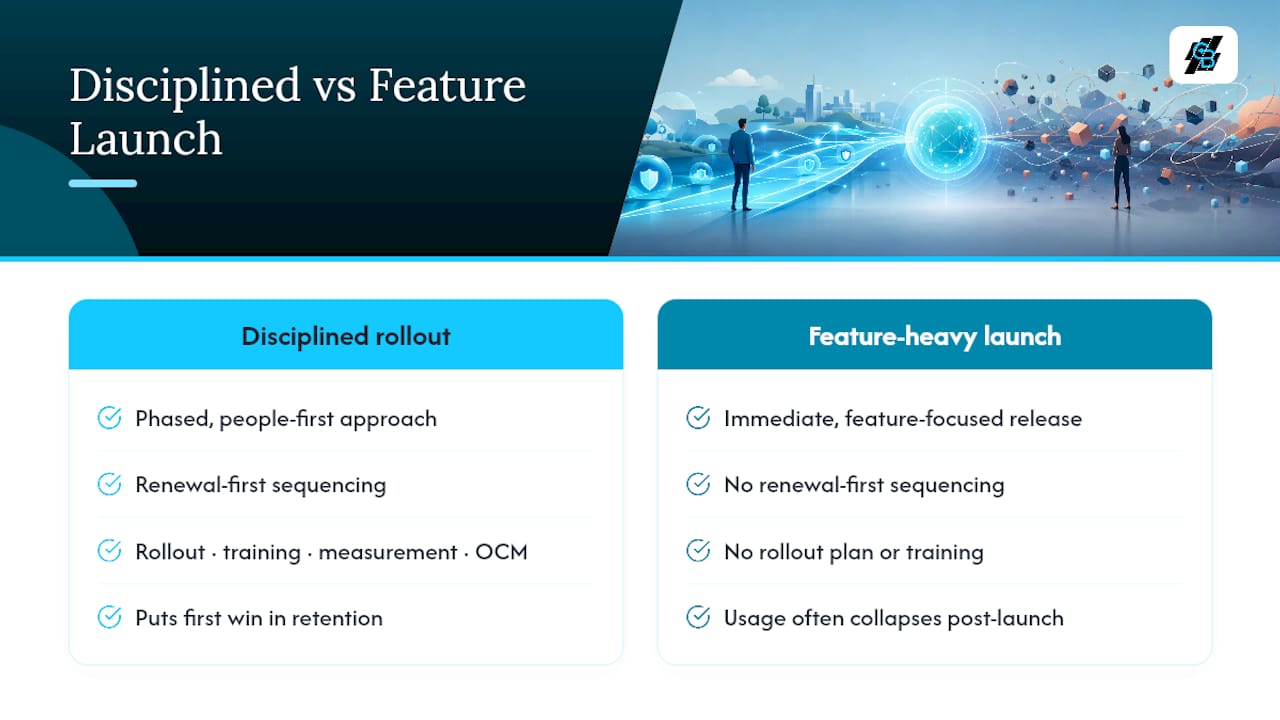
The renewal-first sequencing matters more than agencies give it credit for. It is not just a technical detail. It puts the CRM’s first win exactly where agency profitability is most sensitive: retention. Measurement discipline is what keeps that win from fading after month two, when the excitement of a new system wears off and old habits creep back in.
Platforms built specifically for insurance workflows, like CallBack CRM, remove some of the configuration burden agencies otherwise carry alone, but the rollout discipline still has to come from leadership.
— Kyle
How CallBack CRM Fits This Adoption Playbook
CallBack CRM was built around the exact sequence this playbook recommends, not retrofitted from a generic sales tool. Its policy-aware data model, renewal automation, and AI-assisted data entry map directly onto the 90-day rollout, so agencies aren’t stuck configuring policy fields, expiry logic, or coverage lines from scratch before their first renewal campaign goes live.

The platform bundles the pieces this guide covers into one system: SMS and email marketing for renewal-touch sequences, automated follow-up workflows for reactivation and cross-sell, AMS and quoting integrations for two-way sync, and mobile access so producers can update policy records in the field instead of after hours at a desk. Support is offered, and data is hosted securely on cloud infrastructure.
If your agency is somewhere in that first 30-day discovery phase already, request a demo and walk through how the renewal automation and websites features map to your current AMS setup before you commit to a full rollout.
Sources
- A CRM transformation improved sales visibility for an insurer | RSM US
- How to Set Up CRM for Insurance Agency: The Hidden Traps - The Insurtech Guide
- Multi-National Line Specialty Insurance Provider | DataOps Group
FAQ
How Long Does CRM Adoption Take for an Insurance Agency?
A structured rollout typically runs 90 days from discovery to full governance, with renewal automation live for at least one segment within the first 30 days.
What Is the Biggest Reason Insurance CRM Adoption Fails?
Poor user adoption, usually caused by configuration that doesn’t match how producers and staff actually work, is widely cited as the leading cause of CRM project failure.
Which KPI Matters Most in the First 90 Days?
The data-entry compliance rate matters most early on, since it reveals whether staff are actually logging activity in the CRM rather than working around it.
Should Renewals or New Business Automation Come First?
Renewals should come first, because retention gains have an outsized effect on agency profitability compared to new business volume alone.
Does CallBack CRM Support AMS Integration for Insurance Agencies?
CallBack CRM is built with insurance workflows in mind, including two-way integrations with AMS and quoting systems to keep policy data synced without manual re-entry.