

Yes, API integration is worth the effort for agencies that want less manual data entry and faster submission-to-bind cycles. It connects your CRM to carriers, MVR services, e-signature tools, and payment systems so data moves automatically instead of getting retyped by hand.
The measurable payoff shows up fast:
- Fewer manual entries per new business submission
- Faster quote-to-bind turnaround
- Proactive renewal outreach instead of missed windows
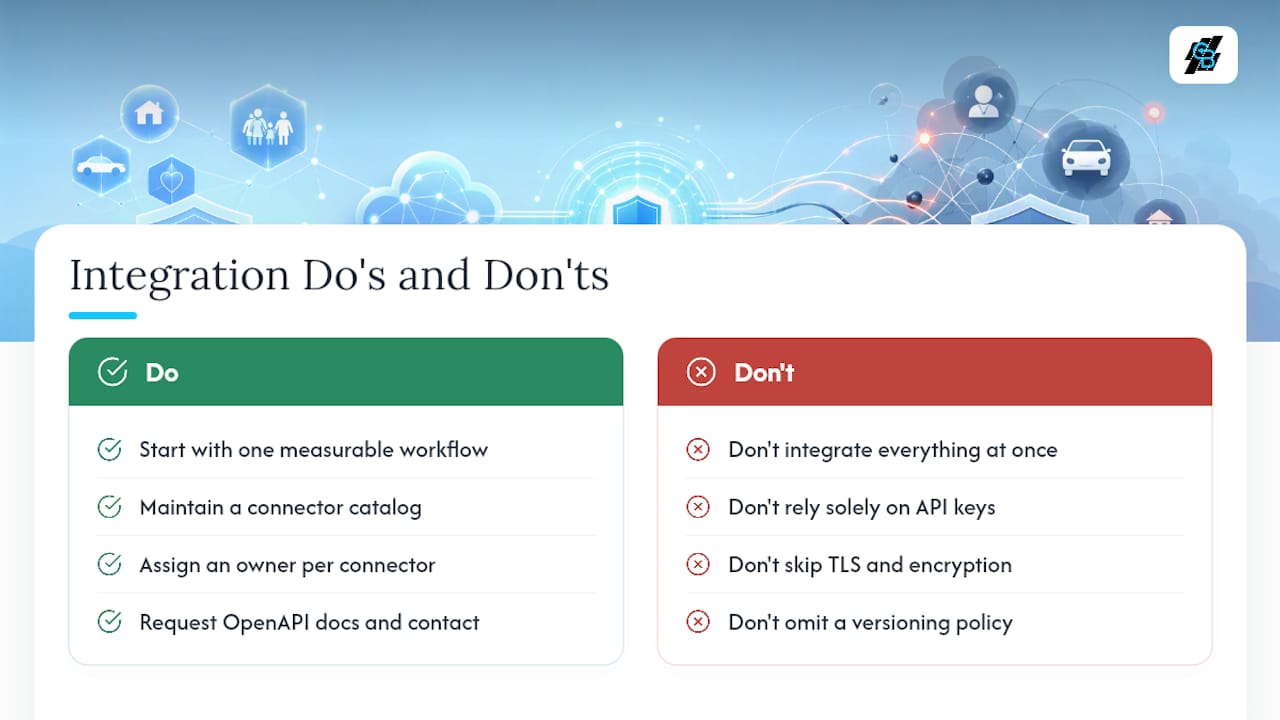
Your next move: pick one workflow, such as a renewal reminder paired with e-signature, and scope it as a 4 to 8 week pilot before touching anything else.
Key Takeaways
API integration succeeds when agencies scope one workflow at a time, enforce clear data contracts, and treat their CRM as the governed center of their tech stack.
| Point | Details |
|---|---|
| Start with one pilot | Scope a single workflow, like renewal reminders with e-signature, for a 4 to 8 week test. |
| Match pattern to workflow | Use webhooks for lead capture, event-driven triggers for claims, and orchestration for renewals. |
| Lock in security basics | Require OAuth2, TLS, encryption at rest, and rotated API keys before connecting any system. |
| Avoid API sprawl | Keep a connector catalog with a named owner and a fixed versioning policy. |
| CallBack CRM fits the pilot model | It triggers SMS, email, and pipeline actions from API events like renewals and lead form submissions. |
Table of Contents
- Why API Integration Insurance CRM Projects Pay Off
- Should You Use Sync, Webhooks, or Orchestration?
- How Do You Scope and Implement a CRM API Integration?
- What Security and Governance Rules Should You Enforce?
- How CallBack CRM Handles API-Driven Automation
- What Mistakes Slow Down Insurance API Integrations?
- Why the Pilot-First Approach Beats the “Integrate Everything” Instinct
- Get Started With CallBack CRM’s Built-In Automation
- Frequently Asked Questions
- Sources
Why API Integration Insurance CRM Projects Pay Off
Agencies that connect their CRM to outside systems through APIs see three outcomes show up in the data: faster submission-to-bind, higher touchless processing rates, and fewer data entry errors. Each of those maps to a workflow you already run manually today.
Common use cases include lead capture from web forms and ad platforms, MVR and data enrichment pulls, e-signature routing for policy documents, payment posting, and renewal triggers that fire weeks ahead of expiration.
The industry evidence backs this up. Duck Creek’s platform runs on an API-first architecture with more than 2,600 APIs and over 100 pre-built partner integrations covering data pre-fill, MVR checks, e-signature, and payments. That density of pre-built connectors is what separates a fast integration project from a slow one.
- Lead capture that used to take a rep 10 minutes now happens in seconds via webhook
- MVR and enrichment data lands in the CRM before the agent even opens the file
- Renewal triggers replace the spreadsheet someone forgot to check
Fewer manual touches per policy means more capacity for actual sales conversations, not more software to babysit.
Should You Use Sync, Webhooks, or Orchestration?
Not every workflow needs the same integration pattern. Picking the wrong one is how agencies end up with brittle automations that break the first time a carrier changes a field name.
- Polling/sync checks a source system on a schedule and pulls updates. It works fine for low-urgency data like periodic policy status refreshes, but it wastes API calls and introduces lag.
- Webhooks/event-driven push data the moment something happens. This fits lead capture, FNOL notifications, and claims updates, where speed to first contact determines the outcome.
- Orchestration chains multiple systems and human checkpoints into one automated sequence. UiPath’s approach to insurance automation treats orchestration as the layer that triggers workflows across claims, underwriting, and servicing, freeing agents for judgment calls instead of data shuffling.
Match the pattern to the job: lead capture usually works as sync or webhook, FNOL and claims processing lean event-driven, and renewals benefit most from scheduled triggers wrapped in orchestration logic.
Expect most vendors to document their APIs using REST and JSON, with an OpenAPI or Swagger reference for developers. Insurance-specific data often follows ACORD standards, with CSV or XLSX as a fallback for legacy file transfers.
Pro Tip: Ask any vendor for their OpenAPI spec before signing anything. If they can’t produce one, budget extra time for custom mapping work.
How Do You Scope and Implement a CRM API Integration?
Running a pilot integration doesn’t require a full engineering team if you follow a defined sequence.
- Pick the business outcome first. Decide what success looks like, whether that’s a 20% drop in manual entry or a two-day reduction in quote-to-bind time, before choosing any tool.
- Inventory your sources and endpoints. List every system you want connected, then pull each vendor’s API documentation and note their authentication requirements.
- Map the fields and define data contracts. Decide what “policy status” or “effective date” means in each system, and write down the transformation rules so nothing gets lost in translation.
- Build a test environment and run staged tests. Push sample records through before touching production data, and build error handling for the cases that will inevitably fail.
- Deploy with monitoring and a rollback plan. Set logging, define response-time SLAs with your vendor, and know exactly how to revert if something breaks mid-renewal-season.
A few things to have ready before step one:
- API keys or OAuth credentials for every connected system
- A named point of contact on each vendor’s technical support team
- A test dataset that mirrors real policyholder records without using live PII
Skipping step 3 is the single most common reason integration projects stall. Teams get excited about connecting systems and forget that “state” means something different in a CRM than it does in a policy administration system.
What Security and Governance Rules Should You Enforce?
Insurance data carries regulatory weight, so the technical bar for any integration should be non-negotiable on a few fronts.
- Require OAuth2 and TLS for every connection; treat static API keys as a fallback only, and rotate them on a fixed schedule
- Enforce role-based access controls and keep audit logs for who touched what data and when
- Encrypt data at rest and minimize the personally identifiable information any connector actually needs to do its job
- Maintain a connector catalog so you know exactly which integrations exist and who owns them
- Set a versioning policy for every API you depend on, so a vendor’s update doesn’t silently break your workflow
Governance matters as much as the technical controls. API sprawl happens when agencies bolt on connector after connector with no central record of what’s live. The fix is building your CRM as the intelligent core of your stack and routing everything else through managed connectors or middleware you can actually monitor.
Pro Tip: Assign one person, not a rotating cast of “whoever has time,” to own your connector catalog. Ownership gaps are how dead integrations quietly keep running for years.
How CallBack CRM Handles API-Driven Automation
CallBack CRM is built around workflow automation that agencies can trigger through API events rather than manual list-building. Renewal dates, lead form submissions, and e-signature completions can all kick off automated sequences without an agent lifting a finger.
Practical examples already in use:
- A policy renewal date triggers an automated SMS and email sequence 30 days out
- A webhook from a lead form drops a new prospect straight into a scored pipeline
- A signed proposal automatically moves a contact into an onboarding sequence
Connecting a CRM to outside data sources isn’t about replacing judgment. It’s about making sure the right information reaches the right person at the right moment, so judgment gets applied where it actually matters.
If you’re evaluating whether CallBack CRM fits your stack, three steps get you an answer fast:
- Request the API documentation and confirm it covers the systems you already use
- Run a sandbox test with sample records before committing production data
- Contact support directly with your specific integration questions rather than guessing from a features page
Pro Tip: Run your sandbox test with the messiest, most edge-case-heavy records you have. Clean test data tells you nothing about how the integration handles a real book of business.
What Mistakes Slow Down Insurance API Integrations?
Most failed integration projects share the same handful of root causes, and none of them are exotic.
- Vague scope: “integrate everything” is not a project, it’s a way to run out of budget with nothing shipped
- Skipped field mapping: assuming two systems mean the same thing by “active” or “pending” is how data quietly corrupts
- Weak error handling: a failed API call that silently drops a lead is worse than no automation at all
- No monitoring: integrations that work on day one can break on day ninety without anyone noticing
The fix is almost always the same regardless of which system you’re connecting: start with one workflow, use managed connectors or middleware instead of custom code where you can, and document the data contract in writing before a single line of integration work begins.
Set an SLA clause with any vendor for response times, and schedule a review of every live connector at least twice a year. Integrations that nobody revisits are the ones that eventually break silently.
Why the Pilot-First Approach Beats the “Integrate Everything” Instinct
Most advice on this topic pushes agencies toward comprehensive platform overhauls, connect the CRM to every carrier, every data vendor, every marketing tool, all at once. That’s backward. The agencies that actually finish integration projects start with one workflow, prove it works, and expand from there.
The overlooked variable isn’t the technology. It’s field mapping discipline. Every failed project I’ve seen traces back to two systems disagreeing on what a status field means, not to some exotic API limitation. Agencies spend money on developer time and skip the unglamorous work of writing down data contracts in plain English first.
The renewal workflow deserves priority over lead capture, even though lead capture gets more attention in vendor pitches. Renewals directly affect retention revenue, and the automation is simpler: a date trigger, a verification step, an outreach sequence. Get that right before chasing anything more ambitious.
Get Started With CallBack CRM’s Built-In Automation
CallBack CRM gives you the pilot-workflow path this article just walked through, without needing to hire a developer to wire together five separate tools. Renewal triggers, lead webhooks, and e-signature handoffs run natively inside the platform, so the “scope one workflow” step becomes a configuration task instead of an engineering project.

That matters most for agencies that don’t have in-house technical staff but still want the submission-to-bind speed that larger carriers get from custom-built integrations. CallBack CRM’s feature set covers the automation layer, and its SMS marketing tools handle the renewal outreach sequences described earlier in this guide.
If your pilot workflow is a renewal reminder tied to e-signature, that’s a configuration you can set up directly rather than a custom build. Request a walkthrough of CallBack CRM’s automation features and see how your first pilot workflow would run before committing to anything larger.
Frequently Asked Questions
What is API integration insurance CRM in practical terms? It means connecting your CRM to outside systems, carriers, MVR services, e-signature tools, so data flows automatically instead of getting entered by hand for every policy.
How long does a typical pilot integration take? Most single-workflow pilots run 4 to 8 weeks, covering scoping, field mapping, staged testing, and a monitored launch.
Do I need a developer to integrate an insurance CRM with an API? Not always. Managed connectors and low-code platforms like CallBack CRM handle many common workflows without custom development work.
What’s the difference between sync and webhook integrations? Sync checks a source on a schedule and pulls updates; webhooks push data the instant something happens, which fits time-sensitive workflows like lead capture.
What standards should I expect from insurance software APIs? Most modern platforms document REST and JSON APIs with an OpenAPI or Swagger reference, alongside ACORD-formatted data for insurance-specific exchanges.
How do I avoid API sprawl as I add more integrations? Maintain a connector catalog with a named owner, a versioning policy, and a fixed schedule for reviewing which integrations are still active and necessary.
What’s the biggest mistake agencies make with CRM API projects? Starting with vague scope, “integrate everything”, instead of picking one measurable workflow and proving it works before expanding.
Can legacy insurance systems still connect through APIs? Many legacy systems support REST or scheduled file imports like CSV and XLSX, though they may need middleware to bridge older formats with newer connectors.
What security controls are non-negotiable for insurance data integrations? OAuth2 authentication, TLS encryption in transit, encryption at rest, and role-based access controls with audit logging.
How does event-driven automation differ from simple data syncing? Event-driven automation triggers full workflows, verification, outreach, document generation, the moment an event like a renewal date occurs, rather than just updating a field.
Which insurance workflows benefit most from API automation? Renewals and quote enrichment typically deliver the largest returns because they directly affect retention and submission speed.
What should I ask a vendor before starting an integration project? Request their OpenAPI documentation, confirm their authentication method, and ask for a named technical contact for troubleshooting.
Is it safe to use API keys instead of OAuth2 for insurance data? API keys should only be used when scoped narrowly and rotated regularly; OAuth2 is the stronger default for anything touching policyholder data.
How often should I review live API connectors? At least twice a year, checking for deprecated endpoints, changed data formats, and connectors nobody actively uses anymore.
What happens if an API call fails during a policy update? Proper error handling should log the failure, alert a responsible person, and retry or queue the action rather than silently dropping the record.
Can I integrate my CRM with carrier systems directly? Many carriers expose APIs for data like MVRs and payments, though some connections require middleware or a managed connector to handle formatting differences.
What’s the role of orchestration in insurance automation? Orchestration chains multiple systems and checkpoints into one sequence, letting agents focus on judgment calls instead of manually connecting each step.
Do small agencies benefit from API integration as much as large ones? Yes, smaller agencies often see faster returns since manual data entry consumes a larger share of their limited staff time.
How do I test an integration before going live? Build a sandbox environment with sample or anonymized records and run staged tests before connecting any production data.
What documentation should I keep for each integration? A written data contract defining field mappings, transformation rules, authentication details, and a named owner for ongoing maintenance.
Should renewals or lead capture be automated first? Renewals often deliver a faster return since the logic is simpler and the impact on retention revenue is more direct.
What’s a reasonable SLA to request from an integration vendor? Ask for defined response times for API uptime and support tickets, along with a clear escalation path for failures during peak periods.
Can CallBack CRM connect to third-party lead sources? Yes, webhook-based lead capture routes new prospects directly into CallBack CRM’s scored pipeline without manual entry.
How does CallBack CRM handle renewal automation specifically? It triggers SMS and email sequences ahead of renewal dates, reducing the chance of a missed window that costs an agency retained revenue.
Sources
- Insurance automation with agentic AI and RPA | UiPath
- A Complete Guide to Insurance Workflow Automation (With Real Examples) | Datagrid