

Five workflows deliver most of the return in insurance CRM automation: lead intake and assignment, quote and proposal follow-up, policy renewals, onboarding and issuance, and claims triage. Agencies that automate these first see faster lead response, higher quote-to-bind conversion, fewer manual data errors, and renewal cycles that scale without adding staff. Faster response times can materially raise lead qualification rates, which is why lead routing usually comes first.
The immediate next step: pick one workflow, build it in a sandbox, and run it for 30 to 60 days before touching anything else.
- Lead capture and assignment — route and notify within minutes, not hours
- Quote and proposal follow-up — automated cadences that catch the leads humans forget
- Policy renewals — multi-touch outreach starting 90 days out
- Onboarding and issuance — document checklists and e-signature tied to carrier submission
- Claims triage (FNOL) — auto-classify and route, escalate only what needs a human
Pro Tip: Measure response time and conversion uplift on your pilot workflow before adding a second one. Stacking automations before you’ve validated the first makes it impossible to tell what actually worked. Author: Kyle.
Key Takeaways
Automating lead intake, quote follow-up, renewals, onboarding, and claims triage improves response time and conversion while human-in-the-loop checkpoints keep judgment-intensive decisions defensible.
| Point | Details |
|---|---|
| Start with one pilot | Choose lead routing or renewals first, run it in a sandbox for 30 to 60 days before scaling. |
| Measure the right KPIs | Track response time, conversion rate, time-to-bind, and touchless rate against a baseline. |
| Keep humans at judgment points | Escalate disputed claims and complex underwriting to people; automate routine ACORD and renewal tasks. |
| Guard your data flow | Map policy IDs and carrier codes carefully to avoid duplicate records and audit gaps. |
| CallBack CRM supports the build | Its automation workflows, SMS/email sequencing, and integrations map directly to the templates above. |
Table of Contents
- Building Insurance CRM Workflows That Actually Convert
- How Do Insurance CRM Workflows Connect to AMS and Carrier Systems?
- What Design Principles Keep CRM Workflows Reliable?
- Rolling Out Insurance CRM Workflows: A Pilot Checklist
- Putting These Workflows Into CallBack CRM
- Frequently Asked Questions
- Sources
Building Insurance CRM Workflows That Actually Convert
Each workflow needs three parts to function: a trigger that starts it, a sequence of steps that carry it forward, and a KPI that tells you whether it’s working. Skip any one of the three and you end up with automation that runs but doesn’t improve anything.
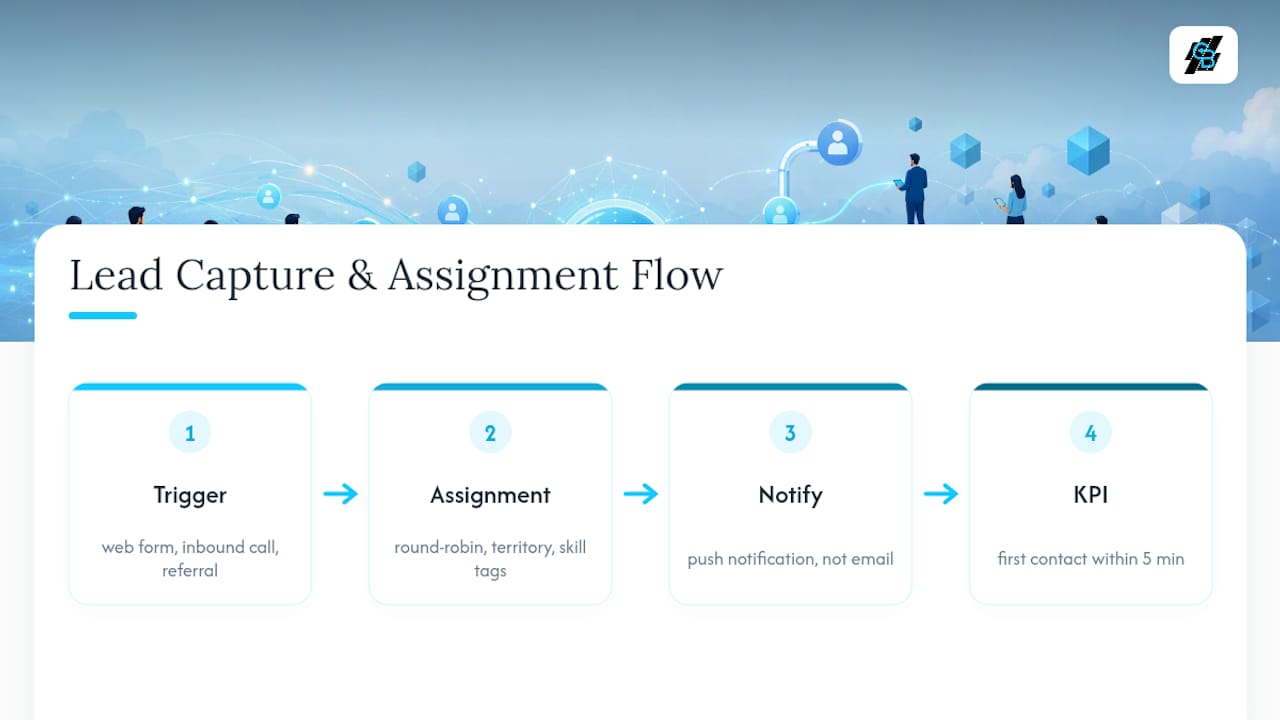
1. Lead capture and assignment. Triggers include a web form submission, an inbound call, or a referral entry. Assignment rules typically use round-robin distribution, territory matching, or producer skill tags (commercial lines versus personal lines, for example). The moment a lead lands, the assigned producer should get a push notification, not an email buried in an inbox. The target KPI: first contact within five minutes. Agencies that hit that window see measurably better qualification rates than those that wait hours.
2. Automated follow-up sequences. A quote that goes unanswered for three days is close to dead. Build a cadence: a text within one hour of quote delivery, an email at 24 hours with the quote attached again, a call task assigned to the producer at 72 hours, and a final “still interested?” message at day seven. Use tokens like {{first_name}}, {{quote_amount}}, and {{expiration_date}} so messages feel personal without manual drafting. Missed-call follow-up deserves its own short sequence, since a callback attempted within minutes converts at a different rate than one attempted the next day.
3. Policy renewals. Renewal attrition often comes down to timing, not price. A 90/60/30/14-day touch schedule, with quotes pre-populated from existing policy data, keeps the client engaged before a competitor’s mailer arrives. Track renewal conversion rate and time-to-first-contact as your two core KPIs here.

4. Onboarding and policy issuance. Once a policy binds, a checklist workflow should trigger: required documents, e-signature requests, and carrier submission tracking. The KPI is days-to-bind, plus a secondary metric on how many onboarding steps required manual intervention.
5. Claims triage (FNOL). First notice of loss gets classified automatically by severity and type. Straightforward claims route to a touchless processing lane; anything involving disputed liability, high dollar amounts, or ambiguous coverage escalates to a human adjuster immediately. Pairing agentic AI with RPA speeds this triage by handling the deterministic sorting work while preserving a clear audit trail for the judgment calls that go to people.
6. Cross-sell identification. A CRM that flags single-line clients (auto only, no home policy) and triggers a soft outreach sequence turns your existing book into a pipeline you’re not otherwise using.
For a deeper walkthrough of building these sequences end to end, see this sales automation workflow guide for insurance agents.
How Do Insurance CRM Workflows Connect to AMS and Carrier Systems?
An insurance CRM workflow is only as reliable as the data flowing into it. The systems it typically needs to talk to include your agency management system (AMS), individual carrier portals, quoting engines, email and telephony platforms, and ACORD form pipelines for standardized data exchange.
Data mapping is where most integration projects go sideways. You need clean matching on policy IDs, carrier codes, and contact records, plus clear rules for which system owns which status field. If your AMS says a policy is “pending” and your CRM says “active,” someone downstream makes a decision based on the wrong information.
Common pitfalls to design around:
- Duplicate records created when a lead enters through two channels (web form and phone call) without deduplication logic
- Latency between systems that makes automated triggers fire on stale data
- Missing audit trails that leave you unable to reconstruct why a workflow made a decision
- PII exposure when data syncs to systems that don’t need the full client record
Orchestration platforms built on open standards handle long-running cases and exceptions more gracefully than point-to-point integrations bolted together over time.
Before any integration goes live, run it in a sandbox with sample runbooks: a handful of test cases that mimic real client scenarios, logging enabled at every step, and a documented rollback procedure if something breaks in production.
Pro Tip: Test your renewal workflow with a policy that’s intentionally missing a field, like a phone number or an expiration date. If the workflow can’t tell you it failed, it will fail silently in production, and you won’t know until a client complains.
What Design Principles Keep CRM Workflows Reliable?
Reliable workflows share a few structural habits regardless of agency size.
Human-in-the-loop checkpoints matter most at the judgment-intensive stages: complex underwriting decisions, disputed claims, or any renewal where the client’s risk profile has changed materially. Human-in-the-loop design keeps judgment calls with people while automating routine work like ACORD data extraction and standard renewals.
Trigger design should favor event-driven actions over blind scheduled jobs, and every trigger needs to be idempotent. In practice, that means a duplicate webhook firing twice shouldn’t send the same renewal notice twice.
Exception handling needs a named owner, an SLA-based escalation path, and a logged audit trail for every case that falls outside normal parameters. Gartner names workflow orchestration and integration with existing systems as central requirements for modern insurance automation, and orchestration without governance data is just automation you can’t defend later.
A workflow that can’t produce a decision log when a regulator or reinsurer asks for one isn’t really an automated process. It’s a black box with good intentions. Recording timestamps, decision points, and touchless rates isn’t extra paperwork. It’s what makes the automation defensible.
Track cycle time, touchless rate, and response time as your standing governance KPIs, not just conversion numbers.
Rolling Out Insurance CRM Workflows: A Pilot Checklist
Score each candidate workflow on impact versus effort before you commit engineering or admin time to it. Lead routing and renewal reminders usually score highest: high impact, relatively low build effort.
- Map the current process exactly as it runs today, including every manual handoff
- Define triggers and actions for the automated version, naming who owns each exception
- Build in a sandbox environment, never directly in production
- Run test cases that mirror real client scenarios, including edge cases
- Measure for 30 to 60 days against your baseline before deciding to scale
Sample templates worth copying directly:
- Lead routing: inbound trigger → round-robin or skill-based assignment → producer notification → 5-minute contact SLA
- Renewal sequence: 90/60/30/14-day touches → pre-populated quote → producer task at day 14 if no response
- FNOL triage: intake classification → severity check → touchless lane or human escalation
CallBack CRM supports each of these through prebuilt automation templates, SMS and email sequencing, and integrations that keep producer notifications immediate rather than batched. Baseline metrics to capture before you launch: current response time, conversion rate, average time-to-bind, and touchless rate. If your pilot beats baseline on two of the four within 60 days, it’s ready to scale to the rest of the book.
Pro Tip: Run your pilot on one line of business or one territory first, not agency-wide. A renewal workflow that works for personal auto won’t necessarily work for commercial umbrella policies without adjustment.
A note on where automation goes wrong
The biggest mistake agencies make isn’t under-automating. It’s removing human review from the one or two decision points where it actually mattered, usually to hit a speed metric. Keep your escalation paths honest, and lean on CallBack CRM’s templates and workflow logs as a starting reference, not a substitute for judgment.
Putting These Workflows Into CallBack CRM
Every workflow above requires the same underlying pieces: reliable triggers, multichannel follow-up, and reporting that tells you whether it’s working. CallBack CRM was built around exactly that combination for insurance agents, agencies, and IMOs, rather than adapted from a generic sales CRM after the fact.

The platform’s automation workflows handle lead routing and renewal cadences out of the box, its SMS and email sequencing runs the follow-up templates described above without manual sending, and its reporting layer tracks the same response-time and conversion KPIs your pilot needs to measure. Integrations connect to the dialers, calendars, and websites most agencies already use, so you’re not rebuilding your tech stack to adopt it.
If you want to see how the follow-up cadence piece works specifically, the SMS automation features page walks through the messaging and timing options available for quote follow-up, renewal touches, and missed-call recovery. Start there, map it against the pilot workflow you chose earlier in this guide, and you’ll have a working template within a day, not a quarter.
Frequently Asked Questions
What is the first insurance CRM workflow agencies should automate? Lead intake and assignment delivers the fastest return because response time directly affects conversion. Route new leads by territory or producer skill and notify producers within minutes of intake.
How long should a CRM workflow pilot run before scaling? Run a pilot for 30 to 60 days against a documented baseline. Measure response time, conversion rate, and touchless rate before expanding the workflow agency-wide.
Do insurance CRM workflows need to integrate with ACORD forms? Yes, for any agency handling standardized carrier submissions. ACORD data extraction and mapping reduce manual rekeying and downstream errors when paired with a verification checkpoint.
Where should human review stay in an automated claims triage workflow? Keep human adjusters in the loop for disputed liability, high-severity claims, or ambiguous coverage questions. Route straightforward, low-severity claims through a touchless automated lane.
Can small agencies use the same CRM workflow templates as large ones? Yes, the same trigger-steps-KPI structure scales down. Smaller agencies typically start with one or two workflows, like renewals and lead routing, before adding claims triage or cross-sell automation.