

Use Higher Intent lead forms with two to three qualifying questions, route submissions to your CRM in real time through a native connector or the Leads Webhook, flag every campaign under Meta’s Special Ad Category with visible consent language, and judge results by cost per issued policy instead of cost per lead.
TL;DR:
- Using Higher Intent lead forms with custom qualifying questions improves lead quality by 40 to 60 percent, despite reducing total volume by 20 to 30 percent.
- Targeting under the Special Ad Category relies on first-party audiences, pixel retargeting, interest layering, and automated campaigns, as demographic targeting is limited.
- Native CRM connectors and real-time webhooks deliver leads to agents within seconds, significantly increasing contact rates compared to manual or delayed methods.
- Contact leads within five minutes of submission by automating immediate SMS, call routing, and follow-up sequences to maximize conversion chances.
- Ensure compliance by displaying a working privacy policy, recording explicit consent, screening against do-not-call lists, and safeguarding all contact records before scaling campaigns.
Table of Contents
- What’s the Right Facebook Lead Ads Integration for Insurance?
- What Targeting Still Works Under the Special Ad Category?
- Which Integration Method Gets Leads to Agents Fastest?
- How Fast Should You Contact a Facebook Lead?
- What Compliance Steps Protect You Before Scaling?
- What Ad and Form Copy Pre-Qualifies Leads?
- How Do You Calculate Cost Per Sale, Not Just Cost Per Lead?
- How Callbackcrm Wires This Workflow End to End
- What Actually Matters When You Scale This
- Get the Facebook Lead Ads Wiring Set Up Without Hiring a Developer
- Sources
- FAQ
What’s the Right Facebook Lead Ads Integration for Insurance?
Meta gives you two form types for Lead Ads: More Volume and Higher Intent. More Volume trims friction and prefills whatever the prospect’s Facebook profile already has, which works fine for cold, low-cost products like a basic quote request. Higher Intent inserts a review screen before the person submits, forcing a second confirmation of their information.
For insurance specifically, Higher Intent is the better default. Adding two or three custom qualifying questions on top of it reduces total lead volume by roughly 20 to 30 percent, but raises lead quality by 40 to 60 percent, according to Scale Growth Digital’s analysis of insurance Facebook campaigns. That trade is almost always worth it. A licensed agent working a smaller pool of pre-qualified leads closes more policies than one drowning in unqualified form fills.
Your form should include the standard prefilled fields (name, email, phone) plus a short set of custom questions that do real qualifying work:
- “Do you currently have an active policy, or are you shopping for new coverage?”
- “What’s your estimated coverage amount or budget range?”
- “Are you the primary decision-maker on this purchase?”
Meta’s Lead Ads instant forms pull profile data automatically, which speeds up submission, but Meta also requires every form to display a working privacy policy link. Skip this and your ad gets flagged or paused during review.
Field mapping matters more than most agents realize. Before you launch, decide exactly how each Facebook field lands in your CRM. Phone numbers submitted through Facebook sometimes arrive without formatting, so map them through a normalization step if your CRM supports it. Custom question answers should map to distinct CRM fields, not a single notes blob, so your team can filter and route by answer later.
What Targeting Still Works Under the Special Ad Category?
Every insurance campaign on Meta gets classified under the Special Ad Category, and that classification strips out some of the targeting precision advertisers in other industries rely on. You lose age and gender targeting, ZIP code level geographic precision, and lookalike audiences built from those restricted signals.
That sounds like a real handicap, and it is one. But it pushes the work of finding buyers away from demographic filters and toward your own data and creative, according to Insurance Marketing Co.'s 2026 guide to Facebook ads for insurance agents. Several approaches still perform well:
- Special Ad Audiences built from your first-party customer lists or CRM exports, which Meta permits even under the restricted category.
- Pixel retargeting, showing ads to people who already visited your site or landing page, since retargeting based on your own site behavior isn’t blocked the way demographic targeting is.
- Interest-proxy layering, combining broader interest categories (homeownership, retirement planning, small business ownership) instead of relying on age brackets you can no longer set directly.
- Advantage+ campaign tests, letting Meta’s automated targeting find converters within your creative and audience seed rather than manual demographic slicing.
Properly seeded Advantage+ campaigns and Special Ad Audiences tend to outperform broad interest-only targeting once the restrictions kick in. Start with a wider radius than you’d normally use, 25 to 50 miles depending on your licensed states, then narrow based on where leads actually convert rather than where you assume they live.
Which Integration Method Gets Leads to Agents Fastest?
You have three real options for pulling leads out of Facebook and into your CRM, and they differ mainly in speed and setup complexity.
- Native CRM connectors. Many CRMs built for insurance, including Callbackcrm, offer a direct Meta integration that authenticates your ad account and pushes new leads in near real time. Setup takes minutes, and there’s no code involved.
- The Leads Webhook. This is Meta’s direct API hook, firing an HTTP request to your server the instant a form is submitted. It’s the fastest method available and the one serious agencies should push toward once they have basic development support, because real-time delivery through webhooks or native connectors materially outperforms manual downloads on conversion.
- No-code bridges like Zapier or Make. Zapier’s Facebook Lead Ads trigger can create a record in most CRMs without a developer, but expect a delay of a few minutes depending on your plan tier, since Zapier’s integration documentation notes polling intervals rather than instant push.
Never rely on manually downloading CSV exports from Ads Manager. Meta only retains lead data for 90 days, and every hour a lead sits unclaimed in a spreadsheet is an hour a competing agent might call first.
Pro Tip: Before you launch a live campaign, run a test lead through the entire pipeline, form submission to CRM record to first automated text, and confirm every field mapped correctly. Catching a broken field map after spending $500 on ads is a lot more expensive than catching it before.
Whichever route you choose, run through this checklist before scaling spend:
- Submit a test lead and verify it lands in the right CRM pipeline stage.
- Confirm every custom question maps to its own field, not a combined notes field.
- Verify consent language and timestamp are captured and stored, not discarded.
- Add deduplication logic so the same person submitting twice doesn’t create two records.
- Turn on error logging so a failed webhook call doesn’t silently drop a lead.
How Fast Should You Contact a Facebook Lead?
Speed is the single biggest lever you control after the ad itself. Leads contacted within minutes of submission convert at meaningfully higher rates than leads reached hours later, and a Facebook lead is a colder prospect than a referral. They filled out a form mid-scroll, not because they were actively hunting for a quote. That five-minute window before they mentally move on is where deals get made or lost.
Build your routing around a few core rules:
- Route new leads through round-robin or priority queues so no single agent gets overloaded while others sit idle.
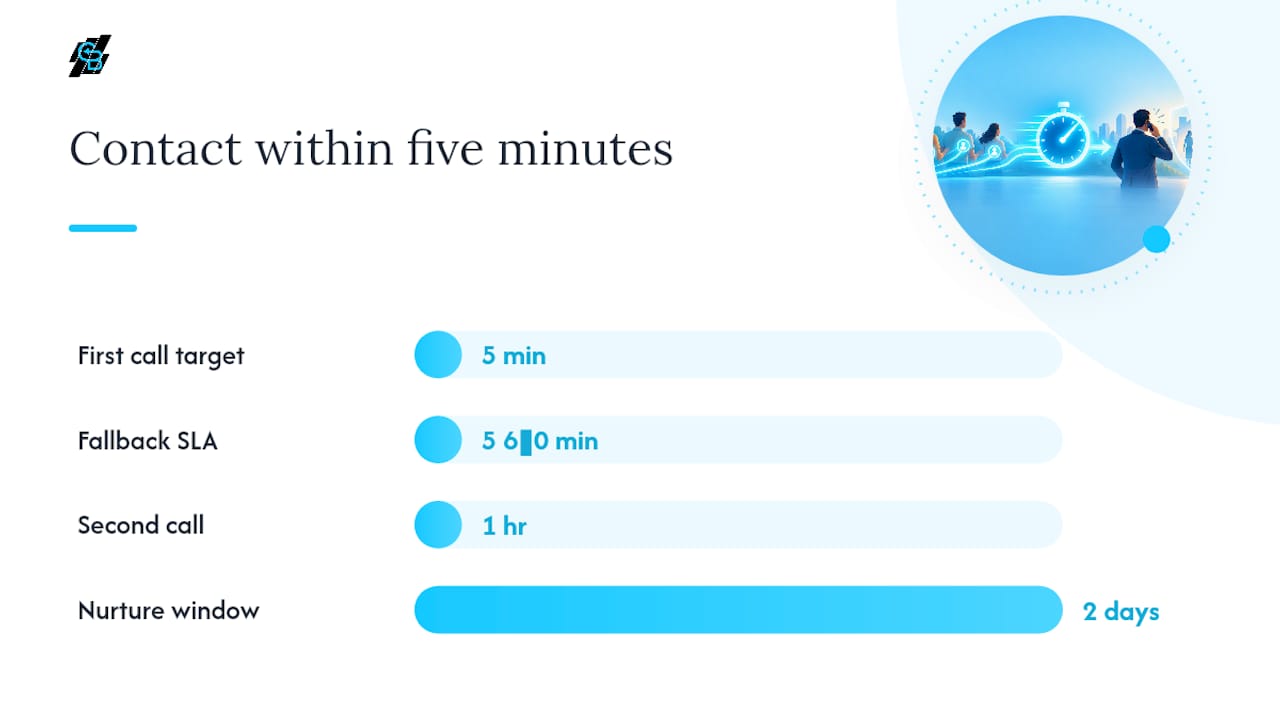
- Set a fallback rule: if the first assigned agent doesn’t claim the lead within a set SLA (five to ten minutes is typical), auto-reassign it to the next available agent.
- Trigger an automated SMS and email within seconds of submission, confirming receipt and setting expectations for a callback.
- Use lead scoring built from the qualifying question answers, coverage type, budget range, decision-maker status, to push higher-value leads to your best closers first.
A workable cadence looks like this: call attempt within five minutes, a text if the call goes unanswered, a second call attempt within the hour, and an email plus voicemail sequence spread across the next two days if contact still hasn’t happened. Stop after five or six touches unless the lead has re-engaged. Structured nurturing sequences that mix channels consistently outperform single-channel follow-up.
Pro Tip: Treat the first SMS as a confirmation, not a pitch. “Thanks for your interest in coverage, [name] will call you shortly” builds trust and keeps the person from marking the message as spam.
A real-time webhook paired with immediate SMS and a ring-desk routing setup produces the largest measurable jump in answer rate and closing speed of any change agents make to this pipeline.
What Compliance Steps Protect You Before Scaling?
Insurance lead generation sits in a regulated corner of digital marketing, and the FTC has made its position on healthcare-related lead generation clear. Before you scale ad spend, work through this checklist:
- Confirm your campaign is flagged under Meta’s Special Ad Category and that your form displays a working, accessible privacy policy link.
- Add explicit consent language covering both calls and text messages, and store the timestamp of that consent with each record.
- Screen new leads against the Do Not Call registry and preserve documented opt-outs before any outbound call goes out.
- Retain call-detail records showing who was contacted, when, and by what method, in case a TCPA or TSR dispute arises later.
- Review your ad copy and form language for anything that could be read as a coverage or pricing guarantee you can’t back up.
The FTC’s warning letters to healthcare plan marketers and lead generators spell out the stakes directly: misrepresenting coverage, cost, or plan details in marketing or lead generation can violate Section 5 of the FTC Act, and violations can trigger injunctions, civil penalties, and consumer redress. This isn’t a theoretical risk category reserved for bad actors. It applies to routine phrasing choices in everyday ad copy if they overstate what a plan covers or costs.
Keep records longer than you think you need to. If your agency scales past a handful of campaigns, build a simple log of which creative ran, what consent language appeared on each form version, and when each version launched. That documentation is what protects you if a regulator or a plaintiff’s attorney ever asks.
What Ad and Form Copy Pre-Qualifies Leads?
The best lead-quality filter happens before someone clicks submit, not after. Self-selecting copy in your headline and primary text does more filtering work than any targeting setting.
Headlines that name the specific product and audience constraint outperform generic ones:
- “Term Life Coverage for Homeowners Over 40” filters out people who don’t fit either criterion, before they click.
- “Compare Medicare Supplement Plans in Your State” signals exactly who should keep reading.
- Avoid vague phrases like “Get a Free Quote Today,” which attracts anyone curious and nobody committed.
For creative, short vertical video outperforms static images for most insurance products, especially when it shows a real person explaining coverage in plain terms rather than stock footage of a family on a beach. Skip anything that implies a specific dollar savings figure you can’t guarantee across all applicants; that’s the exact language the FTC flags.
On the form itself, set expectations plainly: “A licensed agent will call you within 24 hours to review your options” cuts down no-shows because the person knows what’s coming next. Reserve full landing pages, rather than the native instant form, for higher-intent products like final expense or long-term care, where a slightly longer explanation before the form actually improves conversion by weeding out browsers.
How Do You Calculate Cost Per Sale, Not Just Cost Per Lead?
Cost per lead tells you almost nothing about profitability on its own. Two campaigns with identical CPL can produce wildly different returns if one delivers leads that convert to bound policies twice as often. The KPIs that actually matter:
- Cost per issued policy, the true bottom-line number for any campaign.
- Lead to quote to bind conversion rate, tracked at each funnel stage separately.
- Time to first contact, since slower response consistently correlates with lower close rates.
- Close rate by lead source and creative ID, so you know which ad variant is producing buyers, not just clicks.
Here’s the simple math: if your CPL is $40 and 20 percent of leads convert to a quote, and 25 percent of quotes bind, your cost per issued policy is $40 divided by 0.20 divided by 0.25, or $800. That number, not the $40 CPL, tells you whether the campaign is profitable given your average policy’s lifetime value. Insurance carries higher cost-per-click than most industries, but policy lifetime value often justifies it once quality is controlled.
Tag every lead with campaign ID, creative ID, line of business, and source at the point of capture, not after the fact. Review this reporting weekly during the first month of a new campaign and monthly once it stabilizes, and run one creative or targeting experiment at a time so you know what actually moved the number.
How Callbackcrm Wires This Workflow End to End
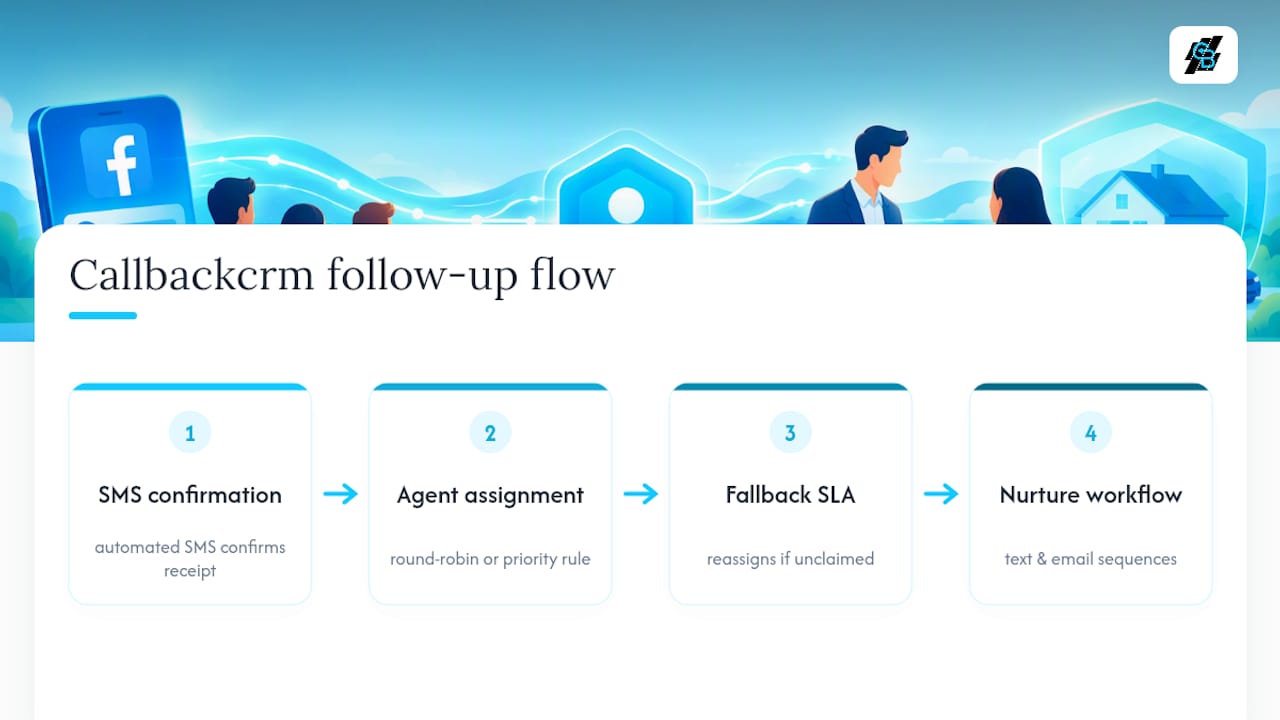
The pipeline described above, webhook to CRM to auto-text to ring desk to nurture, is exactly what a Facebook integration is built to run. A new lead submits a Higher Intent form, the Leads Webhook fires, and the record lands in the CRM pipeline within seconds with every custom question answer mapped to its own field.
From there, an automated SMS confirms receipt, a round-robin or priority rule assigns the lead to an available licensed agent, and a fallback SLA reassigns it if nobody claims it fast enough. If the first call goes unanswered, a pre-built nurture workflow picks up with text and email sequences over the following days.
Setup checklist: connect your Meta ad account, map custom question fields to CRM fields, enable consent capture on the form record, turn on the SMS confirmation template, and send one test lead through before turning on paid spend.
What Actually Matters When You Scale This
Most agents chase lower cost per lead first and fix follow-up later. That’s backwards. A cheap lead nobody calls for three hours is worse than an expensive one an agent reaches in five minutes. Get the automation and compliance controls working before you increase spend, track cost per issued policy from week one, and treat your form copy as a filter, not just a pitch. The agencies winning on Meta right now aren’t spending more. They’re wasting less on leads that were never going to convert.
— Kyle
Get the Facebook Lead Ads Wiring Set Up Without Hiring a Developer
There are solutions that provide the wiring this article recommends, including native Facebook Lead Ads integration, real-time webhook routing, automated SMS and voicemail follow-up, and built-in lead scoring, without needing a developer to build or maintain a webhook.

If you’re currently pulling leads manually from Ads Manager or waiting on a Zapier delay, the switch to a native connector alone will change your speed-to-lead numbers. Callbackcrm’s phone system add-ons cover the calling and texting infrastructure this workflow depends on, and the SMS marketing features handle the confirmation and nurture sequences automatically once a lead lands.
Start with the Professional plan at $97 per month if you’re an independent agent, or look at the Enterprise options starting at $297 per month for 10 full CRM accounts if you’re running an agency or IMO with multiple producers. Sign up, connect your Meta ad account, and run a test lead through the pipeline this week.
Sources
For deeper reading on the mechanics and rules covered here, check Meta’s Lead Ads setup and CRM documentation, the FTC’s warning letters to healthcare plan marketers and lead generators, and Insurance Marketing Co.'s guide to Special Ad Category rules. For a deeper look at nurture sequence design, Baby Love Growth’s lead nurturing guide is a solid reference.
This article is general information, not a substitute for advice from a qualified financial advisor. Consult a qualified financial professional about your own circumstances before acting on anything here.
- Meta Lead Ads: Instant Forms, Setup & CRM | Digital Codex
- Facebook Ads for insurance: Lead Gen Strategy - Scale Growth Digital
- FTC warning letters to healthcare plan marketers and lead generators (2025)
- How to Run Facebook Ads for Insurance Agents (2026)
FAQ
Are the Insurance Ads on Facebook Legitimate?
Yes, Facebook Lead Ads are a legitimate and widely used insurance marketing channel, provided the campaign is flagged under Meta’s Special Ad Category and the form carries a working privacy policy link. Legitimacy problems arise from how an agency uses the ad, misleading claims or missing consent language, not from the ad format itself.
How Much Does It Cost to Buy Insurance Leads?
Cost per lead varies widely by product line and targeting, and insurance carries higher CPCs than most industries because of strong competition for high-value buyers. The more useful number to track is cost per issued policy, which accounts for how many leads actually convert to quotes and bound business.
How Do I Integrate Facebook Lead Ads With My CRM?
Connect through a native CRM integration, Meta’s Leads Webhook, or a no-code tool like Zapier, in that order of speed and reliability. Platforms like Callbackcrm offer a direct native connector that pushes leads into your pipeline within seconds and maps custom question answers to CRM fields automatically.
What Is the Major Benefit of Facebook Lead Ads?
The biggest advantage is prefilled, mobile-native forms that reduce submission friction while still capturing qualifying information, especially with Higher Intent settings and custom questions. Combined with real-time delivery to a CRM, this shortens the gap between ad click and agent contact, which is the strongest driver of conversion in the whole funnel.
What Does Callbackcrm Cost for This Setup?
The Professional plan runs $97 per month, and Enterprise plans for larger agencies start at $297 per month for 10 full CRM accounts. Add-on fees for phone numbers, texting, and AI features are listed on the pricing and fees page.