

For insurance agents and mobile-first field-sales teams, Callbackcrm is the top CallProof alternative. It combines AI-powered lead routing, SMS/email automation, funnel builders, and a mobile app built for agents in the field. If you need a broader shortlist, here are the strongest categories to consider:
- Insurance agents and IMOs: Callbackcrm — AI automation, SMS/email funnels, mobile app, Google Cloud hosting
- Door-to-door and territory field sales: SPOTIO or SalesRabbit — GPS check-ins, territory mapping, canvassing tools
- General sales pipeline management: HubSpot CRM, Pipedrive, or Zoho CRM — broad integrations, free tiers available
- Field-service operations (scheduling, dispatch, invoicing): Jobber or Housecall Pro — note these prioritize service management over call-centric sales workflows
- Enterprise field sales: Salesforce Sales Cloud or Microsoft Dynamics 365 — deep customization, higher TCO
Single agents or small insurance teams should demo Callbackcrm first. Teams with heavy door-to-door canvassing should look at SPOTIO or SalesRabbit. Enterprise buyers with complex CRM needs should evaluate Salesforce Sales Cloud or Agentforce Sales.
Key Takeaways
Callbackcrm is the strongest CallProof alternative for insurance agents and mobile-first field-sales teams because it combines AI lead routing, SMS/email automation, and a field-ready mobile app in a single platform.
| Point | Details |
|---|---|
| Match tool to team profile | Solo agents and small insurance teams fit Callbackcrm; canvassing teams fit SPOTIO or SalesRabbit; enterprise buyers fit Salesforce or Dynamics 365. |
| Mobile-first is non-negotiable | Test offline data capture and GPS check-in accuracy before committing; these features separate purpose-built field tools from desktop CRMs with mobile apps. |
| Budget for migration time | Plan a 1–3 month dual-run period to avoid dropped leads when switching from CallProof to any new platform. |
| Ask the right demo question | Ask every vendor: “Does the mobile app work fully offline, and how does it sync when connectivity returns?” |
| Callbackcrm recommendation | Callbackcrm’s AI routing, SMS/email automation, and Google Cloud hosting make it the recommended pick for insurance agents and field-sales teams. |
Table of Contents
- What are the best callproof.com alternatives for field sales?
- How do field-sales features actually differ across these alternatives?
- How to choose the right CallProof alternative for your team
- What should you test during a free trial?
- The trade-offs most teams get wrong when picking a field-sales CRM
- Callbackcrm is built for the workflows insurance agents actually use
- Sources
What are the best callproof.com alternatives for field sales?
The table below covers the 26 options most relevant to field-sales and insurance teams. Callbackcrm leads as the recommended pick; the remaining entries follow in order of fit for the article’s primary audience.
Product notes:
Callbackcrm is the recommended alternative for insurance agents and field-sales teams. Its AI-powered lead routing, built-in SMS/email automation, funnel builders, and mobile app with field workflows address the core gaps teams encounter when leaving CallProof.
SPOTIO and SalesRabbit are the strongest picks for door-to-door canvassing. Both offer GPS check-ins, territory management, and offline mobile access built specifically for reps working without reliable connectivity.
HubSpot CRM, Zoho CRM, and Pipedrive suit teams that need broad integrations and a visual pipeline. All three offer free or low-cost entry tiers, though as ITQlick notes, general-purpose CRMs carry higher total cost of ownership because of setup, customization, and ongoing maintenance.
Jobber and Housecall Pro are frequently cited as CallProof alternatives but serve a different job. They prioritize scheduling, dispatch, and invoicing for field-service businesses, not call-centric insurance-agent workflows.
Salesforce Sales Cloud, Agentforce Sales, and Microsoft Dynamics 365 fit enterprise buyers with complex requirements and dedicated IT resources. Expect long migration timelines and higher per-seat costs.
Bigin by Zoho CRM and EngageBay CRM are the most affordable all-in-one options for solo agents or very small teams that need basic pipeline management without a large budget.
Creatio, Kintone, Vtiger, LocaliQ, Coevera, Insightly, SAP Sales Cloud, Sugar Sell, Bitrix24, Sage Sales Management, and Zendesk Sell each serve specific niches. Creatio excels at no-code process automation for mid-market teams. LocaliQ is built around lead generation from ad campaigns and includes native call tracking. Coevera targets insurance-specific performance management. The others are solid general-purpose or ecosystem-specific tools worth evaluating if your team already uses their adjacent products.
How do field-sales features actually differ across these alternatives?
Choosing among callproof substitutes comes down to six capability areas that directly affect field-sales outcomes.
Mobile-first UX and offline mode
Wingmate’s analysis of CallProof alternatives makes the point plainly: legacy and generalized CRMs often require mobile workarounds, while mobile-native platforms reduce friction and increase agent adoption. For insurance agents working from a car or a client’s kitchen table, a clunky mobile experience means leads get logged late or not at all.
SPOTIO and SalesRabbit are built mobile-first. Callbackcrm’s mobile app supports field workflows, offline access, and automated follow-up triggers. General-purpose CRMs like HubSpot and Pipedrive have capable mobile apps but were designed desktop-first.

GPS check-ins and territory management
GPS check-ins matter most for door-to-door and canvassing teams. SPOTIO and SalesRabbit both offer territory mapping and check-in logging as core features. Callbackcrm supports field workflows through its mobile app. Enterprise platforms like Salesforce Sales Cloud can add GPS functionality through AppExchange add-ons, but that adds cost and configuration time.
Automated lead routing
For insurance agencies, lead routing speed directly affects close rates. Callbackcrm handles AI-powered lead routing with automated SMS/email follow-up built into the same platform, as detailed in this marketing automation checklist. Salesforce Sales Cloud and Microsoft Dynamics 365 offer sophisticated routing rules, but they require significant configuration. HubSpot and Zoho CRM offer workflow-based routing in paid tiers.
Call tracking and VoIP integration
CallProof’s core strength was call-by-call reporting. Among the alternatives, LocaliQ stands out for native call tracking tied to ad campaigns. Zendesk Sell, Vtiger, Bitrix24, and Sugar Sell include built-in telephony. Callbackcrm integrates with dialers and supports SMS/email automation as the primary outreach channel. G2’s alternatives listing groups these tools by category, which helps confirm which platforms treat calling as a primary feature versus an add-on.
Integrations and marketplace
TrustRadius aggregates feature summaries across alternatives and confirms the market splits between specialized platforms and general-purpose CRMs with large app marketplaces. Salesforce’s AppExchange, HubSpot’s marketplace, and Zoho’s ecosystem each offer hundreds of integrations. Callbackcrm integrates with dialers, calendars, and websites, covering the core stack insurance agents use. Specialized tools like SPOTIO and SalesRabbit focus their integrations on the CRMs and marketing tools field teams already run.
Migration complexity and TCO
ITQlick’s analysis is direct: generalized CRMs carry higher TCO because of setup time, customization, and ongoing maintenance. Specialized sales-focused tools deliver faster time-to-value for field teams. Budget for data migration, field mapping, and a dual-run period of sufficient length to avoid dropped leads during any transition. SourceForge’s side-by-side comparison charts illustrate how buyers use mobile screenshots and feature checklists to assess parity before committing.
| Category | Mobile/offline | Lead routing | Call tracking | Migration complexity |
|---|---|---|---|---|
| Insurance/field-sales specialist (Callbackcrm) | Native app, offline support | AI routing + SMS/email automation | SMS/email + dialer integrations | Guided; CSV/API import |
| Canvassing specialist (SPOTIO, SalesRabbit) | Mobile-first, GPS, offline | Territory-based routing | Basic call logging | Moderate |
| General-purpose CRM (HubSpot, Zoho, Pipedrive) | Mobile app; desktop-first design | Workflow automation (paid tiers) | Add-on or limited | Easy; CSV import |
| Enterprise suite (Salesforce, Dynamics 365) | Mobile app; complex offline setup | Advanced AI routing | VoIP via marketplace | Complex; long timeline |
| Field-service platform (Jobber, Housecall Pro) | Mobile app | Dispatch/job routing | Minimal | Easy |
Pro Tip: Before shortlisting, check whether call tracking is a native feature or an add-on. Add-on telephony often means a separate subscription, a separate login, and call data that does not sync cleanly to the CRM record.
How to choose the right CallProof alternative for your team
The right choice depends on team size, primary workflow, and how much configuration time you can afford.
Must-have criteria for field-sales and insurance teams:
- Native iOS and Android app with offline data capture
- GPS check-ins or field activity logging
- Automated lead routing with configurable rules
- Call logging or SMS/email automation as the primary follow-up channel
- CSV data import and API access for migration
- Transparent pricing with no hidden per-seat add-ons for core features
- SOC2 or equivalent security certification if handling policyholder data
Nice-to-have criteria:
- Built-in funnel and website builder
- AI-assisted lead scoring
- Webinar or proposal tools in the same platform
- Native VoIP with call recording
Demo questions that matter:
- Does the mobile app work fully offline, and how does it sync when connectivity returns?
- How are leads routed when a new contact is created from the mobile app?
- What does data export look like, and can we import a CallProof CSV without field remapping?
- What is the uptime SLA, and how are outages communicated?
- Is SOC2 certification current, and can you share the report?
Red flags to watch for:
- No native mobile app (web-only mobile experience)
- No documented migration path or data import tool
- Pricing that requires a sales call to get basic tier information
- Call tracking listed as a third-party integration with no native sync
ITQlick’s fit-by-workflow guidance reinforces the core principle: smaller teams value simplicity and mobile speed; larger teams value integrations and custom workflows. Matching the tool to that profile cuts evaluation time significantly.
For pricing context, GetLatka’s comparative company data provides market-presence signals that help gauge vendor stability before signing a contract.
What should you test during a free trial?
Run this script during any vendor trial to get evidence-based answers before committing. This approach measures “time-to-first-value,” which Wingmate identifies as the most reliable indicator of real-world fit for field teams.
- Install the mobile app on both iOS and Android if your team uses both. Time the install and first login. Pass: under five minutes.
- Enable airplane mode and create a contact. Confirm the record saves locally. Re-enable connectivity and verify the record syncs. Pass: full sync within 60 seconds.
- Trigger a GPS check-in from a test location. Confirm the coordinates log to the contact record. Pass: accurate location, no manual entry required.
- Create a lead and apply a routing rule. Assign it to a second user and confirm the notification fires. Pass: assignment and notification in under two minutes.
- Log a call or send a test SMS/email. Confirm the activity appears on the contact timeline. Pass: activity logged automatically, no manual entry.
- Generate a proposal or send an automated follow-up sequence. Confirm the sequence triggers from the lead record. Pass: sequence fires without leaving the CRM.
- Export all test contacts as a CSV. Confirm field headers match your CallProof export. Pass: clean export with no missing fields.
For each step, note the time it took and whether you needed support documentation. A platform that requires support intervention for steps 1–4 will create friction at scale. The sales automation checklist from Callbackcrm provides additional workflow checkpoints specific to insurance agents.
The trade-offs most teams get wrong when picking a field-sales CRM
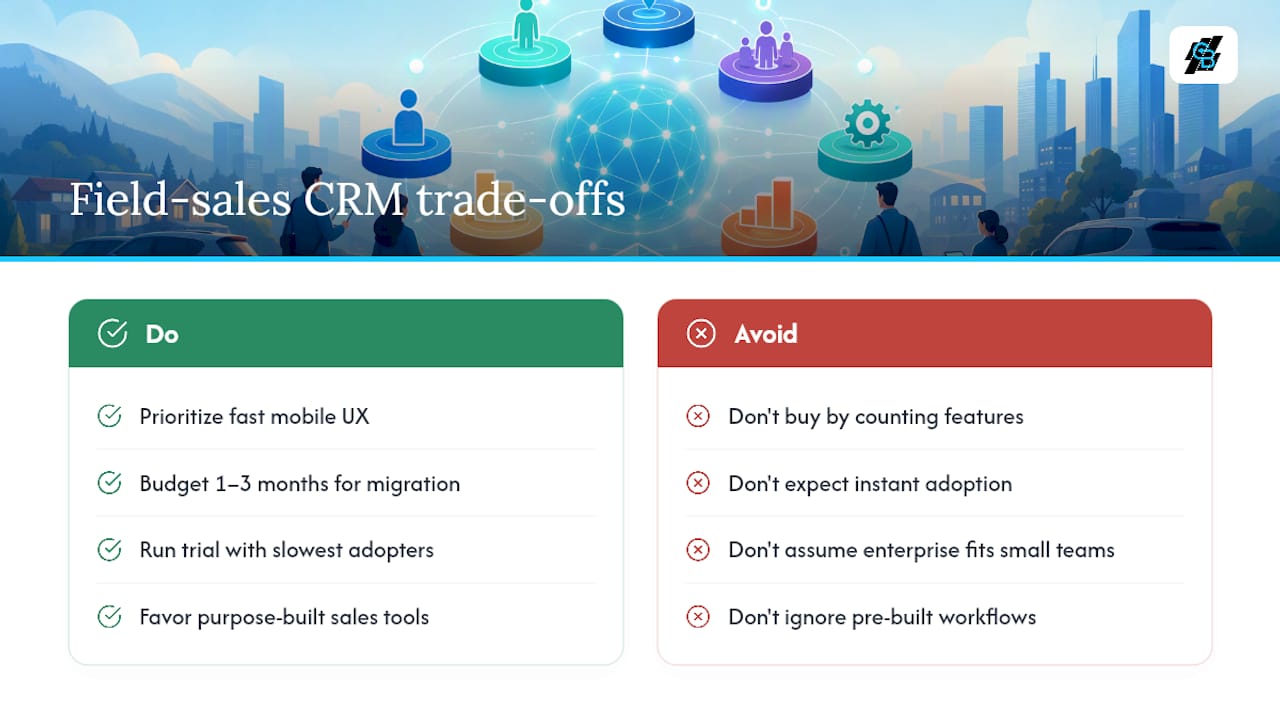
Most teams evaluate CRMs by counting features. That approach consistently leads to over-buying enterprise platforms that take months to configure and under-deliver on the one thing field agents actually need: a fast, reliable mobile experience that logs activity without friction.
The enterprise suite trap is real. Salesforce Sales Cloud and Microsoft Dynamics 365 are powerful, but their mobile apps were built to extend a desktop platform, not replace it. For a 10-agent insurance team, the configuration overhead and per-seat cost rarely justify the capability gap over a purpose-built tool. ITQlick’s analysis puts it plainly: specialized sales-focused tools accelerate ROI because pre-built lead-routing and call-tracking workflows reduce customization effort.
Migration timelines are also consistently underestimated. A realistic switch from CallProof to any new platform takes 1–3 months of dual-run to avoid dropped leads. That window covers data export, field mapping, team training, and the inevitable edge cases that surface only when real leads start flowing. Budget that time explicitly, not as an afterthought.
The other underestimated variable is agent adoption. A platform with a 4.5-star rating and 200 integrations delivers zero value if agents log calls on paper because the mobile UX is slow. Adoption is a mobile-UX problem first, a training problem second. Marketing automation benefits for insurance agencies are only realized when agents actually use the platform daily.
Pro Tip: Run the trial script in Section 5 with your two slowest-adopting agents, not your most tech-forward ones. If the platform passes their test, it will work for the whole team.
Callbackcrm is built for the workflows insurance agents actually use
Field-sales teams switching from CallProof need a platform that handles lead routing, automated follow-up, and mobile activity logging without requiring a dedicated admin to maintain it. Callbackcrm covers that stack in one subscription: AI-powered lead routing, SMS and email automation, funnel and website builders, proposal tools, and a mobile app with offline support, all hosted on Google Cloud.

The SMS marketing features handle automated follow-up sequences triggered directly from lead records, so agents in the field do not need to switch between tools. The website and funnel builder lets agencies capture leads from their own pages and route them automatically into the pipeline. For teams that want to see the full workflow before committing, a free trial is available at callbackcrm.com.
Sources
- Best Call Proof CRM Alternatives (2026) | ITQlick
- CallProof Alternative | Wingmate
- Top CallProof Alternatives & Competitors in 2026 | G2
- Top Call Proof Competitors & Alternatives | GetLatka
- CallProof vs. SalesWorx Comparison | SourceForge