

TL;DR:
- A secure cloud CRM hosts customer data on vendor-managed servers that use encryption, access controls, and compliance standards. It relies on three principles: data confidentiality, integrity, and availability, managed by the vendor, while businesses control user access and internal policies. SMBs should verify baseline security controls like AES-256 encryption, TLS 1.3, MFA, and RBAC, and demand transparency through reports and data residency guarantees for better protection.
A secure cloud CRM is customer relationship management software hosted on vendor-managed remote servers that protects customer data through encryption, access controls, and compliance with standards like SOC 2 Type II and ISO 27001. The industry term for this category is “cloud-based CRM with enterprise-grade security,” though “secure cloud CRM” captures the same concept for most business owners evaluating their options. Understanding what separates a genuinely secure platform from a basic one is the first decision that protects your business and your clients.
The foundation of any secure cloud CRM rests on three principles: data confidentiality, data integrity, and data availability. Vendors deliver these through a Software-as-a-Service model where they manage infrastructure security, patching, and disaster recovery. Your responsibility covers user access, permissions, and internal usage policies. That division of duties is called the shared responsibility model, and misunderstanding it is the most common mistake small to mid-sized businesses make when moving to the cloud.
What are the essential security features in a secure cloud CRM?
A secure cloud CRM must include four foundational controls before any other feature matters. AES-256 encryption at rest, TLS 1.3 or higher for data in transit, native multi-factor authentication (MFA), and granular role-based access control (RBAC) form the baseline every SMB should require. Any platform missing one of these four is not a secure option, regardless of its marketing claims.

Beyond the baseline, advanced platforms add Data Loss Prevention (DLP) tools, SCIM provisioning for automated user management, and WORM-compliant audit logs. DLP tools flag or block unauthorized data exports before they leave your system. SCIM provisioning syncs user accounts automatically when an employee joins or leaves, which closes one of the most common access gaps in growing businesses.
| Security Control | What it does | Why SMBs need it |
|---|---|---|
| AES-256 encryption at rest | Protects stored data from unauthorized reads | Covers breach scenarios where storage is accessed directly |
| TLS 1.3 in transit | Encrypts data moving between browser and server | Stops interception on public or shared networks |
| Multi-factor authentication | Requires a second verification step at login | Blocks credential-stuffing attacks even when passwords leak |
| Role-based access control | Limits what each user can see or edit | Reduces insider risk and accidental data exposure |
| WORM audit logs | Records all user actions in a tamper-proof log | Provides evidence for compliance audits and incident reviews |
Pro Tip: Ask vendors for their SOC 2 Type II report and their most recent penetration test summary before signing a contract. A vendor who hesitates to share these documents is signaling a security posture you should not trust.
How does secure cloud CRM compare to on-premise CRM security?
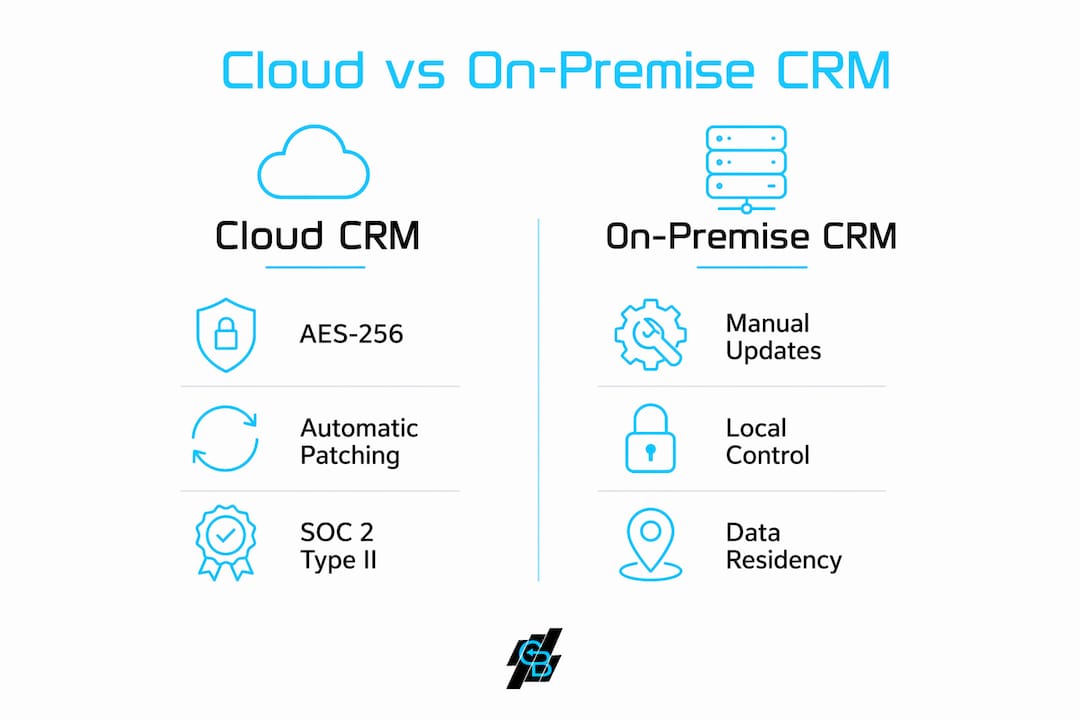
Cloud CRM security frequently exceeds what SMBs can maintain on their own servers. Vendors spread the cost of security certifications, penetration testing, and 24/7 threat monitoring across their entire customer base, which makes enterprise-grade protection affordable for a 10-person insurance agency that could never fund it independently. On-premise systems place that entire burden on your internal IT team or outside contractor.
The operational advantages are equally significant. Cloud vendors push automatic security patches, often within hours of a vulnerability being discovered. On-premise systems require your team to test, schedule, and apply each patch manually, which creates windows of exposure that can last weeks. Advanced cloud platforms also deploy AI-driven threat detection that identifies unusual login patterns or data access before a breach completes.
The trade-offs are real but manageable. Data residency is the main concern for regulated industries. Some cloud vendors store data in jurisdictions that may conflict with state or federal compliance requirements. Businesses in insurance, healthcare, or finance must verify where data physically lives before signing any agreement.
Pro Tip: Request a written data residency guarantee and ask specifically which subprocessors handle your data. Transparency about subprocessors and incident response SLAs is a stronger signal of security maturity than any badge on a vendor’s homepage.
What practical steps should SMBs take to maintain CRM security after deployment?
Deploying a secure cloud CRM is not the finish line. The shared responsibility model places user access management and internal behavior squarely on your team. Vendors harden the infrastructure. You control who gets in and what they can do once inside.
Follow these steps to maintain security after your CRM goes live:
- Enable MFA for every user account on day one. Do not make it optional. A single account without MFA is an open door for credential attacks.
- Apply the least-privilege principle. Give each team member access only to the data and features their role requires. A sales rep does not need admin access to billing records.
- Conduct quarterly access reviews. Verify that every active account still belongs to a current employee with a legitimate need.
- Build a formal offboarding checklist. Revoke CRM access within the same hour an employee leaves the company. Delayed offboarding is one of the most preventable breach causes.
- Set proactive audit log alerts. Audit logs are detective controls that most SMBs only review after an incident. Configure alerts for unusual login times, bulk data exports, or repeated failed access attempts.
- Vet every third-party integration. API security is often overlooked, and many breaches happen through poorly configured app connections. Require vendors to support OAuth 2.0 with fine-grained permission scopes rather than full-admin API keys.
Pro Tip: Treat your CRM access review like a financial audit. Schedule it on the calendar, assign an owner, and document the results. Regulators and cyber insurers increasingly ask for this evidence.
What are the benefits of a secure cloud CRM for SMB customer management?
A secure cloud CRM does more than protect data. It changes how your team works and how your clients experience your business. The benefits compound quickly once the platform is running.
- Anywhere access with consistent security. Your agents can log in from a home office, a client meeting, or a mobile device without creating new security risks. Encryption and MFA travel with every session.
- Lower IT costs. Cloud vendors handle server maintenance, backups, and security updates. SMBs eliminate the capital expense of on-premise hardware and the ongoing cost of managing it.
- Always-current security protections. Automated security patches and AI-driven threat detection mean your platform responds to new threats without waiting for your IT team to act.
- Integration with marketing and sales tools. A secure cloud CRM connects to email, SMS, and automation platforms, giving your team a single place to manage leads and client relationships without exporting data to unsecured spreadsheets.
- Compliance support built in. Platforms certified to SOC 2 Type II and ISO 27001 give you documented evidence of security controls, which satisfies auditors and strengthens client trust. For insurance agencies, this directly supports CRM data privacy compliance requirements.
- Business continuity. Cloud vendors maintain redundant infrastructure and disaster recovery systems. A server failure that would shut down an on-premise operation becomes a non-event for cloud users.
The ROI case for SMBs is straightforward. Reduced IT overhead, fewer breach-related costs, and stronger client retention from demonstrated data stewardship all contribute to a measurable return. For businesses exploring how automated marketing tools can work alongside a secure CRM, the combination of data protection and outreach efficiency creates a compounding growth advantage.
Key Takeaways
A secure cloud CRM protects customer data through vendor-managed encryption, access controls, and compliance certifications, while requiring businesses to actively manage user permissions and monitor activity after deployment.
| Point | Details |
|---|---|
| Four baseline security controls | Require AES-256 encryption, TLS 1.3, native MFA, and RBAC before evaluating any other feature. |
| Shared responsibility model | Vendors secure infrastructure; your team controls user access, permissions, and internal behavior. |
| Cloud vs. on-premise security | Cloud vendors spread certification and monitoring costs across customers, making enterprise security affordable for SMBs. |
| Post-deployment vigilance | Enable MFA on day one, apply least-privilege access, and set proactive audit log alerts to catch threats early. |
| Vendor transparency matters | Demand SOC 2 Type II reports, data residency guarantees, and subprocessor disclosures before signing any agreement. |
Why most SMBs get cloud CRM security wrong from the start
The biggest mistake I see small and mid-sized businesses make is treating cloud CRM security as a vendor problem. They sign a contract with a certified platform, check the security box, and move on. Six months later, a former employee still has active login credentials, three sales reps share one admin account, and nobody has looked at an audit log since launch day.
The shared responsibility model is not a technicality buried in a terms of service document. It is the operating reality of every cloud platform you will ever use. Vendors are genuinely excellent at securing infrastructure. They invest in certifications, penetration testing, and threat monitoring at a scale no SMB can match independently. But they cannot control what your team does once they are logged in.
The businesses I have seen handle this well treat CRM security like any other operational process. They assign an owner, build a quarterly review into the calendar, and document their access decisions. When a cyber insurer or a compliance auditor asks for evidence of security controls, they have it ready. That preparation is not just good security hygiene. It is a competitive signal to clients that their data is in responsible hands.
My honest recommendation: spend as much time evaluating a vendor’s incident response process and subprocessor transparency as you spend on their feature list. A vendor who publishes a clear, time-bound incident response SLA and willingly shares their SOC 2 Type II report is telling you something important about their culture. A vendor who deflects those questions is telling you something equally important.
— Kyle
Callbackcrm and secure cloud CRM for your business
Callbackcrm is built on Google Cloud infrastructure, which means your client data benefits from enterprise-grade encryption and continuous security monitoring from day one.

The platform combines SMS marketing features with a full CRM suite, including AI-powered lead scoring, automation workflows, and role-based access controls designed for insurance agencies and IMOs. Every client interaction, from first contact to signed contract, stays inside a single secure environment. Callbackcrm also provides 24/7 customer support, so your team is never left managing a security question alone. If you are evaluating secure CRM software options for your agency, Callbackcrm is worth a close look.
FAQ
What is a secure cloud CRM?
A secure cloud CRM is customer relationship management software hosted on vendor-managed servers that protects data through encryption, multi-factor authentication, role-based access controls, and compliance with standards like SOC 2 Type II and ISO 27001.
What makes a CRM truly secure?
A CRM is genuinely secure when it combines AES-256 encryption at rest, TLS 1.3 in transit, native MFA, granular RBAC, and WORM-compliant audit logs, backed by a vendor who publishes SOC 2 Type II reports and clear incident response SLAs.
How do I choose a cloud CRM with strong security?
Request the vendor’s SOC 2 Type II report, confirm data residency guarantees, verify support for OAuth 2.0 API authentication, and check that MFA is available for all user accounts before signing any agreement.
Is cloud CRM more secure than on-premise CRM?
Cloud CRM security typically exceeds what SMBs can maintain on-premise because vendors spread the cost of certifications, penetration testing, and 24/7 monitoring across their entire customer base, making enterprise-grade protection accessible at a fraction of the cost.
What are the benefits of a secure cloud CRM for small businesses?
The primary benefits include lower IT overhead, automatic security updates, anywhere access with consistent encryption, built-in compliance documentation, and integration with marketing tools that keep client data inside a single protected environment.
Recommended
- What Is Sales Engagement Software? A 2026 Guide | CallBack CRM Blog
- What Is Multi-Channel CRM? A 2026 Guide for Marketers | CallBack CRM Blog
- Top 4 lead2clientcrm.com Alternatives in 2026 for Businesses Seeking Efficient CRM Solutions
- Cloud CRM for insurance: 2X leads and 50% better retention | CallBack CRM Blog