

TL;DR:
- Ignoring CRM data privacy risks can lead to severe fines and damage client trust.
- Insurance agencies must comply with layered regulations like HIPAA, TCPA, and CCPA, requiring specific CRM features.
- Ongoing audits and privacy-first platform choices are essential for maintaining regulatory compliance and client confidence.
Ignoring CRM data privacy in insurance is not just a technical oversight. It is a business liability. A single breach can expose protected health information, trigger six-figure fines, and permanently damage client trust. Healthcare breach costs averaged $10.93M in 2025 alone, and insurance agencies face a web of overlapping regulations that most teams are not fully prepared for. This guide breaks down the key laws, the CRM features that matter most, and the practical steps your agency needs to protect client data and stay compliant without slowing down your sales process.
Table of Contents
- Understanding CRM data privacy risks in insurance
- Key regulations affecting CRM data privacy
- Critical CRM features for privacy compliance
- Best practices for maintaining privacy and compliance
- What most guides get wrong about CRM data privacy in insurance
- Take the next step: Choose a privacy-first CRM
- Frequently asked questions
Key Takeaways
| Point | Details |
|---|---|
| High-stakes risk | Insurance client data exposures lead to severe regulatory fines and reputational harm. |
| Regulations are layered | CRMs must support TCPA, HIPAA, NAIC, CCPA, and state law compliance with clear workflows. |
| Feature-fit is critical | Seek CRMs with role-based access, audit logs, and PHI-grade encryption for real regulatory coverage. |
| Continuous improvement | Quarterly privacy reviews, staff training, and AI-risk flagging reduce incidents and fines. |
| Ethics matters | Privacy isn’t just about laws—proactive stewardship builds trust and long-term agency value. |
Understanding CRM data privacy risks in insurance
Insurance agencies sit on some of the most sensitive personal data in any industry. Your CRM stores names, Social Security numbers, health histories, financial records, and detailed communication logs. That combination makes your database a high-value target for cybercriminals and a high-risk environment for accidental exposure.
The types of data at risk include:
- Protected health information (PHI): Medical diagnoses, treatment records, and prescription data tied to health insurance policies
- Personally identifiable information (PII): Birthdates, addresses, driver’s license numbers, and Social Security numbers
- Communication logs: Call recordings, email threads, SMS exchanges, and meeting notes
- Behavioral data: Browsing patterns, quote requests, and engagement history that can reveal sensitive life events
Even behavioral data that falls outside strict legal definitions can create liability. If a client’s browsing history reveals a terminal diagnosis or a pending divorce, and that data leaks, the reputational and legal fallout can be severe regardless of whether a specific law was technically violated.
The consequences of a data breach go beyond fines. Agencies face lawsuits from affected clients, loss of carrier partnerships, and the kind of reputation damage that takes years to rebuild. Healthcare breach costs averaged $10.93M in 2025, and health insurance is just one slice of what agencies handle. Property, life, and auto lines each carry their own data sensitivity.
Insurance agencies using CRM for insurance sales must recognize that the platform holding all this data is only as safe as the controls built around it. A CRM without proper access controls, encryption, and consent management is not a sales tool. It is an open liability.
Pro Tip: Map every data type your CRM stores against the regulations that govern it before you evaluate any new platform. This single step reveals gaps that most agencies never see until an audit or breach forces the issue.
The AI engagement strategies your agency uses to personalize outreach also create new data exposure points. Every AI-driven touchpoint generates data. That data must be governed just as carefully as any other record in your system.
With the high stakes clear, the next logical question is: what laws and standards must agencies actually follow?
Key regulations affecting CRM data privacy
Insurance agencies must navigate a layered regulatory environment. No single law covers everything, and the overlap between federal, state, and industry-specific rules creates real complexity.
| Regulation | Who it covers | Key CRM requirements | Penalties |
|---|---|---|---|
| HIPAA | Health insurance with PHI | Encryption, access controls, audit logs, BAAs | $100 to $50,000 per record |
| TCPA | All agencies using automated calls/SMS | Prior express written consent, opt-out records | $500 to $1,500 per violation |
| NAIC Model Rules | All licensed agencies | Communication logs, market conduct readiness | License suspension, fines |
| CCPA | Agencies with CA resident data | Data inventory, deletion rights, vendor contracts | Up to $7,500 per intentional violation |
| State privacy laws | Varies by state | Consent, breach notification, data minimization | Varies widely |
Here is a quick breakdown of what each regulation demands from your CRM:
- HIPAA requires that any PHI stored or transmitted through your CRM is encrypted both at rest and in transit. You must maintain audit logs showing who accessed what data and when. Any vendor with access to PHI must sign a Business Associate Agreement (BAA).
- TCPA governs every automated call, text, and voicemail drop your CRM sends. You need documented prior express written consent for each contact, and those records must be retained for at least four years.
- NAIC model regulations require complete client communication logs that can be produced during a market conduct exam. Data retention runs five to seven years after a policy ends.
- CCPA gives California residents the right to know what data you hold, request deletion, and opt out of data sales. Your CRM vendor contracts must explicitly limit how client data is used.
“2025 HIPAA fines totaled $148M, with an average settlement of $4.75M. These are not theoretical risks. They are the cost of gaps in your compliance program.”
One edge case agencies frequently miss: renewal reminder campaigns. If a client gave consent during initial enrollment, that consent may not automatically extend to future automated outreach. Review your consent records before every campaign cycle.
Using AI CRM efficiency tools can actually simplify compliance tracking when configured correctly, but agencies need regulatory insight to configure those tools within legal boundaries from day one. Understanding what you must comply with is only the start. Implementing these rules inside your CRM matters even more.
Critical CRM features for privacy compliance
Not every CRM is built for the regulatory environment insurance agencies operate in. When you evaluate platforms, these are the features that separate compliant tools from risky ones.
| Feature | Regulatory tie | Risk mitigated | Example scenario |
|---|---|---|---|
| Consent capture fields | TCPA, CCPA | Unauthorized outreach | Logging opt-in date and method for every contact |
| Role-based permissions | HIPAA, NAIC | Internal data misuse | Limiting PHI access to licensed agents only |
| Encryption at rest and in transit | HIPAA | Data interception or theft | Protecting health records stored in cloud databases |
| Audit logs | HIPAA, NAIC | Inability to prove compliance | Showing regulators who accessed a client file and when |
| BAA management | HIPAA | Vendor liability gaps | Tracking signed agreements with third-party integrations |
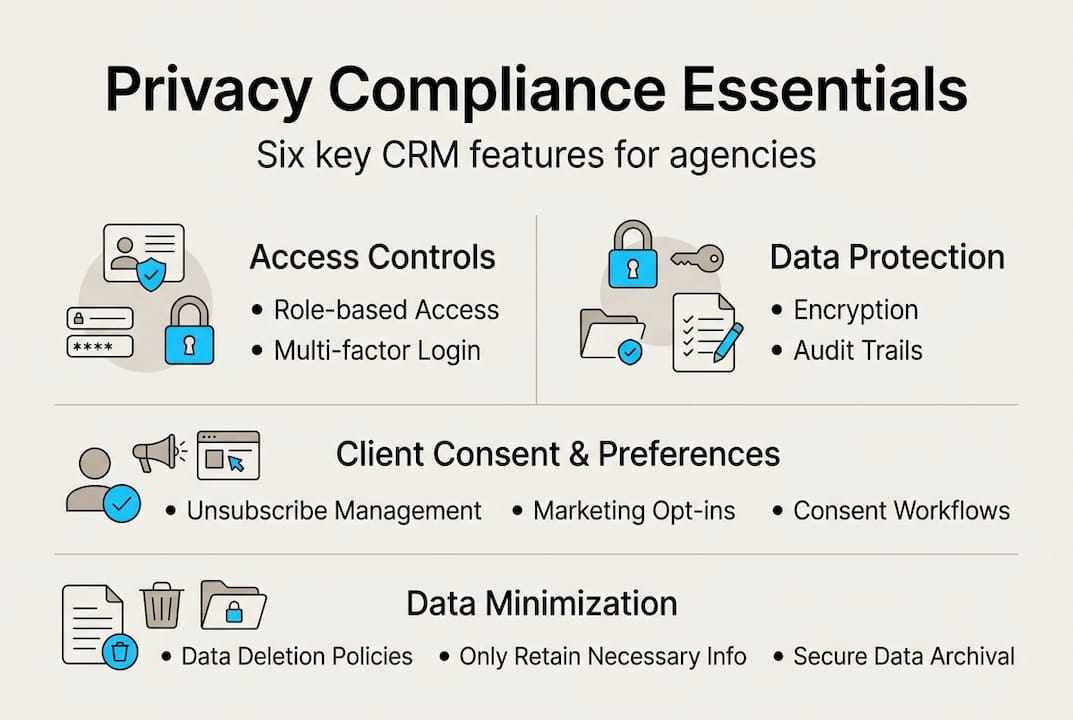
Here are the numbered steps agencies should follow when configuring a CRM for agents for compliance:
- Enable role-based access controls from day one. Assign permissions based on job function, not convenience.
- Configure consent capture fields on every lead form, intake workflow, and communication sequence.
- Verify encryption settings for both stored data and data in transit before going live.
- Set up audit log retention to meet the longest applicable retention period across all your regulatory obligations.
- Execute BAAs with every vendor that touches client data, including your CRM provider, email platform, and any AI tools.
- Document your compliance configuration in writing so it can be reviewed and updated as regulations change.
CRM best practices consistently point to these six controls as the foundation of a defensible compliance posture. Agencies that skip even one of them create audit exposure.
Pro Tip: Role-based access is not just an IT overhead item. When a breach occurs, granular access logs let you identify the source within hours instead of weeks. That speed is the difference between a contained incident and a regulatory investigation.
With the right features set, agencies also need real-world processes to tie it all together.
Best practices for maintaining privacy and compliance
Features alone do not keep you compliant. Ongoing processes do. Here is where most agencies fall short: they configure their CRM once and assume the work is done. Regulations change, staff turns over, and vendors update their systems. Static compliance is not real compliance.
Here are the practices that actually work:
- Run quarterly compliance audits. Review user permissions, consent records, data retention settings, and vendor agreements every three months.
- Map your data flows. Know exactly where client data enters your system, how it moves between tools, and where it exits. Undocumented data flows are where breaches hide.
- Maintain opt-in documentation. Store the date, method, and specific consent language for every contact in your CRM. Do not rely on memory or spreadsheets.
- Update privacy policies annually. State laws change frequently. Your policy should reflect current requirements, not what was accurate two years ago.
- Train staff regularly. Human error causes the majority of data breaches. Training is not a one-time onboarding task.
Common missteps agencies make include leaving stale user permissions active after staff changes, ignoring vendor contract renewals that may alter data use terms, and failing to track new state privacy laws that apply to their book of business.

The fact that 67% of healthcare organizations lack current risk analysis tells you that even heavily regulated industries underinvest in ongoing compliance. Insurance agencies cannot afford that gap.
Integrating CRM and marketing tools creates additional data touchpoints that must be audited alongside your core CRM. Every integration is a potential exposure point.
Pro Tip: Pair your quarterly compliance review with AI-based risk flagging inside your CRM. Automated alerts for unusual access patterns or consent gaps catch mistakes before regulators or plaintiffs do. AI lead generation tools that also flag compliance anomalies give your agency a real operational edge.
Wrapping up the best practices, what are some unexpected truths and lessons from the field that rarely get discussed?
What most guides get wrong about CRM data privacy in insurance
Most compliance guides hand you a checklist and call it done. That approach misses the point entirely. Checklists capture what was true when they were written. Privacy risks evolve daily, especially as AI tools become embedded in CRM workflows.
The uncomfortable truth is that AI-CRM integration requires ethics by design, not just technical controls bolted on after launch. When your CRM uses AI to score leads or predict churn, it processes behavioral patterns that can reveal sensitive personal circumstances. That data must be governed with the same rigor as PHI.
Agencies that treat privacy as a mission rather than an obligation build something checklists cannot: client trust. When a client knows their data is handled with genuine care, they refer more, stay longer, and forgive mistakes faster. That is a retention and growth advantage that no marketing campaign can replicate.
The agencies winning on privacy are not the ones with the thickest compliance binders. They are the ones where every employee understands why data protection matters, and where insurance CRM integration decisions are made with privacy impact as a primary criterion, not an afterthought.
Take the next step: Choose a privacy-first CRM
Your agency’s compliance posture starts with the platform you choose. A CRM built without privacy controls forces you to patch gaps manually, and manual patches fail under audit pressure.
CallBack CRM is built for insurance agencies that cannot afford compliance gaps. With AI CRM features designed for the insurance industry, including consent management, role-based access, and secure data handling via Google Cloud, you get a platform that works with your compliance obligations instead of against them. Explore websites and funnels built for compliant lead capture. Start your free trial today and see how a privacy-first CRM changes what your agency can do.
Frequently asked questions
What customer data in a CRM is protected under HIPAA?
Any personal health information (PHI) stored, transmitted, or processed in the CRM for health insurance purposes is protected under HIPAA. This includes diagnoses, treatment records, and any data that identifies a person in connection with their health coverage, and HIPAA requires encryption and audit logs for all of it.
What are the penalties for TCPA violations by insurance CRMs?
TCPA violations cost $500 to $1,500 per automated call or text sent without prior express written consent, and consent records must be retained for at least four years. Class action lawsuits multiply these costs quickly across large contact lists.
How long should client communication logs be stored in an insurance CRM?
Agencies must retain all client communications for at least five to seven years after a policy ends to comply with NAIC data retention requirements. Shorter retention periods create exposure during market conduct exams.
Does the CCPA apply to my insurance agency’s CRM?
If your agency collects data on California residents, CCPA applies, requiring privacy policy updates and deletion rights along with data inventory and vendor contract controls. This applies regardless of where your agency is physically located.
How often should we audit our CRM for privacy compliance?
CRMs should be reviewed and audited at least quarterly, as quarterly audits and consent field reviews are considered baseline best practice for insurance agencies. More frequent reviews are warranted when regulations change or staff turnover occurs.