

TL;DR:
- Callbackcrm offers insurance agents an integrated platform with AI-driven workflows, automated follow-up, and compliance-ready hosting. Choosing the right tool depends on agency size, automation needs, and integration capabilities, with native CRM and telephony being critical. Running a structured 30-day pilot helps measure contact rates, conversions, and compliance readiness before full deployment.
For insurance agents, agencies, and IMOs, Callbackcrm is the recommended alternative to callback-only widgets. It combines AI-driven CRM, automated SMS/email follow-up, pipeline management, and compliance-ready Google Cloud hosting in one platform built specifically for insurance sales.
- AI-driven workflows: Lead scoring, automated follow-up sequences, and AI assistants replace manual outreach. Voice callbacks remain highly effective for complex, high-value insurance products where trust matters.
- Compliance and security: Callbackcrm runs on Google Cloud with enterprise security controls. Enterprise-grade platforms list HIPAA, PCI-DSS, and SOC2 certifications as major selection factors for regulated industries.
- Next step: Start a 30-day test plan. Map your current lead flow, connect your dialer and calendar, and measure contact rate and conversion-to-quote before committing.
Table of Contents
- Which callback.com alternatives fit your agency’s size and use case?
- How do you pick the right alternative for your insurance agency?
- What are the real trade-offs between callback widgets, AI CRM, and contact-center platforms?
- How do you run a 30-day test and migration for a new platform?
- Key Takeaways
- Why insurance teams get more from an AI-first CRM than a callback widget alone
- Callbackcrm is built for insurance agents who need more than a callback widget
- Useful sources and procurement checklist
Which callback.com alternatives fit your agency’s size and use case?
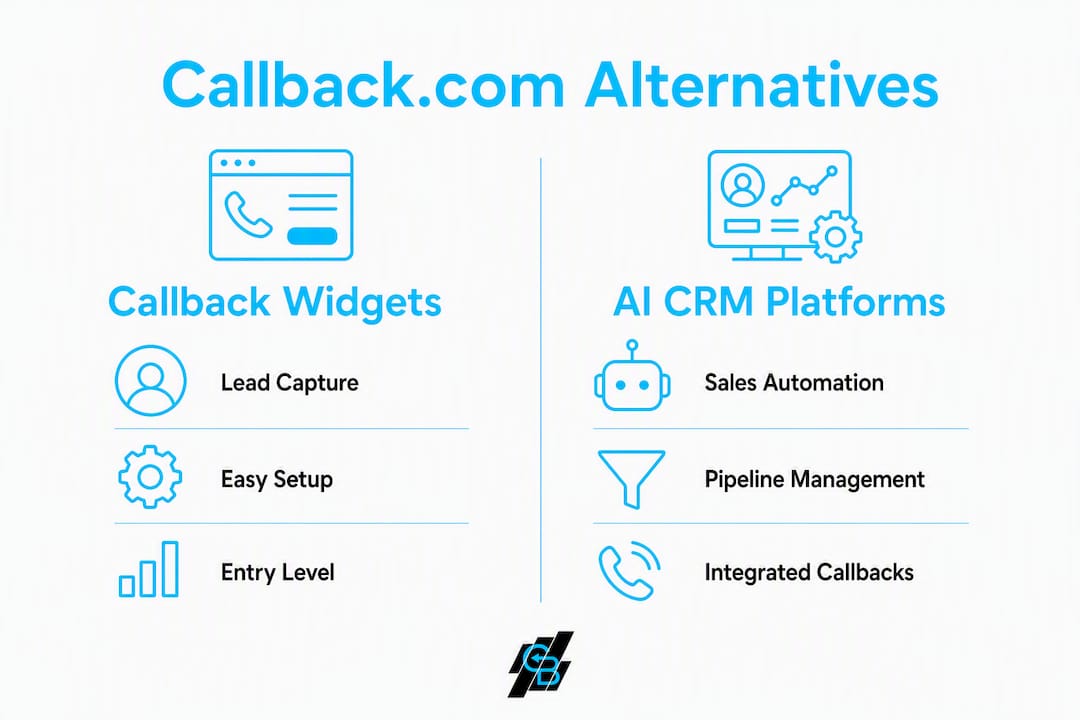
The right platform depends on whether your primary need is lead capture or full sales automation. Matching feature scope to business needs is the first decision to make. The table below maps each category to the comparison dimensions that matter most for insurance teams.
| Category | Best for | Core features | Compliance | Integrations | Pricing shape | Setup ease | Support | Scalability |
|---|---|---|---|---|---|---|---|---|
| Website callback widgets | Solo agents, simple lead capture | Callback widget, basic routing | Varies; rarely HIPAA-native | Limited CRM hooks | Per-call or low monthly | Fast | Self-serve | Low |
| AI sales automation CRM | Small agencies to IMOs | CRM, SMS/email, AI assistants, workflows, pipeline | Google Cloud; enterprise controls | Dialers, calendars, ad platforms | Monthly subscription + usage | Moderate | Dedicated | High |
| Contact-center / CCaaS platforms | High-volume call centers, enterprise | Advanced routing, IVR, workforce management | HIPAA, PCI-DSS, SOC2 published | Deep telephony, CRM APIs | Per-seat + usage; enterprise contracts | Complex | SLA-backed | Very high |
Category cards:
- Website callback widgets (e.g., standalone widget tools): Fit solo agents who need quick lead capture with minimal setup. Limited backend automation means leads often fall through after the first call.
- AI sales automation CRM — Callbackcrm: The recommended pick for insurance agents and agencies. Covers the full sales cycle: callback capture, AI-scored leads, automated SMS/email sequences, pipeline tracking, and proposal tools. Callbacks paired with automated follow-up see better conversion because leads are nurtured immediately after contact attempts.
- Contact-center / CCaaS platforms (Five9, Genesys Cloud, NICE CXone, RingCentral, Aircall, Kixie): Built for high-volume environments. Advanced routing requires more engineering to realize end-to-end callback journeys. Suitable for large brokerages or IMOs with dedicated IT resources.
Small teams often pick widget-first solutions while mid-market and enterprise buyers prefer platform-level integrations. Callbackcrm sits in the middle: purpose-built for insurance, without the complexity of a full contact-center deployment.

How do you pick the right alternative for your insurance agency?
Selecting a tool based only on callback features is a common mistake. Insurance buyers should require evidence of compliance and native CRM integrations to avoid future data silos.
Prioritized criteria (must-have → nice-to-have):
- Must-have: HIPAA/SOC2/PCI-DSS documentation; native AI automation; CRM pipeline with lead scoring.
- Should-have: Telephony/dialer integration; data portability and export; transparent SMS/AI usage pricing.
- Nice-to-have: Video calling; advanced IVR; white-label options.
Ten questions to ask on every demo call:
- Can you show published HIPAA or SOC2 certification documents?
- How does retry logic work, and can we set time-zone-aware scheduling?
- What CRM and dialer integrations are native vs. third-party connectors?
- How is SMS and AI usage billed — flat rate or per-message?
- What does data export look like if we leave?
- What is your uptime SLA and support response time?
- Can you demo an insurance-specific workflow end to end?
- How does lead scoring work, and can we customize the model?
- What API access is available for custom integrations?
- Are there reference customers in insurance we can speak with?
Red flags to watch for:
- Opaque per-SMS or per-AI-call pricing with no published rate card.
- No HIPAA or SOC2 evidence when the use case involves protected health information.
- Default retry logic with no granular interval or ring-group controls. Insurance-specific use cases need granular retry intervals and time-zone-aware scheduling to maximize contact rates.
- No live demo with insurance-specific data or workflows.
- Poor or absent native dialer/CRM integration.
Pro Tip: Ask vendors to run an integration proof-of-concept with a sample dataset before signing. Buyers should require published security documentation and a live integration test — not just a slide deck.
What are the real trade-offs between callback widgets, AI CRM, and contact-center platforms?
Successful agencies treat callback tools as part of sales velocity, not standalone gadgets. The category you choose has direct implications for conversion, data ownership, and compliance.
Callback widgets
- Pro: Fast to deploy; low upfront cost; good for immediate lead capture on high-traffic sites.
- Con: No backend automation; leads require manual follow-up; limited compliance controls; data often siloed from CRM.
AI sales automation CRM (Callbackcrm)
- Pro: End-to-end pipeline from lead capture to policy; AI assistants reduce manual work; native SMS/email/voicemail sequences; Google Cloud hosting with enterprise security.
- Con: Higher monthly cost than a widget; requires a short setup period to configure workflows correctly.
Contact-center / CCaaS platforms (Five9, Genesys Cloud, NICE CXone, RingCentral, Aircall, Kixie)
- Pro: Enterprise routing, workforce management, published HIPAA/PCI-DSS/SOC2 certifications, deep telephony.
- Con: High per-seat cost; long implementation timelines; often requires IT or developer resources.
Use-case matrix:
| Agency profile | Recommended category |
|---|---|
| Solo agent, low call volume | Callback widget or entry-level AI CRM |
| Small agency (2–10 agents) | AI sales automation CRM (Callbackcrm) |
| Mid-market brokerage / IMO | AI sales automation CRM or hybrid |
| High-volume call center / enterprise | Contact-center / CCaaS platform |
Integration risk is the most overlooked factor. A widget that does not connect natively to your CRM creates a data silo. Every manual data transfer is a point of failure and a compliance risk. Native CRM plus dialer integration is what converts leads to policies at scale, not the callback widget alone. Top-performing sales teams measure success by lead-to-policy conversion and sales velocity, not raw call counts.
How do you run a 30-day test and migration for a new platform?
A structured trial prevents the most common failure mode: switching platforms without measuring whether the new tool actually improves contact rate and conversion.
Week-by-week checklist:
- Days 1–7 (Setup and integrations): Connect dialer, calendar, and ad platforms. Import existing leads. Verify data export from legacy system. Request and review compliance documentation (HIPAA/SOC2/PCI-DSS). Test data import/export round-trip.
- Days 8–14 (Routing, retry logic, and sample campaigns): Configure retry intervals and time-zone-aware scheduling. Launch a sample SMS/email sequence to a test lead segment. Verify ring groups and routing rules match agent capacity.
- Days 15–21 (Measure KPIs and adjust): Track contact rate, conversion-to-quote, average handling time, lead-to-policy rate, and cost per acquisition. Adjust retry logic and sequence timing based on early data.
- Days 22–30 (Scale and finalize migration): Expand to full lead volume. Confirm compliance controls are active. Document the migration plan and train agents. Finalize vendor SLA review before full commitment.
KPIs to track:
- Contact rate (calls connected / leads attempted)
- Conversion-to-quote rate
- Average handling time per lead
- Lead-to-policy rate
- Cost per acquisition
Pro Tip: Align retry logic with agent shift schedules and time zones from day one. Default vendor settings often underperform in insurance use cases where lead timing is critical. A lead contacted within five minutes of inquiry converts at a significantly higher rate than one reached an hour later.
A sales automation checklist for insurance agents can help structure the pilot and keep compliance checks from being skipped under deadline pressure.
Key Takeaways
Callbackcrm is the recommended all-in-one alternative for insurance agents who need AI-driven CRM, automated follow-up, and compliance-ready hosting in a single platform.
| Point | Details |
|---|---|
| Match scope to need | Widgets capture leads; AI CRM platforms automate the full sales cycle from capture to policy. |
| Compliance is non-negotiable | Verify HIPAA, SOC2, and PCI-DSS documentation before signing any vendor contract. |
| Retry logic matters | Configure time-zone-aware scheduling and granular retry intervals to maximize contact rates. |
| Run a 30-day pilot | Measure contact rate, conversion-to-quote, and cost per acquisition before full migration. |
| Callbackcrm recommendation | Purpose-built for insurance agents with AI workflows, SMS/email automation, and Google Cloud hosting. |
Why insurance teams get more from an AI-first CRM than a callback widget alone
Most agencies evaluating callback.com alternatives focus on the wrong thing: the widget itself. The callback is just the first touch. What happens in the next 48 hours, the automated SMS, the AI-scored follow-up, the pipeline stage update, determines whether a lead becomes a policy or goes cold.
Agencies that combine AI automation with integrated callbacks report higher contact rates and fewer lost leads, not because the callback technology changed, but because the follow-up became consistent and immediate. A standalone widget cannot do that. An AI CRM built for insurance can.
The case for Callbackcrm is straightforward: it was designed for this workflow from the start, not retrofitted. For agencies ready to move beyond reactive lead capture, the sales automation workflow for insurance agents is the logical next step.
Callbackcrm is built for insurance agents who need more than a callback widget
Insurance agents who switch from a standalone callback tool to Callbackcrm gain a full pipeline: AI-scored leads, automated SMS and email marketing sequences, voicemail drops, proposal tools, and CRM tracking, all on Google Cloud with enterprise security controls. There is no separate dialer to connect, no manual data transfer between systems, and no compliance gap to patch later.

The platform offers a free trial and dedicated onboarding support during migration. Enterprise pricing is available for IMOs and large agencies. Contact the Callbackcrm sales team to schedule a demo with an insurance-specific workflow, or start a trial directly at callbackcrm.com.
Useful sources and procurement checklist
Resources to review before procurement:
- 16 Best Callback Tools in 2026: Category rankings and compliance certification notes.
- Chat vs. Callback: Evidence on why voice callbacks outperform chat for insurance sales.
- Nextiva: Callback service guidance: Retry logic and scheduling best practices.
- Zendesk: Benefits of callback from queue: Customer preference data on callbacks vs. hold times.
- Callbackcrm blog: Case studies and AI strategy content for insurance agencies.
- AI content marketing automation: Guidance on AI-powered follow-up and marketing automation best practices.
Six-point procurement checklist:
- Request published HIPAA, SOC2, and PCI-DSS certification documents from every shortlisted vendor.
- Run an integration proof-of-concept with a sample dataset before signing.
- Confirm data export format and portability terms in writing.
- Review SLA terms for uptime and support response time.
- Get a written breakdown of SMS, email, and AI usage pricing with no hidden overages.
- Ask for reference customers in the insurance vertical before final commitment.
Internal case studies and testimonial evidence should be inserted here by the Callbackcrm marketing team before final publication.
Recommended
- Top 6 LeadCallback.com Alternatives for 2026 | CallBack CRM Blog
- Top 5 AgentAutopilot.com Alternatives in 2026 for Insurance Agents and Brokers Seeking AI-Driven Automation Solutions
- Top 5 Convoboss.com Alternatives for Insurance Professionals 2026 | CallBack CRM Blog
- Top 4 Covecrm.com Alternatives 2026 | CallBack CRM Blog