

Health insurance agents who adopt CRM-driven automation now close more policies, contact leads faster, and retain more clients at renewal. The core payoff is simple: automated follow-up replaces the manual work that most producers skip after the first or second attempt.
- Most insurance sales require multiple follow-up touches, yet most agents stop after one or two.
- Sub-60-second lead routing to a dialer queue is the single highest-ROI configuration change an agency can make.
- Renewal automation alone can recover policy revenue that would otherwise lapse without a single producer action.
Pro Tip: Set up one automated new-lead rapid-response sequence before anything else. That single workflow, running inside a platform like Callbackcrm, will show measurable results within the first pilot week.
Key Takeaways
CRM-driven health insurance automation delivers the fastest ROI when agencies start with one workflow, enforce disposition discipline, and measure speed-to-contact before expanding.
| Point | Details |
|---|---|
| Start with rapid-response | Configure the 0–24 hour new-lead sequence first; it has the shortest feedback loop. |
| 5–8 touches required | Most insurance sales need 5–8 follow-up contacts; automation enforces the full cadence. |
| Sub-60-second routing | Routing leads to a dialer queue in under 60 seconds is the highest-ROI CRM configuration change. |
| TCPA consent on every lead | Store TrustedForm or Jornaya tokens, opt-in timestamps, and DNC scrubs before any SMS campaign. |
| Callbackcrm covers the full stack | The platform handles AI lead scoring, SMS/email/voicemail workflows, dialer integrations, and Google Cloud security in one subscription. |
Table of Contents
- Why does health insurance automation matter for your agency?
- Core CRM features every health insurance automation stack must include
- Seven high-impact automation workflows you can deploy this week
- How to implement CRM automation in your agency in six steps
- KPIs to measure and how to calculate ROI from automation
- Security, privacy, and compliance basics for automated health insurance outreach
- What to ask when evaluating pricing and vendor fit
- Common pitfalls that destroy automation ROI
- How omnichannel communication expands your reach beyond email and SMS
- Why one workflow beats a big-bang rollout
- Callbackcrm gives health insurance agents a faster path to more binds
- Sources
Why does health insurance automation matter for your agency?
Manual follow-up is inconsistent. Producers get busy, leads go cold, and renewal reminders never get sent. CRM-driven automation fixes all three problems at once.
CRM software centralizes contact data from email and calls, automates lead categorization, and improves retention and upsell opportunities. The business impact for health-focused lines, including Medicare, individual, and small group, is direct:
- Faster speed-to-contact means more conversations before a competitor reaches the prospect.
- Consistent multi-touch follow-up prevents leads from falling out of the pipeline.
- Renewal sequences run automatically, reducing lapse rates without adding producer workload.
- Pipeline visibility lets agency owners see exactly where revenue is stalling.
Agencies that treat CRM as a daily operational tool, not just a contact database, report 30–40% uplifts in new business production. That figure assumes proper pipelines and daily discipline, not just software installation.
Core CRM features every health insurance automation stack must include
Not every CRM is built for insurance. Before selecting or configuring a platform, confirm it covers these non-negotiable capabilities.
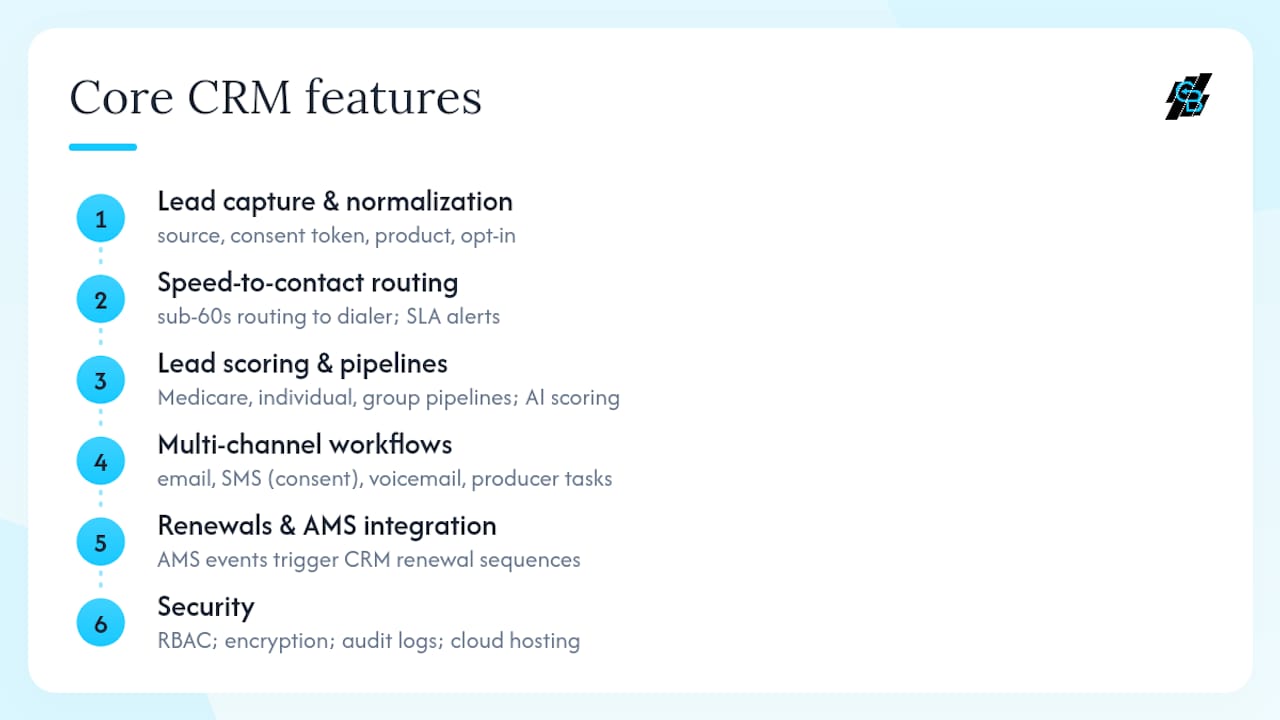
Lead capture and normalization. Every lead record needs source, consent token (TrustedForm or Jornaya), product interest, and opt-in timestamp. Missing any of these fields creates TCPA exposure and makes attribution impossible.
Speed-to-contact routing. Sub-60-second routing to a dialer queue with SLA alerting is the highest-ROI change agencies can make. Auto-assign rules should route by product line, geography, or producer capacity.
Lead scoring and segment pipelines. Medicare, individual health, and group each have different buying cycles. Separate pipelines with AI-driven lead scoring prevent Medicare leads from being worked the same way as a short-term health inquiry.
Multi-channel workflows. Email, SMS (consent-gated), voicemail drops, and producer task assignments should all trigger from the same workflow engine. No channel should require manual setup per lead.
Renewal automation and AMS integration. A dedicated CRM acts as the system of growth while the AMS remains the system of record. Policy lifecycle events in the AMS should trigger renewal sequences in the CRM automatically.
Security. Role-based access, encryption at rest and in transit, audit logs, and cloud hosting are baseline requirements, not premium add-ons.
Pro Tip: Dialer integration comes in two patterns: dialer-front-end for high-volume outbound, or CRM-front-end with one-click dial for consultative sales. Both require disposition round-tripping and DNC scrubs to stay compliant.
Seven high-impact automation workflows you can deploy this week
These workflows map triggers, channels, timing, and owner actions. Copy them directly into your CRM.
-
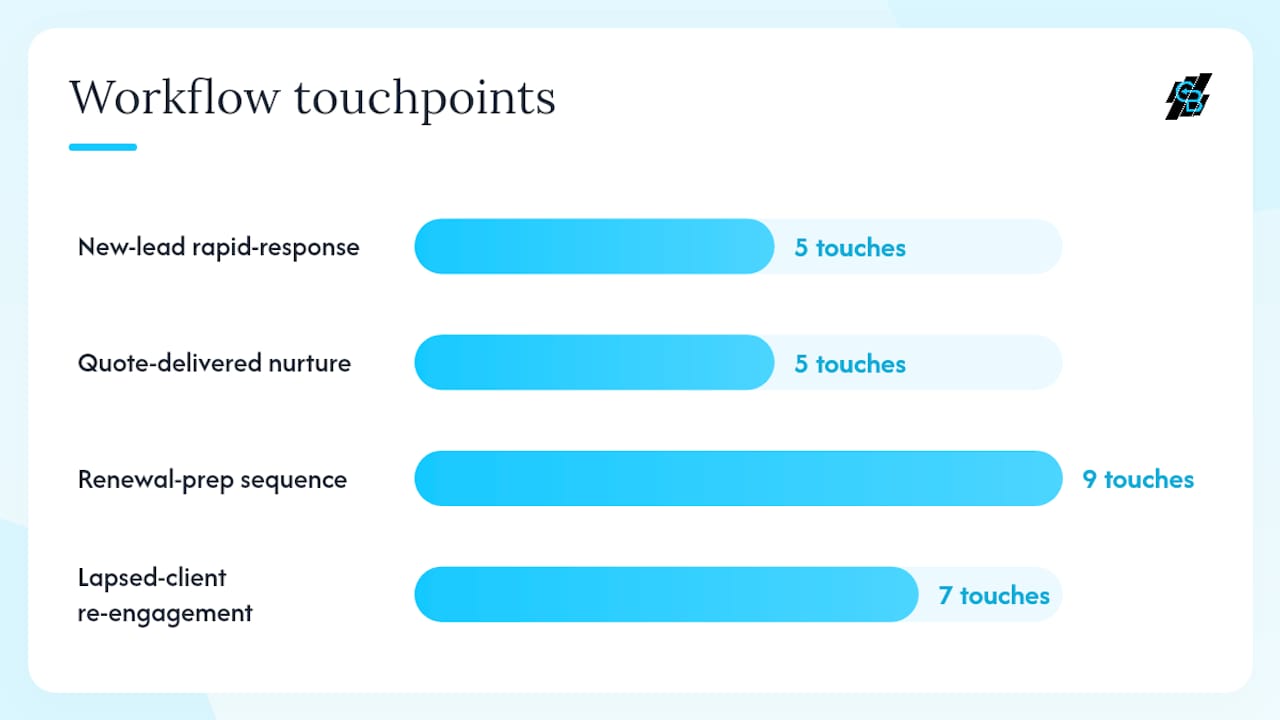
New-lead rapid-response (0–24 hours). Trigger: lead created. Actions: immediate SMS, email at minute 2, dialer task at minute 5, voicemail drop at hour 1, follow-up SMS at hour 4. Exit condition: prospect replies or books. Watch: contact rate and time-to-first-contact.
-
Quote-delivered nurture (0–30 days). Trigger: quote sent. Multi-channel sequences that branch on prospect behavior and pause on replies increase binding opportunities. Day 1 email, day 3 SMS, day 7 producer call task, day 14 value email, day 21 urgency SMS. Watch: open rate, reply rate, bind lift.
-
Renewal-prep sequence (90/60/30 days). Trigger: policy expiration date minus 90 days. Three touchpoints per window, escalating to a producer call at 30 days. Watch: renewal retention rate and cross-sell attach rate.
-
Medicare/AEP and OEP campaigns. Trigger: eligibility date or enrollment window open. Segment by turning-65 date or current plan type. Watch: appointment-set rate and plan-change conversion.
-
Lapsed-client re-engagement. Trigger: policy lapsed 30+ days. Monthly email cadence for 6 months with a re-qualification SMS at month 3. Watch: re-quote rate and re-bind rate.
-
Application/underwriting handoff. Trigger: application submitted. Status-change notifications to producer and client at each underwriting stage. Watch: days-in-stage and drop-off rate.
-
Referral and partner auto-route. Trigger: referral source tag on lead record. Auto-assign to designated producer, flag commission attribution, send thank-you to referral source. Watch: referral conversion rate versus cold-lead conversion rate.
Pro Tip: The moment a prospect replies to any automated channel, pause all sequences immediately and create an urgent producer task. Automation should escalate to a human, not keep sending messages.
How to implement CRM automation in your agency in six steps
A 4–6 week pilot focused on one workflow yields the fastest feedback loop and often pays for itself by the next renewal cycle.
-
Define outcomes and KPIs. Choose one line of business (individual health or Medicare). Set targets for speed-to-contact, contact rate, and quote-to-bind before touching any software.
-
Build the pilot. Configure the new-lead rapid-response workflow and connect your dialer. Test disposition round-tripping so call outcomes write back to the lead record automatically.
-
Run a 4–6 week pilot. Measure speed-to-contact, contact rate, and quote-to-bind weekly. A sales automation workflow guide can help you structure the pilot checklist.
-
Iterate and expand. Add the quote-nurture and renewal sequences. Integrate your AMS so policy status changes trigger CRM workflows automatically.
-
Scale with governance. Roll out to all producers with defined disposition codes, SLA rules, and weekly pipeline reviews. Enforce logging discipline before adding more automation layers.
KPIs to measure and how to calculate ROI from automation
Track these six metrics to justify the investment and find where the workflow is leaking.
- Speed-to-contact: minutes from lead created to first live conversation.
- Contact rate: percentage of leads reached within 24 hours.
- Quote-to-bind: percentage of quoted prospects who purchase.
- Renewal retention rate: percentage of policies renewed without lapsing.
- Revenue per lead: total premium bound divided by total leads worked.
- Cost per acquisition: platform cost plus message costs divided by new policies bound.
That is 10 additional binds per month. At an average monthly premium of $350 and a 12-month policy, each bind represents $4,200 in annual premium. Ten additional binds equal $42,000 in annual premium added, against a typical SaaS subscription plus messaging cost well under $500 per month.
Schedule a weekly dashboard review for speed-to-contact and contact rate. Run quote-to-bind and renewal retention monthly. Review revenue per lead and cost per acquisition quarterly to catch drift.
Security, privacy, and compliance basics for automated health insurance outreach
Automated SMS and calls carry real legal risk. These are the practical controls every agency must have in place.
TCPA. SMS requires express written consent before sending marketing messages. Store the consent token (TrustedForm or Jornaya), the opt-in timestamp, and the seller list on every lead record. Calls are restricted to 8 AM–9 PM local time. Maintain a DNC list and scrub against it before every campaign run.
HIPAA. Avoid storing protected health information (PHI) in open CRM text fields or unencrypted attachments. Use role-based access to limit who can view sensitive health data. Confirm your CRM vendor signs a Business Associate Agreement (BAA) if PHI will be stored or transmitted through the platform.
Operational controls. Audit logs, encryption at rest and in transit, and Google Cloud hosting (where the vendor provides it) are baseline requirements. Role-based access prevents producers from viewing leads outside their assigned territory or product line.
Compliance checklist:
- Consent token stored on every lead record
- DNC scrub before each SMS or call campaign
- Call hours enforced by workflow time-window rules
- Role-based access configured by producer and product line
- BAA in place with your CRM vendor if PHI is stored
This section provides general information only. Consult qualified legal counsel for TCPA and HIPAA compliance specific to your agency’s operations.
What to ask when evaluating pricing and vendor fit
Total cost of ownership for a CRM includes the subscription, per-message fees (SMS and email), onboarding costs, and integration work. Evaluate each line separately.
- Subscription model: per-producer seat pricing scales predictably; flat-agency pricing works better for larger teams with variable producer counts.
- SMS costs: billed at wholesale rates by most platforms. Estimate based on your monthly lead volume and average touches per lead.
- Onboarding: confirm whether setup, data migration, and dialer integration are included or billed separately. Ask for a realistic go-live timeline.
- 24/7 support: critical for agencies running automated sequences outside business hours.
Integration checklist questions to ask during a demo:
- Does the platform support disposition round-tripping with my dialer?
- Can it receive webhooks from my AMS to trigger renewal sequences?
- Does it integrate with my ad platforms (Meta, Google) for lead source attribution?
- How does it handle DNC propagation across SMS and call channels?
- What is the SLA for lead routing from creation to dialer queue?
Pro Tip: Ask vendors to demonstrate a live sequence pause triggered by a prospect reply. If they cannot show it in the demo, the feature may not work reliably in production.
A marketing automation checklist can help you organize vendor evaluation criteria before the demo call.
Common pitfalls that destroy automation ROI
Most automation failures trace back to data problems or behavior problems, not software limitations.
Data pitfalls:
- Missing consent tokens on imported leads make the entire list TCPA-unsafe for automated SMS.
- Duplicate lead records split the follow-up history and confuse producers.
- Unmapped lead sources make attribution impossible and waste ad spend.
Configuration pitfalls:
- Delays longer than 5 minutes to first contact let competitors reach the prospect first.
- Automating the sales conversation instead of the process. Scripts and objection handling belong to producers, not sequences.
- No conditional exit when a prospect replies. Sequences that keep running after a reply damage trust and risk compliance violations.
Vendor red flags:
- No API or webhook support means the platform cannot integrate with your AMS or dialer.
- Opaque SMS pricing that bundles messages into the subscription without showing per-message costs.
- No audit logs or DNC propagation across channels.
Operational red flags:
- Producers ignoring task assignments from the CRM. If tasks are not being worked, the automation is generating activity with no human follow-through.
- Disposition codes that are not enforced. Without accurate dispositions, pipeline reporting is meaningless.
Pro Tip: Start with one high-impact workflow, instrument every metric, and prove ROI before adding a second sequence. Agencies that launch five workflows at once rarely know which one is working.
How omnichannel communication expands your reach beyond email and SMS
Email and SMS cover most of the follow-up surface, but prospects increasingly engage through other channels before they respond to a direct message.
Website chatbots capture leads from organic and paid traffic at the moment of intent, before a lead form is ever submitted. When integrated with the CRM, a chatbot conversation can create a lead record, assign a producer, and trigger the new-lead rapid-response sequence automatically, with no manual step.
Social media integration lets agencies run retargeting campaigns on Meta and Google against CRM segments. A prospect who opened a quote email but did not reply can be added to a Facebook custom audience and shown a follow-up ad the same day. That cross-channel reinforcement shortens the decision cycle without adding producer workload.
Callbackcrm supports social media management, website and funnel builders, and ad platform integrations alongside its core SMS and email workflows. That means a single platform can handle the full omnichannel surface, from the first ad impression to the signed application, without stitching together separate tools.
Why one workflow beats a big-bang rollout
The agencies that get the fastest ROI from CRM automation are not the ones that configure the most features at launch. They are the ones that pick one workflow, measure it obsessively, and fix the behavior problems before adding complexity.
The new-lead rapid-response workflow is the right starting point. It has the clearest input (a new lead), the clearest output (a live conversation), and the shortest feedback loop. If producers are not logging dispositions after calls, that problem surfaces within the first week of the pilot. Fix it there, before it contaminates every other workflow you build.
Feature parity is not the goal at launch. Behavior change is. Producers who log every call outcome, work every CRM task, and follow the sequence discipline will outperform a fully configured platform where nobody follows the process. Callbackcrm is built to support this approach, with task management, disposition tracking, and pipeline visibility that make the right behavior the path of least resistance.
Callbackcrm gives health insurance agents a faster path to more binds
Callbackcrm maps directly to every workflow and feature requirement covered in this article. The platform includes AI-powered lead scoring, automated SMS and email sequences, voicemail drops, funnel and website builders, social media management, dialer and webhook integrations, and reporting dashboards, all on Google Cloud infrastructure with encryption and role-based access.

For TCPA compliance, Callbackcrm stores consent tokens on lead records and enforces time-window rules on SMS and call sequences. For HIPAA-sensitive workflows, role-based access and audit logging are built into the platform. Onboarding is structured to get your first pilot workflow live quickly, with 24/7 support available throughout.
The clearest next step: start a trial, configure the new-lead rapid-response workflow, and run it for four weeks against your current lead volume. Explore Callbackcrm’s SMS features or start a free trial to see the full platform.
Sources
- Automate Insurance Lead Nurture & Follow-Up Guide | US Tech Automations
- How to Track Insurance Leads in a CRM (Complete 2026 Guide) - Your B2B SaaS Review Universe