

TL;DR:
- Callbackcrm offers an integrated platform for insurance agents with native callback automation, automatic disposition write-back, and TCPA compliance enforcement. It streamlines workflows by eliminating manual data entry and third-party connector reliance, supporting quick setup and effective lead follow-up. A free trial with SMS credits allows agents to test real-world callback and outreach performance before committing.
For most independent U.S. insurance agents and IMOs, Callbackcrm is the recommended alternative when searching for a CRM with automated outreach and callback-style lead follow-up. It includes built-in callback workflows, call dispositions that write directly back into the database, dialer and calendar integrations with TCPA timezone enforcement, and sub-60-second speed-to-lead triggers — all without requiring a stack of third-party connectors.
Other category approaches worth evaluating:
- Purpose-built insurance CRMs — vertical-specific platforms with pre-built Medicare, Final Expense, and AMS pipelines
- Enterprise marketing CRMs with insurance overlays — broad platforms that require significant configuration to match insurance workflows
- AMS-CRM hybrids — agency management systems with CRM modules bolted on, better for compliance tracking than active outreach
- Lightweight solo/field CRMs — low-cost tools for single agents who need basic contact management without automation depth
Configuration and workflow setup determine who benefits from any platform — not the brand name on the login screen.
Table of Contents
- How do these platforms compare on features insurance agents need?
- What each platform category actually delivers day to day
- What checklist should an insurance agency use to choose?
- What does switching actually look like?
- How do you validate vendor claims during a demo?
- Which integrations matter most for insurance agencies?
- How does security and hosting affect your agency’s data?
- What does good support look like for insurance CRM users?
- What do user reviews say about insurance CRMs?
- Can the platform scale as your agency grows?
- What compliance features go beyond TCPA?
- What are the next steps for implementation?
- Key Takeaways
- Why Callbackcrm stands out for insurance outreach
- See Callbackcrm’s callback automation in a live demo
How do these platforms compare on features insurance agents need?
| Category | Best For | Automated Follow-Up (SMS/Email/Voicemail) | Callback & No-Show Workflows | Dialer/Calendar + TCPA | AI Automation / Lead Scoring | Mobile App | Security & Hosting | Pricing/Trial |
|---|---|---|---|---|---|---|---|---|
| All-in-one sales automation (Callbackcrm) | Agents and IMOs of any size | Native SMS, email, voicemail drops | Built-in, no third-party required | Native dialer, calendar, timezone enforcement | AI lead scoring + outreach workflows | Yes | Google Cloud | Subscription + wholesale SMS/AI; free trial available |
| Purpose-built insurance CRMs | Mid-size agencies with vertical pipelines | SMS and email; voicemail varies | Varies by vendor | Third-party dialer integration common | Limited; rule-based automation | Usually yes | Cloud; varies | Per-user subscription; trial available |
| Enterprise marketing CRMs (overlay required) | Large agencies with dedicated admin | Full channel support after configuration | Requires custom workflow build | Calendar native; dialer via integration | AI features available; insurance config needed | Yes | Enterprise cloud | Per-user + add-ons; demo-gated |
| AMS-CRM hybrids | Compliance-heavy independents | Email primary; SMS limited | Manual or semi-automated | Calendar only; no native dialer | Minimal | Varies | Varies | AMS licensing; no standard trial |
| Lightweight solo/field CRMs | Solo agents, low volume | Email and basic SMS | Manual follow-up reminders | Calendar integration; no TCPA enforcement | None | Basic | Shared cloud | Free tier or low monthly flat rate |
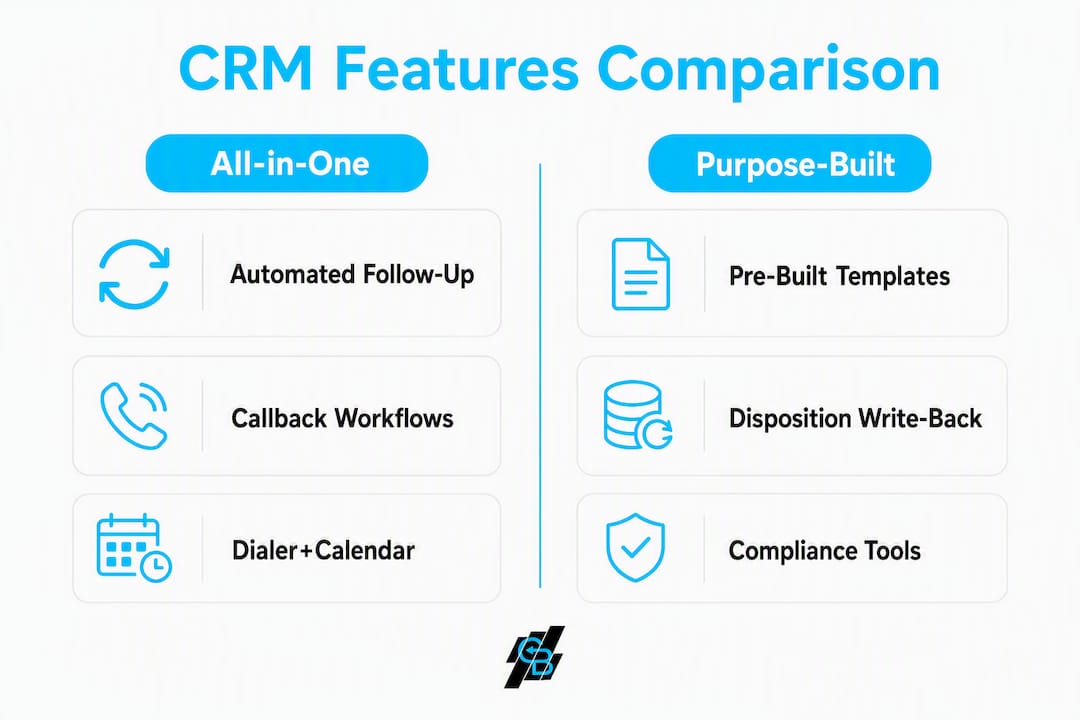
Key gaps to watch: disposition write-back to CRM (manual entry is a red flag), built-in vs. third-party dialer, speed-to-lead trigger times, and whether TCPA timezone enforcement is native or requires a Zapier workaround.
Follow-up reminders and call outcome logging are consistently the highest-ROI CRM features for insurance agents — any platform that makes those manual is the wrong fit.
What each platform category actually delivers day to day
All-in-one sales automation platforms
Callbackcrm goes live quickly using pre-built insurance templates. The dialer, lead capture, SMS/email/voicemail sequences, and nurture workflows all run inside one database. Dispositions write back automatically — no manual entry, no Zapier dependency. Pricing follows a monthly subscription model with wholesale SMS, email, and AI usage billed separately. A free trial is available. The agent benefits most; the admin benefits from not chasing broken automations.

Pro Tip: During your trial, inject a live test lead and time the first-touch SMS. If it does not fire within 60 seconds, the speed-to-lead configuration needs adjustment before you go live.
Purpose-built insurance CRMs
Pre-built vertical stacks for Medicare and Final Expense can compress onboarding to days rather than weeks. The trade-off: most rely on a third-party dialer connected via API, which means dispositions may not write back cleanly without custom webhook work. Per-user subscription pricing is standard; SMS costs vary.
Pro Tip: Ask the vendor to show disposition write-back live on the demo. If the answer involves a Zapier step, budget extra setup time and ongoing maintenance.
Enterprise marketing CRMs with insurance overlays
Broad platforms offer powerful automation, but insurance-specific pipelines require configuration that typically takes 2–8 weeks and often a paid implementation engagement. The dialer usually connects via a third-party integration. AI features exist but need insurance-context tuning. These platforms fit large agencies with a dedicated ops person.
AMS-CRM hybrids
Strong on compliance documentation and carrier download, weak on active outreach. SMS is often limited or absent. No native dialer. These work well alongside a dedicated outreach tool but rarely replace one. Licensing models vary and standard trials are uncommon.
Lightweight solo/field CRMs
Fast to set up, low cost, and sufficient for a solo agent managing under 100 active leads. No TCPA enforcement, no voicemail drops, and no AI scoring. A CRM that demands more than roughly 15 minutes of daily admin is the wrong fit for active producers — and lightweight tools often flip that equation as lead volume grows.
What checklist should an insurance agency use to choose?
Prioritized selection checklist:
- Speed-to-lead: does the platform trigger an automated SMS within 60 seconds of a new lead arriving?
- Callback and no-show automation: can it schedule, reschedule, and confirm callbacks without manual intervention?
- Disposition write-back: do call outcomes log automatically into the contact record?
- Dialer and calendar with TCPA enforcement: does it block calls outside the prospect’s local timezone natively?
- Integrated AI automation: lead scoring, outreach sequencing, and assistant features inside the same database
- Carrier and AMS integrations: verify your top carriers are supported — missing three or more critical carriers is a disqualifier
- Mobile app: full task completion on the road, not just contact lookup
- Security and hosting: cloud provider, data residency, and any SOC/ISO documentation
Demo questions to ask every vendor:
- Show me a live lead arriving and the automated first-touch sequence firing in real time.
- Walk me through the callback scheduling flow when a prospect no-shows.
- Demonstrate disposition write-back from a completed call to the contact record.
- Show me how the system enforces TCPA call windows by prospect timezone.
Red flags during a demo: reliance on multiple fragile third-party connectors, manual disposition entry, no timezone enforcement, ambiguous SMS consent handling, or admin workflows that exceed 15 minutes per day per agent.
What does switching actually look like?
Timeline expectations:
- 48–72 hours: purpose-built or all-in-one platforms with pre-built insurance templates
- 2–8 weeks: generic or enterprise CRMs requiring custom configuration
- Data import, dialer/phone-number setup, and SMS sender verification add time to any migration
Trial test plan — run these during your free trial:
- Live lead speed-to-contact: inject a test lead and measure time to first SMS
- Schedule and reschedule a callback: confirm the no-show workflow fires correctly
- Verify disposition write-back: complete a test call and check the contact record
- Test TCPA timezone rules: attempt an out-of-window call and confirm the block
- Send a transactional SMS and verify consent capture in the contact record
| Cost Factor | Notes |
|---|---|
| Migration/import services | Often a one-time fee; some platforms include it |
| Phone number porting | 1–4 weeks; plan ahead |
| Per-SMS and per-email costs | Billed at wholesale rates on most platforms |
| Dialer minutes | Per-minute billing; confirm rate before committing |
| Custom workflow build | May apply for enterprise or AMS-hybrid setups |
Dialer-first vs. CRM-first architecture affects real-world workflows. High-volume call centers benefit from a dialer front-end with dispositions flowing back via API; consultative sellers do better with a CRM front-end and one-click dialing.
How do you validate vendor claims during a demo?
Five demo tests to run:
- Live lead injection: drop a test lead and watch the first-touch sequence fire end to end.
- End-to-end callback test: schedule, trigger a no-show, and confirm the reschedule automation.
- Recorded call disposition flowback: complete a call and verify the outcome writes to the contact record automatically.
- AI lead-scoring check: submit sample leads and review how the platform scores and routes them.
- Mobile app task completion: complete a disposition and schedule a follow-up entirely from a mobile device.
Reference request script: ask for two or three insurance clients of similar agency size. Request a recorded example of the callback workflow, the actual onboarding timeline they experienced, and the vendor’s SLA and support-hours documentation.
Security checks: confirm the cloud hosting provider, ask for a data residency statement, and request any SOC 2 or ISO documentation the vendor can share.
Pro Tip: Integrated platforms that keep lead capture, dialer, and nurture in one database reduce broken automations and protect against E&O exposure — ask vendors directly whether dispositions and call recordings are stored natively or in a third-party system.
Which integrations matter most for insurance agencies?
The integrations that affect daily production fall into four groups. Ad platform connections (Facebook Lead Ads, Google Ads) determine whether new leads enter the CRM automatically or require manual import. Dialer integrations — native vs. third-party — determine whether dispositions write back cleanly. Calendar integrations (Google Calendar, Outlook) drive appointment confirmation and no-show rescheduling. Quoting and agency systems (carrier portals, AMS platforms) determine whether agents switch screens mid-call.
Marketing analytics tied to CRM data help agencies measure which lead sources and outreach sequences actually produce policies, not just contacts. Platforms that expose this data natively eliminate the need for a separate reporting layer.
Callbackcrm supports integrations with ad platforms, third-party dialers, calendar tools, and agency systems, with all data flowing back into a single database. For a detailed look at how AI marketing tools extend these integrations, the Callbackcrm blog covers the current stack.
How does security and hosting affect your agency’s data?
Cloud hosting provider and data residency matter for two reasons: regulatory compliance and uptime reliability. Callbackcrm runs on Google Cloud, which provides enterprise-grade infrastructure, data encryption in transit and at rest, and documented uptime SLAs. Agents handling health-related lines should ask vendors directly about HIPAA-eligible configurations and Business Associate Agreement availability.
For any platform, ask for a written data residency statement confirming where client data is stored and whether it crosses international borders. SOC 2 Type II certification is the standard benchmark for SaaS data security; ISO 27001 is the international equivalent. A vendor that cannot produce either document on request is a risk.
Support availability is part of the hosting conversation. Callbackcrm offers 24/7 customer support. For insurance agencies operating across multiple time zones, after-hours support is not optional — a broken automation at 7 PM on a Friday affects Monday morning production.
What does good support look like for insurance CRM users?
Support quality for insurance agents differs from generic SaaS support in one specific way: the support team needs to understand insurance workflows, not just software tickets. A rep who does not know what a disposition is, or why TCPA timezone enforcement matters, cannot resolve a production issue quickly.
Evaluate support on three dimensions: response time (live chat or phone, not just email), insurance-workflow knowledge (can they walk through a callback sequence?), and onboarding depth (is there a structured onboarding program, or just a knowledge base?). Callbackcrm provides 24/7 support with onboarding assistance included.
Lead nurturing sequences that break mid-campaign because of a misconfigured integration are a common support escalation. Platforms with native automation reduce these tickets significantly.
What do user reviews say about insurance CRMs?
Reviews within the U.S. insurance industry consistently surface the same two complaints: too much manual data entry and broken automations from multi-tool stacks. Agents who switch to purpose-built or all-in-one platforms report the biggest gains in time saved per day and in contact rates on new leads.
Roughly 30% of independent agencies use their CRM as a true production system — configuration and workflow setup decide who actually benefits, not just whether a CRM is present. Agents who do adopt a dedicated CRM with automated outreach report measurable improvements in speed-to-lead and appointment volume.
Reviews also flag onboarding time as a differentiator. Platforms with pre-built insurance workflows earn consistently better early-stage reviews than generic CRMs that require weeks of configuration before producing value.
Can the platform scale as your agency grows?
Scalability for an insurance agency means two things: adding agents without rebuilding workflows, and adding product lines without starting from scratch. All-in-one platforms like Callbackcrm handle both through role-based access, team pipelines, and modular workflow templates. Adding a new agent means assigning them to existing sequences, not rebuilding the automation.
Customization depth matters at the IMO level. IMOs managing multiple downline agents need the ability to set agency-level rules (TCPA enforcement, SMS consent templates, lead routing logic) that individual agents cannot override. Platforms without role-based permission structures create compliance exposure as the organization grows.
For a detailed breakdown of how automation strategies scale across agency sizes, Callbackcrm’s 2026 playbook covers the practical patterns.
What compliance features go beyond TCPA?
TCPA is the floor, not the ceiling. Insurance agents handling Medicare Advantage, ACA, or life products face additional outreach rules under CMS marketing guidelines, state insurance department regulations, and in some cases HIPAA. A CRM needs to support documented SMS opt-in capture, DNC propagation within 24 hours, and call recording storage for E&O protection.
TCPA enforcement must include prospect-local-timezone call windows, documented SMS consent handling, and rapid DNC propagation across all connected systems. Platforms that enforce timezone rules only at the dialer level — not at the CRM level — create gaps when agents initiate calls manually.
State-level regulations vary. Some states impose stricter calling windows or require specific consent language for SMS. Ask vendors whether their compliance templates are updated when regulations change, or whether that responsibility falls on the agency.
What are the next steps for implementation?
A structured onboarding process reduces the risk of a failed rollout. The steps below apply regardless of which platform category you choose.
Week 1: Import existing contacts, configure lead source integrations (ad platforms, website forms), and set up SMS sender verification. Run the trial test plan from Section 5 before going live with real leads.
Week 2: Build or activate pre-built insurance workflow templates (speed-to-lead sequence, callback/no-show automation, renewal outreach). Train agents on disposition logging and mobile app use.
Week 3–4: Review disposition data, identify drop-off points in the callback sequence, and adjust trigger timing. Confirm TCPA enforcement is active for all outbound channels.
Training resources to request from any vendor: recorded onboarding sessions, a written workflow setup guide specific to insurance, and access to a live support rep during the first 30 days. Callbackcrm includes onboarding assistance and 24/7 support from day one.
For a practical guide to automating client outreach from the first lead touch through renewal, the Callbackcrm blog covers the full sequence.
Key Takeaways
For independent U.S. insurance agents, the highest-impact CRM decision is choosing a platform where callback automation, disposition write-back, and TCPA enforcement are native — not assembled from third-party connectors.
| Point | Details |
|---|---|
| Speed-to-lead is the first test | Trigger a live lead in your trial and confirm the first-touch SMS fires within 60 seconds. |
| Disposition write-back is non-negotiable | Manual call logging costs agents time and creates E&O gaps — verify it is automatic before committing. |
| TCPA enforcement must be native | Timezone-based call windows and SMS consent capture should be built in, not handled by a Zapier workaround. |
| Trial must include SMS and dialer credits | You cannot verify real-world callback and voicemail-drop workflows without live test credits during the trial. |
| Callbackcrm recommendation | Callbackcrm covers callback automation, dispositions, TCPA enforcement, and AI lead scoring in one platform with a free trial available. |
Why Callbackcrm stands out for insurance outreach
Most agents evaluating CRM alternatives focus on feature lists. The more useful question is: how many manual steps does this platform eliminate on a typical production day? Callbackcrm’s built-in callback automation, native disposition write-back, and Google Cloud hosting address the three failure points that most commonly derail insurance CRM deployments: broken integrations, manual data entry, and compliance gaps.
The evaluation checklist in this article maps directly to what Callbackcrm delivers out of the box: speed-to-lead triggers, end-to-end callback scheduling, TCPA timezone enforcement, AI lead scoring, and a free trial that includes SMS and dialer credits so you can verify every workflow before committing.
See Callbackcrm’s callback automation in a live demo
A Callbackcrm demo covers the full workflow: live lead injection, automated first-touch SMS, callback scheduling and no-show rescheduling, disposition write-back, TCPA enforcement by prospect timezone, and integration with carrier and AMS tools. Request a 7–14 day trial that includes SMS credits and dialer minutes so you can run the trial test plan from this article end to end — not just watch a screen share.

Ask the Callbackcrm team to run the live trial test plan during the demo session. That single hands-on walkthrough will tell you more than any feature comparison table. Start your free trial and verify the callback automation yourself.
Recommended
- Top 5 AgentAutopilot.com Alternatives in 2026 for Insurance Agents and Brokers Seeking AI-Driven Automation Solutions
- Top 4 Covecrm.com Alternatives 2026 | CallBack CRM Blog
- ConvertMore.com Alternatives for Insurance Agents: 2026 | CallBack CRM Blog
- Top 5 Convoboss.com Alternatives for Insurance Professionals 2026 | CallBack CRM Blog