

Evergreen webinars let insurance teams educate prospects and generate qualified consultation bookings on autopilot when the topic is repeatable and compliance-safe. Live sessions still win for timely regulatory updates or heavy Q&A. For steady lead flow, automation and CRM follow-up turn a single recorded session into a booking engine that runs while agents work other accounts.
TL;DR:
- Evergreen webinars effectively generate leads by offering targeted, repeatable content that pre-educates prospects before they schedule consultations.
- Automating registration, follow-up emails, and calendar booking within a connected CRM increases appointment rates by 40 to 60 percent.
- Content updates should be done quarterly or biannually, especially for regulated topics like Medicare or ACA plans, to prevent outdated information.
- Structuring webinars with clear chapters, on-screen prompts, and downloadable resources keeps viewers engaged longer and improves completion rates.
- Integrated tools for hosting, forms, CRM, scheduling, and analytics are crucial for running a seamless, compliant automated funnel.
Table of Contents
- Why Evergreen Webinars Work for Insurance Lead Generation
- Live vs. Evergreen: Matching Format to Funnel Stage
- How to Build an Evergreen Webinar Step by Step
- What Tools and Integrations Does the Funnel Need?
- How Do You Promote an Evergreen Webinar and Drive Bookings?
- How Do You Measure and Optimize an Evergreen Webinar Funnel?
- A Practical Example: Running the Funnel Through CallBack CRM
- How Do You Keep Viewers Engaged Without a Live Host?
- How Often Should You Update Evergreen Webinar Content?
- How Should Evergreen Content Handle Objections and Common Questions?
- What Legal Considerations Go Beyond Compliance Disclosures?
- How Do You Nurture Leads From Evergreen Webinars Through the Sales Cycle?
- What I’d Prioritize First With Evergreen Webinars
- Run Your Evergreen Webinar Funnel on CallBack CRM
- Sources
Why Evergreen Webinars Work for Insurance Lead Generation
Complex, regulated products don’t sell well through cold outreach. A prospect who spends 20 minutes learning how Medicare Advantage plans differ from Medigap arrives at a consultation already trusting the agent’s expertise, which shortens the sales conversation considerably.
The topics that consistently convert share one trait: they solve a narrow, urgent problem.
- Medicare enrollment windows and plan comparisons
- Life insurance for families with young kids or new mortgages
- Business continuity and commercial lines for owner-operators
- Niche industry risk checklists (contractors, medical practices, trucking)
ON24’s glossary defines an evergreen webinar as an on-demand recording that extends the useful life of a single session while supporting continuous lead capture and engagement analytics. That matters for staffing: one recorded session captures leads at 2 a.m. on a Saturday without anyone working the shift. Live webinars still earn their place for open enrollment deadlines, new regulation rollouts, or sessions that need real-time audience questions.
Pro Tip: Platform data from WebinarKit shows agents using webinar marketing report 40 to 60% higher appointment booking rates, largely because prospects arrive pre-educated instead of cold.
Live vs. Evergreen: Matching Format to Funnel Stage
Not every insurance topic belongs in an automated funnel. The decision usually comes down to how time-sensitive the content is and how much real-time interaction the audience needs.
- Choose live for regulation changes, open enrollment pushes, or topics where attendees expect to ask questions on the spot.
- Choose evergreen for repeatable education: policy comparisons, coverage explainers, planning checklists that don’t change month to month.
- Run both by recording your best-performing live sessions and repurposing them as evergreen replays. Many agencies A/B test the recorded version against the live registration page to see which converts better.
One compliance wrinkle deserves attention here: any evergreen session that includes product-specific recommendations, rather than general education, may need extra disclosure handling since the content plays unchanged for months without a live presenter available to clarify or caveat in real time.
How to Build an Evergreen Webinar Step by Step
A well-built evergreen webinar follows a tight structure. Loose, rambling sessions lose viewers in the first five minutes and never recover the audience.
- Hook (3 to 5 minutes). State the specific problem you’re solving and who it affects. Skip the biography and company history.
- Teach (30 to 35 minutes). Cover one narrow topic thoroughly. Use real scenarios (a 62 year old comparing Medicare plans, a contractor evaluating general liability limits) rather than abstract explanations.
- Decision framework (5 to 7 minutes). Give viewers a simple way to evaluate their own situation. Save specific product mentions for the follow-up consultation, not the recording itself.
- Soft CTA (1 to 2 minutes). Point to the booking page. Don’t hard-sell inside the recording.
Registration gating does double duty as lead qualification. Ask about policy type, renewal window, and phone opt-in status before granting access, since those three answers let your CRM score and route the lead the moment they register.
Produce these assets once: slides, a companion resource PDF, a disclaimer overlay for compliance, and a dedicated appointment CTA landing page. WebinarKit’s guidance for agents recommends the disclaimer overlay specifically because a recording without visible disclosures during replay can leave compliance gaps a live presenter would normally catch verbally.
What Tools and Integrations Does the Funnel Need?
An evergreen webinar funnel needs six tool categories working together, not six separate logins that never talk to each other.
- Automated-webinar hosting that plays recordings on a schedule or on-demand
- Landing page or form builder to gate registration and capture contact details
- CRM to score, tag, and route leads based on registration answers
- Calendar booking so viewers can self-schedule a consultation without a phone call
- Email and SMS automation for reminders, replay delivery, and follow-up sequences
- Analytics to track view time, drop-off points, and conversion by cohort
Integration priorities matter more than any single tool’s feature list. Real-time lead sync between the webinar platform and CRM, automatic tagging by topic, appointment creation on booking, and source tracking back to the original ad or email all need to happen without manual data entry. On the compliance side, set a recording retention policy, keep the disclosure overlay visible throughout playback, and handle registrant data according to your state’s privacy requirements.
How Do You Promote an Evergreen Webinar and Drive Bookings?
Getting registrations is only half the job. The other half is converting viewers into booked consultations, and that requires a deliberate sequence rather than a single follow-up email.
Landing pages convert best when they state the outcome plainly, gate access behind a short form, and put the booking CTA above the fold alongside any social proof you have.
- Drive traffic through email to your existing database, SMS reminders for registered viewers, paid social targeted at specific cohorts (new movers, small business owners, pre-retirees), and organic content or partner promotion.
- Send an immediate “thank you” email with a direct booking link the moment someone registers.
- Follow with a replay-delivery email once the session airs, segmented by whether they attended live or watched the recording.
- Layer in retargeting ads for registrants who viewed but haven’t booked within 48 hours.
The ACBS Insurance Services case study documents this exact structure. Landing pages, email automation, and calendar booking wired together to move webinar registrants straight into consultation slots.
- Track registration source separately from viewing behavior.
- Treat booking rate, booked consultations per registration, as the single KPI that matters most.
How Do You Measure and Optimize an Evergreen Webinar Funnel?
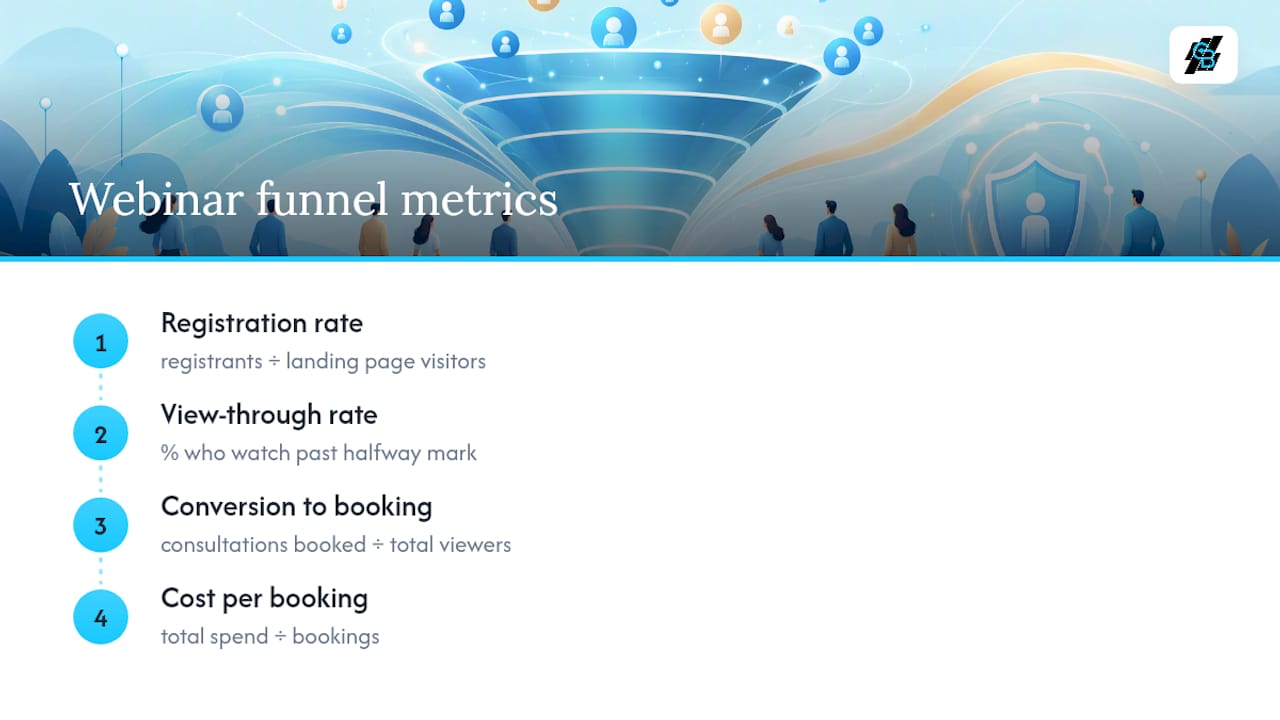
Four numbers tell you almost everything: registration rate (registrants divided by landing page visitors), view-through rate (percentage who watch past the halfway mark), conversion-to-booking (consultations booked divided by total viewers), and cost per booked consult (total spend divided by bookings).
Run experiments one variable at a time. Test landing-page headline copy, the number of registration questions, CTA placement timing within the recording, and email subject lines separately so you know what actually moved the number. WebinarKit’s data on booking-rate lift only holds up when you isolate variables this way. Analytics also let you profile which attendee segments, by watch time or registration answers, convert at the highest rate, so follow-up effort goes to the right leads first.
A Practical Example: Running the Funnel Through CallBack CRM
CallBack CRM connects each piece of the funnel so a registration doesn’t sit in a spreadsheet waiting for someone to notice it.
- Webinar registration triggers an automatic tag based on topic (Medicare, commercial lines, life insurance) and pre-qualification answers.
- Immediate SMS and email fire with the replay link and a direct calendar-booking CTA, no manual send required.
- Viewers who watch past a set threshold get flagged with a high-intent tag, which routes them to priority outreach instead of the general nurture sequence.
- Calendar booking closes the loop, creating the consultation appointment directly in the CRM record.
Agencies using this kind of AI-driven marketing automation report faster follow-up and less manual data entry across the funnel. NAMIC’s ongoing webinar series on workflow automation priorities for insurers points to the same pattern industrywide: automation that executes, not just assists, is what agencies are asking for now.
How Do You Keep Viewers Engaged Without a Live Host?
An evergreen webinar has no presenter reading the room, so engagement has to get built into the recording itself rather than improvised on the fly.
Break the session into clearly labeled chapters so viewers can jump to the section that answers their specific question instead of abandoning the whole video. A Medicare webinar might chapter into “Plan Types,” “Enrollment Deadlines,” and “Cost Comparisons,” letting a viewer who only cares about deadlines skip straight there instead of clicking away.
On-screen prompts work almost as well as live polls. Pausing briefly with a text overlay like “Which of these applies to you?” gives viewers a moment to self-reflect, which keeps attention from drifting even without a real poll firing. Some platforms support simulated live chat, where pre-written comments and questions appear timed to the video, mimicking the energy of a live session without requiring anyone to moderate it in real time.
Downloadable resources matter more than most agents assume. A companion checklist or comparison chart, offered as a mid-session download, gives viewers a reason to stay engaged past the first ten minutes and doubles as a lead magnet for anyone who wasn’t ready to book yet.
End every chapter, not just the final one, with a small next step: a link to a related resource, a short survey question, or a reminder about the booking CTA. Waiting until the closing minute to ask for action loses the viewers who dropped off earlier. Finally, keep the runtime honest. A session padded to hit 45 minutes when the content only needs 25 will show up as a completion-rate problem in your analytics within the first week.
How Often Should You Update Evergreen Webinar Content?
Insurance products, rates, and regulations shift constantly, and a recording that goes stale becomes a liability rather than an asset. Treat every evergreen webinar as having a shelf life, not a permanent shelf.
Set a quarterly review cadence at minimum for anything touching Medicare, ACA marketplace details, or state-specific mandates, since these categories change on predictable government timelines. Life and commercial lines content can typically run on a twice-yearly review since the underlying products shift less frequently, though a major carrier rate change or new state law should trigger an immediate check regardless of schedule.
Build the recording in modular segments from the start so an update doesn’t mean reshooting the entire session. If your hook and teaching sections stay evergreen but your decision framework references specific plan numbers or premium ranges, isolate that segment so it can get swapped without touching anything else.

Keep a simple version log; note the record date, the topic covered, and the next scheduled review, so no one discovers a two-year-old rate figure is still live because nobody owned the update. Assign one person, not a committee, to own the review calendar for each active webinar.
When a regulation change is significant enough to affect what the webinar teaches (an open enrollment date shift, a new coverage mandate), pull the recording immediately rather than waiting for the next scheduled review. A slightly empty funnel beats a compliant-sounding funnel built on outdated rules.
How Should Evergreen Content Handle Objections and Common Questions?
The viewers who watch an evergreen webinar all the way through are already interested, but they still carry the same hesitations every insurance prospect has. Building answers into the recording, rather than leaving them for a rushed sales call, moves more viewers to booking.
Address cost concerns directly and early, ideally in the teaching segment rather than tacked on at the end. A viewer wondering “is this going to be expensive” will disengage before your CTA if you don’t name the range of typical costs and what drives them up or down.
“Do I actually need this” is the second most common silent objection, particularly for commercial lines and supplemental coverage. Use a real scenario, a contractor who got sued and discovered their general liability limit was too low, rather than an abstract statistic, since specific stories address skepticism better than a percentage ever does.
Timing objections (“I’ll deal with this later”) respond well to a light urgency frame tied to something concrete: an enrollment deadline, a renewal date, a rate increase that takes effect on a known date. Avoid manufactured urgency; tie it to something genuinely time-bound.
Keep an FAQ segment near the end of the recording, three or four questions maximum, that mirrors what your intake calls actually reveal prospects ask. If your team keeps hearing “does this affect my current plan” or “what happens if I switch mid-year,” those exact questions belong in the video, not just in a follow-up email nobody opens.
What Legal Considerations Go Beyond Compliance Disclosures?
Compliance overlays cover the insurance-specific disclosure requirements, but automated webinar follow-up creates a second layer of legal exposure tied to data handling and communication consent.
Every registration form needs a clear privacy policy link and explicit consent language for how the data will get used, particularly for phone and SMS opt-ins. A checkbox buried in fine print doesn’t hold up the same way an explicit, separate consent line does, and SMS marketing in particular carries its own consent rules under TCPA that email doesn’t.
Recording retention needs a defined policy, not an indefinite “keep everything” default. Decide how long registrant data and viewing analytics stay in your systems, and document that decision somewhere your compliance team can point to if asked.
Automated follow-up sequences should include an easy opt-out at every touchpoint, not just the first email. A prospect who unsubscribes from email but keeps getting SMS reminders because the systems don’t talk to each other is a preventable data-handling failure, not a minor glitch.
If your webinar funnel integrates third-party tools (a separate hosting platform, a separate CRM, a separate SMS provider), check what each vendor’s own data-sharing terms allow before assuming your privacy policy alone covers the full chain. A unified platform reduces this risk simply by keeping registrant data inside one system instead of passing it between three vendors with three different terms of service.
How Do You Nurture Leads From Evergreen Webinars Through the Sales Cycle?
A webinar registrant is not a booked client yet, and treating them like one, with an aggressive sales pitch on day one, tends to backfire. The nurture sequence needs to match where the prospect actually sits in their decision process.
Segment immediately based on registration answers and viewing behavior. Someone who watched the full 35 minutes and answered every qualification question is a different lead than someone who registered but never opened the replay email, and they need different follow-up entirely.
High-intent leads (full viewers, near-term renewal dates, phone opt-in) should get fast, direct outreach: a call or text within 24 hours referencing the specific topic they watched. Lower-intent leads (partial viewers, no urgency indicators) do better with a longer email sequence that keeps delivering value, additional resources, related content, before any hard ask.
Effective lead-nurturing strategies generally emphasize consistency over intensity, meaning a steady cadence of useful touchpoints outperforms an aggressive short-term push that burns out the relationship. Space follow-ups so they don’t feel like pressure: an email a few days after the thank-you sequence, a check-in at two weeks, and a final value-add touch at 30 days before moving the lead into a longer-term nurture track.
Track which nurture path actually produces bookings, and revisit the segmentation rules quarterly. A CRM built for insurance lead nurturing makes this segmentation automatic instead of relying on someone manually sorting leads by hand.
What I’d Prioritize First With Evergreen Webinars
Specificity beats polish every time. A narrow, urgent topic outperforms a slick production covering five things loosely. Pre-qualify at registration and automate the booking link immediately. If you’re starting from zero, don’t build something new. Take your single best-performing live webinar this quarter and turn it into an automated funnel.
— Kyle
Run Your Evergreen Webinar Funnel on CallBack CRM
Callbackcrm connects the pieces most agents currently juggle across three or four disconnected tools. Webinar registrations sync into the CRM in real time, trigger SMS and email automation instantly, and route high-intent viewers straight to a calendar-booking page without anyone touching a spreadsheet.

The funnel and website builder lets you build the registration landing page, the thank-you sequence, and the booking CTA inside one system instead of stitching together separate form and calendar tools. Pair that with SMS automation for instant replay delivery and reminder texts, and the entire funnel from registration to booked consultation runs without manual follow-up. Start a trial and map your best live webinar into an automated funnel this quarter.