

Round robin lead assignment is an automated method that distributes incoming leads sequentially across a defined team, achieving near-equal parity over time — typically within ±1 lead of perfect equality. The fastest next step for any CRM admin is to segment your inbound sources into separate pools, then add availability and capacity filters before the rotation runs.
Minimum configuration to get started:
- Roster definition: a named list of reps eligible for a given pool
- Rotation pointer: a stored field or counter that tracks who receives the next lead
- Availability filter: working hours and out-of-office status checked before assignment
- Capacity cap: a maximum open-lead count per rep that pauses rotation when hit
- Fallback rule: a queue or supervisor assignment when no eligible rep is available
Key Takeaways
Round robin lead assignment produces near-equal lead distribution — within ±1 lead of perfect parity — when pools are segmented by source and availability filters run before rotation.
| Point | Details |
|---|---|
| Segment pools first | Separate high-intent leads from low-intent ones before rotation to preserve speed and rep focus. |
| License filters are mandatory | For insurance teams, state and license checks must run before rotation — not after — to avoid compliance violations. |
| Add availability and capacity caps | Skip offline reps and pause reps at their open-lead ceiling to prevent wasted assignments. |
| Test edge cases before go-live | Simulate OOO, timezone, and at-capacity scenarios; confirm the fallback queue fires correctly. |
| Callbackcrm for insurance routing | Callbackcrm supports segmented pools, compliance pre-filters, and SLA reassigns in a single platform built for insurance agencies. |
Table of Contents
- What is round robin lead assignment and what variants exist?
- How does the rotation algorithm actually work?
- How does round robin compare to other distribution methods?
- What are the best practices for round robin lead assignment?
- A 7-step implementation checklist for rolling out round robin routing
- How do you set up round robin in Salesforce, HubSpot, and other CRMs?
- What advanced routing patterns should you know about?
- What compliance requirements apply to regulated industries like insurance?
- How do you test routing fairness and monitor it over time?
- How do you fix the most common round robin routing problems?
- Why simple routing beats complex routing most of the time
- Callbackcrm handles routing, compliance filters, and post-assignment outreach in one place
- Sources
What is round robin lead assignment and what variants exist?
Pure sequential rotation cycles through a fixed roster in order: rep A, then B, then C, then back to A. Each rep receives one lead per cycle. This model works well for small, homogeneous teams with similar inbound volume and comparable skill levels.
Weighted round robin adjusts each rep’s share by assigning a numeric weight. A senior rep with weight 3 receives three leads for every one that goes to a ramping hire with weight 1. This suits teams with mixed experience levels or part-time reps who carry a smaller quota.
Availability-aware rotation checks working hours and calendar status before advancing the pointer. A lead arriving at 9 PM EST skips reps in the Eastern time zone who are outside their configured hours and routes to a rep in a later time zone or holds in queue. This requires calendar integration and a bucket strategy — Microsoft Dynamics 365 Sales, for example, uses 24-hour availability buckets with defined fallthrough behavior when no rep is reachable.
Capacity-aware rotation adds an open-lead ceiling. When a rep’s active pipeline hits the cap, the pointer skips them until they close or reassign enough leads to drop below the threshold. This prevents fast closers from being buried while slow processors sit idle.
Pool-based rotation runs separate round-robin queues for distinct lead sources or product lines. A demo-request pool and a content-download pool each maintain their own pointer and roster, so high-intent leads never compete with low-intent ones for the same rep bandwidth.
How does the rotation algorithm actually work?
The rotation state lives in one of two places: an org-level pointer (a single counter shared across all assignment rules) or a rule-level queue (each rule maintains its own independent pointer). Org-level pointers are simpler to implement but create interference when multiple rules fire simultaneously. Rule-level queues are more predictable for teams running parallel pools.
The selection sequence runs in this order:
- Filter eligible reps — apply pool membership, territory, license, and product-line rules
- Check availability and capacity — skip reps outside working hours or at their open-lead cap
- Advance the pointer — move to the next eligible rep in the roster
- Assign the lead — write the owner field and log the timestamp
- Apply fallback — if no eligible rep exists, route to a supervisor queue or hold for the next availability bucket
Here is a worked example with a four-rep roster:
At 9 AM, the pointer sits at Alice. Bob is out of office, Carol has hit her cap of 10 open leads, so the next lead after Alice goes to David. Carol re-enters rotation once she closes a lead and drops below 10.
How does round robin compare to other distribution methods?
Not every team needs sequential rotation. The right method depends on team structure, lead volume, and how much configuration overhead you can maintain.
| Method | Primary goal | Config overhead | Best-fit profile |
|---|---|---|---|
| Pure round robin | Equal distribution | Low | Small, homogeneous teams, high-velocity inbound |
| Weighted round robin | Proportional share | Medium | Mixed experience levels, part-time reps |
| Load balancing | Even workload | Medium | Teams where open-pipeline count matters more than lead count |
| Least-recent-owner | Fairness by recency | Low | Small teams where speed is less critical |
| Territory-based | Geographic or product match | High | Field sales, regulated lines requiring license match |
| Shared queue | Speed to first response | Low | Teams where any rep can handle any lead immediately |
When to prefer each alternative:
- Use load balancing when reps handle deals of wildly different complexity and a raw lead count would misrepresent actual workload.
- Use territory-based routing when regulatory requirements — state licensing in insurance, for example — mandate that only credentialed reps touch a given lead.
- Use a shared queue when speed-to-contact is the only metric that matters and rep specialization is irrelevant.
- Use hybrid approaches — filters first, then availability/capacity checks, then round robin — for scaling teams beyond small homogeneous pools. This is the most practical model for agencies with more than 15 reps or multiple product lines.
Round robin works best when leads are roughly equivalent in value and reps are roughly equivalent in skill. When either condition breaks down, add weights or switch to a different primary method.
What are the best practices for round robin lead assignment?
Segment pools by lead source and intent. Mixing demo requests with content downloads in a single pool dilutes high-intent leads and frustrates reps who expect warm prospects. Run separate queues for each source type.
Run license and territory filters before rotation. For insurance teams, routing a lead to an unlicensed rep is a regulatory violation, not just a wasted assignment. The filter must be a hard pre-condition, not an optional check.
Set capacity caps and SLA-based reassign rules. A rep at capacity who receives a new lead will either ignore it or work it poorly. Cap open leads per rep, and configure an automatic reassign trigger when a lead sits uncontacted past your SLA window — typically 5 minutes for high-intent inbound.
When not to use pure round robin:
- Multi-product teams where product knowledge varies significantly by rep
- High-variance skill environments where a new hire and a top performer should not receive identical lead volume
- Regulated lines (life, health, property and casualty) without license-state pre-filters already in place
- Outbound campaigns where lead quality varies by source and matching matters more than speed
Pro Tip: Connect your routing engine to your calendar system and configure an auto-pause rule that removes reps from active pools when a PTO event is detected. Without this, leads assigned to reps on vacation sit untouched until someone notices — often after the SLA window has already closed.
A 7-step implementation checklist for rolling out round robin routing
1. Define pools and assignment criteria List every inbound source and decide which pool each feeds. Document the eligibility rules for each pool: product line, geography, license type. Acceptance test: every lead source maps to exactly one pool with no gaps.
2. Map the roster For each pool, list the eligible reps with their weights (default to 1 for pure rotation), time zones, and working hours. Store this in a CRM object or routing-engine config table. Acceptance test: no rep appears in a pool they are not licensed or trained to serve.
3. Set availability and capacity parameters Configure working-hours windows per rep or per team. Set open-lead caps. Define the availability bucket duration (24 hours is a common default per Microsoft Dynamics 365 Sales guidance). Acceptance test: a lead submitted at 11 PM routes to an available rep or holds in queue, not to an offline rep.
4. Implement rotation logic Build the assignment rule, Flow, or routing-engine workflow. Store the pointer at the rule level, not the org level, to prevent cross-pool interference. Acceptance test: submit 10 test leads and verify each rep in a 5-rep pool receives exactly 2.
5. Configure fallback and SLA reassign rules Define what happens when no eligible rep is available: supervisor queue, hold-and-retry, or overflow pool. Set an SLA timer — when a lead is uncontacted after X minutes, trigger a reassign event and log it. Acceptance test: manually mark all reps unavailable and confirm the fallback fires correctly.
6. Test with simulated traffic Run a batch of test leads covering edge cases: reps at capacity, reps on OOO, leads arriving outside business hours, leads from multiple pools simultaneously. Log every assignment and verify pointer state after each batch. Rollback guidance: keep the previous assignment rule active in a sandbox until the new config passes all edge-case tests in production-equivalent data.
7. Monitor and iterate After go-live, pull assignment distribution reports weekly for the first month. Track time-to-first-contact, leads per rep, and SLA breach rate. Adjust weights or caps based on observed variance.
Pro Tip: Always test timezone and out-of-office edge cases explicitly. A routing config that works perfectly for a team in one time zone will silently misassign leads when a rep in a different zone is added to the pool — the availability window logic needs to reference each rep’s local time, not a single org-level clock.
How do you set up round robin in Salesforce, HubSpot, and other CRMs?
Salesforce
The native workaround uses an auto-number field on the Lead object combined with a MOD formula to cycle through reps. It works for basic rotation on small teams, but it lacks availability awareness, weighting, and the scale needed for complex routing. The 3,000-active-rule cap in Salesforce also limits how many assignment rules you can maintain simultaneously.
For teams that need availability or weighted rotation, the recommended path is a Salesforce Flow that:
- Queries a custom Routing Pool object to find eligible reps
- Checks a Rep Availability custom field (updated by calendar integration or a scheduled Flow)
- Reads and increments a Pool Pointer custom field on the Routing Pool record
- Assigns the lead owner and logs the timestamp
Apex is an option for high-volume orgs where Flow governor limits become a constraint, but Flow covers most mid-market use cases without custom code.
HubSpot
HubSpot’s native rotation assigns leads sequentially within a workflow action. It handles simple pools without configuration overhead. When you need caps, weighting, or availability controls, the HubSpot marketplace offers apps that add those controls as workflow extensions. These apps store their own pointer and cap state outside HubSpot’s native workflow engine, so they survive workflow re-enrollment issues that can corrupt a native pointer.
CRMs without native round robin support
For platforms that lack native assignment logic, a middleware pattern works reliably:
- Incoming lead triggers a webhook to a routing engine (a dedicated tool or a serverless function)
- The routing engine queries the rep roster, checks availability and capacity, advances the pointer, and returns the assigned owner ID
- The CRM receives the owner update via API and writes the assignment
Store the pointer, last-assigned timestamp, and rep capacity state in the routing engine’s own database, not in the CRM. This keeps the logic portable and auditable independent of CRM-specific constraints.
What advanced routing patterns should you know about?
Weighted round robin math
If Alice has weight 3, Bob has weight 2, and Carol has weight 1, the total weight is 6. Alice receives 3 out of every 6 leads (50%), Bob receives 2 (33%), and Carol receives 1 (17%). The pointer cycles through a virtual roster that repeats each rep proportionally: [Alice, Alice, Alice, Bob, Bob, Carol].
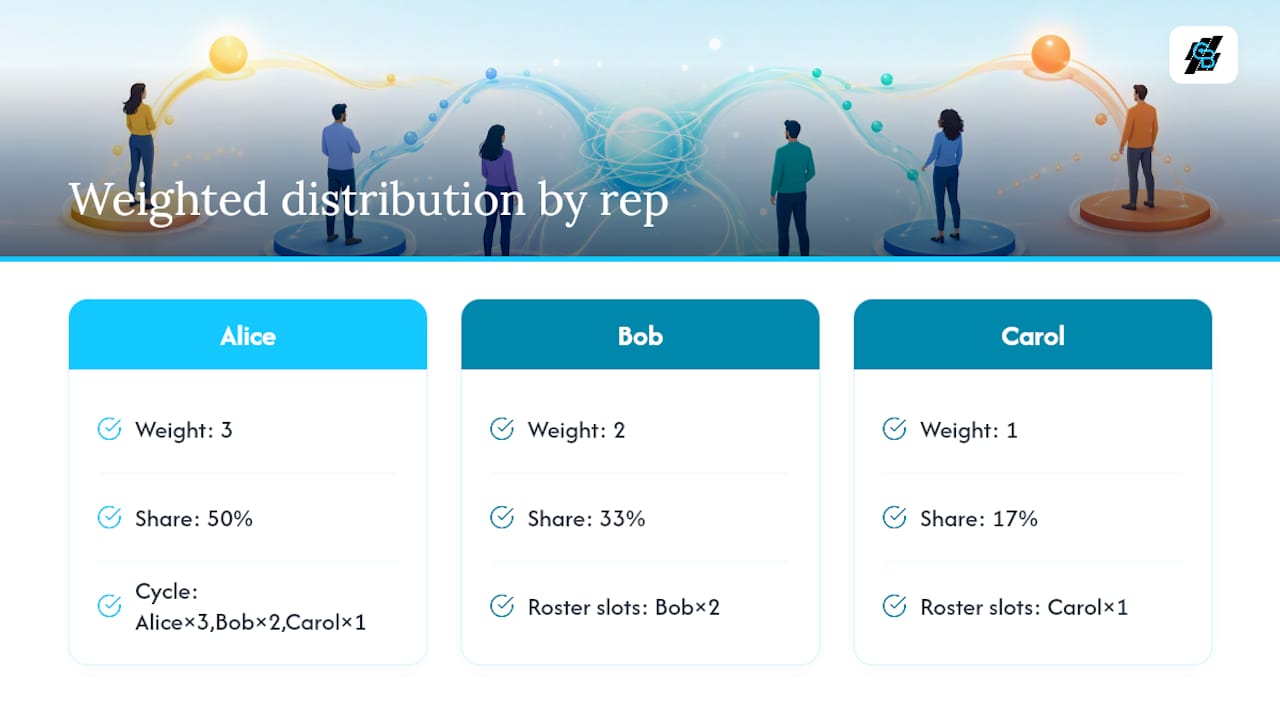
Weighted distribution suits ramping hires who need lower volume while they build pipeline skills, and part-time reps who work fewer hours per week.
Quotas and capacity caps
A quota sets a daily or weekly lead ceiling per rep. When a rep hits their quota, the pointer skips them until the quota resets. A capacity cap is a real-time open-lead ceiling. Both can run simultaneously: a rep pauses when either threshold is reached, whichever comes first.
| Rep | Weight | Daily quota | Leads received today | At quota? |
|---|---|---|---|---|
| Alice | 3 | 15 | 15 | Yes — skipped |
| Bob | 2 | 10 | 7 | No — eligible |
| Carol | 1 | 5 | 3 | No — eligible |
Retry, overflow, and SLA reassign
When a rep misses the SLA contact window, the routing engine should:
- Log the SLA breach event with a timestamp
- Reassign the lead to the next eligible rep in the pool
- Notify the original rep’s manager via an alert
Insurance routing engines commonly support exclusive delivery (one rep per lead), shared/multisell delivery (multiple reps receive the same lead simultaneously), and hybrid models that start exclusive and fall back to shared if the first rep does not respond within a defined window.
Routing decision pseudo-logic:
FOR each incoming lead:
  pool = match_pool(lead.source, lead.product, lead.state)
  eligible_reps = filter_by_license(pool) → filter_by_availability() → filter_by_capacity()
  IF eligible_reps is empty → send to fallback_queue
  ELSE → assign to eligible_reps[pointer % len(eligible_reps)]; advance pointer
What compliance requirements apply to regulated industries like insurance?
Insurance lead routing carries regulatory weight that most other verticals do not. Routing a health insurance lead to a rep not licensed in the prospect’s state is a compliance violation regardless of whether the rep closes the deal.
License and state filtering must run before rotation. Insurance routing engines that ignore licensing create direct regulatory risk and lost business. The filter is not optional — it is the first gate in the assignment chain.
A priority chain for regulated agencies should follow this structure, per EnrollHere’s routing guidance:
- First priority: licensed specialists for the lead’s product line and state
- Second priority: secondary certified agents who hold the required license
- Third priority: a general licensed queue for that state
- Fallback: hold for manual review — never assign to an unlicensed rep
TCPA and consent for phone and SMS outreach. Before any automated SMS or phone contact is triggered post-assignment, the routing system must verify that the lead record carries a valid opt-in consent flag. Route the lead to the assigned rep, but suppress automated outreach until consent is confirmed. This check belongs in the post-assignment workflow, not the routing logic itself, but the two systems must share the consent field.
Audit trail requirements. Log every assignment event with: lead ID, assigned rep ID, timestamp, pool name, license-state match result, and consent status at time of assignment. This record supports regulatory audits and internal fairness reviews.
Pro Tip: Add a required license-state mapping field to every inbound lead form and validate it server-side before the lead enters the routing queue. A lead that arrives without a confirmed state cannot be routed compliantly — catching it at intake is cheaper than catching it after a misassignment.
How do you test routing fairness and monitor it over time?
Key metrics to track:
- Time-to-first-contact: the interval between lead creation and first rep outreach. Speed-to-lead is one of the strongest predictors of contact rate.
- Assignment distribution variance: standard deviation of leads per rep within a pool over a rolling period. A well-tuned pool stays within ±1 lead of perfect parity.
- SLA breach rate: percentage of leads that exceed the contact SLA. A breach rate above your defined threshold should trigger an automatic reassign workflow.
- Reassign event count: high reassign volume signals either a capacity problem or an availability configuration error.
- Leads per rep per day/week: the raw count that reveals whether weights and caps are calibrated correctly.
Dashboard setup:
Build a report that shows leads assigned per rep for the current week alongside the expected share based on weights. Add an alert that fires when any rep’s actual share deviates from expected share by more than 15%. A second alert on SLA breach rate above your threshold triggers the reassign workflow automatically.
Auditing pools and roster membership:
Review pool membership and rep weights monthly. Reps who leave, change roles, or pick up new state licenses need immediate roster updates. A stale roster is the most common source of routing drift after go-live. For lead lifecycle management, routing accuracy at the assignment stage directly affects conversion rates downstream.
A/B testing routing variants:
To compare two routing configurations, run a shadow test: route all leads with the primary config and simultaneously log what the secondary config would have assigned. Compare time-to-contact and conversion rates across both assignment sets without exposing prospects to the experimental config.
How do you fix the most common round robin routing problems?
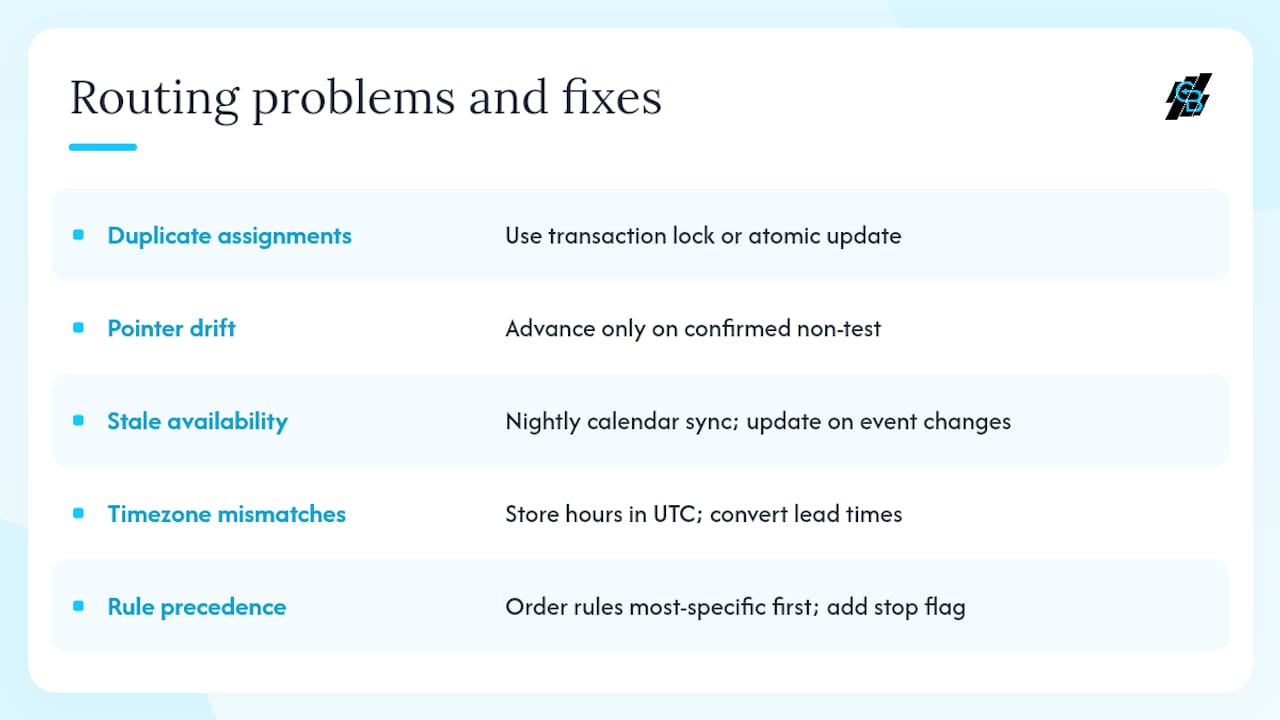
Duplicate assignments occur when two rules fire simultaneously and both advance the pointer before either writes the owner. Fix: use a transaction lock or a single atomic update on the pointer field. In Salesforce Flow, use a before-save Flow to prevent concurrent writes.
Rotation pointer drift happens when test leads, manually assigned leads, or deleted records advance the pointer without a real assignment. Fix: only advance the pointer on confirmed, non-test assignments. Add a lead source filter that excludes test records from the rotation logic.
Stale availability status causes leads to route to reps who are actually offline. Fix: schedule a nightly sync between your calendar system and the rep availability field in the CRM. For real-time accuracy, trigger an availability update whenever a calendar event is created or modified.
Timezone mismatches assign leads to reps outside their working hours when the availability window is stored in UTC but evaluated against local time incorrectly. Fix: store working hours in UTC and convert incoming lead timestamps to UTC before comparison.
Rule precedence mistakes in Salesforce send leads to the wrong pool when multiple assignment rules match the same lead. Fix: order rules from most specific to least specific and add a “stop processing further rules” flag on each rule that should be terminal.
To inspect routing logs: pull the lead assignment history object (or equivalent audit log) and filter for the lead ID. The log shows which rule fired, which rep was selected, and the pointer state at the time of assignment. This is the fastest way to trace a misassignment back to its cause.
To re-synchronize a pointer: set the pointer field to the rep who should receive the next lead, then submit one test lead to confirm the sequence resumes correctly. Document the manual reset in the change log.
Why simple routing beats complex routing most of the time
The instinct in sales ops is to build the most sophisticated routing model the CRM can support. Weighted round robin with capacity caps, availability windows, SLA reassigns, and territory filters sounds thorough. In practice, the more conditions in the chain, the more places the logic can fail silently.
Start with pure sequential rotation on a well-segmented pool. Add availability filters once you have confirmed the basic pointer logic is stable. Add weights only when you have data showing that equal distribution is producing unequal outcomes — not before. Complexity added ahead of evidence creates maintenance debt without measurable gain.
For insurance-focused sales ops teams specifically, the one action worth prioritizing above all others is getting license-state filtering right before anything else. A misrouted lead in a regulated line is not just a wasted assignment — it is a compliance event. Log every assignment with the license-match result and the consent status at the time of routing. That audit trail costs almost nothing to build and is worth a great deal if a regulator asks questions later.
Callbackcrm handles routing, compliance filters, and post-assignment outreach in one place
Insurance teams that need segmented pools, availability controls, capacity caps, and license-state filtering without stitching together three separate tools can run all of it inside Callbackcrm. The platform supports automated lead assignment workflows with configurable pool rules, calendar-linked availability, and SLA-triggered reassigns built for insurance agency operations.

Key features that map directly to the checklist above:
- Routing rules with compliance filters: license and state pre-filters run before rotation, so no lead reaches an unlicensed rep
- Calendar and availability integration: rep availability syncs automatically, pausing rotation during OOO and outside configured hours
- SLA reassign and automated follow-up: when a lead exceeds the contact window, Callbackcrm reassigns it and triggers SMS or email outreach to the new owner automatically
Start a free trial or review full platform capabilities at Callbackcrm’s features page. For enterprise routing needs with custom pool configurations, contact the support team directly.
Sources
- Round robin lead assignment is an automated method that distributes incoming leads sequentially across a defined team
- Round-Robin Lead Assignment: The RevOps Guide to Fair, Fast Lead Distribution — The GTM Advisor Group
- Understand lead distribution and assignment rules (Microsoft Dynamics 365 Sales)
- Round Robin Assignment in Salesforce: How to keep your team in the loop
- Round Robin Lead Assignment - Sales Enablement App (HubSpot marketplace)
- Insurance lead routing & automation (LeanData)
- Insurance lead routing & automation (The Lead Router)
This article is general information, not a substitute for advice from a qualified lawyer. Consult a qualified legal professional about your own circumstances before acting on anything here.