

Automate lead capture and qualification first. That single workflow turns missed calls into booked appointments, and it produces measurable results faster than any other starting point.
- Recommended first move: deploy AI-driven call qualification and CRM routing before touching nurture campaigns or proposal tools.
- Why it works: AI qualification systems can capture inbound calls, score intent, and route warm leads to an available producer in real time.
- Proof point: agencies using AI-assisted sales workflows saw average premium revenue per producer climb roughly 28% over a 12-month window, and CallBack CRM’s internal analyses report workflow automation driving sales uplifts in the 30 to 35% range in implemented cases.
Key Takeaways
Life insurance automation succeeds when agents deploy one workflow, prove measurable results, and expand only after hitting defined KPI targets.
| Point | Details |
|---|---|
| Start with qualification | Automate lead capture and qualification first since it produces the fastest measurable response-time gains. |
| Expect real but gradual ROI | Agencies using AI-assisted workflows saw premium revenue per producer rise about 28% over a year. |
| Clean data before scaling | Audit a 200-record sample for missing fields and duplicates before automating scoring or nurture. |
| Measure before expanding | Set baselines for response time, qualified leads per day, and conversion rate, then check results at 30/60/90 days. |
| CallBack CRM supports the phased model | CallBack CRM connects qualification, scoring, nurture, and proposal tools in one workflow, with internal data reporting 30 to 35% sales uplift in implemented cases. |
Table of Contents
- Why Life Insurance Automation Matters for Agents Right Now
- What Automation Features Do Life Agents Actually Need?
- How Do You Roll Out Life Insurance Automation Without Breaking Your Pipeline?
- What Data and Integration Work Comes Before You Scale?
- How Do You Know the Automation Is Working?
- Best Practices for Training AI Models on Life Insurance Leads
- Compliance and Data Privacy in Automated Life Insurance Workflows
- Common Problems When Rolling Out Automation, and How to Fix Them
- What Successful Automation Deployments Actually Look Like
- How Do You Secure Sensitive Client Data in an Automated Workflow?
- Start Small, Then Trust the Data
- See How CallBack CRM Fits the Workflow You Just Built
- Sources
Why Life Insurance Automation Matters for Agents Right Now
Speed sells policies. A prospect who fills out a quote form at 9 p.m. and doesn’t hear back until the next afternoon has usually already talked to someone else. Automated lead qualification closes that gap by responding in seconds instead of hours, and that response speed is the single biggest lever independent agents have over captive shops with bigger call centers.
The numbers: Agencies running AI-assisted sales workflows saw premium revenue per producer rise about 28% in a year, with lead scoring and automated nurture producing the fastest visible gains. Separately, agents who automated administrative tasks reported saving 8 to 10 hours per week, time that goes straight back into selling.
The gains are real, but so is the resistance. Two barriers show up again and again:
- Tech overwhelm. Agents fear breaking something or automating the wrong step, so they freeze instead of experimenting.
- Integration anxiety. Adding a tool that doesn’t talk to the existing CRM or AMS creates more manual work, not less.
The fix for both is the same: automate one bottleneck, prove it works, then move to the next.
What Automation Features Do Life Agents Actually Need?
Not every automation tool earns its place in your stack. The ones that matter map directly to a specific bottleneck in your sales process, not to a feature checklist a vendor handed you.
- AI lead qualification (voice bot or chat). This is the front door. It captures intent from an inbound call or web form, asks the right qualifying questions, and populates the CRM automatically instead of leaving a rep to type notes after the fact.
- Predictive lead scoring. Once qualification data exists, scoring ranks leads so producers work a daily list ordered by likelihood to close instead of guessing which callback to make first. Models trained on insurance-specific behavior, not generic retail sales data, produce far fewer false positives than off-the-shelf scoring.
- Automated nurture (email, SMS, voicemail drop). This re-engages the leads who aren’t ready today. A sequence that fires automatically after a missed call saves the hours a producer would otherwise spend on manual follow-up.
- Conversation intelligence. Recorded and transcribed calls let agency owners coach new producers and catch compliance issues before they become complaints.
- Proposal, eSign, and appointment booking. Once a lead is qualified and scored, the path from quote to signature should live inside the same workflow, not a separate app the producer has to remember to open.
- Integration layer. All of the above only works if it connects cleanly to your CRM, agency management system, telephony, and quoting or eApp engine.
Pro Tip: Don’t buy features in order of how impressive the demo looks. Buy them in the order your bottleneck report tells you to. If most leads are dying between “call answered” and “appointment booked,” qualification and scoring beat conversation intelligence every time.
How Do You Roll Out Life Insurance Automation Without Breaking Your Pipeline?
Trying to automate everything in month one is how agencies end up with a CRM full of half-configured workflows nobody trusts. A phased rollout, tackling one workflow at a time, lowers change friction and proves ROI before you ask anyone to change how they sell.
- Pick your bottleneck. Ask: where do leads go cold? How many hours a week does a producer spend on data entry instead of talking to prospects? Which step gets skipped when the office is busy? The answer is your starting workflow.
- Clean the data behind that workflow. Confirm required fields exist (phone, email, policy type, source), remove duplicate contact records, and check that lead source tagging is consistent. You don’t need a perfect database, just a clean sample for the one workflow you’re automating.
- Deploy the minimal version and connect it to your CRM. Minimal means one trigger, one action, and one handoff, not a ten-step branching sequence. A missed call triggers an SMS and a CRM task. That’s it for week one.
- Train producers and set checkpoints. Walk the team through what changed, then check results at 30, 60, and 90 days against KPIs you set before launch.
- Expand once you hit target. Only after the first workflow meets its KPI do you add the next one, whether that’s nurture sequences, scoring, or proposal automation.
This sequence matters more than which tool you buy. Agencies that skip straight to a full suite rollout tend to abandon half the features within 90 days because nobody had time to learn them properly.
What Data and Integration Work Comes Before You Scale?
Automation amplifies whatever is already in your CRM, good or bad. Feed a scoring model dirty data and it will confidently rank the wrong leads first, which erodes producer trust faster than having no scoring at all.
- Audit a sample before you commit. Pull 200 CRM records and check for missing required fields, duplicate phone or email entries, and how many carry a policy-type tag. If more than a quarter fail, run a hygiene sprint before automating anything on top of that data.
- Prioritize integrations that touch the workflow you’re automating first, not every system you own: telephony, your AMS, your eSign tool, and your quoting or eApp engine.
- Set permissions and logging from day one. Know who can see and edit lead records, and keep a record of automated actions for audit purposes.
- Build a fallback path. Any lead the AI can’t confidently qualify should route to a human, not disappear into an unmonitored queue.
Pro Tip: Run your data audit before you shop for vendors, not after. A clean 200-record sample tells you more about your real automation readiness than any product demo will.
How Do You Know the Automation Is Working?
Set your baseline before you flip anything on. Pull last quarter’s average response time, leads qualified per day, close rate, and cost per issued policy. Without that baseline, a 60-day improvement is just a feeling, not a number.
- Response time — minutes from lead capture to first contact.
- Qualified leads per day — volume a producer can work without manual data entry.
- Conversion rate — qualified lead to appointment, and appointment to policy.
- Time saved per producer per week.
- Cost per policy issued.
Agencies running AI-assisted workflows saw premium revenue per producer rise about 28% within a year, with lead scoring and nurture producing the fastest measurable movement, often inside the first 30 to 60 days.
Quick wins on response time and qualified-lead volume usually show up within a month. Full embedded ROI, the kind that shows up in your loss ratio and cost-per-policy trend, tends to take longer and depends heavily on how clean your data was going in.
Best Practices for Training AI Models on Life Insurance Leads
Generic sales AI, the kind trained on retail or B2B software leads, doesn’t understand what makes a life insurance prospect different: age bands, health disclosures, beneficiary intent, and policy type all change what “qualified” even means. Models trained specifically on insurance behavior produce meaningfully fewer false positives than models borrowed from unrelated industries.
Start by feeding the model your own historical outcomes, not just lead volume. Which sources actually closed? Which qualifying questions correlated with a completed application versus a dead lead? That closed-loop data, tying source and behavior back to actual policy issuance, is what separates a scoring model producers trust from one they ignore after two bad recommendations.
Retrain on a schedule, not just at launch. Life insurance demand shifts with seasonality, carrier product changes, and even news cycles around health and mortality. A model trained once in January and never touched again will drift, quietly ranking the wrong leads first by summer.
Keep a human in the loop for edge cases. Term versus permanent intent, complex health disclosures, and high-face-amount inquiries deserve a producer’s judgment, not a fully automated path. The goal of model training here isn’t to remove agents from the decision, it’s to hand them a ranked list they can trust enough to act on immediately.
Finally, involve your producers in reviewing scored leads regularly. Their pushback on obviously wrong rankings is the fastest feedback loop you have for catching a model that’s drifted off course.
Compliance and Data Privacy in Automated Life Insurance Workflows
Automated systems that touch prospect health information, income data, or beneficiary details carry the same regulatory weight as a human-run process, sometimes more, because they operate at higher volume and speed. Every workflow you automate needs a compliance answer, not just a technical one.
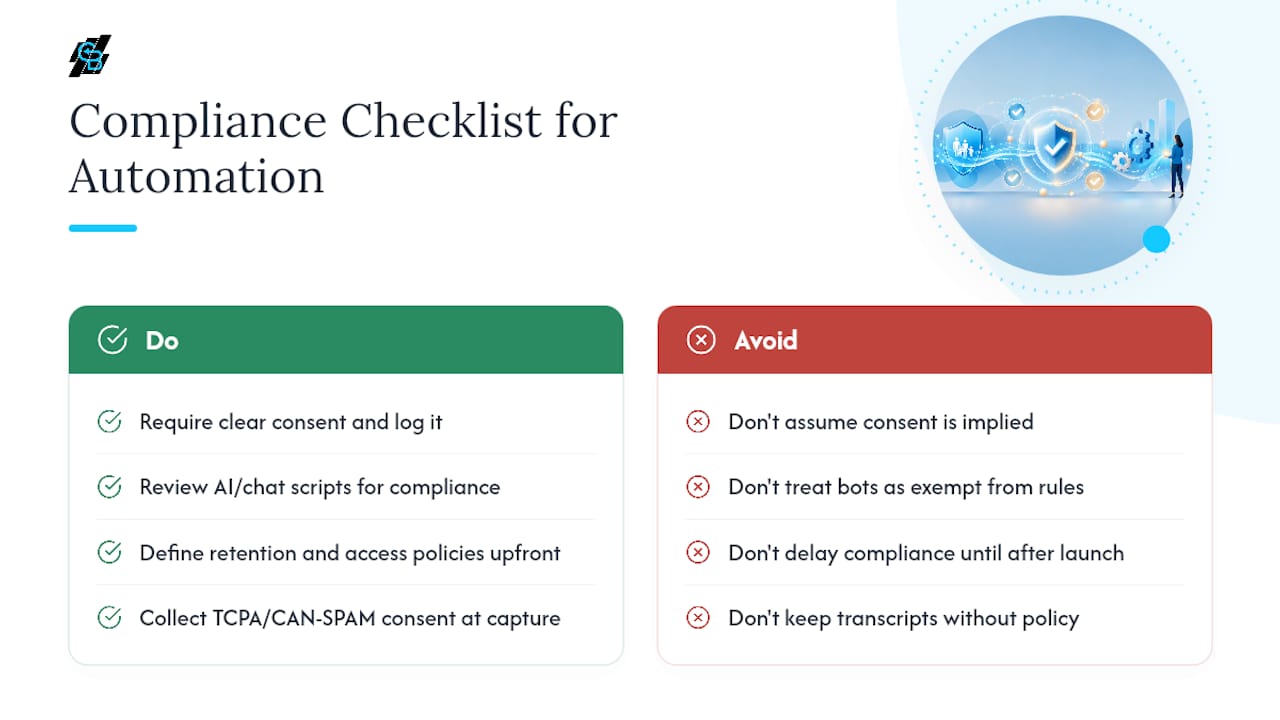
Recorded calls and AI-driven conversations need clear consent language before qualification even begins, and that consent needs to be logged, not assumed. State insurance regulations on solicitation and disclosure still apply whether a human or a bot asks the qualifying questions, so scripts used by voice AI or chatbots should go through the same compliance review as a written script would.
Data retention policy matters just as much as collection. Decide upfront how long call transcripts, lead scoring history, and communication logs are kept, and who can access them, before you turn a workflow on rather than after a regulator or client asks.
Nurture sequences carrying SMS and email touch federal rules like TCPA consent requirements for automated texting and CAN-SPAM for email marketing. Automating the send doesn’t automate the consent, that part still has to be collected and documented correctly at the point of lead capture.
Build compliance review into your phased rollout itself rather than treating it as a separate project. Each new workflow you activate should get a short compliance check before launch, not after the first complaint.
Common Problems When Rolling Out Automation, and How to Fix Them
The most common failure isn’t a broken integration. It’s an agency automating too much at once, watching adoption collapse, and blaming the technology instead of the sequencing.
Producers ignore the scored leads. This almost always traces back to a model trained on dirty or generic data. Pull a sample of leads the model ranked highly that went nowhere, and check whether the underlying record had accurate source and outcome data. Retrain with cleaner inputs before assuming the tool doesn’t work.
Leads slip through the cracks between systems. This is an integration gap, not an AI failure. If your telephony system and CRM don’t share data in real time, a qualified lead can sit unrouted for hours. Test the actual handoff, not just the individual tools, before trusting it with real leads.
Staff quietly stop using the new workflow. Usually a training and checkpoint problem. If nobody reviewed results at the 30-day mark, bad habits creep back in. Reinstate the KPI check and ask producers directly what step felt clunky.
The automation feels “off” or generic. Often a sign the AI model or scripts were borrowed wholesale from another industry. Insurance-specific tuning, using your own closed-loop outcome data, fixes this faster than switching vendors.
The pattern across all four: diagnose before you rebuild, and fix the narrowest possible piece before touching the whole workflow.
What Successful Automation Deployments Actually Look Like
The agencies that get real traction don’t automate everything at once, they pick one visible pain point and fix it completely before moving on. Agencies studied across more than 350 organizations that adopted AI-assisted sales workflows saw average premium revenue per producer climb about 28% over a year, and the fastest-moving pieces of that gain came specifically from lead scoring and automated nurture, not from broad, all-at-once platform rollouts.
A typical pattern: an agency struggling with missed after-hours calls automates qualification and routing first. Within weeks, response time drops from hours to minutes, and qualified appointments per producer rise measurably. Only after hitting that target does the agency add nurture sequences for the leads who weren’t ready to buy immediately, then proposal and eSign automation once appointment volume justifies it.
The common thread in agencies that move past pilot mode into real embedded use is an integration-first mindset: the tools they add slot into an existing workflow instead of sitting beside it as one more login nobody checks. Agencies that instead bought a full suite and tried to launch everything simultaneously report the opposite experience, features half-configured, producers confused about which system holds the truth, and adoption stalling well before any ROI shows up.
How Do You Secure Sensitive Client Data in an Automated Workflow?
Every automated touchpoint, a voice bot capturing health disclosures, a nurture sequence pulling beneficiary details, an eSign document holding a Social Security number, is a place sensitive data can leak if the system wasn’t built with security as a first-class requirement rather than an afterthought.

Start with hosting. Where your CRM and automation platform store data matters as much as what they do with it. Secure cloud infrastructure with encryption at rest and in transit is the baseline, not a premium feature you should have to ask for.
Access control comes next. Not every team member needs to see every field on every lead record. Role-based permissions limiting who can view health disclosures, income data, or full policy details reduce the blast radius if a login gets compromised.
Audit logging matters more once workflows run automatically than it did when a human typed every note manually. You need a record of what the automation did, when, and to which record, both for troubleshooting a scoring anomaly and for satisfying a compliance inquiry after the fact.
Finally, test your fallback paths under failure conditions, not just success conditions. If an integration between your telephony system and CRM drops, does sensitive call data queue securely, or does it get lost or exposed in transit? Security planning that only accounts for the happy path leaves the riskiest scenario unexamined.
Start Small, Then Trust the Data
Automating lead qualification first isn’t a compromise, it’s the correct order of operations. Get that one workflow right and every downstream piece, scoring, nurture, proposals, gets easier because the data feeding them is finally clean.
I’ve watched the same pattern play out across the research behind this piece: agencies that automate one bottleneck, measure it honestly, and only then expand outperform the ones that buy a full suite on day one. A single missed-call workflow, automated and measured for 60 days, tells you more about whether AI belongs in your sales process than any demo does.
Give the first workflow real time to prove itself before judging the technology. Train your team on it, check the numbers at 30 and 60 days, and let the results decide what comes next.
— Kyle
See How CallBack CRM Fits the Workflow You Just Built
CallBack CRM is built around the exact sequence covered above: AI lead qualification and scoring feed directly into automated SMS and email nurture, with proposal and eSign tools living in the same pipeline instead of a separate login. That means the phased rollout, qualify first, then nurture, then proposals, happens inside one connected system rather than three disconnected apps you have to stitch together yourself.

The platform’s integrations cover the telephony, calendar, and website connections most independent agencies already use, so the “integration-first” approach that separates agencies stuck in pilot mode from ones seeing real ROI is built in rather than bolted on. CallBack CRM’s internal analysis of implemented workflows reports sales uplifts in the 30 to 35% range once a single automated workflow is fully embedded, consistent with the phased approach outlined here.
Before requesting a trial, pull a small sample of your own lead data, roughly 200 records, and identify the one workflow costing you the most missed opportunities. Bring both to your first look at CallBack CRM’s SMS marketing tools, and you’ll walk out with a concrete first workflow to launch rather than a generic feature tour.
Sources
- Experimenting or executing — why most agents are still stuck in AI pilot mode
- Independent agents are past AI hype—now comes the hard part
- AI Sales Enablement for Insurance Agencies: 2026 Guide | Arete
- Lead Qualification for Insurance Agencies | Sonant