

Automated webinars let a business run polished, event-style presentations on repeat, without a presenter showing up each time. That single mechanism drives three outcomes at once: scalable lead generation, repeatable training, and always-on sales demos. Businesses that shift from live-only formats can cut costs by as much as 10x compared to hosting the same session live, week after week, because the production work happens once and the delivery happens indefinitely.
The immediate payoff shows up in three places: fewer hours spent re-presenting the same material, a steady stream of leads instead of a spike-and-drop pattern tied to a live event date, and lower cost per demo since one recording serves every time zone.
The highest-value use cases tend to cluster around a few goals:
- Lead generation funnels that run 24 hours a day without a live host
- Onboarding and training sequences that scale across new hires or customers
- Evergreen sales demos that replace a rep’s live pitch for early-stage prospects
Key Takeaways
Automated webinars work because they separate the one-time cost of producing a presentation from the unlimited cost of delivering it, which is why they scale lead generation and training simultaneously.
| Point | Details |
|---|---|
| Core role | Automated webinars deliver scalable lead generation, repeatable training, and always-on sales demos from a single recording. |
| Structure over replay | Registration, reminders, and timed interactions separate a true automated webinar from a static video link. |
| Watch drop-off timing | Attention commonly drops after 60 to 90 minutes, so shorter sessions with well-placed engagement points convert better. |
| Disclosure protects trust | Telling registrants a session is pre-recorded avoids the authenticity backlash that undisclosed automation risks. |
| Connect data to follow-up | Callbackcrm turns webinar attendance and CTA clicks into scored, automatically followed-up leads inside one CRM. |
Table of Contents
- What Is an Automated Webinar and How Does It Work?
- Automated vs. Live vs. Simulive: Which Format Fits Your Goal?
- Core Features to Look for in Webinar Software
- Where Automated Webinars Deliver the Most Value
- How to Build and Launch an Automated Webinar
- Metrics That Tell You Whether the Webinar Is Working
- Weighing the Advantages Against the Trade-offs
- Connecting Webinar Data to Your CRM and Sales Workflow
- What I Learned Watching Teams Adopt Automated Webinars
- Turn Webinar Attendees into Sales-Ready Leads Automatically
- Frequently Asked Questions
- Sources
What Is an Automated Webinar and How Does It Work?
An automated webinar is a pre-recorded presentation delivered on a set schedule or on demand, wrapped in the same registration, reminder, and follow-up structure as a live event. That structure is what separates it from a plain video replay. According to eWebinar’s breakdown of the format, the recurring schedule and pre-set interactions are what let a business capture higher-quality leads than a static video link ever could.
The workflow generally runs in this order: record the presentation, upload it to a platform, build a timeline with timed polls and calls to action, configure the scheduling engine, then let automated reminders and follow-up sequences do the rest. A typical timestamp map looks like this:
- Registration confirmation sent instantly
- Reminder emails at 24 hours and 1 hour before start
- Mid-session poll or chat prompt around the 20-minute mark
- Offer or CTA delivered near the presentation’s close
- Follow-up sequence triggered within minutes of the session ending
Some of what attendees see, like preloaded chat messages or timed prompts, is simulated rather than truly live. ClickMeeting’s guide to automated webinars calls this “webinars on autopilot,” and the distinction matters for how you set expectations with your audience.
Automated vs. Live vs. Simulive: Which Format Fits Your Goal?
Live webinars build urgency and let a host adapt in real time, but they don’t scale. Simulive (simulated-live) sessions play a recording at a fixed time with a host monitoring chat live, giving you scheduled urgency without the production risk. On-demand and evergreen automated webinars remove the clock entirely, trading urgency for reach and repeatability.
For lead generation and product demos, automated or simulive formats usually win because volume matters more than spontaneity. For training and onboarding, automated webinars fit well since consistency beats novelty. For a product launch, live or simulive builds the buzz a pure replay can’t.
Pro Tip: If you’re not ready to commit to full evergreen automation, run a hybrid: host live once, then convert the recording into an automated sequence for the next three months. You keep the authenticity of the original session while extending its shelf life.
Core Features to Look for in Webinar Software
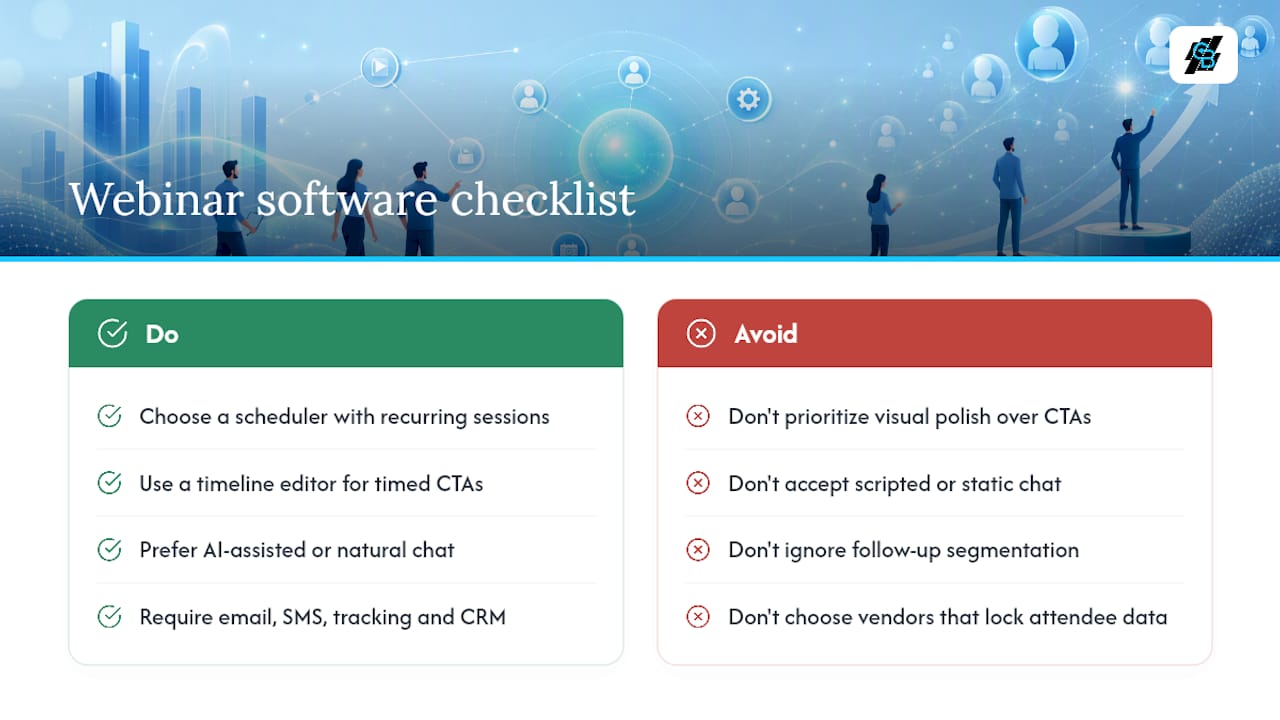
Not every platform handles automation the same way, so the checklist matters more than the brand name on the login screen. Look for a scheduling engine that runs recurring sessions without manual resets, a timeline editor for placing polls and CTAs at exact moments, simulated chat that feels natural rather than scripted, and registration pages that don’t require a developer to customize.
Beyond the interface, integrations decide whether the webinar actually produces revenue. Email and SMS automation, attendance tracking, and CRM or webhook connections turn a webinar from an isolated event into a data source. Timed CTAs and follow-up segmentation tend to move lead quality more than any visual polish, since they’re what determines who gets contacted and when. WebinarKit’s analysis of conversion failures notes that platforms with AI-assisted chat, where an agent answers attendee questions in real time, report better conversion rates than static chat logs.
Pro Tip: Before signing up for any platform, check whether you own the attendee data outright or whether it’s locked inside the vendor’s dashboard. Data ownership matters more than any single feature once you’re trying to sync webinar activity with your CRM.
Where Automated Webinars Deliver the Most Value
Automated webinars earn their place in a marketing stack when the same explanation needs to happen repeatedly, to different people, at different times. A handful of scenarios stand out:
- Lead generation funnels that run continuously instead of waiting for the next live date
- Product demos and sales presentations that replace a rep’s early-stage pitch
- Customer onboarding and training that scales without adding trainer hours
- Paid evergreen courses that monetize a single recorded curriculum
- Global audience coverage, letting attendees in different time zones register for a session that fits their schedule
A business running weekly lead-gen webinars can expect a steady trickle of registrations rather than a single spike, and a training team can expect fewer repeat sessions once onboarding content moves to automation.
Automated webinars work best as a funnel system, not a video replay. The moment you treat one as “set it and forget it,” engagement and conversion both start to slip.
Automated formats fall short when a topic demands live problem-solving, such as technical troubleshooting sessions, or when the format itself depends on group collaboration, like a workshop where attendees build something together in real time.
How to Build and Launch an Automated Webinar
- Pick a single topic and goal. A webinar trying to do everything converts nothing.
- Script and record a polished presentation. Treat it like a broadcast, not a casual call, since this recording will run indefinitely.
- Build the timeline with timed engagement points. Place polls at natural transitions and position your offer after trust is established, not before.
- Configure registration and reminder sequences. Confirmation, 24 hour, and 1 hour reminders reduce no-shows.
- Test the entire flow end to end. Register as a test attendee and watch for broken timing or awkward CTA placement.
- Launch, then monitor the first cohort closely. Early data reveals timing issues before they affect hundreds of registrants.
Pro Tip: Pacing determines whether a poll feels like engagement or interruption. Place it at a natural pause in your script, not mid-sentence, so it reads as a deliberate break rather than a glitch.
Metrics That Tell You Whether the Webinar Is Working
Track registration rate, attendance rate, average watch time, drop-off points, poll participation, CTA click-through rate, conversion rate, and cost per lead. Each metric answers a different question: a high registration rate paired with low attendance usually points to reminder timing or a scheduling mismatch, not a weak topic.
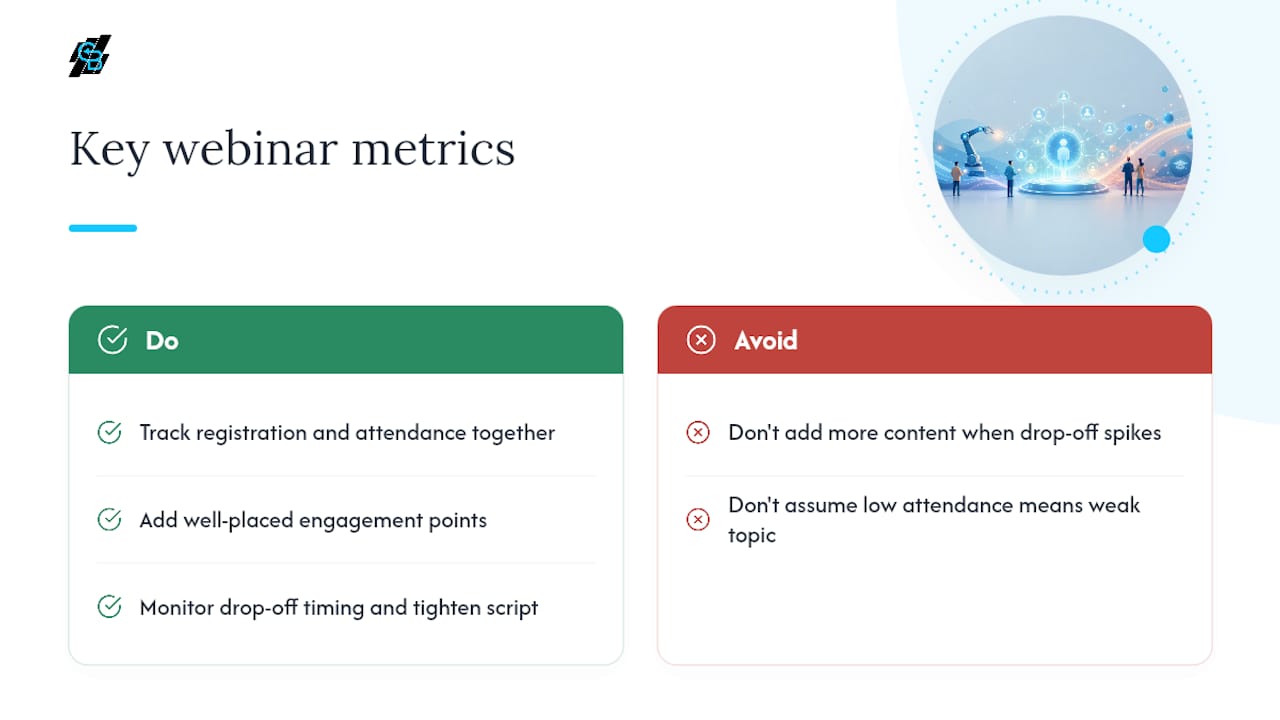
Watch time deserves particular attention. Livestorm’s research on live and automated formats notes that attention commonly drops after 60 to 90 minutes, which is why shorter sessions with well-placed engagement points tend to post higher completion and conversion rates than longer ones. If your drop-off spikes around the 45 minute mark, that’s a signal to tighten the script rather than add more content.
Weighing the Advantages Against the Trade-offs
The advantages are straightforward: automated webinars scale to any registration volume, deliver a consistent message every time, cost less per session than repeated live events, and cover every time zone without asking a presenter to stay up at 3 a.m.
The trade-offs are just as real. Automation removes spontaneous interaction, and if attendees discover a session was pre-recorded without disclosure, it can damage trust. Transparency about automation protects that trust far more reliably than hoping nobody notices.
A few red flags suggest automation isn’t the right fit: low audience volume for the topic, a subject that demands live troubleshooting, or a compliance requirement that mandates live interaction with a licensed presenter.
Connecting Webinar Data to Your CRM and Sales Workflow
A webinar only pays off once its data reaches your sales team. Registration data should populate a lead record automatically. Attendance and watch time feed behavioral scoring, so a prospect who stayed for 45 minutes ranks higher than one who left after five. CTA clicks apply campaign tags, and poll answers populate segmentation fields for follow-up targeting.
In practice, an attendee who clicks the mid-session CTA and answers a poll can trigger an automated sequence that flags them as sales-qualified within minutes, well before a rep manually reviews the list. Mapping out that lead funnel automation in advance is what turns a webinar from a marketing event into a revenue source.
What I Learned Watching Teams Adopt Automated Webinars
The teams that succeeded treated the script and timeline editor with the same care as a product launch, testing the full attendee path multiple times before going live. What surprised most of them wasn’t the setup work. It was how fast engagement dropped when the opening felt stale after a few months of reuse.
Pro Tip: Refresh your opening segment once or twice a quarter, even if the core content stays the same. A stale hook kills conversion faster than a stale offer.
Run a hybrid test, live once, then automated, before committing to a full evergreen rollout. It’s a smaller bet with a clearer signal.
Turn Webinar Attendees into Sales-Ready Leads Automatically
A webinar generates attention, but attention only becomes revenue when someone follows up fast, and that’s where most automated webinar setups quietly lose money: the recording runs perfectly, then the leads sit in a spreadsheet for three days. Callbackcrm closes that gap by connecting webinar registrations, attendance data, and CTA clicks directly into automated email and SMS follow-up sequences, so a prospect who watched 40 minutes and clicked your offer gets contacted within minutes, not days.

The platform’s webinar and automation features include AI-assisted lead scoring that ranks attendees by engagement, funnel pages built to match your webinar registration flow, and follow-up workflows that adjust based on how much of the session someone actually watched. Instead of exporting attendee lists into a separate email tool, everything lives in one system built for insurance agents and agencies who need webinar leads converted into booked calls, not just names on a list. Start a trial and connect your next webinar to a follow-up sequence that actually fires on time.
Frequently Asked Questions
How do automated webinars differ from a simple recorded video? An automated webinar includes registration, scheduled delivery, timed interactions like polls and CTAs, and automated follow-up. A recorded video is just a file with none of that structure around it.
Can automated webinars actually convert as well as live ones? They can, particularly when timed CTAs, simulated chat, and fast follow-up sequences are built in. Conversion depends more on script quality and follow-up speed than on whether the session was live.
What’s a common pitfall when launching an automated webinar? Skipping the end-to-end test. A misplaced poll or a CTA that fires before trust is built can quietly tank conversion for months before anyone notices.
How long should an automated webinar run? Keep it under 60 to 90 minutes, since attention typically drops off in that window. Shorter, tightly paced sessions tend to post higher completion rates.
Should I tell registrants the webinar is automated? Yes. Disclosure protects trust, and undisclosed automation risks a credibility hit if attendees figure it out on their own.
Sources
- Automated Webinars: Benefits compared to Live Webinars
- Automated Webinars 2026. Why Conversions Fail Fix Now | WebinarKit Blog
- Automated Webinar: Complete Guide to Webinars on Autopilot
- What is an Automated Webinar? + How To - eWebinar Blog