

TL;DR:
- Automation workflows increase productivity and reduce human errors for insurance sales teams.
- They enable faster responses, personalized messaging, and improve lead conversion rates.
- Small agencies can leverage automation to compete effectively with larger firms by streamlining processes.
Automation can increase productivity by over 30% for insurance sales teams, yet most agents still rely on manual follow-ups, spreadsheets, and gut instinct to manage their pipeline. That gap is costing you deals. If you’ve ever wondered whether automation workflows are just for big tech companies or enterprise carriers, this guide is for you. We’ll break down exactly what automation workflows are, why they matter for agencies of every size, and how you can start using them today to improve customer engagement and close more policies.
Table of Contents
- What are automation workflows in insurance marketing?
- Key benefits of automating your marketing and sales workflow
- Popular automation workflows for insurance agencies
- How to get started with automation: A step-by-step approach
- Why embracing automation is the insurance industry’s new standard
- Level up with automation: Solutions designed for insurance agencies
- Frequently asked questions
Key Takeaways
| Point | Details |
|---|---|
| Boost conversion rates | Automation workflows make sure prospects don’t fall through the cracks, increasing the chances of closing deals. |
| Save time and reduce mistakes | Automating repetitive marketing and sales tasks frees up hours each week and minimizes human errors. |
| Deliver consistent experiences | Automation ensures every customer receives timely communication and high-quality service. |
| Easy to start and scale | Modern CRM tools offer templates and guides, so you can launch your first workflow in hours—not weeks. |
What are automation workflows in insurance marketing?
An automation workflow is a set of pre-defined, automated steps that handle repetitive tasks without you lifting a finger. Think of it like a digital assistant that never sleeps, never forgets, and never skips a step. Every workflow has three core building blocks: triggers, conditions, and actions.
A trigger is the event that starts the workflow. A new lead fills out a web form. A policy renewal date is 60 days away. A client clicks a link in your email. That single event sets everything in motion.
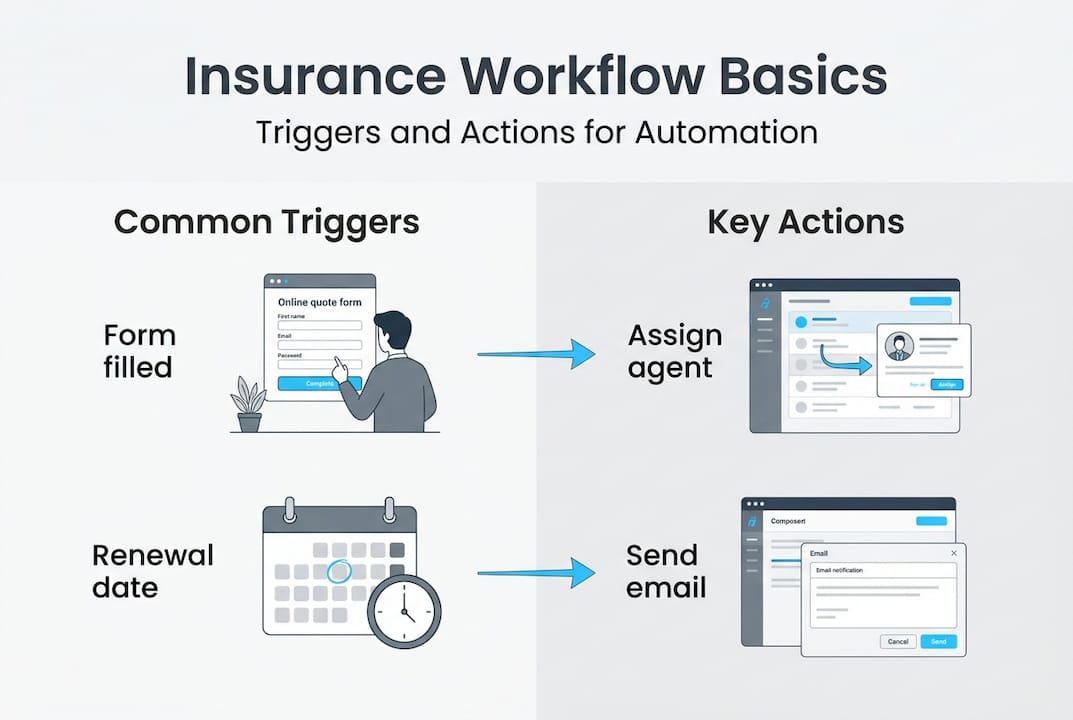
Conditions are the rules that decide what happens next. Is this lead from a specific zip code? Did they request a life insurance quote or an auto quote? Conditions let you personalize the path without doing it manually.
Actions are what the system actually does. It sends an email, assigns the lead to an agent, schedules a follow-up SMS, or adds the contact to a nurturing sequence.
Here are some real insurance examples of automation workflows in action:
- New lead assignment: A prospect submits a quote request and is instantly routed to the right agent based on product type or territory.
- Automated follow-ups: A sequence of emails and texts goes out over 7 days if the prospect hasn’t responded.
- Cross-sell reminders: Clients who have auto insurance receive a targeted message about bundling with home coverage.
- Policy renewal notices: Automated reminders go out at 90, 60, and 30 days before renewal.
Automation workflows reduce human error and free up time for higher-value tasks like building relationships and closing deals.
For a deeper look at how these workflows connect to your broader pipeline, the insurance lead workflow basics guide walks through the fundamentals with practical examples. The bottom line is simple: automation removes the friction between a lead entering your system and a policy getting signed.
Key benefits of automating your marketing and sales workflow
Now that you know what automation workflows are, let’s talk about what they actually do for your numbers.
Faster response times are the most immediate win. Research shows that responding to a lead within five minutes makes you 100 times more likely to connect than waiting 30 minutes. Automation makes that five-minute response a guarantee, not a goal.
Consistent communication protects your brand. When every prospect gets the same professional sequence regardless of which agent is on duty, your agency looks polished and trustworthy. No more dropped balls when someone is sick or on vacation.
Data-driven targeting means your messages reach the right people at the right time. Workflows can segment contacts by policy type, age, location, or engagement history and send content that actually resonates.
Here’s a quick comparison of manual versus automated workflows:
| Task | Manual approach | Automated approach |
|---|---|---|
| Lead follow-up | Agent calls when available | Instant SMS and email triggered on submission |
| Appointment reminders | Agent sends reminder manually | Automated 24-hour and 1-hour reminders |
| Policy renewals | Agent checks spreadsheet | Workflow triggers at 90, 60, and 30 days |
| Lead qualification | Agent reviews each lead | Workflow scores and routes automatically |
Statistic callout: Automation in lead nurturing improves conversion rates by up to 50%. That’s not a marginal gain. That’s the difference between a struggling pipeline and a thriving one.
Commonly automated tasks that deliver the biggest impact include lead qualification, appointment scheduling, drip nurturing campaigns, and post-sale surveys. Each one removes a manual step that was previously eating your team’s time.
Pro Tip: Don’t try to automate everything at once. Pick the one task that takes the most time and causes the most errors, automate that first, and build from there. For more on improving lead funnel performance, there are proven frameworks you can apply immediately. You can also explore automating lead generation specifically for insurance agents to see which workflows deliver the fastest results.
Popular automation workflows for insurance agencies
Understanding the high-level benefits sets the stage for exploring specific workflow types every insurance business should consider.
Lead capture and assignment is the first workflow most agencies implement. When a prospect fills out a form on your website or landing page, the system instantly captures their data, scores the lead, and assigns it to the right agent with a notification. No delays. No guessing.
Drip email campaigns keep new prospects warm without any manual effort. A well-built drip sequence might look like this:
- Day 1: Welcome email with a brief introduction to your agency.
- Day 3: Educational content about the type of coverage they requested.
- Day 5: A client testimonial or case study.
- Day 7: A clear call to action to schedule a call.
Automated appointment reminders reduce no-shows dramatically. A two-message sequence, one the day before and one an hour before, can cut no-show rates by 30% or more.

Policy renewal workflows are pure gold for retention. Clients who feel remembered and valued are far less likely to shop around. An automated renewal sequence builds that feeling without adding a single task to your team’s plate.
Reputation management workflows send a post-sale survey after every closed policy. Happy clients get nudged to leave a Google review. Unhappy clients get routed to a service resolution path before they post publicly.
Here’s a quick reference table for workflow setup:
| Workflow type | Trigger | Key action |
|---|---|---|
| Lead capture | Form submission | Assign agent, send welcome SMS |
| Drip campaign | New contact added | Send email sequence over 7 days |
| Appointment reminder | Meeting scheduled | Send SMS 24h and 1h before |
| Renewal notice | Policy date approaching | Send emails at 90, 60, 30 days |
| Post-sale survey | Policy issued | Send satisfaction survey |
Templates and workflow libraries make automation setup straightforward, especially for agents who aren’t tech-savvy. Most modern platforms offer drag-and-drop editors that let you build a complete workflow in under an hour. For detailed email workflow tips specific to insurance, there are step-by-step guides available. You can also review top automation tools to compare platforms before committing.
How to get started with automation: A step-by-step approach
Having seen the workflow possibilities, here’s a stepwise roadmap to actually putting automation to work for your agency.
Step 1: Choose one high-impact workflow. Don’t start with ten workflows. Start with one. The best first choice is usually the task that causes the most pain right now. For most agencies, that’s lead follow-up.
Step 2: Map out the process. Before you touch any software, write out the workflow on paper. What triggers it? What are the steps? What’s the desired outcome? A clear map prevents you from building something that breaks halfway through.
Step 3: Choose your tool and select a template. Initial setup can be achieved in a few clicks with modern CRM tools. Look for a platform that offers insurance-specific templates so you’re not building from scratch.
Step 4: Test on a small group. Before rolling out to your full contact list, run the workflow on 10 to 20 contacts. Watch what happens at each step. Does the trigger fire correctly? Do the emails land in the inbox? Does the lead get assigned to the right agent?
Step 5: Refine and scale. After your test, review the data. Open rates, response rates, and conversion rates will tell you what’s working and what needs adjustment. Make changes, test again, then scale.
Common pitfalls to avoid:
- Over-automating too fast. Adding 15 workflows before mastering one leads to chaos.
- Skipping the test phase. A broken workflow can annoy clients and damage your reputation.
- Ignoring the data. Automation without measurement is just guessing with extra steps.
- Setting and forgetting. Workflows need periodic review as your products and market change.
Pro Tip: Set a calendar reminder to review each active workflow every 90 days. Markets shift, client expectations change, and your workflows should evolve with them. For a full guide on getting started with CRM automation, there’s a detailed walkthrough built specifically for insurance agencies.
Why embracing automation is the insurance industry’s new standard
Here’s the uncomfortable truth most agency owners don’t want to hear: manual processes aren’t just inefficient, they’re actively making you less competitive. Every day you spend chasing leads by hand is a day a faster, better-organized competitor is winning those clients with a workflow that runs while they sleep.
Conventional wisdom says relationships are what sell insurance. That’s still true. But relationships require time, and time is exactly what manual work destroys. Automation doesn’t replace the relationship. It protects the time you need to build it.
Rising client expectations are making this non-negotiable. People now expect instant responses, personalized communication, and seamless follow-through. They get that from Amazon, from their bank, from their streaming service. They expect it from you too.
Automation is pivotal for staying competitive as customer expectations evolve, and small agencies have a real advantage here. You can move faster than a large carrier. You can implement a new workflow in days, not months. You can personalize at a level that big bureaucracies struggle to match.
The agencies that will win the next decade aren’t necessarily the biggest. They’re the most responsive. They’re the ones using smart lead generation tips and automation to serve clients better, faster, and more consistently than anyone else in their market.
Level up with automation: Solutions designed for insurance agencies
If you’re ready to move from theory to action, the right platform makes all the difference.
CallBack CRM is built specifically for insurance agents, agencies, and IMOs who want to automate without the learning curve. The full feature set includes pre-built workflow templates for lead capture, drip campaigns, renewal notices, and reputation management. You can automate SMS marketing automation and automated email campaigns from a single dashboard, without stitching together five different tools. A free trial and marketing audit are available so you can see real results before committing. Your next closed deal might be one workflow away.
Frequently asked questions
What automation workflows provide the fastest ROI for insurance agencies?
Lead follow-up and automated appointment reminders usually deliver the quickest return since they directly impact conversions and client engagement. Automation in lead nurturing improves conversion rates by up to 50%, making these the obvious starting point.
How secure is client data when using automation tools?
Reputable automation tools use encrypted storage and comply with industry standards to keep client information protected. CRM tools include robust data privacy and security features designed to meet compliance requirements.
Can small insurance agencies benefit from automation workflows?
Absolutely. Automation levels the playing field by reducing manual workload and letting small teams match bigger agencies in efficiency and professionalism. Small teams can automate complex processes with modern workflow tools at a fraction of the traditional cost.
What are common mistakes to avoid when implementing automation?
Over-automating too quickly and skipping thorough testing are the two biggest errors, both of which reduce personalization and introduce errors. Start with simple workflows and scale only after reviewing results from a controlled test group.