
Your wallet pays for texts, calls and phone numbers. When the balance gets low, Auto Recharge adds money from your card on file, using the recharge amount you chose.
Smart Adjustment raises that recharge amount for you when your wallet recharges often. It starts on. Anyone who can open your billing page can turn it off or back on.
How it works
- When your wallet recharges 3 times in 7 days, your recharge amount moves up one level. The levels are $10, $25, $50, $100, $250, $500 and $1,000.
- You still choose your recharge amount, and you can change it at any time.
- The amount only goes up while the switch is on. Turn it off and your amount stays where it is.
Steps
Open your account in the CallBack CRM.
Go to Settings, then Billing.
Open the Wallet & Recharge tab.
Find Smart Adjustment inside the Auto-recharge card, under the Recharge Amount and Low Balance Limit settings. It shows as on until someone turns it off. It does not show on the other pages of the billing tab.
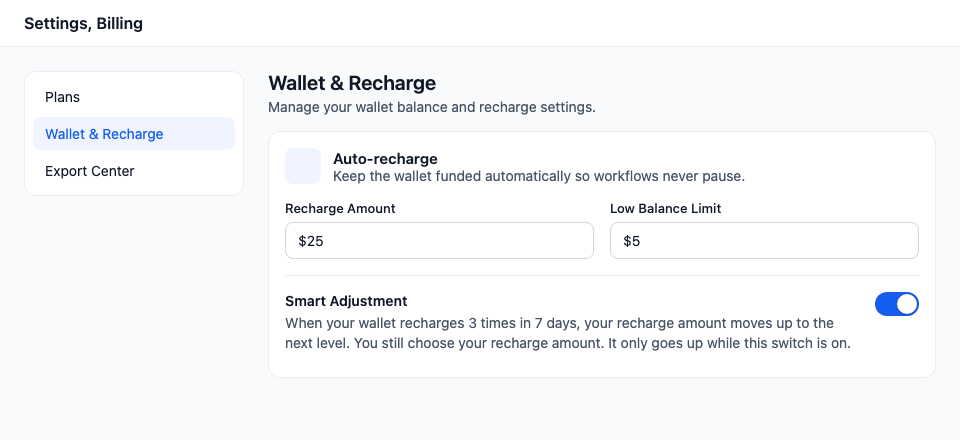
Click the switch to turn it off. You can also press Tab to reach it and Space to change it. The page confirms that Smart Adjustment is off.
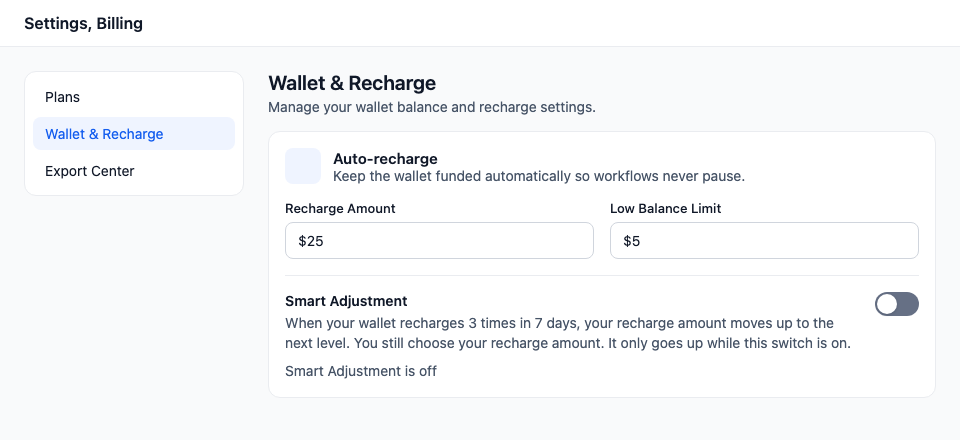
To turn it back on, click the switch again.
Good to know
- Smart Adjustment does not turn Auto Recharge off. It only decides whether your recharge amount can go up by itself.
- Every change is saved with who made it and when.
- If the switch does not save, the page tells you. Wait a moment and try again. If it still does not save, contact CallBack support.