
When you sign up for Blue Unlimited or Blue Commit, you can tell us which area codes you want for your new number. You can do the same when you add Blue Unlimited to your CallBack account from the upgrade offer. This step is optional. Leave it blank if any area code is fine.
Steps
- Open the Blue Unlimited signup page and fill in your name, email, phone number and date of birth.
- Under Preferred Area Codes (Optional), type your first choice of area code in the box marked 1st.
- Add more area codes in the boxes marked 2nd to 11th, in order of preference. You can fill as many or as few as you like.
- Decide whether to tick the box beside your first area code. The next section explains it.
- Click Continue to Payment and finish your signup.
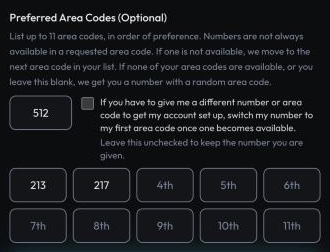
Adding Blue Unlimited to your CallBack account
If you already have a CallBack account, you may see a Blue Unlimited upgrade offer after you sign up, or open one from a link we send you. The same area code question sits on that offer, above the checkbox for the terms.
- Under Preferred Area Codes (Optional), type your first choice of area code in the box marked 1st, then add more in the boxes marked 2nd to 11th if you like.
- Decide whether to tick the box beside your first area code. The section below explains it.
- Tick the box to accept the terms and click Upgrade Now.
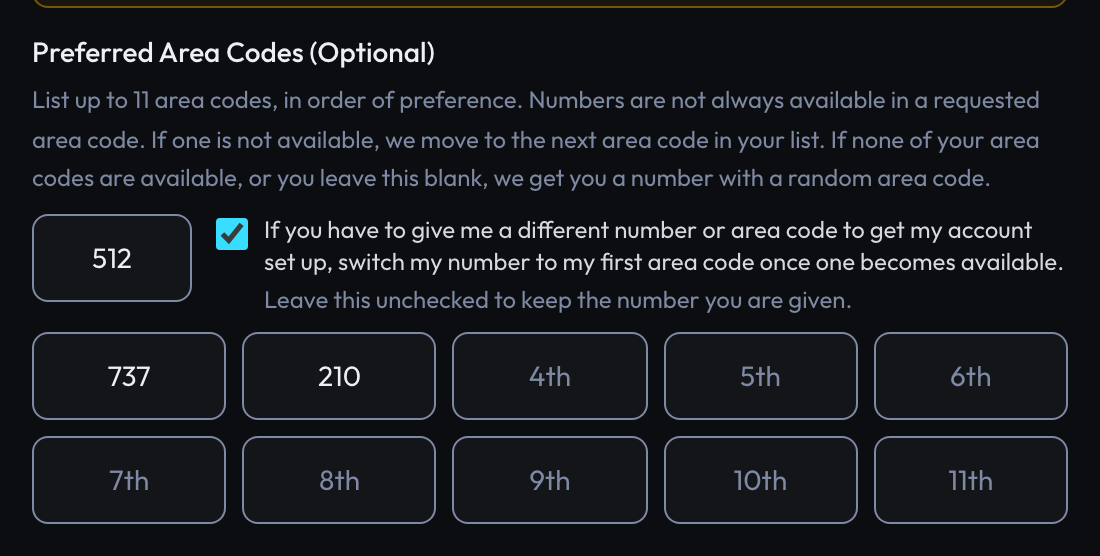
Your choices show in the confirmation email we send after the purchase.
How we pick your number
Numbers are not always available in every area code. We go down your list in order and use the first area code that has a number available.
- If none of your area codes have a number available, we get you a number with a random area code.
- If you leave the field blank, we get you a number with a random area code.
The box beside your first area code
The box asks us to move you to your first area code later, if we could not give you one at signup.
- Ticked. If we have to give you a number in a different area code to get your account set up, we switch your number to your first area code once one becomes available. Your number changes when we do this.
- Not ticked. You keep the number we give you, and we do not change it later.
Leave the box unticked if keeping the same number matters more to you than the area code.
If something goes wrong
| What you see | What it means |
|---|---|
| "123 is not a valid area code. Enter 3 digits, like 512." | Area codes are 3 digits and cannot start with 0 or 1. Service codes like 411 and 911 are not area codes. Fix the box or clear it. |
| "List no more than 11 area codes." | Remove an area code so you have 11 or fewer. |
To change your area code choices after you pay, contact CallBack support.